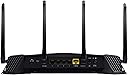
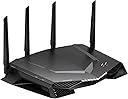
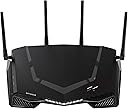
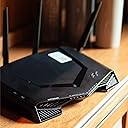
🎯 Dominate your game with the router built for pros and legends alike!
The NETGEAR Nighthawk XR500 is a high-performance AC2600 dual-band WiFi router designed specifically for gamers. Powered by Netduma’s DumaOS, it offers real-time bandwidth monitoring, MU-MIMO support for simultaneous streaming, and advanced lag control features optimized for popular titles like Fortnite and PUBG. With 4 gigabit Ethernet ports and ReadySHARE USB functionality, it ensures fast, reliable connections and easy device sharing, making it the ultimate networking weapon for serious gamers.


| ASIN | B078X68G19 |
| Antenna Location | Gaming |
| Antenna Type | Internal |
| Best Sellers Rank | #87,539 in Computers ( See Top 100 in Computers ) #1,162 in Routers |
| Brand | NETGEAR |
| Built-In Media | 1 |
| Color | Black |
| Compatible Devices | Laptop, Personal Computer, Smart Television, Tablet |
| Compatible devices | Laptop, Personal Computer, Smart Television, Tablet |
| Connectivity Protocol | Wi-Fi |
| Connectivity Technology | Wi-Fi |
| Control Method | App |
| Controller Type | Switch |
| Coverage | Extensive |
| Customer Reviews | 4.2 out of 5 stars 743 Reviews |
| Data Transfer Rate | 2600 Megabits Per Second |
| Frequency | 1.7 GHz |
| Frequency Band Class | Dual-Band |
| Frequency band class | Dual-Band |
| Global Trade Identification Number | 00606449131154 |
| Is Modem Compatible | No |
| Item Type Name | NETGEAR XR500 Nighthawk Pro Gaming WiFi Router - Dual-Band AC2600 - Optimised for Black Ops 4, Fortnite, FIFA 19, PUBG and All Other Popular Games |
| Item Weight | 1.6 Kilograms |
| LAN Port Bandwidth | 1000 Mbps |
| Manufacturer | Netgear |
| Maximum Upstream Data Transfer Rate | 1300 Megabits Per Second |
| Mfr Part Number | 0714360 |
| Model Name | NETGEAR XR500-100EUS |
| Model Number | XR500-100EUS |
| Model name | NETGEAR XR500-100EUS |
| Number of Items | 1 |
| Number of Ports | 4 |
| Operating System | DumaOS 3.0 |
| Other Special Features of the Product | WPS |
| Security Protocol | WPA2-PSK, WPA3 |
| Special features | WPS |
| UPC | 606449131154 |
| Unit Count | 1 Count |
| Warranty Description | Manufacturer warranty for 1 year |
| Wireless Compability | 802.11a, 802.11ac, 802.11b, 802.11g, 802.11n |
| Wireless communication standard | 802.11a, 802.11ac, 802.11b, 802.11g, 802.11n |
M**O
Amazin
Amazing product
R**.
Not a good router
I keep getting packet loss with this router ever since I started using it. I never used to have that with me Linksys Velop router. I tried all the settings recommended by Netgear and nothing fixed the problem. I need this router returned
V**A
Good product
Good coverage Price is to high Phone Application need improvement it's very slow
F**I
Bester Router im Moment
Bevor ich diesen Router gekauft habe, hatte ich einen von der Konkurrenz gehabt. Diese hatte nach einer Entfernung von nur 8 Meter und ein Wand dazwischen nur einen Balken Wlan Signal an mein Handy. Das Gerät wurde daraufhin sofort wieder zurückgesendet. Nach weiteren recherche im Internet habe ich mich für diesen Router entschieden. Ich bin sehr sehr froh das ich mich dafür entschieden habe. Es läuft alles perfekt. Es sind ca. 16 Geräte angeschlossen. Davon 3 mit Lan-Kabel. Der Rest nur über Wlan-Signalen. Allle Geräte, ob Handy, Tablet etc. haben überall max. bis 3 Balken Wlan Signal. Die Software läßt keine wünsche offen. Jedes Gerät kan man beliebig Internetgeschwindigkeit geben. Guck euch mehrere Videos davon an. Das aussehen erinnert an ein Sportwagen. Die LED's sehen aus wie die Tagfahrlichter bei den PKW's. Die LED's kann man auch komplett abstellen wenn es einem nerven sollte. Im Moment habe ich überhaupt keine Kritikpunkte. Ich bin sehr zufrieden und empfehle es meinen Kumpels und werde auch jedem weiter empfehlen der einen schlechten Wlan Empfang in der Wohnung hat oder schlechten Ping beim spielen. TOP Produkt. Netgear hat das Produkt mit den Gamern für die Gamer etnwickelt. Bravo Netgear
G**0
Incredibilmente semplice ma efficace
Tenendo in considerazione che non sono un esperto in questo campo dell'informatica, cercherò di fare una recensione da utente medio senza entrare nei dettagli tecnici. La mia situazione con internet era alquanto instabile (provider:Eolo), da 60 di ping in gioco schizzavo spesso (ogni 5 min) a cifre vicine al 2000...inutile dire che non riuscivo a concludere una partita. Da qui è iniziata la mia curiosità verso un qualsiasi tipo di upgrade che migliorasse la mia connessione. Dopo GIORNI di "rimuginamento" ho ordinato contemporaneamente il nuovo contratto con altro provider e questo router. Il router è arrivato 1 giorno dopo, quindi non ho esitato a provarlo. E qui iniziano le meraviglie di questo router: l'installazione è stata così semplice che ero certo di essermi dimenticato qualcosa...in realtà si tratta veramente di montare 4 antenne, collegare il router al modem con un filo, il pc al router con un altro filo e alimentarlo. Arrivati a questo punto sono andato sul pc fisso (già acceso) collegato fisicamente al router e si è automaticamente aperta la pagina di configurazione. Un altra volta devo dire che è stato estremamente facile. Nel giro di 10 minuti ero online con il nuovo router. Ora viene il bello, DumaOS è estremamente semplice, intuitivo, chiaro, funzionale. Per me, principiante in materia, sono riuscito a gestire in semplicità larghezze di banda, flusso dati di ogni dispositivo, monitorare il carico della CPU...un sacco di cose su cui prima non avrei mai messo mano. Ma veniamo al punto, sto ping...mentre prima di sera era ingiocabile con questo router finalmente sono riuscito a godermi delle partite decenti con un ping medio di 60 nonostante tv, telefoni, potatili e tablet, prima con queste condizioni il ping medio girava attorno ai 200... Per quanto riguarda il Wifi sembrerebbe andare bene, ora ho copertura fino in giardino, cosa mai vista prima... C'è da dire che il mio Note 9 non ha mai visto la banda 5GHz... ripeto, non mi ritengo competente in materia...solo che mio papà con l'S8 si è connesso immediatamente. Il design personalmente mi piace, tutte le specifiche sono già scritte sulla pagina del prodotto, una cosa invece che vorrei puntualizzare sono le luci, si vedono tutte anche sotto luce intensa, infatti sono molto luminose, per fortuna c'è il bottone per spegnerle, nonostante tutto non sono riuscito a trovare un manuale che mi spiegasse a cosa consistono i vari tipi di colore nei led (bianchi o arancioni)... faccio questo esempio perché durante il cambio del provider...dopo il resert e il collegamento al nuovo modem la luce d'accensione rimaneva color arancio...nell'ignoranza del significato (e dopo aver cercato online) ho eseguito un altro reset e tutto è tornato alla norma. Ho fatto un test con il nuovo provider senza router ma solo il loro modem-router in dotazione ed effettivamente è un disastro: di sera, durante il picco di utilizzi si raggiungono tranquillamente i 100 di ping (senza picchi stellari)...con router si oscilla dai 30 ai 50. I miei confermano un miglior wifi e una fluidità maggiore su netflix e sui loro cellulari (soprattutto Instangram). Globalmente ha migliorato la mia connessione con entrambi i provider e mi ha reso la gestione del traffico una barzelletta. Consiglio qualsiasi router con DumaOS a chiunque ed in particolare mi sento di consigliare questo modello dopo 1 mese di prova. Ps: ho provato pure le porte USB, la configurazione sembra semplice, sono riuscito a accedere da remoto alla chiavetta, sta di fatto che per ora non ne sento la necessità quindi oltre ad un semplice test non ho altre informazione.
M**!
XR500 and XR1000 Are they really worth the money?
XR500 and XR1000 Three years ago I bought the XR500. After a few weeks I sent it back. My conclusion then was that it had huge potential but it just wasn’t ready. Features had not matured and there were just too many bugs. Not enough preset games, VPN was fixed to a terrible non-gaming vpn and bugs meant that features either just failed to do what they were supposed to do or worse, crashed. Having said all that, the incredible graphical interface of the router felt like it was definitely had tons of potential given a bit of time. With that in mind, here I am three years later trying again with the XR1000. So this review is based on a disastrous experience with the XR500 and the “newly” bought XR1000. Packing is uninspired but the product although very light is good quality. Plugging it in it goes through a ridiculous setup process that completely fails if your internet requires a login and password like mine does. Five minutes completely wasted while it is trying to connect when there is absolutely no hope that it can, lol. If you need a login then you go to the internet page and enter the details, and wait another few minutes while the router resets. This has to be the slowest router reset I have ever encountered, lol. There is plenty of time to grab a coffee while it resets. Finally it will come back with an internet connection and you can start setting up the router. You can manually go through all the junk it tried to do automatically without and internet connection, this time with one! It’s a really slow process because each time you apply a setting it takes forever to update it. The router is very slow loading pages, but I guess that’s to be expected given the complicated graphical interface. The DumaOS has an amazingly good user interface. It is intuitive and just so easy. Everything is logically laid out and there is exactly what you want to know. There is comprehensive performance monitoring so you can see what the router is up to when you play games. You can tweak settings to avoid situations that may cause lag, and you can set priorities and bandwidth for games and gaming machines. And of course there is Geo Location, which I am sure you have heard of. The router software is already biased towards gaming without the need for any game specific configuration. Just plug it in and go and it instantly favours games. Mine certainly seemed to know when I was gaming and whatever other things I was doing. If you take a look at a the Traffic Prioritisation page a little icon lights up when someone is playing a game. As long as that lights up then really you don't need to do anything else. If it doesn't then you need to fiddle with the settings so it detects your game. But there are more settings aimed towards improving matters if you are having trouble. Reducing lag when your home network is very busy and helping you to select game servers that are closer to you. The router has far less features than a traditional router, like an Asus, say, but presents them in a way that is just great. Overall if you want features then buy an Asus, but if you want gaming specific monitoring, graphs and solutions then buy one of the Netgear DumaOS. After I sent the XR500 back I bought an Asus but over the following year really came to the conclusion that I wasn’t using any of the features. The problem with the Asus is that it's not really a gaming router - it's a normal router with some gaming functions. The Netgear on the other hand is built around gaming functions. Also, with the Asus, if you do almost anything you have to agree to Trend Micro collecting all your data and browsing histories. Trend can even take your emails and those of your family. What? Seriously? It's one of those agreements you really need to read!! One of the things you will do, is check the Connection Benchmark. This is a detailed test of your broadband and gives you a ton of very useful information you can then use in QOS to optimise your connection. In my case I discovered that my upload ping became very erratic when other people were using the broadband at the same time I was playing game. My upload ping would wander about from 11ms all the way up to 220ms. I enabled Congestion Control or anti-buffer-bloat. The Connection Benchmark showed me what figures I needed to set and moments later my ping was stable and never went above 12ms. Success! The device map is really useful. It shows your network in graphical form. You do need to fill in some information for devices it can’t identify and also it took a reboot of my switch to get it to full organise the graphic correctly. Oddly it has no enter-able information for the modem. The device map can also take a little while to update. One thing you need to know for that is that "Apply Settings" buttons found on other pages forces the table to update. The XR1000 has vpn settings where you can enter your own vpn. This is a great improvement on the XR500 which were hard-wired to just one useless vpn – HMA. There are also rumours of the new Hybrid vpn being a future update for the XR1000. That is a vpn that allows you to choose what traffic goes through the vpn, which is ideal for gaming vpn's. And of course there is the mighty Geo-Filter. This is a slam dunk for console owners. I guess it all comes down to features. If you want a huge array of features then you should be buying an Asus. But if, like me, you never actually use all the features, then the information provided by the XR routers is probably more useful. Certainly console owners should be buying the an XR because of Geo-Filter. Don’t forget, though, that all this niceness is costing money. The XR’s are a lot more expensive than the competition but then you are paying for a regular router with a custom design and interface so it’s not too surprising. When it comes to reliability, alas the Netgear is not up there with the best. Unfortunately, they tend to keep on releasing the software with bugs. Left to run for a few weeks the Netgear does tend to fall over with some obscure error. There are routers I have never reset during the years I have owned them, but this is not one of those! Having said that, I would still buy one again. The fact is that the gaming features and information this router provides is streets ahead of any other router other than perhaps an Asus, and as I already mentioned the Asus has some pretty nasty downsides too. Are they really worth the money? Originally I said no, but three years later the answer is yes. It is without doubt the best Gaming router there is.
V**R
Sencillamente Espectacular
Lo comprĂ© siendo bastante escĂ©ptico, habĂa leĂdo mucho sobre el router y sus bondades pero sonaban demasiado bien para ser ciertas, yo soy un jugador no profesional, pero si competitivo, no me gusta perder partidas por culpa de la conexiĂłn asĂ que me lancĂ© a su compra. Que decir, configuraciĂłn sencillĂsima, yo tengo solo fibra contratada y ha sido conectar a la ont, habilitar el vlan6 y funcionar al instante. Genial. Como todo buen router esperas una buena conexiĂłn tanto por cable como wifi y vuelve a ser sobresaliente en el tema inalámbrico, parezco un comercial de netgear, pero no, usaba un router comercial y no hay color, toda la casa con señal y velocidades muy altas. Y llegamos a lo importante, el dumaOS, el GEO filtro, como describo en el tĂtulo, sencillamente espectacular, utilizo fibra 600/600 y siempre jugaba con pings de 55/65 segĂşn el juego, ahora limitando con el router llego a jugar partidas a 7 ms! Parece que estoy literalmente en el servidor, la ventaja es considerable, si juegas a cods, battleroyal como es mi caso, ya solo dependes de tu habilidad no de si el contrincante tiene mejor conexiĂłn que tĂş. Por lo tanto merece totalmente la pena si te gustan los juegos con online. Espero haber ayudado a alguien con mi experiencia la cual repito, ha sido magnĂfica. Un saludo.
P**E
Au top !!!!
Installateur pro j’utilise pas mal de produits netgear en ap wifi , routeur et modem ces modèles pro donnant satisfaction tant en installateur que côté client , c’est tout naturellement que j’ai opté sur du netgear pour mon installation personnelle les autres constructeurs que j’utilise à côté ne me proposant pas de solution palliative aux box de nos FAI traditionnels . J’apprécie particulièrement le DUMAOS ou l interface est clair et limpide , le service QOS vous permettra de brider la bande passante si des utilisateurs la monopolisent avec les snapchat et autre s réseaux sociaux gourmands en bande passante inutilement . Pour le game ça s’annonce superbe car choix des serveurs dédiés selon les jeux (je n’utilise pas trop ce service pour ma part ) excellente borne wifi même dans une maison à murs épais après possibilité d ajouter borne de la même gamme afin de gérer par l appli , bonne surprise au niveau de cette dernière ou en 3min j ai configuré un wifi provisoire sécurisé (choix du temps) a distance Faite le choix d’un routeur en dehors des FAI est un investissement synonyme de sérénité vous n aurez pas tout a reconfigurer Lors d’un changement de fournisseur puisque votre box sera que un modem En résumé simple a configurer , interface clair en tan réel , pas que pour le gaming même si c est orienté pour , conviendra à qui veux gérer simplement son réseau, aux parents qui ne veulent pas se faire monopoliser leur bande passante et aux gamers
Trustpilot
1 week ago
2 weeks ago