🚀 Elevate Your Connectivity Game!
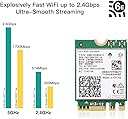
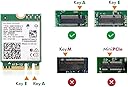
The AX210NGW WiFi Card is a cutting-edge wireless network adapter that supports the latest Wi-Fi 6E standard, offering tri-band connectivity with speeds up to 5400Mbps. It features Bluetooth 5.3 for improved device communication and is designed for easy installation in laptops with an M.2 2230 interface, compatible with Windows 10/11 (64-bit).


| ASIN | B08NSSJNV1 |
| Best Sellers Rank | #1,426 in Internal Computer Networking Cards |
| Brand | CHILISON |
| Built-In Media | AX210 Wifi module, CD driver, Installation guide |
| Color | multicolor |
| Compatible Devices | Laptop |
| Customer Reviews | 4.6 out of 5 stars 1,851 Reviews |
| Data Link Protocol | IEEE 802.11a |
| Hardware Interface | Bluetooth 5 |
| Item Dimensions L x W x H | 1.18"L x 0.86"W x 0.02"H |
| Item Weight | 50 g |
| Manufacturer | WISE TIGER |
| Mfr Part Number | AX210NGW |
| Model Number | AX210NGW |
| Number of Items | 1 |
| Product Dimensions | 1.18"L x 0.86"W x 0.02"H |
| UPC | 793420184640 |
| Warranty Description | 1 year warranty |
B**H
Just the upgrade that I needed
I purchased the Wise Tiger AX210NGX Wi-Fi 6E card and installed the wireless card in my MSI Prestige series PE70 2QD core i7 laptop. Before the upgrade I was getting 30Mbps downloads in my home office, it was so bad that I had to get an extender and place it on my desk to and run a CAT cable over to my laptop to get 70Mbps. After installing the new Wise Tiger wireless card I am able to disconnect the wireless extender into my office and use just my laptop. Speeds are ranging from 320 Mbps up to 400 Mbps connecting on a Wi-fi 6e wireless network. I would probably get better speeds if I turned off my P2P program and other devices like Ring cameras and what not but I'm not really interested in really running the card through its paces. I care about real world download speeds in a real world environment. Overall I am quite happy with the card. It is cost effective at about $28 dollars. It arrived in two day with Prime shipping, installed in about a minute, and I was up and going. The range of the card is a noticeable improvement over my last wireless card as is the increase performance.
K**G
AMAZING upgrade
I upgraded to this WiFi card from the base line Killer card included with MSI GS 73VR 7RG Stealth Pro laptop. If you feel confident enough to open the back of your laptop, installation is incredibly simple. You will want to use the included CD to install drivers, or download them before you switched WiFi, as the base Windows program won’t recognize it without the driver installer. I derped, and had to use another computer to copy the CD to a USB flash drive to get drivers on my computer, still incredibly easy solution. It was very easy to install, the perfect size, and thickness. Network speed tests are AMAZING, I didn’t realize what a fantastic upgrade it would be. It took me maybe fifteen minutes to install this, and most of that was just carefully unscrewing the case. If you are on the fence, it’s an incredibly affordable upgrade if you can’t use Ethernet reliably. Huge quality of life improvement, if I could give them more stars I would!
C**O
Great upgrade over WiFi 5/AC
Purchased 2 cards to upgrade my wife's laptop and our htpc to wifi 6 to go with our new Asus Ax86u router. Installation is fairly easy, though this will depend on the model of machine you're installing it on. For example, my wife's laptop only required removal of the bottom cover to access the wifi card, whereas the htpc required motherboard removal to access the wifi module (it's an Asus that has wifi integrated with the rear I/O). I imagine some models may be more difficult to upgrade than others. You'll likely need to manually install the drivers, at least for Windows (not sure about Linux) before you can connect to the network, so I'd suggest either downloading the drivers to your machine or a usb before the upgrade, or be plugged into ethernet to download the drivers after the install. With the new cards and our new router, we've seen speeds jump from about 90mbps download to 700mbps. They also seem to connect faster than the old cards when booting the machines from sleep or shutdown compared to the non-intel cards we had installed before. If you don't have a wifi 6 or 6E router, I wouldn't suggest this upgrade if you have a decent wifi 5/ac card in your computer. We tried these with our old router first, and there was not a speed difference until we upgraded that too.
J**N
Simple install for a big upgrade
I had to recently do repairs on my old Alienware 17r4 to replace the keyboard which required me to open up the laptop and pretty much remove every component so I figured I would upgrade older parts while I was in there. Among them was the old Killer1535 Wifi card that was in the system prior. The old card was rather slow and had spotty connections sometimes so after reading reviews I went with this intel card. It arrived in perfect condition and well packaged. Installation of the card itself is rather simple and straight forward as long as you can easily access your network card plugin for your system easily. Upon booting the system and plugging into the LAN temporarily to download the driver the system immediately downloaded the driver once it had an internet connection and once I unplugged the LAN and connected to the Wifi it worked flawlessly. I ran a speed test and had much better readings compared to my Killer card and it has been working flawlessly for sometime now. I highly recommend this card if you're looking to upgrade.
J**N
Huge upgrade in speed and throughput!
Awesome upgrade from original Intel AC-7260NGW that got a Speedtest download of 331,88 Mbps max. I have now gotten 851.60 Mbps max with the replacement Intel AX210NGW card. The router is an ASUS RT-AXE7800 connected to a Spectrum Gigabit internet connection averaging 960 Mbps or so max at the routers ethernet connections (depending on the time of day of course.) This was an inexpensive upgrade that was worth every penny. The laptop is running Windows 10 and I have not been able to connect to the 6E band yet even though all the settings have been properly set. I'm using the latest Intel drivers currently from 4/3/2023, version 22.220.1.1. Searching the internet, many other users of this card with Windows 10 are having the same issue while Windows 11 users are not. Hopefully a solution will come out soon but in the meantime I'm still very pleased with the huge bump in speed on the 5Ghz band! it's definitely a game changer! Highly recommended!
K**Y
Works better than expected
Works very fast with a WiFi 6 router. Connects at 2.4 Gbs and transfers files at a steady 200 MBs on the local network. Internet connection runs at full speed. It has never slowed down even when transfering massive disk images (80+GB) from a file server. I had orginally planned to get 2.4Gbs NICs for the computers but now have decided to go all WiFi6. The only 2.5Gbs nic will be in the server and all the other computers will have WiFi cards. 200 GBs is good enough for me.
D**L
Awesome Upgrade For The Price
Laptop upgraded: Lenovo L14 Gen 1 Operating system: Windows 11 I was upgrading from the stock Intel Wi-Fi 6 AX200 Wi-Fi card. The speeds were ok, but they were hovering at around 300 Mbps. I also did not like the range. I have an Asus 6E router as well. I upgraded to this Wi-Fi card AX210NGW for my Lenovo and immediately it was detected and installed. I did not see any load up screens saying this network card was restricted or banned. I was worried at first because of the reports of Lenovo not whitelisting certain Wi-Fi cards. Lenovo's site had a list of compatible Wi-Fi cards for my laptop and did not show the AX210 on it. The speeds immediately went to around 800 Mbps. The range was really good as well. It dipped to around mid 700 Mbps as I shifted a couple rooms away from the router. Very impressed and quite an affordable price for an upgrade.
T**R
Works Great - But
Great product, great price. It installed no problem with the supplied drivers except no 6Ghz! I installed the AX210 drivers from Intel. No 6Ghz. I have Windows 10 21H2. Turns out, Windows 10 disables 6Ghz because MS wants that to be an attractive feature in Windows 11. So I started looking around and found a post with a modified driver. There may be other hacks too. It worked. I named my 6E 6Ghz network a different SSID so I know it's working and yes it's everything it's supposed to be. I live in a crowded apartment complex and I can finally work at home with all my bandwidth. ×××Update. I've been using this card for a few days and it's great. I've ordered a second for my work laptop. I actually know a bit about this because I map, install, and configure Meraki and Ubiquity Wifi mesh networks for a living. Really Important - On my Dell, the White wire was the Main and the original AC card denoted Main as White, Aux as Black on its' label. This new one is backwards. It shows Main as Black but in the same position and same #2 on the PCB. Do not pay attention to the color coding. Whatever was Main before, regardless of wire color, must be Main now. I went online and looked at pictures of other laptops to make sure mine wasn't miswired by Dell. It seems with AC, White was Main much or all of the time. Some people will argue, say it's just a piece of wire, they're identicle antenna leads. No, not for all systems. If you switch them you may see degraded Wifi or Bluetooth. Main is Main, Aux is Aux.
F**R
Works nicely
Downloaded drivers before doing the switch. Installation went smoothly and everything works like a charm. Shipping and delivery was very fast as well. Extra : my computer is too far to use the wifi 6e to its full potential. But the 2.4ghz and 5ghz works very nicely. Haven't had any drops. Speed tests results are 400-500mbs which is definitely an improvement compared to my previous wifi card which was giving me 150-200. If I was closer to router I could definitely switch to 6e and have crazy speed but I'm about 40 feet away and going through multiple walls. Update : I've moved my pc close to the router to test. speed and stability are definitely there. Updated with speed test results. (Current isp plan is 1.5gb/s down & 1gb/s up)
R**I
Eccellente scheda WiFi 6E e Bluetooth 5.2
Scheda WiFi e Bluetooth acquistata in quanto, con la scheda WiFi Realtek 8822BE presente sul mio PC, avevo grandi problemi di stabilità (nonostante la continua installazione di driver aggiornati). La scheda WiFi 6E garantisce il supporto di reti WiFi a 2.4GHz, 5GHz e 6GHz, oltre all'aggiornamento dei driver direttamente da Windows (senza dover cercare driver aggiornati chissà dove, che comunque si trovano facilmente anche sul sito di Intel). Anche la componente Bluetooth è molto valida e aggiornatissima, supportando la versione 5.2. Da verificare di avere sul proprio PC il connettore M.2 2230 Key A o Key E e fare attenzione al collegamento delle due antenne alla scheda, in quanto sono microscopiche ed è una operazione non proprio agevole! In conclusione, scheda consigliata per potenziare il proprio PC nell'ambito WiFi-Bluetooth con un prodotto Intel di ottima qualità ed un eccellente rapporto qualità/prezzo.
J**.
Funciona mucho mejor que el tenía mi labtop de fabrica
Funciona mucho mejor que el tenía mi labtop de fabrica, exelente
T**R
Fonctionnellement impeccable
J'ai pris cette carte Wi-Fi pour remplacer la Killer 1550 qui était installée dans mon MSI GS65 et qui rencontrait sans cesse une erreur de driver sous Windows 10 (code 10, impossible de démarrer le périphérique). Lassé de devoir faire les manipulations dans le BIOS pour tenter de redémarrer la carte Wi-Fi (à terme, les manipulations ne résolvaient pas le souci), j'ai décidé de remplacer la carte interne. Le démontage du PC s'est fait sans souci, et l'installation de la carte est très facile. Dans l'idéal, téléchargez les drivers sur le site officiel d'Intel avant d'installer votre nouvelle carte. Une fois mise en place dans votre machine, une simple installation des pilotes et tout se connecte sans souci. Jusqu'à ce jour, après 2~3 semaines d'utilisation, je ne rencontre plus de problèmes de déconnexion ou d'erreur de driver comme la Killer 1550 installée d'origine. Ma raison principale du changement était de résoudre cette erreur, la nouvelle carte est alors parfaite. Ne disposant que d'une Freebox Révolution, je ne peux rien dire sur les capacités du Wifi 6E mais la vitesse en 5 GHz est très efficace. Tarif super correct pour disposer des dernières ondes Wi-Fi en 2021 !
B**F
Werkt prima op een Lenovo T480 met Windows 11
Omdat ik een snellere verbinding wilde hebben dan WiFi4, zoals bij mijn oudere laptops, deze AX210 aangeschaft. Op het internet (LENOVO forum) werd aangegeven, vooraf de drivers voor de WiFi en BT te downloaden. En ja, nadat de AX210 geïnstalleerd was, werd deze niet herkend. Nadat de drivers voor WiFi en BT geïnstalleerd waren, liep alles als een zonnetje. Mijn T480 haalt nu de maximale snelheid van mijn intranet. Heel tevreden. Negatief puntje: De huidige WiFi verbinding stekkers zijn zo priegelig, dat het me bijna 10 minuten kostte om deze goed te plaatsen. Maar dan ligt niet aan deze WiFi kaart. Meer aan de huidige standaard antenne aansluitingen voor WiFi en BlueTooth. Advies: Kijk eerst YouTube video’s om de T480 te openen en de AX210 te installeren.
Trustpilot
3 days ago
2 weeks ago