Desertcart purchases this item on your behalf and handles shipping, customs, and support to Tunisia.
⚡ Power your productivity with the dock that does it all — fast, sharp, and future-ready!
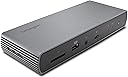
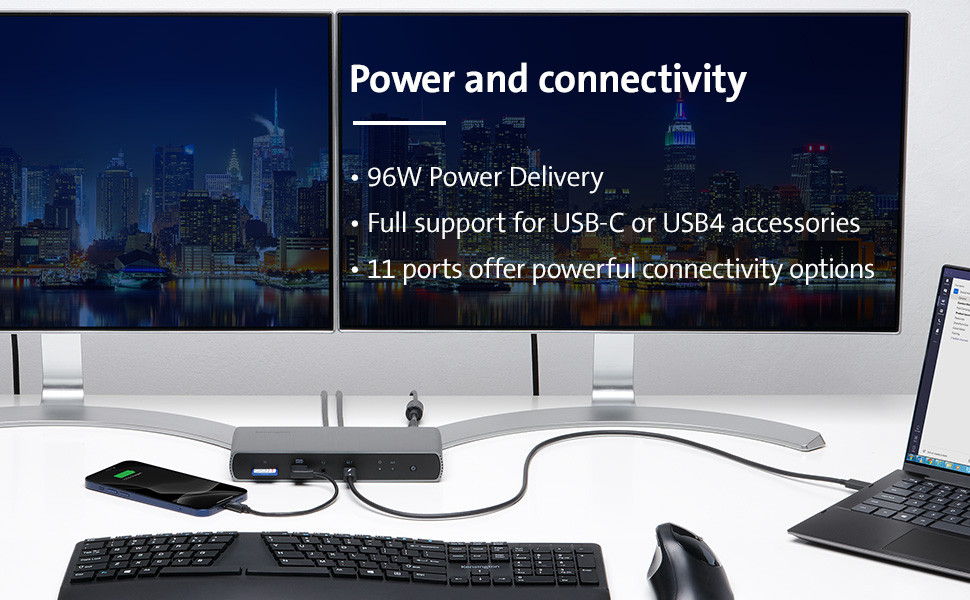
The Kensington SD5700T is a premium Thunderbolt 4 docking station designed for Windows 10 and macOS 11+ laptops, delivering up to 40Gbps data transfer, dual 4K @ 60Hz or single 8K video output, and 90W power delivery. Featuring 11 versatile ports including Thunderbolt 4, USB-A, SD card reader, and Gigabit Ethernet, it supports seamless multi-device connectivity with enterprise-grade security and network management tools, backed by a 3-year warranty.


| ASIN | B08KRTKX9V |
| Best Sellers Rank | #6,123 in Computers & Accessories ( See Top 100 in Computers & Accessories ) #455 in Laptop Docking Stations |
| Brand | Kensington |
| Built-In Media | sd5700t dock, thunderbolt 4 cable, power supply |
| Color | Black |
| Compatible Devices | MacBook, PC, Windows |
| Customer Reviews | 3.8 out of 5 stars 444 Reviews |
| Global Trade Identification Number | 00085896351757 |
| Hardware Interface | USB Type C |
| Item Dimensions L x W x H | 10"L x 3.66"W x 6.14"H |
| Item Type Name | Kensington SD5700T Thunderbolt 4 Docking Station, Dual 4K, 90W PD - Window and Mac OS (K35175NA) |
| Item Weight | 16 ounces |
| Manufacturer | Kensington |
| Mfr Part Number | K35175NA |
| Minimum Required Operating System Version | Mac OS 11 Big Sur, Windows 10 |
| Model Number | K35175NA |
| Number of Items | 1 |
| Number of Ports | 11 |
| Product Dimensions | 10"L x 3.66"W x 6.14"H |
| Total USB Ports | 8 |
| Total Usb Ports | 8 |
| UPC | 085896351757 |
| Unit Count | 1 Count |
| Warranty Description | 3 year |
| Wattage | 90 |
K**.
This dock has no problem when going sleeping mode. Well waked. 180W power enough to supply current.
Today, i got sd5700t, and test all round, i was worried about sleep mode problem, who wrote this. Don't about this problem, I try to make unpleasant environment to meet this problem, for hibernate mode. Well wake up. 180-watt power is for itself operation 90 watt and supply for connect to devices 90watt. The power is enough than other same products, etc. The OWC,. small than 130W. I was fully tested the OWC counterparts, the test scores is thunderbolt 3 controller with extern storages, a little lower for writing speed. OWC score higher for writing speed. but a littler. Yes OWC counterparts also good things, but have no control for sleep mode, so it powers on states, connected all device have consume Energy even no signals. Notebooks goes power off. the Doc work continues. Now only use 1 days. If i find a problem, Tell here. Currently, I find a problem when using USB A port which is located back, three usb port, which speeds 10gbps. When i test speed, very slow and disconnected when testing, the device separated. So i have to initialized. for hardware problem, i will test same H/W dock. Kensington sent another dock, i will compare each docks. I test the dock from exchanged same another dock, find same problem. The problem is related power suppled USB port A, about 900mA. Tested device is extern SSD disk, with 512GB, i guess, USB A port is only used low power devices, for keyboard, mouse, printer, small usb device. I move to the SSD disk to thunderbolt port, then no problem from now. SD5700t have three thunderbolt port 2 port for dual monitor, last for other device for high speed, more power device, extern SSD device. I accept this problem to avoid use USB A port. Thanks. finally, i test LG S8 27inch, 4k monitor to connected DP-ALT mode, Well operate, So I conclude All my tesing is mostly Good, USB A ports a little unstable, but it is the Extern Disk have much eats current more 900ma. thanks again to give me a chance to another same Dock to compare it's operating. More over back to a little money, The Dock discount when i test. I will back to another dock because i finished test. Thinks for Amazon.` My system, notebook is Lg gram 2022,17inch, Intel 12gen, with thunderbolt 4 included. Windows 11 home, Korean. Recently i find this device is unstable and weak at USB A port are, backpanel 3 port and flont one usb 2.0 port, total 4 usb A port have problems, i have to buy new one, i recommand that DONT USE STRESS USB A port if so do lan port will dead,
T**R
Excellent Docking Statioin
I've used many docking stations. Most recently Dell 6000 and Dell WD19 docks. The D6000 uses an internal DisplayLink chipset and driver, and WD19 passes USB-C alternate mode video like this dock. Docks are buggy. They just are. I see the negative reviews about this dock not handling systems waking from sleep mode. Sorry, docking stations just don't handle this well. Full shut downs and restarts allow all the devices to properly initialize, sleep/wake does not. Docks like the Dell D6000 use the computer's CPU to render video to the onboard Displaylink and the signal is compressed. They tend to slow down systems because the dedicated GPU isn't used - however they are truly universal. The WD19 was great (and is direct-competing product) until Dell's May 2022 firmware update broke it. It won't pass video now and Dell hasn't fixed the problem. And I constantly fought with it not initializing, having to restart my Dell laptop again and again. The Kensington Dock is great. It doesn't require any specialized drivers, it has more than enough expansion ports - in fact, I was able to eliminate my USB 3 hub because now I have plenty of ports. At 90 watts, this provides plenty of charging power (although Dell systems will only recharge at 65 watts from non-Dell docking stations). My only gripe about this is the metal case. The edges are sharp. The moment it came in contact with my monitor base it scratched it. Be careful or you could end up with a scratched desk, scratched equipment... The metal enclosure keeps it cool, which is the point, but the corners will tear your stuff up. But this is an effortless docking station. I'm in IT - I'm using a 38" QHD wide screen monitor and diverse equipment, and have tried four different laptops (three Dell and one HP) and it just works.
M**S
Do not waste your time and money on this lemon
I purchased this dongle directly from Amazon to use with a new MacBook. I didn’t try it immediately, big mistake on my part. So when I finally got around to installing my scanner and printer I tried to use the dongle and surprise, surprise nothing connected to it was visible on my macbook. So after trying to unplug, replug, check connections, etc. I finally called Kensington tech support. They asked me to do again everything I had already done. Long story short, after two hours on the phone they finally told me that the dongle was probably defective. Since they couldn’t tell if the issue was the cable or the dongle itself they offered to send me a new cable for free and said that if that didn’t solve the problem then I would have to send in the dongle for repair. REPAIR a brand new dongle? Not me, unless I knowingly purchase a second-hand item. My impression, from the period I had this dongle, is that it’s too bulky and awkward. Be aware that it has two heavy cables with a huge heavy brick. My desk size is average to small and the dongle with its cable used up about a third of the available area. So know that before you commit. I read lots of reviews and picked this model because of the high marks, but a device that doesn’t work out of the box is a lemon, plain and simple. Regarding Kensington Tech Support, I found them to be so not worth the wait period to get a live person. Part of the reason I chose Kensington was because of the 3-year warranty period. But you know what, 3 times zero is zero. So I won’t be buying a Kensington dongle ever again. Damn Apple for designing computers without enough ports!
C**S
A great thunderbolt dock option for Macbook Pros
I recently purchased a new Macbook Pro with the intention of replacing my existing laptop and desktop, A majority of the this computer will be on my desk at my home office, but I wanted a clean setup that was easy to plug and unplug when I do take the laptop with me. My goal was to find a solid dock that could handle my various peripherals, multiple monitors, power my MBP, and do it all with only one cable connected to the MBP. So far, this dock has delivered perfectly! It's slim and attractive compared to some other options and reasonably priced to boot. As a sample case study, right now it is handling: one Apple Cinema Display (Mini DisplayPort to USC-C apadter), one Apple Cinema Display (Thunderbolt 2 to Thunderbolt 3 adapter), wireless USB keyboard, wireless USB mouse, Ethernet, and a lightning cable to charge my iPhone or iPad. All this while powering my MBP, allowing me to store the included charging brick in a drawer until I take it on the go. If you're looking for a similar setup, learn from my mistakes: skip an unpowered hub and make sure you get a Thunderbolt dock, not a USB-C dock. While they look the same, they're two very different things. There are other options out there depending on your port needs, but I'm confident this dock can work for most people.
B**H
OK so far; some coil whine, sharp edges
Purchased this Kensington dock ("SD5700T Thunderbolt 4 Docking Station") to work with an M1 Pro 14" Macbook Pro. Main reason I chose it over others was the price - it was on sale for roughly 150, vs. the 220+ for other similar/identical devices. My particular unit does have a small amount of "coil whine" coming from the dock itself whenever it is powered on. (I'm in my early 40s but was a musician when younger and have protected my hearing more than most; some people may not notice the whine.) The edges of the aluminum have not been honed at all, they are not sharp enough to cut skin by running across it, but they are sharp enough that you can shave keratin off of a fingernail. The included Thunderbolt 4 cable is pretty short - not even a full meter long (I think it's listed at 0.8M). This may impact your desk arrangement, but it was tolerable for mine. Another oddity I have noticed is that in macOS at least, the audio jack does not appear until something is connected to it, and it disappears again after headphones or speakers have been unplugged. The SD Card slot behaves the same way -- the device itself does not even show up in the USB tree until you put a card into it. (I would normally expect to "see" an empty card reader device, but no.) The Thunderbolt ports behave as expected - I have two USB-C to DisplayPort adapters connected, each one driving a 4K display @60Hz. I am just using cheap AmazonBasics USB-C to DP1.4 dongles for this. (The displays themselves _do_ have USB-C inputs, but they also include downstream USB and Ethernet ports that I do not want to use, hence connecting via DP instead.) I have not tried to connect another Thunderbolt device downstream of the dock but I have no reason to believe it won't work. It's worth noting that this unit, the "Pluggable" dock with Amazon ID ("ASIN") B0CFC9CR5W, the OWC with ASIN B097TVLB4F, and probably a few others, all seem to use the same board layout and probably the same or very similar chips internally. The Pluggable version is notable in that it swaps one of the TB4 ports for an HDMI (seems like a downgrade to me), but then you also gain 2.5Gb Ethernet and the front port changes to USB3 (the front port on the Kensington is only USB2 / 480Mbps). The coil whine and the poor finishing of the enclosure give this dock a more cheap feeling than I was expecting, but for the price, it's hard to complain. Most other TB4 docks with the same port layout go for at least 70 USD more.
J**E
Works well witth M2 Macbook
I'm using this with an M2 Macbook to make an easy 1 wire connection to monitor, charging, external drives and other peripherals. I'm not exactly a power user, but this hub does exactly what I'm looking for. Fast connect/disconnect, everything working within specs. Nothing to complain about. Things I like about that are missing from many other hubs: - 3.5mm audio jack (this is a must for me) - power button - charges from usb ports when computer isn't connected (my work hub does not do this - WTF?) Speaking of the work computer - this works just as well with my Windows 10 laptop as the Macbook. The only negative I'll say about this hub is that the dedicating USB "charging" port on the front of the unit actually charges very slowly. Both the USB-C and USB-A ports on the back charge normally, but somehow the dedicated charging point on the front is useless. Not a big deal, but I will mention it. My only concern (as with all modern electronics) is longevity. If this thing breaks, I'll update the review, but until then, I'm happy with this product.
J**P
Excellent value and functionality. Works perfectly with Mac Mini M4
Update: When the monitors go to sleep, the dock makes a whistling sound that is similar to a boiling kettle or a slightly cracked car window. If i tap the keyboard, it stops. Using with a MacBook Pro M3 Pro, MacBook Pro M4 Pro, and Mac Mini M4. Went with this model because of the three USB-C and USB-A offerings versus the dedicated DP or HDMI ports. Pros: It just works. Zero glitches with my older Dell 2415 monitors. This was the easy button with the Mac Mini M4 especially considering the Mini is 1/4 the price of the MacBook Pros. Literally one cable to connect a new device. Cons: Could use one more USB-C port.
A**7
Not Mac compatible (read this if you have a Mac)
I have a MacBook Pro Silicon. The Kensington SD5700T device fails to connect to my 2 standard 1080 monitors when the computer wakes up from sleep. I have to turn the dock on and off several times, lift my laptop lid, close it, etc... And then it MIGHT connect. When it finally connects, half of the time the keyboard/mouse aren't working. Forcing me into yet another cycle of turning it on and off. It's really frustrating and a big time waster. Everything works flawlessly when the monitors are connected to the laptop directly, proving the fault lies with the dock. And now for the worst part, the manufacturer does not stand behind the product at all. I've been in contact with their India-based customer support center for the past WEEKS and they give me the run-around. Every e-mail comes from a different rep and they don't read what the previous rep said. They make me go through the same stupid troubleshooting steps every day, asked me and received my invoice several times, feigned misunderstanding the problem, etc. I've explicitly asked for a refund several times and their answer is a new set of troubleshooting steps. So now I'm stuck with an expensive paperweight and I have to buy another brand. If you have a Mac, steer clear of this dock and try the Caltech (I've heard good things about it but opted for this one as it is cheaper- mistake). I'm thinking of asking Amazon to remove that Mac designation because it's clearly not been tested with the Silicon Macs.
M**Z
日本向けの品番の商品との違いはプラグだけ
本体は同じで電源プラグの形状が日本仕様になっている別の品番の商品より、こちらの方が安価で10,000円くらいお得です。 1,000円程度の日本国内向けの変換プラグを別途購入すれば、問題なく使えます。 会社とかでよく見る3ピンタイプの電源タップがあれば、変換プラグすらも不要でそのまま使えるはずです。 ただし説明書等は全て英語です。 サイズは大きすぎず、電源供給も安定していて、この商品のおかげで配線がすっきり整理できて満足です。
T**S
Excellent performance
I have used other docks that have had reliability issues with thunderbolt connecting sometimes and not others. This has been flawless so far. I am evened using a thunderbolt 2 monitor with a thunderbolt 3 adapter without issue. Everything seems high quality including the cable which has a thunderbolt 4 label. Design is sleek and fits in with the rest of my setup. Daisy chaining off of my thunderbolt monitor has worked flawless. SD reader write/read speeds seemed to be on par with my internal reader on my MacBook Pro. I haven’t tested the gigabit Ethernet yet but everything else is A+.
N**U
Good Product
Good product, meet all described specifications. All provided ports are working as per the Spec.
V**O
Superb
Got exactly what was prescribed
H**1
Thunderbolt 4
Leider war defekt, umgehend wurde zurückgeschickt!
Trustpilot
2 weeks ago
2 weeks ago