🚀 Unlock your iPhone’s full potential—store more, share faster, stress less!
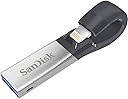
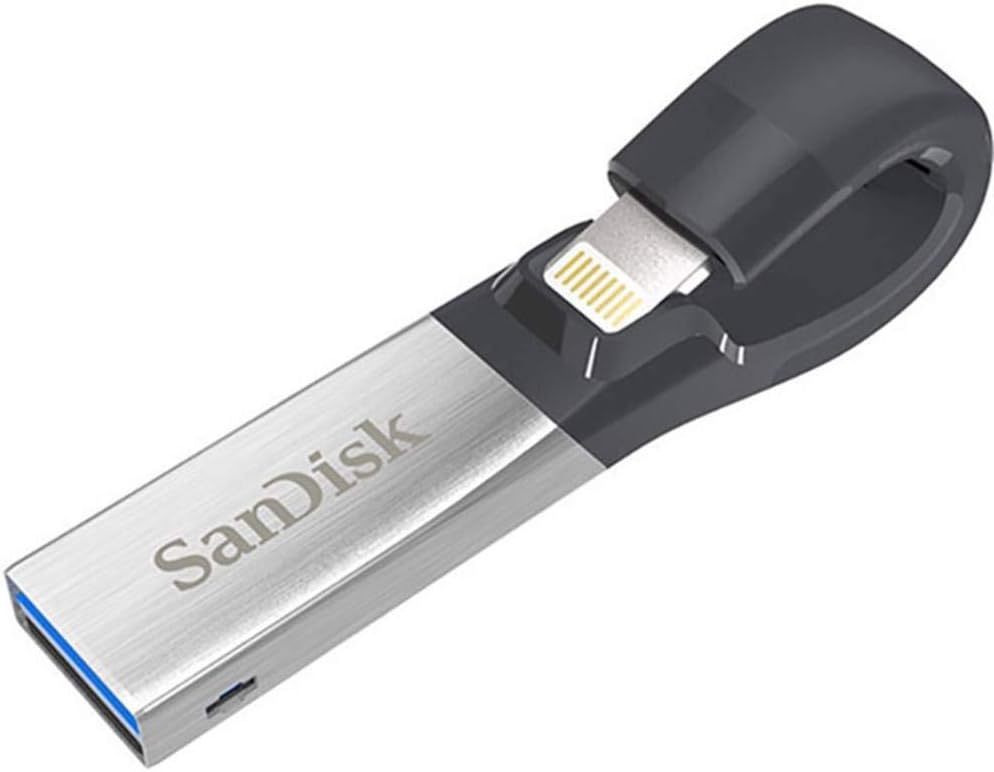
The SanDisk 128GB iXpand Flash Drive is a sleek, high-speed USB 3.0 storage solution designed specifically for iPhone and iPad users. Featuring a flexible Lightning connector that fits through most cases, it enables effortless backup and transfer of photos, videos, and contacts. Compatible with iOS 8.2+ and major desktop OS, it offers password protection to secure your data. With 128GB capacity and transfer speeds up to 150MB/s, it’s the perfect tool to free up space and keep your digital life organized on the go.


| ASIN | B01CIEBXZG |
| Additional Features | Lightweight |
| Best Sellers Rank | #6,326 in USB Flash Drives |
| Brand | Sandisk |
| Built-In Media | IXPAND FLASH DRIVE |
| Color | Silver |
| Compatible Devices | Mobile, Tablet |
| Compatible Phone Models | Iphone 5 |
| Connectivity Technology | USB |
| Customer Reviews | 4.4 out of 5 stars 19,568 Reviews |
| Flash Memory Type | USB |
| Global Trade Identification Number | 00619659143022 |
| Hardware Connectivity Technology | USB Type A |
| Hardware Interface | USB 3.0 |
| Item Weight | 5.4 Grams |
| Manufacturer | Western Digital Technologies, Inc. |
| Memory Storage Capacity | 128 GB |
| Mfr Part Number | SDIX30C-128G-GN6NE |
| Model Name | SanDisk iXpand Flash Drive, 128GB |
| Model Number | SDIX30C-128G-GN6NE |
| Read Speed | 150 Megabytes Per Second |
| Special Feature | Lightweight |
| UPC | 619659143022 |
| Unit Count | 1.0 Count |
| Warranty Description | 5 year |
| Write Speed | 80 |
B**M
Great for transferring iPhone photos
Excellent flash drive that works seamlessly with my iPhone 6+ (running latest iOS 10.0.2), PC and Slate PC (both running Windows 7). The main reason I bought this item was I needed an easy way to get photos into my camera roll. As every iPhone user knows, it's easy to get photos out of the iPhone, but very difficult to get photos in. Prior to using this device, I used various transfer apps via WiFi (spotty connection and unreliable) and via Personal Hotspot (uses cellular data and got expensive). I also used iTunes and I found it too complicated and time consuming. This iXpand Flash Drive solves my problem easily and effortlessly. I just had to plug the drive into my iPhone and follow the instructions that automatically pops up. You simply download the iXpand Drive app from the App Store (there’s only one version so there’s no confusion as to which one to download) and it’s ready to go. I also appreciate the high-speed USB 3.0 feature which makes the transfer process fast. I’ve had no issues with the device (so far) and I’m very happy with it’s speed and functionality.Highly recommended.
A**N
Awesome Drive Very Happy Buyer :)
This flash drive is Sandisk 128GB it a Awesome Drive I order a different brand before I got this one don’t go cheap on a none Brand Flash Drive like I did and had to return it because it was junk i purchase this one was so happy at the easy it work and how fast it downloads all my photos and videos from my iPhone I had about 80GB on my phone overlord for sure this drive took about 25 min to download everything not bad at all Sandisk is well known for it SD CARDS so it a brand Name if you buy a knock off one beware they said they are 128 GB or so but can’t hold that at all are they just don’t work I try for 4 days to off load my phone what a waste of time if you go cheat on one are buy a off Name get ready for trouble Sandisk Brand is Your best bet pay a little more and get it done right :) they have different GB I got 128GB because it can hold a lot before I off load it to a External hard drive are you can off load it to a labtop Or computer but for me external hard drives are the best place to off Load your Flash drive anyway for safe keeping plus they hold a lot of memory buy a 2TB are higher for off loading your flash drive to external Hard Drive hope this help you all PS I keep my flash drive in a plastic little zip bag you can buy a case for them but why pay out more money these bags keep um dry and safe I took a picture of my Drive in it bag check it out
T**E
The build quality and Longevity is my major concern (the app as well)
I'm going to be honest in this review , This product is useful and by all means a good buy but in all good things on amazon theres a flaw one of those being Build Quality (and the app but we will get to that currently i have had my particular Flash drive or (ixpand drive, idc) for around Seven months during these seven months there were a lot of problems with the app not picking up certain flies that i copied which i will dwell on further but recently i realized upon connecting the drive to my phone and any other lightning device that it would never get recognized i thought it was a glitch so i formatted the flash drive but it didn't fix anything i was about to complain to Amazon but i saw a post on the forums of the device (yes they have a forums, with a lot of complaints may i add.[quality checking is probably non-existent at Sandisk's Factory ]) and found out that another person had the same problem and a person offered a suggestion to use a powerbank connect the drive to it and then connect the drive to the phone and it worked! I honestly think this is a problem with the connection from the main board to the lightning port where if the wires in the loop ( i don't know what else to call it) wears out the connections become unstable and unable to work properly. Recently i tried to shift the loop a bit to see if it can work without a powerbank connected but it only works at a specific angle and is quite finicky so im stuck with the bulky and unpractical powerbank method for now. if this is the problems im facing at this point i dont know what to expect later onward Now for the App *sigh* again these are my honest opinion The default Application is honestly Garbage its only good purpose is the Automatic Photo back up don't expect to do anything more with the app.I personally use this flashdrive on my phone for media consumption such as music and videos AND BOY YOU BETTER HAVE A CHARGER NEAR BY the app drains your phone battery so fast you wounder if the battery took place as the seconds hand on a clock (bad joke, but who cares someone somewhere laughed) Sad to say but i no longer use the app as a primary source of media consumption i now use a 3rd party app called File Explorer and what an amazing experience its been so far. For starters the battery on my phone last longer, i believe its cause of the app not running in the background 24/7 ad it only gives power to the flash drive at some times instead of again 24/7 but that's just a speculation another good part of the new app is the design, the Ixpand app tends to be a bit cluttered and messy but the file explorer is minimal but still overs a lot of flexibility and can do may things that the ixpand app cant/ is bad at OK this review is going on for to long time for a conclusion. Now i gave this product a 4 star and i honestly think it deserves a 3.5 until 1) theres an update for the app that helps with the disappearing files and the battery life of decrease while using the device and 2) a better build/ quality check happening ill keep you up to date on anything else that happens to the device bye
T**Y
Thought it didn't work, had to reformat
I am assuming most people leaving bad reviews could've been in the same boat as me. I went through all the troubleshooting steps after having the iOS app. not recognize the flash drive. The thing that fixed the iOS app. not recognizing the flash drive was this: 1) Plug flash drive into a PC (Windows 10 recommended) 2) Windows 10 will prompt to reformat the flash drive 3) Click ok/yes 4) Continue through reformat steps, give the flash drive a name etc. 5) You are ready to plug the flash drive back into your iPhone, and a message should pop up. 6) Tap 'Allow' If these steps don't work, also make sure that all permissions are enabled for the application to fully work. Once the the flash drive is working, this thing is SOOOOOoo easy to use. Plug into iPhone, get a prompt to open the app., it starts backing up all new images automatically and asks if I want to delete them off my iPhone. Super simple and convenient.
P**B
Great for pictures and videos from your iPhone to free up more space on your iPhone
SanDisk iXpand Flash Drive 128GB for iPhone and iPad, Black/Silver, (SDIX30C-128G-GN6NE) Just got this and love it. Very easy to use. If you have any files (movies) that are over 4 gb in size then the 64 or the 128 versions are for you since they support a formatting version that will allow you to transfer from your computer to the iXpand. It will back up your photos and video that you take on your iPhone to the iXpand. You can't back up the music from the iPhone to this. You can copy mp3 music files to the iXpand and play them from the iXpand on your iPhone. It will also work with my Otterbox Defender Case which I love, I found out that there is a version for the Otterbox that you don't have to bend the connector too much but it still works. Great purchase if you are going on a trip and don't want to take your computer with you. 128 gb should hold everything you are taking on any trip and when home just plug into your computer and copy the pics and videos you took to your computer.
P**O
Yes, it can move a DOC or PPT file from an iPad to a PC!
I'm giving it 5 stars because it does exactly what I needed and solves a huge problem for me. I travel often and have to give a powerpoint file to someone for a presentation. I have replaced my Macbook with the new 10.5" iPad Pro, and I need to be able to get presentations and other files onto a thumb drive from the iPad. I had read several sites, including Apple's discussion site, and it was not clear that you could do this. There was speculation that you could, but I needed to test it for myself as the main use of this seems to be moving photos and videos, not necessarily other file types. However, I can say that I have tested it and it works beautifully! On the iPad I went to Powerpoint (I do have a subscription) and made a new talk. I then selected "Save a Copy" and I picked the SanDisk iExpand Drive. It worked! Then I removed the USB drive and plugged it into a PC... and it worked great! So: problem is SOLVED! This works!!! Whoo hoo! I can now use my iPad Pro as my main machine! So excited as this was the last piece holding me back. This is a great little product and I trust SanDisk to do this right.
F**I
PC users have few options with apple UPDATE WITH MORE TIPS TO GET IT TO WORK
UPDATE: This is such an annoying product, it's seriously a complete UGH! But Apple driver issues on Microsoft have limited options. So here's some tips that will save you some massive UGH yelling at the computer. I hope this helps. I still for whatever reason like it, because the driver issue work around is only this, so there's really not a great option, besides emailing yourself all your pictures and videos, so this is way more ideal than that. - Create a folder on your Computer for your Backup, BUT! create another folder with another name (I used "current videos") Only transfer TWENTY at a time. Into the "current videos folder". Then go through the copied videos to make sure they are all there. Then copy them to your BACKUP folder you made. My reasons for this seemingly ridiculous step? 1. It transfers what it wants too. Some videos/pictures won't transfer the first time you try. I assume if you are taking the time to transfer your files, they mean something to you. So it's important to make sure they are all there, even if it is tedious. 2. If you transfer them into backup, and try to review your most recently transferred, there is usually an error. Be it Date Created, Modified, Filmed, Uploaded. There is an issue, that takes so frustratingly long to sort out, and sort through, that it's just easier, to make the separate folder to then check, and then copy to the main back up folder you made on your PC. In even simpler terms, The videos/photos you just transferred might somehow get mixed into another date/video/image name. So basically, your Fall Photos might be half in the FALL according to the date taken, but half might be hidden in the SPRING grouping of dates. It makes no sense, and i've been trying to figure that out, but the easiest way is just to check in a different folder, then transfer to the main one you made (or maybe you like making multiple folders! That's completely up to you!) I REALLY want to love this product, because it seems like a great solution. But it's a hassle. So please get the small one, The large one makes no sense with all the glitches this thing has. REGULAR GLITCH fixes: 1. When plugging it into your phone and trying to copy, the screen might start flashing and say "error". Take out the plug, turn off your phone, turn back on, re-plug it in, try again. Sometimes that doesn't work! So plug it into your computer instead (The sandisk), Then MAKE SURE TO EJECT IT, DON'T JUST PULL IT OUT. Turn off phone again, Turn back on phone, plug in Sandisk to phone, try copying your photos or videos again. If it's still saying "error" etc, then unfortunately you need to give it a few minutes (unplugged again, this little Sandisk overheats too, so make sure it's cool) Then try again. 2. It overheats! so don't copy too much at once. You will literally feel how hot this little Sandisk gets when it's plugged into a pc. I got this because of the driver issues when trying to connect apple phone to computer. It does transfer things, but you have to do only a few at once otherwise you will have a terrible time figuring out which videos/ pictures it didn’t copy. The transfer to the usb is fast. But then going through everything to make sure it copied takes a lot of time. So don’t buy the large one, just get the smallest or cheapest one because you will want to work in batches of 20 to make it more manageable. Otherwise you will miss that it missed something. It’s less terrible than iphone transferring through lightening cable. But it still has so many flaws that I can’t write a review without addressing. I got the smallest one after seeing other reviews and I’m glad I did.
A**R
Essential, Useful, Easy to Use...Perfect!
I'm an iPhonographer. So I needed something other than my PC to store my photos & videos. I have an iPhone 6 w/ 64gb. I take photos/videos with my phone every single day! I am so impressed by this USB. It's perfect! Downloaded all 8,882 photos/videos from my iPhone in less than 15 min and only used about 15% battery power. It even organized all the files into folders based on month/year upon downloading. It only took up 8gb on the USB, too. So glad I took a leap of faith and purchased this! Gives me peace of mind knowing I can upload precious photos/videos anywhere and into a secure, separate place. The app is also simple and super easy to navigate. Upon plugging in the USB for the first time into your phone/iPad, the app automatically prompts you to download. The app is free. Buy this USB! You won't be disappointed.
A**X
Idéal pour soulager l'espace de stockage des vidéos de des photos de votre appareil Apple
Certainement le seul produit de ce type actuellement disponible pour les produits Apple. La clé est solide et fonctionne parfaitement après l'installation de l'application disponible sur l'Apple Store (attention l'application est obligatoire pour fonctionner). Très simple d'utilisation l'application gère le delta entre vos dernières sauvegardes et les photos et vidéos que vous avez actuellement sur votre équipement. L'application permet aussi de naviguer dans les photos/vidéos que vous avez stocké sur celle-ci. On est donc face à une solution de sauvegarde simple d'utilisation que l'on peut connecter facilement à son produit Apple et à son PC ou autre via l'interface USB3. Le taux de transfert est très satisfaisant. Les seuls problèmes sont : La consommation d'énergie La vitesse de lecture des photos depuis votre téléphone ou tablette. Impossibilité de sauvegarder des musiques sur la clé. En effet la clé consomme pas mal d'énergie et sollicitera votre batterie aussi prévoyez d'avoir suffisamment de batterie pour utiliser cette clé. Ensuite la navigation dans les médias demande un temps de préchargement qui fait que cette clé ne sera pas aussi rapide que votre mémoire interne mais cela reste convenable et suffisant. A recommander pour tous ceux qui ont cherche une solution simple de stockage pour leurs vidéos et photos afin de libérer de l'espace sur leur téléphone ou tablette Apple
D**L
Functional & Utilitarian Means Of Data Transfer
the product works as advertised and is especially useful when backing up photos and videos directly via physical means between the iPhone and your computer. it's much faster and more reliable when compared with the regular wireless means like air drop.
A**A
Essencial pra iPhones/iPads com 32GB
Se você anda precisando de espaço, é uma ótima pedida. Ainda que você pode usar como um pendrive convencional. Recomendo!
V**O
Quality product
Expensive but SO easy to use and saved a lot of space on your phone.
S**Y
Best alternative for iPhone space.
Best solution to save your iPhone space. Also can buy a lower space iPhone with this alternative.
Trustpilot
2 weeks ago
5 days ago