Buy anything from 5,000+ international stores. One checkout price. No surprise fees. Join 2M+ shoppers on Desertcart.
Desertcart purchases this item on your behalf and handles shipping, customs, and support to Tunisia.
๐ธ Turn your vintage memories into digital goldโbefore they fade away!
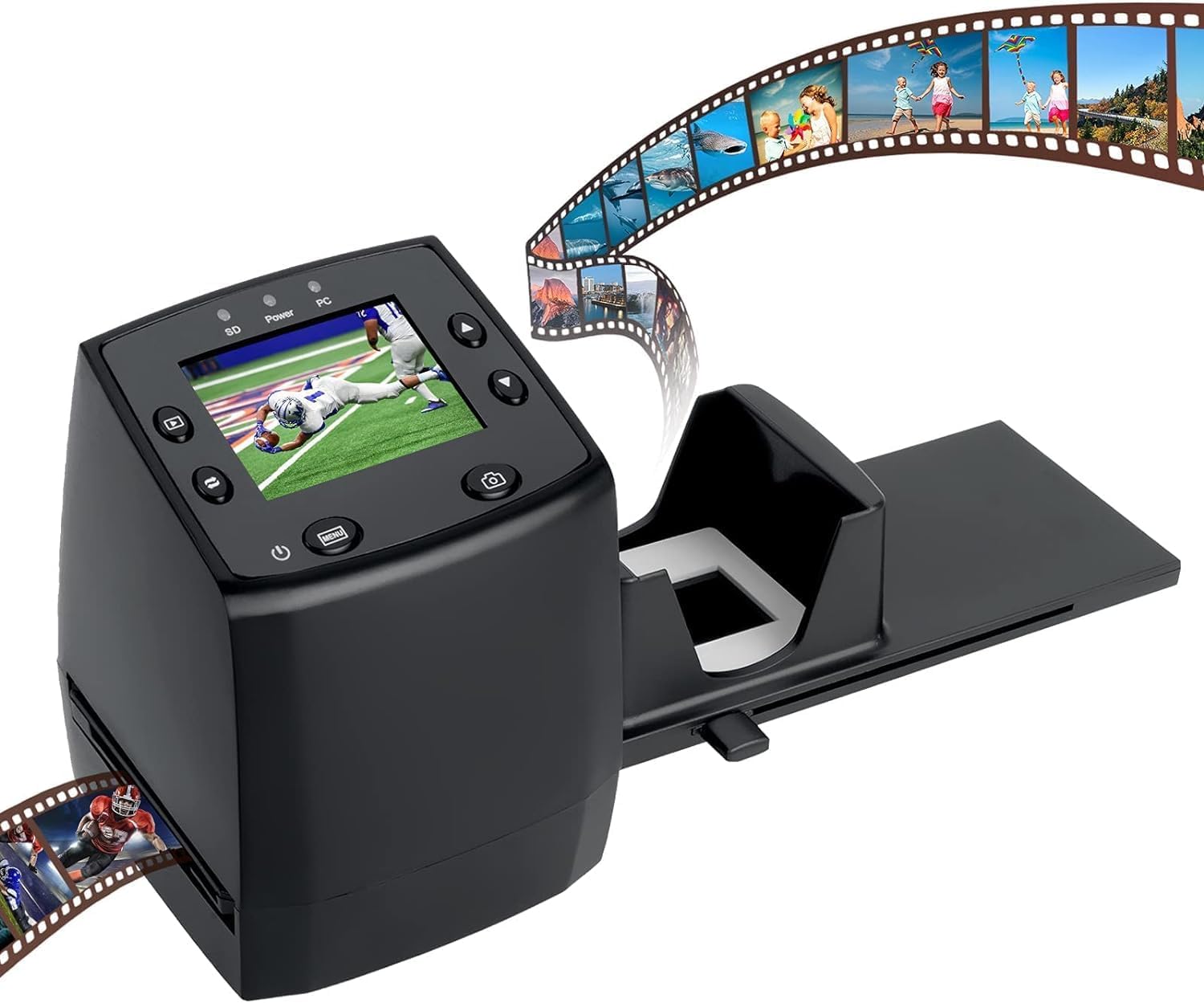
The DIGITNOW! Film Scanner offers high-resolution 1800 DPI scanning of 35mm film negatives and slides, saving images directly to an SD card (up to 32GB) or computer via USB 2.0. Featuring a 2.4-inch TFT LCD for real-time preview and contrast adjustment, it supports Windows XP through Windows 10 and Mac OS. Its adjustable rapid slide feeder accelerates batch digitization, making it an affordable, user-friendly solution for preserving your analog memories in stunning digital quality.


| ASIN | B01GHKL7HQ |
| Best Sellers Rank | #60,024 in Office Products ( See Top 100 in Office Products ) #40 in Slide & Negative Scanners |
| Brand | DIGITNOW |
| Color Depth | 16 bpp or higher (16,777,216 distinct colors or more) NA |
| Connection Type | USB |
| Connectivity Technology | USB |
| Customer Reviews | 3.6 out of 5 stars 2,367 Reviews |
| Greyscale Depth | supported NA |
| Item Dimensions D x W x H | 3.43"D x 3.4"W x 4.3"H |
| Item Weight | 1.5 Pounds |
| Light Source Type | LED |
| Manufacturer | DIGITNOW |
| Media Type | Negatives, Slide |
| Minimum System Requirements | Windows XP |
| Optical Sensor Technology | CIS |
| Product Dimensions | 3.43"D x 3.4"W x 4.3"H |
| Resolution | 1800 |
| Scanner Type | Film |
| UPC | 889743404968 612520601584 889743596571 |
| Unit Count | 1 Count |
| Warranty Description | 1 Year |
T**Y
Best bang for the buck, why spend more !
For the money this device provides excellent results. It's simple to set up and incredibly easy to operate in spite of the lack of a simplified US full color manual. As noted, no SD card is included but is required in order to operate the device so order one if you dont have one on hand. All images are scanned directly onto the SD card and it is not possible to view the images in real time on the PC. After scanning the image/s you can then choose PC from the device menu and open / import the files on the PC via USB. The slide feeder is a real pain in the butt if your slides are not flat and in good condition and in that case forget stacking them. I will not retract a star for this because it works as intended with good flat slides in good condition. If that becomes an issue in your case you can use the provided film tray for slides as well. I love the option to adjust the contrast in real time while scanning without having to go into the menu but I have also found that in most cases adjusting the contrast was a mistake unless the slide was very very dark. The images appear less light / clear on the device screen than the actual scan. I noticed almost no difference in image quality between the 5mp & 10mp scans so I decided to scan everything @ 5mp in case I decide to do any future editing. I am sure a few devices get through that are not quite up to par as is the case with every manufactured device but IMO this device is solid and well worth 50 bucks. I would definitely recommend this device to anyone who just wants to get their collection of home slides digitized on the cheap before they turn to dust. If you've got the money and can afford more then sure, go for bigger and better. Otherwise this will do quite nicely nicely.
A**T
Good scanner for the price...
I recieved the scanner the next day after placing my order... very FAST delivery! I found the setup easy, and quickly began scanning my old slides. After about 50 slides, when I pushed the capture button, the screen went black and stayed that way. I had to power cycle the unit to get back a normal screen and tried again to capture the slide, but had the same result. I then tried the next slide, but still the same result. It was getting late and I decided to stop and investigate further tomorrow. I thought perhaps I had recieved a defective unit, or maybe after scanning 50+ slides, the unit had overheated. The next day, I tried to rescan the two slides from the previous night, with the same results. However, moving along to a different slide, the unit operated normally, but trying the previous two slides, again locked the scanner up. I was baffled! I finally discovered by lowering the scan resolution from 10 to 5 solved the issue, although why this would be, I don't know. Neither of the two slides were particularly different than others, not over or under exposed. I ran into a few other slides that locked the scanner up, but lowering the resolution to 5 always worked. My only other gripe is the same that many others have commented on, which is the unreliability of the fast loader. It seems much more troublesome when loading my older, cardboard mounted slides, and works almost flawlessly with the newer plastic mounts. All in all, I think this is a good deal for a consumer-grade scanner at this price range!
R**T
It could have been SO much better
First, I need to say that when this scanner works, it actually works pretty well. So why the 1-star review? There are several flaws with the device and its software that suggest corners were cut in the design and development, enough testing wasnโt done, or the company was trying to produce the cheapest device possible. Online reviewers have focused most of their criticism on the fact that owners have to provide their own flash memory card. But given how inexpensive these cards are, this is an inconvenience at most. The following problems are far more important. 1. The scanner has two settings, 5 megapixels (5M) and โinterpolatedโ 10 megapixels (10M; which means, I guess, the slide is scanned twice at 5 MP and the images combined). Generally, the 10M setting works well, but if the image is too complex somehow, the device simply stops working. Thereโs no error message, no suggestion to reset to 5M and try again, nothing. It just stops and has to be disconnected from the computer itโs attached to. It canโt even be turned off. 2. All slides must be scanned in landscape orientation, no matter how the image was shot. So while the device has an image mirroring/rotation tool, it will not rotate a portrait-oriented image to the correct orientation. And if the user tries to rotate images while viewing them using their computerโs image viewer, they might succeed a few times, but eventually not only will the device lock up, it will lock up their computer as well, forcing them to restart or reboot. Again, thereโs no error message, no warning, and nothing in the user manual to warn of this problem. The images can only be rotated to their correct orientation after saving them to another computer. 3. The device comes with three feeders: one that holds a strip of five negatives, one with slots for four slides, and one that holds a stack of roughly 20 slides. This latter one seemed like a good ideaโitโs something none of the other scanners I considered hadโbut it doesnโt work. Slide frames vary in thicknessโplastic frames are thicker than paper onesโso the feeder has to be able to accommodate all of them. As a result, paper-framed slides donโt consistently push an already-scanned slide out of the way as the user tries to move the next slide into place. Itโs a good idea poorly executed. 4. I had expected Iโd be able to save images directly to my computer but I canโt. Users have to save the images to the flash drive, then link the scanner to the computer and copy them, or power off the scanner, remove the card, put it in the appropriate slot on their computer, and copy them that way. While this is more of an inconvenience than a serious problem, a better design would have allowed saving the images directly to a connected computer. On the positive side, when Iโve contacted DigitNowโs tech support, theyโve been reasonably responsive, getting back to me within 24 hours, and their answers have generally been helpful. Now that I know how to work around or avoid the problems listed above, I can reliably scan a couple dozen slides in about 15 minutes, and the scan quality certainly meets my needs. Itโs easy to see why the scanner made it into other online reviewersโ top-10 lists but it would have gotten even better rankings if it had been better designed and the design better executed.
A**R
Pretty hard to beat for price and function
I was recently sent over a thousand old family slides ( I said please just send a few and I'll see if I can convert them to jpegs, but whose brother ever listens?). My old converter was way out dated and no longer working with Windows, so rather than spend big bucks on a new machine.. I gave this guy a chance. Wow! Not disappointed at all. After a little practice I was shooting through the slides pretty quickly. Some good features: Stack holder for quicker feed, card recorder for storage, no need to be connected to the computer or updating software and you can convert slides and negatives. Pretty cool for minimum price. Don't get me wrong, it will occasionally jam, but easy to unjam . I am not converting all thousand, that would be nuts. So this is the perfect machine for me.
L**T
Not bad, but VERY cheaply built...
I'm using this scanner to convert a bunch of my parents' old slides to digital. I've converted about 66 pictures in less than 2 hours. Honestly, the quality of the pictures is rather good-- much better than I was actually expecting for a $40-50 device. The 16GB SD card I used with it worked right away, no issues there. The menus were simple enough to navigate and it worked pretty much how I expected it to. The BIGGEST problem I have with this scanner is the build quality-- it's absolutely terrible. The slide feeder adapter is a nifty idea, but the slides all kept getting jammed. This would happen every single time I advanced the slide, not just once in a while. The main problem is that the plastic is SUPER thin and bendable. Even though the slide adapter is fastened together with these small screws, I feel like with enough force it can easily be ripped apart. A good trick I've found with this slide scanner is to really take your time and be gentle with it. If your slides get jammed, pull the slide feeder/adapter thing out and carefully/methodically fix the jamming. Don't use too much force at all, or else you might actually damage your slides. I included two pictures as samples, both of which demonstrate the quality I was able to achieve. Again, for a $50 device, I'm pretty happy with the quality of the scans. This device will definitely be useful to scan all my slides to digital. I'm not worried so much about the longevity of this device, because I don't have more than 300 slides, and I can always buy another slide feeder adapter. Hope this helps, and have a good night.
D**E
Ho-hum with a unique accessory
The good: 1) If you don't have any other options, this works kinda okay to get an image digitized. 2) The speed loader for slides is something that I couldn't find anywhere else. I totally scavenged this one accessory to use the speed loader on another project. The not-so-good: 1) It offers either 5MP or 10MP resolution, but always comes up in the lower resolution. However, I don't think the resolving power of the internal lens is good enough to really take advantage of the 10MP resolution anyway, so maybe it doesn't matter. 2) The menus are cryptic. For example, the "capture" option allows you to select from B&W negatives, color slides or color negatives (in that order), but the options are not labeled and the icons are not intuitive. I have film in each of these formats so I could verify through trial and error which was which. 3) When scanning, to make an exposure adjustment (EV) takes several more button presses than other similar units. 4) On my copy of this unit, the built-in lens is soft, or rather has a soft spot in the middle. I'm picky about image quality and the project that I scavenged this for is using a $1000 macro lens. So the comparison probably isn't all that fair. 5) The resulting images are (too) contrasty and the color gradations are not pleasing. 6) The SD card slot doesn't have a good feel to it and I got "card errors" several times. Context: I'm a 20-years-experience professional photographer and I'm very picky about image quality. All of my modern work is digital and I'm only starting to dabble in digitizing my older film. I also have a similar but older unit made by Wolverine, which improves on all 6 of my points above. This (or any similar scanner) starts with a light source on the bottom, which projects light through the film, into a lens and then to a sensor. As with any other camera, the quality of the lens and sensor is a really important thing. For my application, I bought this unit only to get the speed loader for slides. I've built another rig including a DSLR camera and macro lens and wanted that part. It (the speed loader) works adequately (but even then has quirks that need attention). Specifically, the slides don't quite line up correctly and often "over-shoot" the scanner when using the speed loader. Since the only part that I'll actually keep and use is the speed loader accessory, it was a little bit expensive.
A**R
Great Product.
Makes converting 35mm and slides easier. Very simple to use.
A**M
Convenient to use but limited slide formats, and feeder doesn't work well
Image quality is pretty good, although colors are muted compared to the actual slide (holding them up to a light to view them). Increasing the brightness exposure control leads to washed out images. I often end up scanning at normal exposure and post-processing the scans to compensate for the muted color. Doesn't handle as many slide formats as others. I bought this and it was great for my 35mm slides, but then I found some "127" slides and this digitizer can't capture that format so I had to buy a different digitizer for those. One reason I chose this model was for the slide feeder to make it easy to feed in a lot of slides one after the next, but in my case the slides always jammed. It would have been a great idea if it worked. However, the standard slide holder accepts 4 slides at a time, and that's not so bad (other models only accept one at a time).
Trustpilot
2 months ago
2 weeks ago