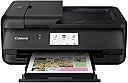
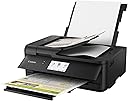
🖨️ Elevate your workspace with print power that keeps you ahead of the curve!
The Canon PIXMA TS9520 is a sleek all-in-one wireless printer designed for home or office use, featuring a 5-color individual ink system for sharp text and vibrant photos. It supports a wide range of paper sizes up to 11x17 inches, offers versatile connectivity options including Wi-Fi, AirPrint, Google Cloud Print, and Alexa voice control, and includes a flatbed scanner with an Auto Document Feeder for efficient multi-page scanning.


| ASIN | B07G685PX1 |
| Additional Printer Functions | All In One |
| B&W Pages per Minute | 15 |
| Brand | Canon |
| Built-In Media | Multi-Purpose Tray, PIXMA TS9520 Wireless Inkjet All-In-One Printer, Paper, Power Cord, Set of Standard Ink Tanks, Setup CD |
| Color | White |
| Color Depth | 16 bpp |
| Color Pages per Minute | 10 |
| Colour | White |
| Compatible Devices | Laptops, PC, Smartphones |
| Connectivity technology | Bluetooth, Ethernet, USB, Wireless |
| Control Method | Voice |
| Controller Type | Amazon Alexa |
| Customer Reviews | 4.1 out of 5 stars 1,069 Reviews |
| Display Type | LCD |
| Dual-sided printing | Yes |
| Duplex | Automatic |
| Global Trade Identification Number | 00013803305753 |
| Hardware Interface | USB |
| Ink Color | Black |
| Item Type Name | PIXMA TS9520 Wireless 11x17 Printer |
| Item Weight | 21.3 Pounds |
| Manufacturer | Canon USA Inc. |
| Maximum Copy Resolution Color | High Resolution |
| Maximum Copy Speed Black and White | 15 ppm |
| Maximum Media Size | 11 x 17 inch |
| Maximum Sheet Capacity | 100 |
| Model Name | TS9520 |
| Model Number | 2988C002 |
| Model Series | TS |
| Model name | TS9520 |
| Number of Licenses | 1 |
| Number of Trays | 3 |
| Other Special Features of the Product | Auto Document Feeder, Scanning, Borderless Printing, Auto Duplex, Touch Screen, Memory Card Slot |
| Output sheet capacity | 100 |
| Paper Size | A4, Legal, Letter |
| Print media | Paper (plain) |
| Printer Connectivity Type | Bluetooth, Ethernet, USB, Wireless |
| Printer Output Type | Color |
| Printer Type | Inkjet |
| Printing technology | Inkjet |
| Resolution | 4800 x 1200 |
| Scanner Type | Flatbed |
| Special features | Auto Document Feeder, Scanning, Borderless Printing, Auto Duplex, Touch Screen, Memory Card Slot |
| Specific Uses For Product | Home, Office |
| Total Usb Ports | 1 |
| UPC | 013803305753 |
| Unit Count | 1 Count |
H**S
No es para todo el mundo, pero yo estoy encantado
Antes que nada, hay que decir que esta impresora no la vende Canon en México, por lo que si se estropea, arreglarla va a ser complicado. Lo mismo aplica a la disponibilidad de consumibles (tinta) que se deben importar. Dicho lo anterior, yo buscaba una impresora que abultara poco (en particular que no fuera muy alta) que imprimiera bien y que funcionara muy bien con mi Mac. Todo eso lo cumple a la perfección y por eso estoy muy satisfecho de mi compra. Sin embargo, entiendo que no es una buena elección para todo el mundo.
R**9
Excellent option for home printers.
All I can say is "WOW!" I had a Pixma MP800 that i had to replace as there were no updated drivers for Windows 10 and printing photos or color made me think the print head was bad (it wasn't). Did a lot of shopping and feature comparison and was pleased to find that my best option was once again a Canon. This printer has amazing color, prints beautiful photos, has easy to use software for digital scanning and photo manipulation. And it prints 11x17! Do wish it automatically placed a short cut on the desktop during install, but that's no big. Don't understand the quality complaints - while this printer does not seem as sturdy as my last Canon, it is still better quality than my HP all-in-one that it (also) replaced. The flip up front control panel does worry me regarding durability, however, I don't beat up my electronics and only worry about my cat using it as a launch pad. Love my Canon Pixmas! Worth every penny, without as many pennies I thought I would have to spend! Unless Canon turns to crap, I will probably never buy another manufacturer printer again!
N**N
Don’t waste your time.
I purchased this printer about a year ago, and ever since I’ve had issues with it, you might as well spend more money and buy a better printer or just buy a different brand altogether. The printer is nice for basic things, but when it comes to anything besides computer paper expect to wait 5 to 10 minutes for a single sheet to print out, I purchased this printer to make prints of my artwork, when I scan them it takes up to two minutes, after that like I said it can take anywhere from 5 to 10 minutes for the machine itself to read your work and then print it. I can’t even begin to tell you how many error codes, all the little things that this printer will do to stop itself from printing, I have lived in three separate places with this printer and it still can’t work with the Wi-Fi more than half the time. Majority of the time it will stop printing halfway through and spit you out an error code or tell you that it can’t connect to Wi-Fi, and good luck using your phone with this it doesn’t wanna link up only when it wants to. The printer prints out mediocre Prints, it may take 20 minutes but the majority of the color that you want to be there won’t be there I should’ve bought the Epson printer. Overall when I spent $500 on this piece of junk a year ago, I did not know what I was getting myself into, canon itself can’t provide an accurate description so I had to get on QVC and watch two middle-age women present it to me. Don’t waste your time with this printer. Unless you enjoy waiting an hour or two to print five pages, not to mention the feed slot on the back only excepts one piece of paper, have fun.
O**Z
No cumplió las expectativas
El ADF es de calidad pobre, migré de un modelo MX880 de hace 1o años a este justamente por la excepcional calidad del anterior en todo aspecto, pero no le llegó a la calidad. La tapa del ADF no tiene soporte estático por lo que siempre tienes que sostenerla con la mano al colocar documentos, el ingreso del ADF es muy reducido para el manejo de hojas múltiples y el escaneo en todo momento sale ligeramente chueco de los bordes, en las reducciones no te permite escanear sin bordes por lo que las orillas extendidas siempre las va a recortar. Si pudiera la devolvía y compraba algo mejor.
T**S
Great printer, terrible driver!
Hardware wise is printer solid. The Wi-Fi connectivity works good, even the app for your phone works good. But the driver it comes with this terrible! You might think of $250 printer that's designed to do edge to edge printing would .. I don't know, not require 4 hours to get to work? First, you have to go into printer properties and set it to borderless. That's not too bad, although one would assume that a borderless printer would default the borderless. But then, you have to change another slider, for minimum extension, whatever the hell that means? From being two notches over by default to being the whole way to the left. If you don't do that, anything you tried to print will be scaled and bottom will go like six millimeters past the edge and cut off :-( I've included a pic of the slider you need to change.
Trustpilot
2 days ago
1 month ago