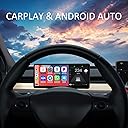
🚗 Elevate your Tesla drive with smart HUD tech that’s as dynamic as you are!
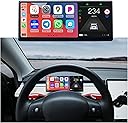
The VERKOKAPPA Tesla HUD is a 9-inch HD IPS touchscreen upgrade designed exclusively for Tesla Model 3 and Y (2019-2023). Featuring an AMD Ryzen processor and a minimalist Linux OS, it delivers ultra-responsive, lag-free performance with wireless CarPlay and Android Auto support. Its 600-nit brightness ensures visibility in all lighting conditions, while OTA updates and customizable UI themes keep your interface modern and personalized. This HUD integrates seamlessly without altering your Tesla’s original structure, providing real-time vehicle data and enhanced driving safety.


| ASIN | B09DKXVFR6 |
| Brand | VERKOKAPPA |
| Built-In Media | Dash Camera |
| Color | Grey |
| Compatible Devices | Tesla Model 3, Tesla Model Y |
| Connectivity Technology | Bluetooth |
| Customer Reviews | 3.8 out of 5 stars 42 Reviews |
| Display Type | LCD |
| Item Dimensions L x W x H | 9.02"L x 3.94"W x 3.94"H |
| Item Weight | 2.5 pounds |
| Manufacturer | VERKOKAPPA |
| Mfr Part Number | T3 |
| Model Number | T3 |
| Native Resolution | 1920*720 |
| Number of Items | 1 |
| Product Dimensions | 9.02"L x 3.94"W x 3.94"H |
| Screen Size | 9 inches |
| Warranty Description | 90 Days |
A**E
Easy to install and looks like it’s OEM (Great support response too)
This works perfectly for adding Apple Car play to my Tesla Model 3. The install was pretty easy. There’s one tight spot pulling the connector out but other than that it’s a breeze. It took me a little over an hour. My CarPlay does default to the speaker so when I play music I just hit the airplay button and send it to the car. While that may seem a little annoying I’ve found I like that as my Waze notifications come through the speaker on the device and not my car speakers. Overall, I’m more than happy with this product. I did reach out to support for two items and they responded the same or the next day. They helped me through both issues. The first was getting the system tray to appear (It's a swipe from the middle of the right side into the center of the screen) the instructions say to tap the top right corner. The second was getting my calls to automatically chose my car speaker and not the screen speaker. They sent me this below and it works! The phone call setting needs to be set to Bluetooth priority (mobile: accessibility > touch > call audio routing > set to Bluetooth headset ), so that the car's speaker output will be used first after the call.
M**C
Glitchy
It was okay. Wouldn’t show up in mpg. And it was glitching and shaky. I could t drive w it like that so bad to uninstall
J**C
Great substitute HUD
For those looking for a heads up display, this is a great choice (this is apparently no different than the Hanshow one according to their website/FAQ) With a 2022 M3SR+ (AMD Ryzen), you have to get the power from the 12v cigarette lighter as there is no way to draw power from the battery as shown in the installation video. Took me almost two hours to disassemble/reassemble before realising the access to the frunk area is inaccessible for this particular vehicle. Then had to purchase a separate piece for that (*Cigarette Lighter Male Plug with Leads*). Which means, in the end, the wires cannot be fully hidden For those concerned about it blocking the climate control, it will depend on your particular area. Since my location is rather moderate for most of the year, it doesn’t concern me, but yes, the airflow is definitely hampered (by quite a bit), so keep this in mind Can’t install software update yet as I don’t have a USB-C flash drive, so also just purchased one to update the unit Satisfied with the out of box display thus far. It can employ either AppleCarplay or AndroidAuto, which means you can use Waze or GMaps for your navigation. It can also Bluetooth into your sound system, which is SIGNIFICANTLY better than the attached speakers. I sorta like that the waze navigation sound comes from this unit, as it doesn’t interrupt music/radio from car speakers (depending on your settings). Conclusion: if you reside in a hot climate, you MIGHT be able to work this in by adjusting the airflow (flowing separately left/right instead of straight on). If you’re ok with the cigarette lighter being always occupied (it also blocks the tray from being easily removed), and a small bit of visible wire hanging out your centre console (it’s possible to use black electrical tape to cover up), then I recommend this purchase.
A**A
Looks great but blocks AC
Looks great and works great. 720p IPS screen, thin bezels, looks OEM. I got it for carplay/android auto, but ended up using the gauge cluster more than the phone interfaces. Tesla maps is just much more convenient with the big screen. Had to contact seller for Ryzen Model 3/Y install kit (Free). Sell was nice and response. Was a pain the butt to install on the new Li-Oh battery but got it working. One annoying thing is that until you start the car, all the readings are in KM/H instead of MPH. But ended up removing it due to the drive side AC being completely blocked; it would be nice if it mounted about the vents where it didn't block it, but it makes it unusable especially in summer. I ended up just getting a tilt mount for the main Model 3/Y screen. Overall I would only recommend it if you live in an area where you dont need Heating or cooling in your car, or you cant live without carplay/Android auto.
M**K
CarPlay on my Tesla makes it all worth it
Installed on my Model Y 2022. AMD Ryzen chip. New Model DOES NOT require you to go through the firewall to connect to the battery. You simply connect the wires and you are done. Originally I couldn't get it to disconnect from CarPlay while at home. learning that I have to lock it to turn off solved it. Thank you VeroKappa support! Positives: CarPlay works flawlessly. 98% of the time. once in a while you may just to wait for an extra 2-3 minutes Android Auto tried it once it works Looks stock Relatively easy to instal. Negatives: Audio lag when using the display as a middleman between the phone and Tesla BT Using the display to take phone calls is terrible. Audio is great, Lag is awful. This is not the displays fault but rather a limitation of Bluetooth. Your best option to avoid the lag is to switch to phone Bluetooth on the Tesla. Then move it back once call is over. This is probably not an issue for wired Android auto. Wish List Allow wired CarPlay. Port it there why can't wired CarPlay work?? it works for Android Auto. This would solve the input lag issue. Connect to two devices. Unless I am doing something wrong. I cannot get it to connect to my wife's phone.
D**Y
A bit hard to install, many flaws with interface but acceptable
The device I have is the original T3 (9") display. I was able to install it without issues but was a bit complicated. My big issues now is that after over a year of owning it, there seems to be no more support from Verkokappa. I was able to get from them links to download an updated Firmware a couple of times but I am no longer able to get a reply from them whatsoever. My display works fine for now except that the Fog Light signal does not work (remains OFF regardless if the Fog Lights are ON or OFF). I also do not like the fact that the speedometer is wrong in MPH, while it works correctly, the speed numbers are the same as used for km/h so the top speed shows as over 200 MPH which is completely inaccurate. Also the Speed Limit sign is the round white one with a red circle which is NOT the American standard (should be all black rectangular). If anybody has a link for the latest Firmware please post it here somehow. Verkokappa support is good for nothing. I am also contacting Hansshow since they have the same display (hardware) with different Firmware so it is possible to use it as well. Verkokappa, you go under the name Joker and looks like it is exactly what you are. Prove me wrong and reply.
C**G
Perfect addition to my model Y!
Easy to install on my 2022 model Y with AMD Ryzen. Hardest part was obtaining 12v, had to run the cable to the nearest power source. The display works well and is stable. Unlike competitors (Hansshow etc ) This vendor provides frequent firmware updates which have improved features. I love using waze. My only complaint is I wish it could link with the factory sound system and only play the Waze notifications as a phone call so it butted into music or whatever is playing on the tesla. I use the little built in speaker for Waze as a workaround.
A**R
Do not buy no colors its only black and white
Do not worth it for money and they lie about product. On description photos its nice colorful but in reality black and white and it only shows digital speed and tire pressures (see photo) not happy at all I bought 2 for my Y and 3 but it looks very cheap.
Trustpilot
2 weeks ago
2 months ago