🚀 Unlock the future of home networking with speed, security, and scale!
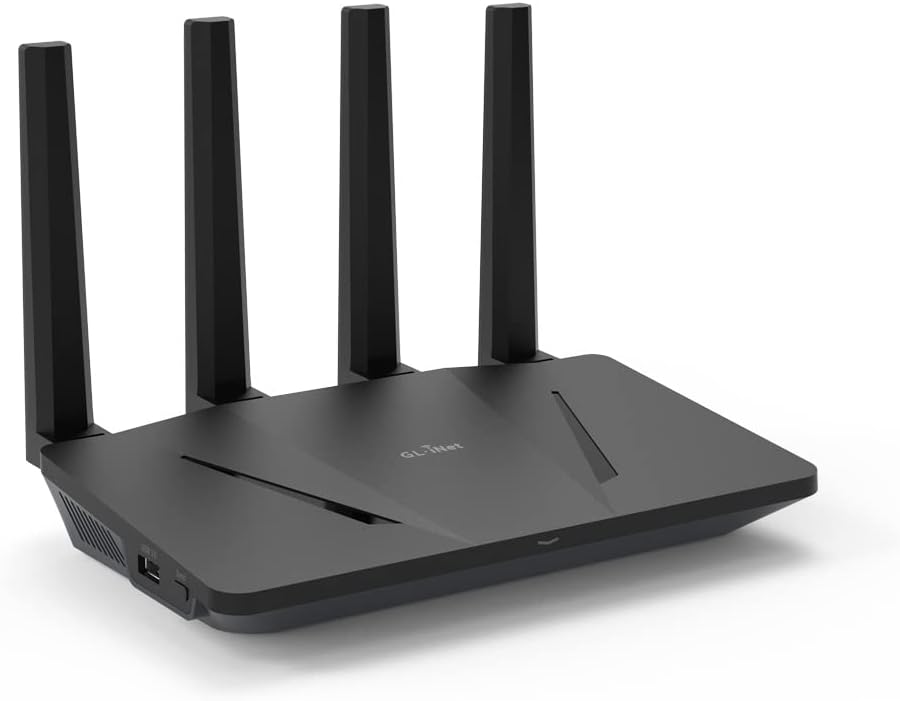
The GL.iNet GL-AX1800 (Flint) is a dual-band WiFi 6 router delivering up to 1.8 Gbps speeds and supporting up to 120 devices simultaneously. Featuring 5 gigabit Ethernet ports, built-in WireGuard and OpenVPN with speeds up to 500 Mbps, and integrated AdGuard Home for ad and tracker blocking, it combines powerful hardware with open-source flexibility. Ideal for professionals and tech-savvy users seeking reliable, secure, and high-capacity wireless networking.


| ASIN | B09HBW45ZJ |
| Antenna Location | Gaming |
| Antenna Type | Fixed |
| Best Sellers Rank | #11,161 in Electronics ( See Top 100 in Electronics ) #71 in Computer Routers |
| Brand | GL.iNet |
| Built-In Media | Ethernet Cable, GL-AX1800 (Flint) router with 2-year warranty, Power Adapter (US Plug), User Manual |
| Color | AX1800 |
| Compatible Devices | Personal Computer |
| Connectivity Technology | Wi-Fi |
| Control Method | App |
| Controller Type | App Control |
| Coverage | Up to 120 devices |
| Customer Reviews | 4.5 out of 5 stars 1,250 Reviews |
| Data Transfer Rate | 1.8 Gigabits Per Second |
| Frequency | 5 GHz |
| Frequency Band Class | Dual-Band |
| Has Internet Connectivity | Yes |
| Has Security Updates | Yes |
| Is Modem Compatible | No |
| Item Weight | 0.45 Kilograms |
| LAN Port Bandwidth | 1000 Mbps |
| Manufacturer | GL.iNet |
| Maximum Upstream Data Transfer Rate | 900 Megabits Per Second |
| Model Name | GL-AX1800 |
| Model Number | GL-AX1800 |
| Number of Antennas | 4 |
| Number of Ports | 5 |
| Operating System | Linux |
| Other Special Features of the Product | WPS |
| RAM Memory Installed | 512 MB |
| Router Firewall Security Level | High |
| Router Network Type | wireless |
| Security Protocol | WPA3, WPA2 |
| Unit Count | 1 Count |
| Voltage | 12 Volts |
| Warranty Description | 1 year warranty |
| Wireless Compability | 802.11ax |
P**Y
Worth the money (excellent tech support)
My apartment complex provides fiber internet as a hotshot throughout with a captive portal. I was able to log in, join the service and the router remained logged in the whole time. From time to time it will get kicked off but it will choose the alternate connection I've set it up for. The connections are fast. I've connected to my VPN using wireguard and am using the ad guard as well. Surfing is smooth on either my 5 or 2.4 WAN. My speed, which is relegated to the VPN, works very well. The stability of the router is very good thus far. I experienced some lock ups which required me to unplug the router. (More about this later). I have several smart devices such as a Google Nest, a Bose smart speaker, Samsung TV and a Fire stick. Neither of these likes to go through the VPN. On my Fire stick I noticed that Amazon Prime will not work. Disney works, Netflix works. To get everything on the Fire stick to work, I set up VPN rules now. I made the router route all selected MAC addresses through the VPN so all my other devices bypass the VPN. Oh, once you set up the VPN rules it helped to reboot the router. It took me some time to figure this out so I wanted to pass this on to those that might have a similar situation at their home. I've set up the router for remote access and I use the app. Both work very well. Note, you can't control the VPN settings remotely. If you're connected to the router, the app does it all. On the web based remote access, it has a living map but I haven't figured that out so it doesn't display my location on the map. Summary: the repeater works very well. The drops and pick ups I was experiencing were, from what I could tell, from the VPN server. I'll make an update later now that I'm using my current configuration of having all my smart devices bypass the VPN. Update: 4/2024 I had a big speed drop. I'm no longer using the VPN, just the built in Adguard, which works really well! I've kept up with the firmware updates and apparently the previous update really messed up my speeds. I was originally getting about 95/95 and my speeds were down to like 5/15. I contacted tech support who made every attempt to resolve my issue. My unit, being out of warranty was no longer exchangeable. The company offered me a discount on the Flint 2, which appears to be a great upgrade. I ordered it! Upon login in to my router to copy some settings, it immediately notified me of an available firmware upgrade, which I did. I decided to check the speeds again. And wouldn't you know it, my router, in the repeater mode I use it in, was back to normal. My hotspot speeds are 100/100 connected directly. Through the Flint, they are about 97/98! I'm so glad to have it working again. I thought the hardware had failed but it just didn't like the previous firmware. The new firmware fixed everything! This is a great router and a great company that is overlooked. I highly recommend them and their products. As you can see, I had purchased the Flint 2 thinking my router had an internal failure. I trust their products enough to go with them again! I wish to add, the UI they provide, is awesome and so easy to use with helpful tips. I do wish to convey my experience with their product and help anyone whose looking for a great product with Repeater, Router, and other modes, or needing to connect to a hotspot like myself.
T**H
Recommended by IT Pro
As a high IT professional and avid open source software enthusiast, I cannot express how in love with this product I am. It gives you the best of all worlds. For home users: It's very affordable, It's easy to install, reliable, fast. For fellow techies: Comes with the latest AX speeds, and OpenWRT and LUCI pre-installed "underneath" their own proprietary web gui. Their webgui really helps fill some of the user-friendliness gaps in the underlying management system, such as vpn and ddns configuration. But for whatever their gui doesn't cover, there's nothing you can't do with this router by accessing the "under the hood" LUCI gui through the "advanced settings" link. The body seems to be made simpler, cheaper. Basic construction, antennas only pivot on a single axis, no swivel. I like to think no expense was wasted on aesthetics with this unit. It's backed by a POWERFUL hardware platform for its price class, equivalent to some of the mainstream brands you'd have to spend 250+ to get. 4 core ARM processor with almost half a gig of RAM, CPU SKU is suspiciously similar to RPi 3B+ (in fact I wouldn't be surprised if that's actually what this was under the plastic), so it seems to be open source hardware as well. It makes all the advanced stuff a tech enthusiast would want to do, SO easy. Hosting servers, simple. It gives you a free DDNS URL you can CNAME your domains to. You can enable adguard, VPN, TOR with the click of a button. No need to mess around building a PIHole or other similar device. Absolutely brilliant. Anyways, if you're looking for the best union of horsepower, affordability, FOSS and configurability - this is your best product on the market currently.
L**D
does its job well
I currently have three WiFi routers at my house. 1) combo DSL modem/router provided by AT&T, my internet service provider. I have turned off wifi capabilities on this device and use this purely as a DSL modem. 2) TP-Link Archer AX11000 WiFi 6 router for all internet access except for streaming services (through VPN). An excellent router but lacks VPN client support. 3) GL.iNet GL-AX1800 (Flint) WiFi6 for streaming services through VPN (mostly to access content that is blocked in my geographical location). Also, rumor has it there is at least one device in my house running few not-so-trustworthy add-ons in Kodi! Both GL.iNet and TP-Link routers are connected to DSL modem through network cables. What do I like about this router? * easy setup through web browser * VPN configuration as simple as uploading (through web admin interface of this router) the configuration files from VPN provider * supports Wireguard VPN protocol * free AdGuard service blocking ads and trackers * kill switch (stops internet access when VPN connection drops) * great coverage throughout my house (even though I use the “Low” Transmission Power setting. The choices are Max, High, Medium, Low) * Wireguard speeds are good for my use case. Per speedtest: 40ms ping, 45Mbps download, 20Mbps upload. This is excellent considering that the max speed my DSL service gives me is only 75Mbps. Cons according to me? * no way to turn off the lone LED on this device. (TP-Link routers allow turning off all lights. It can even be scheduled for when they stay on and when they are off.) * no way to schedule automatic reboot of the router, I have to remember to manually reboot the router (through web interface) once a month or so to keep it running smoothly. This reboot is not a rule or recommendation but I just do it. (my ASUS router provides scheduling to automatically reboot once any day of the month/week. I have it scheduled for the first day of every month. Haven’t had to log into ASUS router for years since initial setup.) Although this router is small, sleek, and whisper quiet, I don’t make purchasing decision based on how the router looks. As long as all it does is sit in the house where it is placed and does its job well, I don’t even have to look at it. And this GL.iNet router does its job well. Hasn’t been any problem for over four months that I’ve had this. More details, with images, on my blog. Edit (Nov 24, 2023): The current firmware version, 4.4.6, allows for "Scheduled Tasks" where I can schedule (via GUI) 1) LED Display 2) Reboot 3) 5G wi-fi and 4) 2.4G wi-fi. The reboot schedule allows for any day of the week but not a days of a month. What this means is the reboot can be done once (or multiple times) a week. I would like to reboot once a month. This can't be done through the graphical interface. However, since this router is running OpenWRT, I have scheduled (through Advanced Settings -> System -> Scheduled Tasks) a cron job to reboot once a month. #reboot at 4.44 am every first Saturday of the month 44 4 1-7 * 6 /sbin/reboot
B**E
Is it good for my use case?
I really like this because of the great WebUI which overalys OpwenWRT, and Layer 1 to 3 routing and Layer 3&4 firewall. However, there are known bugs specifically with Gl.inet's implementation. Specifically support for legacy 802.11 g/b/n devices. My printer wifi (802.11b/g/n ) doesn't work with it. A couple of IoT devices will connect and drop. This is a long known issues predating and continuing the latest 11/2024 firmware. DHCP issues exist and full custom routing available on the full Openwrt can't be done with Gl.Inet's implementation. For example, presenting a Wifi-LAN that uses LAN --> Wan and Wif-VPN that uses LAN --> VPN. This can be done on openwrt, but not this version of openwrt. Likewise, port forwarding is tricky doesn't seem to work as well as simpler routers. I like this router. It's ease of use, backup restore, out of the box experience for switch/route/firewall features you can't get on most routers in this price range. It performs well too. But it's not full openwrt. Is it good for my use case? Standby...
S**.
Excellent, stable router with good coverage.
I'm very impressed with this router. I replaced an older Linksys E2500 which was admittedly many years out of date. This router improved coverage in the house significantly. I tested it in all corners of a two story house and got excellent throughput and a stable connection. Perhaps more importantly, the router user interface is excellent, easy to use and responsive. I was able to upgrade the firmware with a couple of clicks after booting it up, and especially happy to find AdGuard simple to activate with a single click because I got this router for my parents. As a DD-WRT user on other routers I have managed, I was happy to see that this router is running on OpenWRT and provides access to a sophisticated level of configuration options and plugins if you need them. All of my interactions with this router were smooth and easy, it never froze up or behaved erratically during configuration. This is a great option for people looking for a stable, performant router with excellent coverage.
C**E
I own 8 of these devices, all in operation. Take that as you will
I vouch for GLinet. I've used them for over 3 years and I've never been let down. I've slowly bought 8 devices of this model over the course of 3 years for various homelab use cases. I also own x2 cell hotspots and x2 mini travel routers. recommend them to my friends and they use them. They are reliable and well made. The fact that I've never experienced problems with how hard I run these is very telling. I love this design, it fits nicely and can be wall mounted. Speed, coverage and features are all covered. Its not noisy. Regular firmware updates and power consumption isnt bad at all. I really like the customer support too. 10 out of 10. It's speedy and run by someone named Bernard who cares about customers and is actually technically savvy. This makes a huge difference in quality of life for fulfilling my needs and requests as the customer. I am a lifetime loyal customer of theirs
S**N
Who is this for?
This router only have 128 megabyte storage for the entire operating system. As soon as you install AdGuard you basically run out of space and the unit starts becoming unstable. This is got to be one of the stupidest design I have ever seen in my life. How can you make a device that gives you open source freedom to do whatever you want and then put a max 128 MB capacity into it? You have to be extremely dumb to do something like this. I inserted a USB 3.0 flash drive (ext4) and mounted it using fstab, then installed ADGuard to it which seems to work however it doesn't survive reboot. Up on reboot the USB flash storage will mount again however, there is a race condition which makes AdGuard crash and fails to start up. Google search will tell you how to do this with a USB flash drive in another way however those instructions are no longer valid due to the firmware update. With AdGuard if you have over 15 computers this router will overheat and freeze. The CPU just doesn't have proper cooling to handle 15 computers while blocking ads. In the router you have list of other apps that you can install but it's all useless due to the limited 40 mb space free. Don't bother buying this and instead buy the travel router of this version which has a microSD slot, that seems to work much better and be much more stable. For your home main router I wouldn't recommend this brand at all. They over price for a device that is not even 1/4 of $25 raspberry pi. After the recent update of 4.1.0 this device completely stopped working in terms of both Wi-Fi and VPN. This should be a criminal activity from this company.
P**.
I'm impressed. And I don't usually say this
First of, this isn't a paid or sponsored review. I first started using one of their travel routers years and years ago. I bought this router, because I knew the brand, it seemed to get great reviews, and I wanted to try out wireguard. So... installation and setup: Beyond easy. They have an apple and google app, or you can just go to the default gateway (192.168.8.1) and do the setup. I also have to say KUDOS for using the 192.168.8/24 network. I loathe all those companies that use 192.168.1/24. So wireguard setup was a snap. Generated my wireguard config, cut and pasted it into the wizard for the GliSetup, and connected. Its been connected at this point for about 2 days, no random disconnects. Blocks internet traffic correctly if wireguard drops, and even has an additional internet kill toggle. It does support OpenVPN too, but I've not tried it. No need. Speed. I have 2.5Gb fiber internet. Right now I can say I'm getting about 200Mb up and 200Mb down just fine off this box, so I can't complain about that. What I can say, is its "about" the same speed as I was getting from my desktop using a windows app. For this box to say the same - wow. I'm impressed. I'm so used to router performance being much more poor than a windows app. I've tested using two computers behind this on its network so far, and both are not seeming to have any performance. While two PC's were downloading, I did a speed test, and the CPU was seemingly able to handle the performance with more bandwidth remaining. So, again, I'm am impressed. If you want simple configuration, for the first time ever using wireguard, and you're not a networking expert... I would say you're going to get this up and running and have no issues whatsoever. Ease of setup: 10/10 Value: 11/10 (so many other routers cost soo much more and don't offer any performance improvement) Mobile App: 10/10 easy to use and configure wizard. bottom line: Expert or novice if you want great performance at a fantastic price for wireguard this is your router!
Trustpilot
1 month ago
3 weeks ago