โป๏ธ Print smart, save big, and stay effortlessly connected!
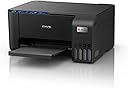
The Epson EcoTank L3252 is a high-resolution (5760 x 1440 dpi) all-in-one ink tank printer designed for home and small office use. It delivers fast printing speeds of up to 33 pages per minute in black and 15 ppm in color, powered by energy-efficient Heat-Free technology consuming only 12W. Featuring wireless connectivity and app control, it supports spill-free, high-capacity ink tanks that print up to 7,500 color pages per refill, drastically reducing ink costs and environmental impact. Compact and reliable, itโs a smart investment for professionals seeking quality, convenience, and sustainability.


| ASIN | B09KGV4PYS |
| Additional Printer Functions | Copy, Scan |
| B&W Pages per Minute | 33 ppm |
| Best Sellers Rank | #1,693 in Computers & Accessories ( See Top 100 in Computers & Accessories ) #11 in Inkjet Printers #12 in Ink Tank Printers |
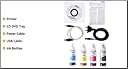
| Box Contents | Ink Bottles, Power Cord, Setup Guide |
| Brand | Epson |
| Brand Name | Epson |
| Color Pages per Minute | 15 ppm |
| Colour | Black |
| Compatible Devices | Smartphones |
| Connectivity Technology | USB, Wi-Fi |
| Control Method | App |
| Controller Type | Android, iOS |
| Customer Reviews | 4.1 out of 5 stars 4,292 Reviews |
| Display Type | LCD |
| Dual-sided printing | Yes |
| Duplex | Manual |
| Hardware Interface | USB 2.0 |
| Importer Contact Information | Epson India Pvt ltd, 12 th Floor, The Millenia, Tower A, No.1 Murphy Road, Ulsoor, Bangalore - 560008 |
| Ink Color | Black, Cyan, Magenta, Yellow |
| Is Electric | Yes |
| Item Dimensions D x W x H | 20D x 20W x 10H Centimeters |
| Item Type Name | InkTank Printers |
| Item Weight | 5.6 Kilograms |
| Manufacturer | EPSON INDIA PVT LTD, EPSON Precision , (Philippines) INC., LIPA Plant, EPSON Precision , (Philippines) INC., LIPA Plant |
| Manufacturer Contact Information | EPSON Precision , (Philippines) INC., LIPA Plant |
| Max PrintResolution Color | 5760 x 1440 dpi Dots Per Inch |
| Max PrintSpeed BlackWhite | 5760 x 1440 dpi Dots Per Inch |
| Maximum Copy Resolution Black and White | 600 x 600 dpi |
| Maximum Copy Resolution Color | 600 x 600 dpi |
| Maximum Copy Speed Black and White | 33 ppm |
| Maximum Media Size | A4 |
| Maximum Sheet Capacity | 100 |
| Model Name | L3252 |
| Model Number | L3252 |
| Model Series | L3252 |
| Network Connectivity Technology | USB, Wi-Fi |
| Other Special Features of the Product | Network-Ready |
| Packer Contact Information | EPSON Precision , (Philippines) INC., LIPA Plant |
| Paper Size | 21 x 29.7 |
| Power Consumption | 12 Watts |
| Printer Output Type | Colour |
| Printer Type | Inkjet |
| Printing Media Type | Paper (plain) |
| Printing Technology | Inkjet |
| Resolution | 5760 x 1440 |
| Scanner Type | Flatbed |
| Special Feature | Network-Ready |
| Specific Uses For Product | Home, Office, SOHO |
| Unit Count | 1 Count |
| Warranty Description | 1 year manufacturer |
| Warranty Type | 1 year or 30,000 pages whichever comes first |
| Wattage | 12 Watts |
A**I
Epson EcoTank L3252 โ A Printer That Feels Like a Long-Term Investment, Not Just a Purchase
If thereโs one printer that truly delivers on performance, reliability, and long-term savings, itโs the Epson EcoTank L3252. Iโve used multiple printers over the years, but this one stands miles ahead โ not because itโs flashy, but because it does everything right and keeps delivering without drama. The print quality is crisp, sharp, and consistent โ whether it's documents, photos, school work or office use. Colors come out vibrant, blacks are deep and clean, and the details never look washed out. The ink efficiency is almost unbelievable โ one refill lasts ages, and prints cost literally feel like pennies per page. If youโre tired of buying cartridges again and again, this printer is a breath of fresh air. Wi-Fi printing is smooth, fast and extremely convenient โ I print directly from my phone and laptop without connecting a single wire. It wakes up, prints, and finishes without delay. Scanning is just as easy, and the quality is excellent for digital storage and PDFs. For home, business, work-from-home setups or even a student desk, it fits perfectly. The EcoTank line has always been known for reliability โ but this L3252 model feels refined to perfection. It runs quietly, doesnโt clog up if you leave it idle for days, and maintenance is minimal. You literally refill, print, forget, and continue. The highlights that make it a winner: โ Ultra low running cost โ Rich color output + high clarity text โ Wi-Fi printing that works instantly, every time โ No frequent ink changes or cartridge headache โ Perfect for home, office, students & business use โ A long-term printer that saves money, time & stress This is not just a printer โ itโs peace of mind for years. If you want a machine that prints beautifully, lasts long, and doesnโt burn money on ink, the Epson EcoTank L3252 is easily one of the smartest buys you can make. Efficient, economical, and effortlessly reliable โ a true all-round champion.
M**A
Detailed review
The product overall is very great, I recommend watching a YouTube video on how to setup this since it's easy, The printer functions great but the color pages take around 3x more time than the B&W pages. Printed alot of pages already and not much of an issue. There was an issue where it thought I didn't have a page. I just restarted the printer and put the page properly. The printer is compact, as to what I see. Only issue is that a part broke off the printer but somehow I fixed it on my own. No screws were on that part. Thank god! Functions very good, especially the all-in-one features! They make the job a LOT easier...
A**L
Epson Printer Setup & Honest First Experience
Using my Epson printer has been a really smooth experience. The ink filling process was clean and beginner friendly, setup was simple, and the print quality is very good. Itโs lightweight, easy to use, and overall feels completely worth the purchase. For anyone setting it up for the first time, here's a simple guide: 1. Fill the ink tanks carefully according to their dedicated colors. 2. Plug in the printer. 3. Turn it on using the power button on the left side. You will see the green light turn on. 4. Press and hold the ink button on the right side for around 3 to 5 seconds until the lights start blinking. โข This process is only needed during the first time setup. โข It usually takes around 10 to 20 minutes. โข Make sure there is no power cut during this time. โข Wait until the blinking stops completely. 5. Once the setup is complete, the printer is ready to use. โข Load papers in the back tray. โข Place your document or photo properly. โข Press the Black & White or Color button based on your requirement. 6. For Wi-Fi connection and mobile printing, install the Epson Smart Panel app. The app provides step by step guidance for setup. After setup, you can directly print photos and documents from your phone or other devices. Overall, really happy with this purchase. Easy setup, clean ink system, good print quality, and very beginner friendly.
N**9
Best one
Excellent product. But it should use daily
J**D
Not worth the price
The printer has been a nightmare to use. It keeps disconnecting from my laptop, making printing extremely unreliable. If I manage to print from my phone, it often stops printing from my laptop. I have reinstalled the driver multiple times, but the problem keeps coming back. Sometimes it shows a Wi-Fi connection issue, and other times it disconnects for no apparent reason. The setup and troubleshooting process has been very frustrating and time-consuming. Also the printing has gone slow. I got it three weeks ago. Overall, it has been a very disappointing experience.
A**H
Awesome Purchase.
Very good. Go for it.๐๐ Ease of use, value for money, Good Quality Print.
S**A
Excellent & Economical All-in-One Printer
The Epson EcoTank L3252 is an excellent all-in-one printer that perfectly balances cost, quality, and convenience. Its compact design fits easily into a home or small office setup. The print quality is outstanding, delivering sharp text and vibrant colors with a high resolution of up to 5760 x 1440 dpi. One of its best features is the incredibly low running cost, thanks to the high-yield ink bottles that can print up to 4,500 black-and-white or 7,500 color pages. The spill-free refilling system is also a huge plus. Wi-Fi and Wi-Fi Direct connectivity make it extremely easy to print directly from a smartphone or laptop without any hassle. While it lacks automatic duplex printing, its overall performance, speed, and economical ink usage make it a fantastic value for anyone looking to save on printing costs. Highly recommended!
V**R
Not working even after service engineer visited.. not recommended
Editing the review. As new engineer assigned & he found faulty print unit & replaced with.. but not expecting this faulty unit with new device.. anyway service was quick & satisfactory.. so moving from 1starr to 3 start.. โฆ printer looks good in first glimpse.. but day 1 issue started. First no print coming on paper after installation. Made complaint online, person came & found nozzle jammed(not a big problem according to him) .. remove & wasted some ink. Did some reference paper, work fine. Within a few days.. again struggling with no print coming on paper.. better to go with good brand with better service provider..
Trustpilot
1 day ago
2 months ago