Desertcart purchases this item on your behalf and handles shipping, customs, and support to Tunisia.
🎬 Elevate Your On-Set Game with PT5 – The Ultimate Compact Director’s Monitor
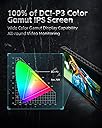
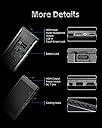
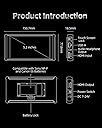
The Portkeys PT5 is a 5-inch Full HD touchscreen field monitor designed for filmmakers and DSLR users seeking professional-grade exposure, focus, and color tools in a lightweight, portable package. Featuring a 1920x1080 resolution with 10-bit color depth and wide color gamut, it supports advanced 3D LUTs, Luma and RGB waveforms, and multiple power options including Sony NP-F and Canon LP-E6 batteries. Its compact design and comprehensive monitoring features make it an essential companion for on-the-go video production.


| ASIN | B083J8RP6J |
| Additional Features | Portable |
| Aspect Ratio | 16:9 |
| Aspect ratio | 16:9 |
| Best Sellers Rank | #184,073 in Electronics ( See Top 100 in Electronics ) #190 in Camera & Camcorder Viewfinders |
| Brand | Portkeys |
| Brightness | 500 |
| Color | Black |
| Color Gamut | 100 |
| Compatible Devices | [VARIOUS] |
| Connectivity Technology | HDMI |
| Contrast Ratio | 1000:1 |
| Customer Reviews | 4.2 out of 5 stars 454 Reviews |
| Display Resolution Maximum | 3840 x 2160 |
| Display Technology | IPS |
| Display Type | LCD |
| Hardware Connectivity | HDMI, USB |
| Has Color Screen | Yes |
| Image contrast ratio | 1000:1 |
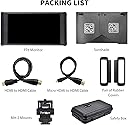
| Included Components | HDMI Cable, Holder Mount, Sunshade, Anti-drop kit |
| Item Dimensions D x W x H | 1.7D x 14.2W x 7.8H centimeters |
| Item Weight | 0.5 Kilograms |
| Manufacturer | Portkeys |
| Model Name | PT5 |
| Model Number | PT6 |
| Mounting Type | Rack Mount |
| Native Resolution | 1920x1080 |
| Number of Component Outputs | 2 |
| Picture Quality Enhancement Technology | Wide color gamut, 10-bit color depth, 3D LUT, New Peaking |
| Refresh Rate | 60 Hz |
| Resolution | FHD 1080p |
| Response Time | 5 Milliseconds |
| Screen Finish | Gloss |
| Screen Size | 5.2 Inches |
| Screen size | 5.2 Inches |
| Screen surface description | Gloss |
| Specific Uses For Product | Video Editing |
| Total Number of HDMI Ports | 2 |
| UPC | 193948046459 |
| Unit Count | 1 Count |
A**L
Budget field monitor
Very good field monitor on a budget
田**家
シェード付きのモニターは屋外で重宝
商品を説明マニュアルが英語中心なので、しっかり機能を掴んでから現場で使いましょう。シェードが付いているので屋外使用時の遮光に少しは役立ちます。
J**B
Great monitor for its price.
I bought this monitor after a promo in the portkeys facebook group with a discount! I didn’t really need yet another new 5” monitor. I already have their BM5 2200nits and Atomos Ninja for ProRes Raw recording. I couldn’t pass down a discount! I must say... I am surprised on how well the monitor perform! Pros & Cons: Pros: - Great quality monitor in term of the actual glass, colors are also rich and sharp. - Built quality is not too bad for the price it’s ABS plastic and the monitor is super light for gimbal work! It’s not metal housing so it won’t be taking a beating like their BM5. but it has a rubber contour on the left & right to protect from corner bumps but also to clamp on the sunhood. - The function buttons are ridged and has 4 short cut keys which are quiet handy. - Power is via NPF battery or Canon LP E6 and there is even a DC input. - Very quiet Cons: - Only 500nits, if it was at least 1000nits or above would be ideal. but again for the price... it’s hard to complain. But i doubt I’ll be using it on bright days. - The swivel arm bracket isn’t a great design and the pin broke after I tried tightening it... but am getting a new one. - Sunhood is too reflective for my liking... it should’ve had a velour type inlay to absorb more light. - The 3button menu navigation is not ideal! too many steps to navigate... their other monitor has a 2 bottom(wheel and exit) system which is much faster to make adjustments and more intuitive. Conclusion: Where the monitor really surprised me are the features... it has pretty much what you gona need and more! From peaking, zebra, histogram, waveform, false color with various degree of adjustments and you can even load 3D Luts! Straight out of the box the monitor was too warm compared to my calibrated monitor I used as a comparison but I went in the menu and adjusted the colors and got it super close. The one thing that blew me away which is actually simple... by accident I chose a black and white option in the peaking short key. So when i press it... the image becomes black and white and the peaking red and after also tweaking contrast... BAM! You can actually critically pull focus! If a 7” Version with 2200nits and light weight and not noisy ever get released... am buying it as my wireless focusing monitor rig!
C**Y
Portkeys PT5
For the price, you’d be hard-pressed to find a better monitor. It’s compact, lightweight, and portable, yet still packs impressive specs that make it a standout value.
A**R
Promising if they polish the firmware.
I chose this over the Atomos and others because it’s lightweight, thin, fanless, with waveform, and full HD. Strengths: * The luma and RGB waveform scope is fast and smooth. Transparency can be adjusted, large or small, located in any corner. * False color is also smooth, and the color guide can be hidden once you memorize it. * Focus peaking has color, multiple levels of greyscale, and black mode, with options for peaking colors and thickness. * Audio meters can be split on the sides, or both on top or bottom. * Buttons are better than touchscreen because muscle memory learns how to navigate faster with sequences of clicks. * Power switch is either on or off instead of a button you push and hold for seconds. * No apparent screen flicker from poor LED backlight dimming. * Silent with no fan noise and no beeps. * Screen automatically reorients when you flip it upside down. Weaknesses: * When powering on and video signal is lost or changed there is a solid blue color. That might help people in a studio, but when the screen is in your face on a camera the sudden shift to bright blue can disrupt your vision, and cause eye pain. Especially in dim lighting, when you’re intently focused on the subtle colors and focused edges, if you need to change resolution or FPS on the camera, you’ll get hit with a flood of bright blue and your eyes have to adjust again to the darker picture. * When you have a LUT applied, and turn on false color, when you disable false color the LUT is also disabled. You have to reenable it again by either going into the menu or assigning a function button to load the LUT. * The luma waveform can only be in green. It’d be nice to have the choice of color. * The histogram isn’t as smooth as the waveform, and you can only have one shown at a time. * Focus peaking includes the OSD, so even the battery voltage will be outlined as in focus. * It takes around 7 seconds to boot and show the video signal. * When you flip the screen toward the front of the camera you might prefer it to be in a “mirror mode” where your left hand on the screen is on your left. To do that you need to disable auto rotation and manually flip it horizontally and vertically in the menu. But then the text on the menu will be reversed because it flips too, so there’s also a setting to flip the “on screen display” text. These settings can be saved to a separate user profile, but you do have to go into the menu each time you want to flip the screen and use your “mirror mode”. A function button can be used to flip the video, but then the text is reversed, and it requires a separate function button to flip the OSD. The solution is if they apply the manual flip settings to the auto mode, so you can customize how you want it to flip the video and OSD when it detects the physical screen is upside down. * There’s some other quirks in the firmware where it needs to be polished more, and there’s a graphical glitch of the OSD whenever it exits. Overall the P6 seems promising, and might be the best option in January 2020 if you prioritize light weight, silence, compact size, and smooth waveform. Hopefully they can improve the firmware, and it’s upgradable via USB, so it’s probably good enough for now.
Trustpilot
1 month ago
2 days ago