Desertcart purchases this item on your behalf and handles shipping, customs, and support to Tunisia.
⚡ Power your home network like a pro — fast, stable, everywhere.
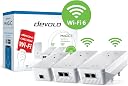
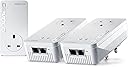
The devolo Magic 2–2400 Wi-Fi 6 Whole Home Kit combines advanced G.hn powerline technology with Wi-Fi 6 mesh to deliver up to 2400 Mbps wired and 1800 Mbps wireless speeds. Designed for multi-floor coverage and heavy multi-user environments, it includes three adapters (2 Wi-Fi, 1 LAN) with five Gigabit Ethernet ports, enabling seamless UHD streaming, stable home working, and easy network expansion.
| ASIN | B09JWRRFWD |
| Best Sellers Rank | #67,023 in Computers ( See Top 100 in Computers ) #119 in Powerline Network Adapters |
| Brand | devolo |
| Built-In Media | 2 x Magic 2 WiFi 6 and 1 x Magic 2 LAN |
| Color | white |
| Colour | white |
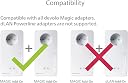
| Compatible Devices | Compatible with all wi-fi routers, devolo MAGIC and G.hn adapters and wi-fi-capable devices |
| Compatible devices | Compatible with all wi-fi routers, devolo MAGIC and G.hn adapters and wi-fi-capable devices |
| Customer Reviews | 3.8 out of 5 stars 62 Reviews |
| Data Link Protocol | WiFi 6 (802.11 ax), Gigabit Ethernet |
| Data Transfer Rate | 2400 Megabits Per Second |
| Data link protocol | WiFi 6 (802.11 ax), Gigabit Ethernet |
| Data transfer rate | 2400 Megabits Per Second |
| Hardware Interface | Ethernet |
| Hardware interface | Ethernet |
| Item Weight | 1.29 Kilograms |
| Manufacturer | Devolo |
| Mfr Part Number | 8952 |
| Model Number | 8952 |
A**R
تردد المنتج 50Hz لا يتوافق مع مصدر الطاقة في المملكة 60Hz
المنتج جيد لكن ترد. المنتج 50Hz لا يتوافق مع تردد مصدر الطاقة في المملكة العربية السعودية 60Hz
A**N
Don't buy
TLDR: Super expensive. Terrible instructions. Terrible UI. Didn't work properly at all. The automatic pairing nature and designating a LAN/Master was a shambles. Do not buy. So lets acknowledge something quickly. I am not complaining that the speeds weren't fast enough or that powerline adaptors aren't good. I'm complaining about these ones specifically. My parents have always had issues with internet (big house thick walls, lucky them) so I splashed out on what I thought would be high end adaptors after the tp-links they were using were ok, but not really cutting it. I lost a day trying to get these to pair correctly. The instructions are bad. They say things like "Connect all your devices" and then in the next sentence "Connect your LAN". I tried both methods. Or wanting you to connect your devices. and then plug your router into one of the devices. But then this messes up the network meshing, due to unplugging your router, during setup in my experience. And a few other contradictory instructions. Even when you follow them correctly the network loves incorrectly designating the wrong device as being connected to your router (as the LAN/master adaptor). So you have one of your satellites acting as the signal source and trying to talk to your router through the wifi, and then sharing the signals with your other satellite adaptors. Meanwhile your LAN adaptor's sitting ether-netted up twiddling its thumbs. You have no way to manually assign the correct one. It can also constantly jump between adaptors as the LAN/master. And whilst its doing this you're dropping your whole powerline/network. And if you do try troubleshoot it you end up with them just cloning networks and a huge mess in the app screen. I think i had every possible combination of a LAN and 3 satellites at one point. And none worked. I Tried setting them up at their eventual final designated sockets. Or sockets all next to each other and moving them. Neither worked correctly. For the price this is just absolute garbage.
D**N
Experiment with the configuration
I have 6 x Mesh WI-Fi and 3 x LAN Magic 2 adapters on a single encrypted powerline network. They all run at LAN speeds above 100Mps (Up and Down), the ones nearest the router at over 1200Mbps, and are proving very stable and reliable. These are excellent adapters, but be aware that they use the G.hn network standard and are not compatable with dLAN® Powerline adapters and other HomePlug AV products. If a network of these adapters is used on the same power circuit as a network of adapters running the dLAN standard, they interfere with each other. Both networks will run slower and all adapters will need regular resetting. However, the G.hn standard easily supports 8 compatible adapters on a single network, rather than the dLAN standard which only work reliably with 5 adapters. My house has 0.5m thick stone walls, so I need a large number of wi-fi transmitters to get good coverage. Now, for the first time and after 15 years of trying different products and network configurations, I have a single network of the Magic 2 adapters with a powerline backbone that provides excellent WI-Fi, as well as LAN, coverage thoughout. In addition, to reduce local electrical equippment interference, I followed the installation advice and use the interference filtering in the passthrough socket, if necessary with an extension lead, to connect all other electrical devices plugged into the same socket outlet block and I no longer plug anything into immediately adjacent power socket outlets. This has significantly boosted the powerline LAN network speeds. I had the significant expense of replacing all my top of the range dLAN adapters, but now, my entire LAN network runs more than 10 times faster, I hardly ever have to reset the adapters or router, and I finally have full Mesh Wi-Fi coverage throughout my house.
D**N
Great when they work...
"Magic WiFi" - it is when it works, but it's flaky. This generation is easier to set up than previous versions, but generally doesn't reset itself when the router drops the signal (rural Somerset, so not an uncommon occurence) - have to go through the whole setup procedure again each time. A pain. Adaptors also get very hot, which can't be good for them. I have a "master + 3 slave" setup to cope with a sprawling area. I bought the new set in September - but in December the master died and it took 3 attempts for Devolo's (usually excellent) tech support to diagnose the problem . The printed material doesn't have a usable trouble-shooting guide, and the online one (like having the instructions for opening the box sealed in the box!) isn't much better. Amazon, as usual were excellent & replaced the set promptly. Today (1 Feb) it went down again - tech support have again got it working but ..... When it's working the Devolo kit works seamlessly - but if I could find a reliable way of doing the same job, I'd dump the Devolo kit in a heartbeat. Edit 22 Feb 2023: Devolo tech support must be getting VERY fed up with me. They got it all working again yesterday - same issue - router dropped the signal and the 2 of the 3 slaves didn't come back on line, Although all the LEDs lit as advertised, I couldn't connect any devices to either one. Investigation of the network showed that both were broadcasting (on both 2.4 & 5 GHz bands) but hadn't picked up the password from the router. Weirdly, the default set up is for each of the extender boxes to have its own password. There's an extra set of hoops you have to go through at (re) installation to have each extender broadcasting as a clone of the router so that a wandering device seamlessly picks up whichever extender is closest. Irritating. (Note to Devolo: All the trouble-shooting instructions - such as they are - are written and illustrated for the German version (with a 2 pin Schuko socket, instead of the UK version with a UK 3 pin plug - which has to mount theother way up to the German version. that means that the diagrams that say "press button 1" - showing the left hand button - actually mean the right hand button - labelled as "Button 2". Ah - zese inscrutable Chermans! Ve haff vays of confusing you!)
P**P
Easy set up work well but no registration or extended warranty
Easy to set up and work very well. I have 150Mbps broadband and each access point is delivering more than 50Mbps. However the registration process and included extended warranty is not available which is not really acceptable. I would expect to be able to register 1. In case there is a safety recall 2. Peace of mind from an extended warranty.
Trustpilot
1 month ago
1 day ago