🖥️ Elevate your workspace with 4K clarity and seamless USB-C power—because your desk deserves the best.
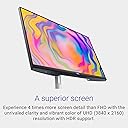
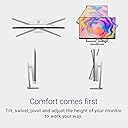
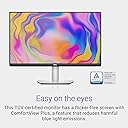
The Dell S2722QC is a 27-inch 4K UHD monitor featuring a sleek ultrathin bezel design, USB-C single-cable connectivity, and built-in dual 3W speakers. It offers a 60Hz refresh rate with AMD FreeSync for smooth visuals, 1.07 billion colors with 99% sRGB coverage, and ergonomic adjustments including height, tilt, swivel, and pivot. ComfortView technology reduces blue light emissions, making it ideal for extended professional use.
| ASIN | B09DTDRJWP |
| Adaptive Sync | FreeSync |
| Additional Features | Built-In Speakers, Flicker-Free, Height Adjustment, Pivot Adjustment, Swivel Adjustment, Tilt Adjustment |
| Aspect Ratio | 16:9 |
| Aspect ratio | 16:9 |
| Best Sellers Rank | #45,169 in Computers ( See Top 100 in Computers ) #1,229 in Computer Monitors |
| Brand | Dell |
| Brightness | 250 |
| Color | Platinum Silver |
| Color Gamut | 99 |
| Compatible Devices | Computer |
| Connectivity Technology | Bluetooth, HDMI, USB Type A |
| Contrast Ratio | 1000:1, |
| Customer Reviews | 4.4 out of 5 stars 1,839 Reviews |
| Display Resolution Maximum | 3840 x 2160 |
| Display Technology | LED-backlit LCD |
| Display Type | LED |
| Hardware Connectivity | 3.5mm Audio, HDMI, USB 3.2 Gen 1, USB Type C |
| Has Color Screen | Yes |
| Image contrast ratio | 1000:1, |
| Included Components | Monitor panel, Power cable, Quick setup guide, Safety / Environmental / Regulatory Information, Stand base, Stand riser, USB Type-C to USB Type-C 3.2 Gen 2 cable |
| Item Dimensions D x W x H | 17.5D x 61.2W x 51H centimeters |
| Item Type Name | Flat Panels |
| Item Weight | 6.87 kg |
| Manufacturer | Dell |
| Model Name | Dell 27 4K USB-C Monitor - S2722QC |
| Model Number | S2722QC Monitor |
| Mounting Type | Wall Mount |
| Native Resolution | 3840x2160 |
| Number of Component Outputs | 1 |
| Picture Quality Enhancement Technology | HDR & AMD FreeSync |
| Pixel Pitch | 0.1554 |
| Power Consumption | 24.8 Watts |
| Refresh Rate | 60 Hz |
| Resolution | 4K UHD 2160p |
| Response Time | 4 Milliseconds |
| Screen Finish | Matte |
| Screen Size | 27 Inches |
| Screen size | 27 Inches |
| Screen surface description | Matte |
| Series Number | 2722 |
| Shape | rectangular prism |
| Specific Uses For Product | Business, Education, Gaming |
| Total Number of HDMI Ports | 2 |
| Total USB 3.0 Ports | 2 |
| Total Usb Ports | 3 |
| UPC | 884116404026 |
| Unit Count | 1 Count |
| Viewing Angle | 178 Degrees |
| Voltage | 240 Volts (AC) |
V**Y
A well priced, easy to set up and visually reliable monitor for mac? This is it.
This is better than I expected at rendering the macbook air m2 display. I researched a lot before buying monitors, even returned a few I purchased earlier from Amazon because the display, especially text and icons were pixelated or not scaling well. This desktop did not have any of those issues. Go ahead if you are happy with the price point. Better any day than buying an overpriced mac or studio display for perfectly accurate macbook mirroring
S**R
About as good as the much more expensive Dell U2720QM monitor (I own both)
I have external monitors at home and work so I can just plug in my M1 Macbook Air and have plenty of screen real estate. I bought this monitor 6 weeks ago to replace an aging 24" Dell monitor that had served me very well. But 4K monitors have been getting better and coming down in price, so it was time to upgrade. Last fall, I bought the more expensive Dell U2720QM monitor for my office at work. That one cost about $550 (and often cannot be found for less than $650). This one, the Dell S2722QC, costs about $380. I will be comparing them in this review, and - spoiler alert - this monitor, the QC, is pretty much just as good as the more expensive QM. Both the QC and QM models are 27", 4K, have nice bright screens, and accurate vivid colors right out of the box. Both have wonderfully adjustable stands: there's the usual tilt & swivel, and you can slide the screen up to a higher position (useful if the screen is plugged into a laptop and the laptop is directly in front of the screen on your desk) or to a very low position where the bottom of the monitor is an inch from the surface of your desk. But the really cool thing is that stand (for BOTH monitors) allows you to rotate the screen 90 degrees so it's in portrait mode. That's really helpful for some of my use-cases. It's also useful to help you see the ports on the bottom edge of the display, when you're plugging in cables - otherwise they're hard to see when you're trying to plug something in. Both of these monitors can replace a USB-C hub. Meaning, you can plug in several peripherals into the monitor and connect the monitor to your computer using just a single USB-C cable. Your computer will get power from the monitor over the same USB-C cable that your computer uses to transmit data to the monitor. And your computer will see all the peripherals that are connected to the monitor as if they were connected directly to your computer. These USB-C hubs are godsends for people with laptops that only have 1 or 2 or 3 USB-C ports. For this reason, I have used USB-C hubs for my offices at home and work; they're not cheap, but they're worth it for me. But the USB-C hubs take up desk space and have some cord clutter. With the Dell monitors, I don't need the USB-C hubs any more. I donated one to my college and the other to a local church. Both Dell monitors have enough ports for me to plug in my printer, my external hi-fi speakers, my external web-cam for Zoom & FaceTime calls, and an external SSD hard drive. So why does the Dell U2720QM cost so much more than this Dell S2722QC? Well, the QM has one or two more ports (for the USB-C hub functionality) than this QC model. And, on paper, the QM seems to have a slightly better display, according to specs. But I have both, and I can't tell a difference in video quality. Probably people who do a ton of photo and video editing could, but I have good eyes and I can't tell the difference, and I don't think most people will see enough of a difference to justify spending $200 more for the QM model. Oh, here's one more difference: the cheaper QC model has built-in speakers, the more expensive QM model does not. I have to say, I really dislike the sound that comes from the speakers in the QC monitor; it is very very thin and tinny sounding, almost to the point of being shrill and annoying. My laptop speakers (which are not great) sound way better. And that's a shame, because if you're feeding video into the QC monitor from HDMI (for example if you plug a blu-ray player into the HDMI port), the audio goes in over the same cable, so the monitor really needs to have its own speakers otherwise it's difficult to find a way to hear the sound. Bottom line: for most people, this $380 QC model is every bit as good as the QM model that costs $550 or $650 or more, even though both have a gorgeous 27" 4K display and both have very useful USB-C hub functionality. And the stand's flexibility is really useful. Highly recommended!
E**O
Muy buen monitor por el precio
En general muy buen monitor, se ven bien los colores, la resolución cumple y la calidad está bien por el precio; muy buena la función de que se cambie de fuente de entrada cuando se conecta otro dispositivo. La única queja es que no se puede ajustar la altura del monitor.
S**K
Loving the Dell Monitor - S2722QC and the Appreciate the supplier as well.
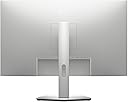
VESA 10x10 in Dell S2722QC monitor made it very easy to install. The 4K resolution gives me absolutely great control over the video/picture quality (editing work) that I do as my hobby.. The power over usb-C is a great thingy and gives a "clean" look to the desk. I have been using it for a month plus and could recommend anyone who would like to upgrade to 27" monitor with 4K.
M**C
Perfect for Work and Design – Great Price, Great Quality!
As a Mac user, I was looking for a monitor that offers exceptional image quality for photo editing and graphic design tasks without breaking the bank, and the Dell 27 4K UHD USB-C Monitor - S2722QC has been the perfect choice. The 4K resolution is simply stunning, with crisp, clear images and vibrant colors that make everything from photo editing to graphic design feel incredibly accurate. The USB-C connection is super smooth, allowing me to connect directly to my Mac without needing an HDMI adapter. Plus, I can use the second USB-C port to charge my phone or other devices, making it extra convenient. The design of the monitor is sleek and modern, fitting perfectly in my workspace. This monitor is also great for everyday tasks, making it an all-around winner for both work and general use. The only thing I wish for is an app that works on Mac to easily adjust the brightness, but it’s not a big deal—I can still adjust it manually with the buttons on the screen. What really stands out is how you get outstanding quality at such an affordable price. I actually grabbed this during a Black Friday deal, and it was definitely a deal not to be missed. This monitor has completely exceeded my expectations, and I couldn’t be happier with it! Highly recommend!
Trustpilot
1 month ago
2 weeks ago