Buy anything from 5,000+ international stores. One checkout price. No surprise fees. Join 2M+ shoppers on Desertcart.
Desertcart purchases this item on your behalf and handles shipping, customs, and support to Tunisia.
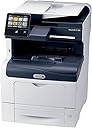
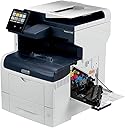
🚀 Elevate your office game with Xerox VersaLink C405 — speed, smarts, and serious capacity!
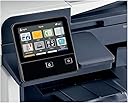
The Xerox VersaLink C405/DN is a high-performance color laser multifunction printer designed for busy professional environments. Delivering up to 36 pages per minute with crisp 600x600 dpi resolution, it features a large 550-sheet input tray, duplex printing, and a user-friendly mobile-style touchscreen. With IT-free setup, preloaded productivity apps, and robust Ethernet connectivity, it streamlines print, copy, scan, and fax tasks while supporting smartphone control. Backed by a one-year warranty, it balances speed, capacity, and smart features to keep your office running efficiently.
| ASIN | B01N7JASW3 |
| Additional Printer Functions | All In One |
| B&W Pages per Minute | 36 ppm |
| Best Sellers Rank | #373,818 in Office Products ( See Top 100 in Office Products ) #523 in Laser Computer Printers |
| Brand | Xerox |
| Built-In Media | Fax Cord, Installation Guide, Power Cord, Quick Use Guides, VersaLink C405 Color MultiFunction Printer, software and documentation CD, starter capacity toner cartridge: One each of cyan, magenta, yellow: 2K capacity, Black: 3K capaticy |
| Color | Gray |
| Color Depth | 24 bpp |
| Color Pages per Minute | 36 |
| Compatible Devices | Smartphones |
| Connectivity Technology | Ethernet |
| Control Method | App |
| Controller Type | Android, iOS |
| Customer Reviews | 3.7 out of 5 stars 187 Reviews |
| Display Type | LED |
| Dual-sided printing | Yes |
| Duplex | Yes |
| Global Trade Identification Number | 00095205841725 |
| Hardware Interface | USB |
| Initial Page Print Time | 36 Seconds |
| Ink Color | Black |
| Item Dimensions D x W x H | 17"D x 21.3"W x 23.6"H |
| Item Type Name | Color Laser MultiFunction Printer, Print/Copy/Scan/Fax, letter/legal, up to 36ppm, automatic 2-sided printing, USB/ethernet, 550 sheet tray, 150 sheet multi purpose tray, 50 sheet DADF (single pass duplex) |
| Item Weight | 72 Pounds |
| Manufacturer | Xerox Office Products |
| Maximum Copies Per Run | 150000 |
| Maximum Copy Resolution Black and White | 600 x 600 dpi |
| Maximum Copy Resolution Color | 600 x 600 dpi |
| Maximum Media Size | 8.5 x 14 inch |
| Maximum Sheet Capacity | 1250 |
| Maximum print Resolution Color | 600x600 dpi |
| Model Name | C405/DN |
| Model Number | C405_DN |
| Model Series | C405 |
| Number of Ethernet Ports | 1 |
| Number of Trays | 3 |
| Other Special Features of the Product | Ethernet |
| Paper Size | 8.5 inch x 14 |
| Power Consumption | 82 Watts |
| Print media | Envelopes, Labels, Paper (plain) |
| Printer Connectivity Type | Ethernet |
| Printer Output Type | Color |
| Printer Type | Laser |
| Printing Technology | Laser |
| Processor Count | 2 |
| Resolution | 600 |
| Scanner Type | document |
| Series Number | 405 |
| Special Feature | Ethernet |
| Total USB 2.0 Ports | 1 |
| Total Usb Ports | 1 |
| UPC | 095205841725 |
| Unit Count | 1.0 Count |
| Warranty Description | 1 year on-site warranty |
| Warranty Type | one-year warranty |
| Wattage | 82 watts |
P**C
Feature packed business class printer
Have purchased three of these printers for our office about a month ago and have been very pleased so far. The print quality, ADF handling, and wonderful speed are very impressive, with setup straightforward and build quality excellent. It is clear this is a serious business class printer, with as well screen customization and printer website granular adjustments. Understood beforehand it needed a separate wireless adapter, which I think for business security reasons is not automatically built in. Wireless was easy to setup and is much faster than USB. Purchased these due to their speed, large 0 to 90 degree adjustable display and Xerox print quality. Especially like the full ream (550 sheet) built in paper tray, so no need to purchase for $150-200 an add on tray (which I've found never seem to work properly). Scan by USB supported, at least for my setup to an iMac with OS 11.0 (beta). Pleased as well with ability to purchase generic high capacity toner that brings the black & white page cost to about 0.25 cents and color to about 0.45 cents. Generic toner (ld products) I've purchased works well with no error codes and no need for proprietary chip replacements. Price of printer without need to purchase separate tray is the same or even less than most other printers, such as the Canon 743 or Brother 8900. This easily allows the purchase of an extended warranty, so no future worries there. Tech support for a minor setup issue (my fault actually) was quick and professional. Highly recommended.
P**S
Terrible reliability....
So disappointed with this product after 18 months ownership and moderate/heavy use (1500 pages per month). Over the last 18 months, I have had hundreds of errors, most of which I have had to troubleshoot myself and the machine is smart enough to identify the problem with a code, but then you must manually lookup the code to discover the problem/solution. Problems have ranged from connectivity issues, to unseated toner cartridges, to print quality issues. Print quality is good when its good, but randomly goes bad with poor color quality on one color or another. This usually lasts for a month or two, then magically fixes itself. The last error we just got is 024-747...which I have not been able to overcome...so the printer is still copying fine, but will not print from a networked computer. Ready to make this thing my new boat anchor....I don't think a week has gone by when we did not have any down time with this system :-(
D**R
Best multi-function machine for the money
I'll keep this short... This is easily the best value for a fast, multi-function, full color machine that money can buy. This is my second one and it really is shocking at the quality of this machine. First of all it uses genuine Xerox toner and produces the quality that you would expect from Xerox. All the features you could possibly want including scan to email or to your desktop is incredibly simple through a lightning fast set of process. If you're not great with computers, call Xerox customer support and they will remote into your computer and get everything set up for you. The nicest feature for me is the fact that I can put stationary in one feeder and a full ream of paper in the tray. if you're considering a printer that does not hold 500 sheets or more don't buy it. It's a royal pain in the butt when you run out of paper. More and more businesses are going paperless and this machine handles that beautifully. Give the machine a try, you'll be glad that you did.
M**S
Great business machine!
The cheaper printers out there just aren't worth it - expensive ink and low performance to say the least. Xerox has been a trusted name for commercial grade printers for years, and now they are offering a great product available through Amazon. I couldn't be happier with the quality and performance of this printer. A++++
K**K
Small Office Printer
We purchased this printer/scanner to replace the leased printer/scanner in my office since we have gone paperless and print very little paper now. Xerox has been a good product in the past for me and this seems to be a good choice so far. Be aware that if you enter the admin password wrong a few times, you are in trouble because it will lock you out of the machine and you'll have to pay Xerox tech to help you out. The documentation says the password is 1111 or 11111, but that is out of date. It is the machine serial number, which would have been nice to know before I locked it up and had to pay to get it unlocked. First of all, this is not good business to charge your customers to unlock their own machine. That policy at Xerox should change. Now, the machine, once you get into the admin console is not terrible to set up, but does take some knowledge if you want to setup print to email or print to folder. Best bet is to let the machine jump on the network with DHCP rather than setting a static IP, it just doesn't do well, even when manually typing in the IP, subnet and gateway. Scan to email is also tricky because you need to know an SMTP relay based on your email and all the settings, such as port numbers, SSL, etc... For an IT person, this is easy stuff, but for a typical business owner, it's not. Overall, after a few hours to set it up, and the machine restarting dozens of times everytime you make a change, it seems to be running fine. For users, download the Xerox app from the Microsoft store and let it auto-find and configure on the network.
J**.
BUYER BEWARE - This is an outstanding printer, but you may have to use genuine Xerox replacement toner cartridges
I really loved this printer, until it came time to replace a toner cartridge. A set of 4 genuine Xerox high-yield replacement toner cartridges can easily cost you more than the price of the C405/DN printer, so I looked for a good generic compatible cartridge brand. Long story short - generics won't work in this printer. I received this printer new less than two weeks ago from Amazon. I had a large color print job that burned through one of the toner colors in a couple of days, so I ordered a set of 4 generic compatible toner cartridges. When I inserted the replacement cartridge, I got a Toner Fault error. I assumed it was a bad brand, since there were no reviews yet on Amazon. So, I ordered another brand that had good reviews on Amazon and reportedly worked with this printer. When I inserted that cartridge, I got the same result - Toner Fault. After several correspondences with the toner vendor, I reached out to Amazon today for support, who got Xerox technical support on the phone. The Xerox tech towed the company line, insisting that they only support genuine Xerox toner cartridges. This printer was recently manufactured by Xerox (March 2018) with the latest March 1, 2018 version of the firmware. I suspect that Xerox has clamped down on the use of non-genuine toner cartridges in the latest version of their firmware, causing the Toner Fault error to be issued, although the Xerox tech would not confirm that. Xerox does not post earlier versions of the firmware on their site, and the tech said the only way I could get that was through an in-person service call. This experience has left me feeling angry at Xerox, if in fact they have altered their product firmware to forbid usage of generic toner cartridges. This is a huge step that will seriously alter the operating costs for anyone planning to use generic toner cartridges. I've returned this printer to Amazon, and I don't plan to ever buy another Xerox product! This really is an outstanding printer, but be prepared to pay for genuine Xerox toner cartridges.
J**S
Does NOT support Dropbox. Also slow.
So I paid a substantial premium for the C405 over the 6515 specifically for the cloud service integration promised on the Amazon description, manufacturers web site, and product brochure. Well, they left off a couple asterisks. First off, there is no native cloud integration; you have to download “apps” to enable it, and all of the apps have a monthly/annual service fee. As far as I’ve been able to tell each and every cloud service you want to connect is $10 a month or $100 a year, on top of what you pay for the cloud service itself. There’s no “lifetime” option either, you will be paying a monthly or annual service charge for as long as you have the device if you want to use it with any cloud services. Of course that’s moot for Dropbox, since Xerox has apparently dropped support for Dropbox altogether. Maybe it will come back in the future but right now you can’t install it at any price. The setup process on this printer is anything but intuitive. It turns out you can’t set it up to access an SMB share from the printer; you need to log in to the web interface from a computer to do that, and you are gonna need to read the manual or call support because as tech savvy as I am none of it was intuitive to me. What I mean is that you have to set the SMB access up as a “contact” which just makes no sense. Once I finally got SMB configured, I discovered that the scanner on this device is pretty slow. It’s not painfully slow in an objective sense, but it’s definitely slower than most larger copiers, and it’s noticeably slower than the Scansnap this was supposed to replace. We will be returning this and keeping the Scansnap. Finally, printing. Admittedly, Word for Mac is finicky about printing envelopes regardless of the printer, so envelope printing was the first thing I tested. From my two 2020 Mac Mini units, I was completely unable to print an envelope from either of them. I went through all the settings and the issue seems to be with the “tray settings” on the printer itself, which I can’t figure out how to change. The printer wants internal Dara points for type and COLOR of paper for each tray including manual feed, and if any one attribute including color doesn’t match between the printer’s memory and the computer configuration, it will refuse to print and you can’t override it; you need to delete the job and go back to settings to poke around. But try as I may, I could not get the printer to recognize “envelopes” as envelopes; it kept insisting that I had white letter paper in the bypass tray, and I couldn’t find a setting to tell it otherwise. Total fail. So I was unable to print envelopes from any computer, and I was able to print regular documents from one of my Macs but nothing I could do would get it to accept print jobs from the other Mac; maybe the Mac is trying to print to the wrong weight of paper or something. I guess the printer is trying too hard. Bottom line: Don’t buy this one. It’s not worth the money. The 6515 is a much better value. But based on the slow scanning and finicky printing, I’m not sure I’ll stick with the Xerox brand at all. Oh, one good thing: Customer service answered quickly and was very helpful, relatively speaking. They were able to get scanning working, but were not able to help me get envelopes to print.
P**R
The Xerox C405 printer is a scam
We've been using Xerox C405 for 3 months now. We printed 2885 B&W pages and 6650 color pages. We keep getting error 092-320 all the time. A technician showed up today for 5th time to fix it. When I called Xerox, I requested the printed be replaced because it is garbage. They said they can't replace it; the technician must initiate a replacement of the printer. I asked the tech today, to get it replaced. The tech said it is not his job to do such a thing, and he wouldn't even know who to call anyway. Xerox C405 is a scam, a waste of money, and a joke. If I needed a printer to print some 20 pages a week, then I'm sure it would be a fine printer. Printing 9500 pages in 3 months is too much for the printer to handle. Update 2024-03-07: This is a history of our Xerox C405 service person visits since I decided to start keeping track of it. Initially I did not bother because I didn't think much of it when it had initial few problems. 2024-01-17: Fault or Error (092–320), case number: 261 943 xx, technician replaced drum, printer working again. 2024-01-26: Fault or Error (092–320), case number: 261 986 xx, technician replaced toner, printer working again. 2024-01-30: Fault or Error (092–320), case number: 261 996 xx, I wasn't in the office and nobody told me what was done, printer working again. 2024-02-07: Fault or Error (092–320), case number: 262 030 xx, I wasn't in the office and nobody told me what was done, printer working again. 2024-02-28: Fault or Error (092–320), case number: 262 118 xx, Xerox phone support guy advised to ask the technician to request a printer replacement when he is on-site. 2024-03-01: Technician on-site refused to get it replaced saying he is not authorized to do so. He did something and it works again. Current printer usage data: Black Impressions 2885 Color Impressions 6650 Total Impressions 9535 2024-03-07 Called support to find out what the deal is with replacing the printer. Xerox person confirmed that only the on-site technician can initiate a printer replacement. If he refuses, then we should call his supervisor. Xerox company cannot do anything about it. --- end of story for now I will never ever, zero chance, buy another Xerox device again. That company is a sick joke. I didn't like HP before, yet now I can't sing praises on HP any louder. HP replaced a faulty printer immediately, no need for 5 service visits (in fact it was more) to make a move.
C**E
Xerox
great connectivity
A**R
Clear color printing
We like the scanning of both sides in one step, speed, setting up other locals, software for phones
A**S
Quand c’est une grande compagnie
Excellent équipement, service à la clientèle de Xerox, ça c’est autres choses!!!🥴
G**A
Buena impresora
Excelente impresion, buena velocidad
C**N
Calidad y servicio del vendedor
excelente servicio del proveedor y calidad del equipo tambien
Trustpilot
1 day ago
2 months ago