🚀 Elevate Your Workspace with VisionTek!
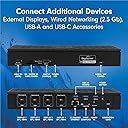
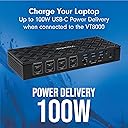
The VisionTek VT8000 USB-C 4X Monitor Docking Station is a versatile and powerful docking solution designed for professionals. It supports up to four 4K displays, offers a robust 100W power delivery, and features a wide range of connectivity options, making it ideal for both Windows and MacOS users. With advanced enterprise features and universal compatibility, this docking station is perfect for enhancing productivity in any workspace.


| ASIN | B09PS6ZWJB |
| Best Sellers Rank | #144,948 in Computers & Accessories ( See Top 100 in Computers & Accessories ) #3,346 in Laptop Docking Stations |
| Brand | VisionTek |
| Built-In Media | 180W - DC 20V/9A Certified Power Adapter,USB-C to USB-C Cable |
| Color | Black |
| Compatible Devices | USB-C/3.0 systems |
| Customer Reviews | 3.8 out of 5 stars 15 Reviews |
| Global Trade Identification Number | 00810078050551 |
| Hardware Interface | DisplayPort, Ethernet, HDMI, Secure Digital Card, TransFlash, USB 3.0, USB Docking Station |
| Item Dimensions L x W x H | 3.86"L x 2.5"W x 1.5"H |
| Item Type Name | Docking Station |
| Item Weight | 16 ounces |
| Manufacturer | VisionTek Products, LLC |
| Mfr Part Number | 901492 |
| Model Number | VT8000 |
| Number of Items | 1 |
| Number of Ports | 3 |
| Product Dimensions | 3.86"L x 2.5"W x 1.5"H |
| Total Number of HDMI Ports | 4 |
| Total USB Ports | 4 |
| Total Usb Ports | 4 |
| UPC | 810078050551 |
| Unit Count | 1 Count |
| Warranty Description | 2 Year |
| Wattage | 100 watts |
C**8
Have to restart macbook everytime it hybernate
The device works well at first, with Display Link it does connect my Macbook M1 Max to 4 displays. However, after using it for a few days, I found out that it disconnects the Macbook to the displays if the Macbook goes to sleep. Even if I wake up the Macbook, turn off and on the device, even unplug the cable, the displays don't turn on again. I had to restart my Macbook every time just to get stuffs back to normal. I decided to return the item and will be looking for another dock which is more compatible with Macbooks.
C**O
DO NOT BUY any Visiontek products! buyer beware
purchased the VT8000 for $499 and after a year only running 2 monitors, the device fails to stay connected to the monitors. LED on the device stopped working letting me know there's an issue. I then called Visiontek to seek a replacement and they won't warranty their FLAGSHIP product. If you do buy, please ensure that you register it as showing proof of purchase is not suffice with this company. I WILL NEVER BUY ANOTHER Visiontek product EVER AGAIN!
S**S
Good quad 4K dock, terrible customer service
I bought this to use with my setup that consists of a 3 yr old Thinkpad that has a 5Gbps USB-C port (no thunderbolt), connected to few USB 3.0 devices and four monitors. Two of the monitors are 4k and other two are 2k. Pros: 1. Setup was super easy. After plugging in all the monitors and devices, I installed Displaylink drivers and everything worked instantly. 2. Monitor resolutions were off in Windows, so it required a few clicks to set. Again, super easy. 3. For each monitor, there is an option to use HDMI or Displayport. I have all the monitors connected to HDMI and running at 60Hz. Cons: 1. I wish there were more USB-A ports. The dock has total 4 USB-A ports, which I feel may not be enough for some people. I had to get a USB hub with 7 ports and connected it to the dock. 2. There is no downstream USB-C port. 3. The dock “apparently” supports wall mounting or under desk mounting, as it has 2 threaded holes. However, Visiontek does not make any mounts for it. 4. The power button is too close to the USB port, which causes it to be pressed when plugging in USB cables. This turns off the dock. 5. I had issues with Ethernet throughput performance. 6. Visiontek customer care was awful with their “very short, few words” responses and response time. If you ever need assistance, expect little to no customer service. My wish list for this dock: 1. The charger is huge. This is one of the most expensive docks in the market and I wish Visiontek can make a GaN charger, which would be much smaller. 2. Mounting the charger and the dock under the desk isn’t possible with no mounting kits available from the manufacturer. Conclusion: Buy it at your own risk and keep in mind that your won’t get decent customer support. I returned mine after my awful experience with them.
M**R
Quad 4K@60Hz, but Limited Connections & Support
This review is for VisionTek VT8000 Quad 4K Display Thunderbolt Docking Station. I was intrigued by the four display and Thunderbolt support, so I ordered this docking station. I am in the process of converting my PC and laptop environment over to Thunderbolt. I have 4 3 x 1080p system, so I wanted to see if I could get this to work with my laptop. First, I want to say the owner’s manual is just okay. It has some useful information, but it could be a lot better. Second, it would appear that my new laptop only supports two monitors out of Thunderbolt, so I can’t seem to figure out how to get all four going. I will say I am new to Thunderbolt, so that may not be helping things. Also, This thing should have had more connections for this price, especially on the front. There should have been a USB-C or Thunderbolt connection on the front. There should have also been a Thunderbolt output on the back as well. It’s tough to decent where I rate this, and that is because of the price. This thing is expensive. Thunderbolt and 4 x 4K@60Hz is not going to be cheap. However, at the same time, for this kind of price it needs to be outstanding and have good support. The support is lacking, and it’s missing some key connections. Because of the high price point, I’m knocking one start off for the missing connections, and I’m knocking another star off for the limited support. That makes this a 3 star docking station.
G**G
purchased this for my 4 monitor setup but had video issues
I bought this as there are not many docks on the market the support 4 monitors. I had issues with two of my dell monitors not working with this dock, the other two did. looked for firmware updates but no luck so returned it. will look at Dell/Lenovo/HP for options.
D**E
Decent
This item is top tier everything I was looking for in an item like this.
Trustpilot
3 weeks ago
2 days ago