


๐ Elevate your command center with Alienwareโs ultrawide powerhouse โ where every pixel counts.
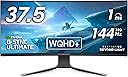
The Alienware AW3821DW is a 38-inch ultrawide curved gaming monitor featuring a 2300R curve and 21:9 aspect ratio for immersive viewing. It boasts a sharp 3840x1600 WQHD+ resolution on an IPS Nano Color panel with VESA DisplayHDR 600, delivering vibrant colors and deep contrast. With a blazing 144Hz refresh rate, 1ms response time, and NVIDIA G-SYNC Ultimate certification, it ensures ultra-smooth, tear-free gameplay. Designed for both gaming and productivity, it offers ergonomic adjustments, multiple connectivity options, and a premium build backed by a 3-year advanced exchange warranty.
| ASIN | B093T2NSD4 |
| Adaptive Sync | G-Sync |
| Additional Features | Anti Glare Screen, Curved, High Dynamic Range, Swivel Adjustment, Tilt Adjustment |
| Aspect Ratio | 21:9 |
| Best Sellers Rank | #425,720 in Electronics ( See Top 100 in Electronics ) #8,482 in Computer Monitors |
| Brand | Alienware |
| Brightness | 450 |
| Color | White |
| Color Gamut | 130.6 |
| Compatible Devices | Gaming Consoles, Speakers, Laptops, Desktops |
| Connectivity Technology | DisplayPort, HDMI, USB Type A |
| Contrast Ratio | 1000:1, |
| Customer Reviews | 4.4 out of 5 stars 256 Reviews |
| Display Technology | IPS |
| Display Type | IPS |
| Hardware Connectivity | USB |
| Image Contrast Ratio | 1000:1, |
| Included Components | Cable Cover, Monitor panel, Power Cable, Stand base, Stand riser |
| Item Dimensions D x W x H | 22.82"D x 35.23"W x 11.56"H |
| Item Type Name | Monitors |
| Item Weight | 17.5 pounds |
| Manufacturer | Dell |
| Model Name | Dell Alienware 38 Gaming Monitor - AW3821DW |
| Model Number | AW3821DW |
| Mounting Type | Desk Mount |
| Native Resolution | 3840x1600 |
| Number of Component Outputs | 3 |
| Picture Quality Enhancement Technology | IPS Nano Color technology, VESA DisplayHDR 600, NVIDIA G-SYNC ULTIMATE |
| Pixel Pitch | 0.23 |
| Power Consumption | 46.35 watts |
| Refresh Rate | 144 hertz |
| Resolution | QHD Wide 1440p |
| Response Time | 1 milliseconds |
| Screen Finish | Matte |
| Screen Size | 38 inches |
| Screen Surface Description | Matte |
| Shape | Rectangular Prism |
| Specific Uses For Product | Gaming, Photo Editing, Video Editing |
| Total Number of HDMI Ports | 2 |
| Total USB 3.0 Ports | 5 |
| Total Usb Ports | 5 |
| UPC | 884116370048 |
| Viewing Angle | 178 degrees |
| Voltage | 240 volts_of_alternating_current |
| Warranty Description | 3-Year Advanced Exchange Service & Premium Panel Exchange |
| Warranty Type | 3 Years Manufacturer Warranty |
S**T
An Absolute Beast That Has Stood the Test of Time Reviewed in the United States on June 30, 2025
Still the Centerpiece of My Command Center After 3 Years Rating: โ โ โ โ โ (5/5 Stars) Style: AW3821DW | Verified Purchase After three years of daily use, the Alienware AW3821DW remains the unshakable centerpiece of my setup. In an industry where tech becomes obsolete quickly, this monitor has proven to be an exceptional long-term investment. It flawlessly handles everything I throw at it, from intense gaming sessions on my RTX 5070 Ti to demanding, multi-window productivity workflows. The build quality is outstanding, with no dead pixels or signs of wear, feeling just as premium today as it did on day one. It's a testament to the idea that buying a top-tier product is true value. The performance and visuals are where this monitor justifies its price. The 38-inch, 21:9 curved screen provides a level of immersion in games that standard monitors can't touch, while the vast 3840x1600 resolution is a powerhouse for multitasking. The combination of the vibrant Nano IPS panel, a buttery-smooth 144Hz refresh rate, and NVIDIA's G-SYNC Ultimate creates a stunning, tear-free visual experience that still competes with the best on the market. The WQHD+ resolution is the perfect sweet spot, delivering incredible sharpness and detail without being overly taxing on my hardware. My only minor critique is the faint IPS glow visible on pure black screens in a dark roomโa standard trait for this panel type and a complete non-issue in real-world use. Ultimately, the AW3821DW was a significant purchase that has paid for itself many times over in both enjoyment and productivity. Even after three years, it's an absolute workhorse and a stunning display that I can wholeheartedly recommend to anyone with the budget and desk space. It's an endgame monitor that truly stands the test of time. -Anathema
F**U
It's not OLED, and I'm fine with that!
I needed a new monitor to replace my primary monitor in a dual monitor setup, a failing seven year old 27" gsync IPS display. I knew I wanted a larger display, so I dived into researching what is available in 2023. I looked into 34" widescreens - I wanted more vertical space. 49" widescreens - basically two 27" monitors in one. That's great, but I still wanted to use a 27" monitor on the side, so that ends up being the equivalent of three monitors which is giving up too much desk space. 32" is ok, but I'd want 4k, and that is alot of pixels to drive. So I stumble across 38" 3840x1600 monitors. Larger and higher resolution than the 27" I'm replacing, but not so large that continuing to use my other 27" alongside it would erase too much desk space. Fewer pixels to drive than a 4k monitor. Similar PPI to my existing 1440p monitors. I know some will say that the panel being IPS and not OLED is a downer, maybe a deal breaker. For me, that is a positive. I know OLED is beautiful and vibrant. I know that there are lots of mitigations built in to those monitors to help prevent burn in. However, I have had cell phones that suffered burn-in despite my best efforts, and it really bothered me. I don't want to worry about my computer monitor possibly having the same fate. Sometimes I walk away from my PC monitor because some emergency comes up, it usually turns to standby itself after a few minutes, but sometimes I have come back to Windows still awake with whatever I was doing still on the screen an hour or more later. I know I should get in the habit of turning off the screen myself, but I'm lazy and hard to train. Yes, I know most (all?) OLED monitors have burn in covered by warranty, but I just don't want that hassle. For all these reasons, an OLED is just not right for me. So among the limited 38" options, I chose this AW3821DW, mostly on price, 3 year warranty, and easy availability from Amazon. The monitor arrived very well packed and protected in it's box, which is very well designed. I am very pleased to have zero dead pixels, yay! For an IPS screen, I think it's beautiful. I'm very, very happy with my purchase and hope it lasts a long time. Maybe when it fails another technology like mini-led or something else (something not susceptible to burn in, preferably) will be common. For now, this monitor is just right for me.
A**S
Large size fits high resolution perfectly
I like a large size, high resolution and relatively low price. No dead pixels. It's not full 4K, so my AMD 6950 XT easily handles any game and does not get too hot. Monitor background glow looks good and changes colors, but not very useful. Turns ON and OFF very easily and smoothly. Screen is not glossy and I like it. Not LED, so there will be no burn-in. I use it both for IT work and games to relax. Highly recommended and make sure you have a large enough desk!
H**S
Amazing Monitor with a Few Minor Wishes
The Alienware Ultrawide Curved Gaming Monitor delivers an incredible gaming experience โ vibrant colors, sharp details, and buttery-smooth gameplay. The build quality is excellent, and it really adds a premium feel to my setup. Games and movies look fantastic on the big ultrawide screen. The only reasons Iโm giving it four stars are that I wish the HDR performance was a bit stronger, and I would have preferred a higher curvature for a more immersive feel. Still, itโs an outstanding monitor overall and a great choice for anyone looking to upgrade their gaming or work space!
M**G
Excellent buy....
Works as intended and had no issues setting it up or using it for many months now. At 37.5 inches (actual, wish they wouldn't claim 38 when it's less) it fits the bill for my primary monitor. While the colors don't "pop" as much as an OLED (which I will likely swap to as they become more predominant in the market in days to come) the image quality is great and using HDR consistently I'm very pleased with performance. Not a fan of using Dell's alienware software to control the lighting, I do find it worthwhile to have it in order to take advantage of extra lighting on my desk, the downward facing light is great, the lighting on the back is worthless though because it's simply not bright enough to make it useful to improve ambient light.
A**M
Beautiful All-Purpose Monitor
The AW3821DW is a really fantastic all-purpose monitor. 21:9 is the ideal resolution for a PC - it's perfect for gaming, it's perfect for movies/media, it's perfect for work. And this particular 21:9, is just fantastic. It looks great, it works great, it's built solid and man does it kick gaming up to the next level coming from 2k/1440. You can't go wrong here. And if you're wondering if you should spring for this or buy the MSI Optix MEG381CQR Plus for a few hundred less. I went through 3 Optix - 19 dead pixels and a broken stand on the first, a bright green and a broken stand on the second, a horribly scratched screen and... a broken stand on the third. Spend the extra few hundred and save yourself the trouble of having to assemble and disassemble a cheap gimmicky monitor to replace it with the Dell anyway.
J**K
Fantastic Looking Monitor; Mine was Defective
From Day 1, this monitor was giving me random black screens where the monitor was clearly still on but the image went black. Turning off and turning on sometimes fixed it; other times it would stay black. I had a full day where it was completely unusable. Then, it seemed to randomly work. I thoroughly troubleshooted everything: different cables, different PCs, different accessories, etc., but I was unable to pinpoint anything as the root cause. I spent a good 4 days troubleshooting. I need it for work and gaming; I connect two computers to my monitors, and I've never had this issue before. Research online showed that many others have encountered this problem, especially with older models. Seems to be a hardware issue. Dell seems willing to replace them, but some ppl encountered the same issue with replacements. It seems like a monitor lottery where you have to hope you get the right one. With that said, the picture was amazing when it worked and I had no complaints on that. For the price of $899, I couldn't find anything even close (it was on sale), which is why I'm so sad to return this. For that money, I want something that will work and not give me the hassle of returning it, getting a new one, and then risking having even more issues. Perhaps this was so cheap because it was an older model with the higher chance of faulty components? So what I'd recommend doing is searching for "black screen issue" with this monitor before you buy. Read the forums and issues and such, and that way you can make a well-informed decision of whether you want to risk it for this. As I said, for the price of 899, you literally cannot find anything even close! Hope this helps some folks!
T**N
A great monitor for daily productivity and gaming
I bought this monitor about 16 months ago and have thoroughly enjoyed it. Since it is an IPS panel, it is also suitable for daily productive work without any fear of burn-in. The monitor is slightly curved though, which might make it less than ideal for certain types of productive work. I personally do like the curvature though, it is very subtle and does not distract at all for my use-cases. This monitor only lists Nvidia G-Sync support, but not FreeSync support, but I'm happy to report that it works with FreeSync as well (in my using the Display Port of my AMD Radeon 6750XT). For gaming the experience is really immersing. The only "downside" is that the high-pixel count will tax your graphics card more and thus lower your FPS rate. Potentially you may need to lower graphics settings in your games. But that is just the general nature of things. For productivity use it is great to have two applications open side-by-side, e.g. a web browser and an excel sheet. Overall I am thoroughly please with this monitor and can highly recommend it.
A**.
Perfect monitor
First this monitor was professionally packaged in the most damage proof box and materials imaginable. The monitor itself is super easy to assemble onto the stand and serve up. I ran pixel test numerous times and could never find even one bad pixel, it is perfect. The picture quality on this 38" monitor is superior to my 34" ultra wide LG. I'm impressed, satisfied, and delighted with this monitor! Highly recommended for gaming, movies, imaging, and general productivity.
C**N
Received a damaged used monitor (AW3821DW)
I received a monitor that was clearly not brand new. Box was super dirty, there was no plastic protector on the screen anymore, and most of all, the screen was already severely damaged. When I first booted it, there there were multiple vertical and horizontal lines . This is very misleading as it's not mentioned anywhere that the monitor is not brand new. Horrible experience...
L**M
Buggy firmware doesn't support DDC/CI and bad out of the box colors
I own a 34GP83A-B which uses a slightly newer 34" version of the same panel tech (Nano IPS). Compared to that panel the AW3821DW has noticeably worse contrast, has terrible out of the box color accuracy, lacks a gamma setting, and has worse motion performance. The gamma issue could be remedied through the DDC/CI gamma capability except the monitor has a buggy DDC/CI implementation that resets any values set through DDC/CI when the monitor goes into standby or turns off. This probably won't be a deal breaker for many but it's super annoying if you use DDC/CI to control brightness from your computer and it means I can't correct the gamma either. I've reported a bug with Dell but they informed me they won't be fixing the issue as it's "not supported". Ridiculous, I own a 13 year old Dell monitor that properly supports DDC/CI and this 2021 panel can't? On a positive note the size and pixel density of the AW3821DW is pretty perfect for gaming and productivity but unfortunately that cons outweigh the pros for me. I'll be returning the AW3821DW and looking to try QD-OLED options or stick with my 34GP83A-B.
S**S
Pixel defects unacceptable
Monitor had stuck and dead pixels. At this price point that is unacceptable. Debating on going through the hassle of returning it.
Trustpilot
1 month ago
2 weeks ago