


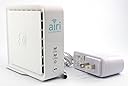
AT&T Air 4920 Airties Smart Wi-Fi Extender - White
Product ID: 43540671
Details
- BrandAirTies
- ColorWhite
- Data Transfer Rate1000 Megabits
- Special FeatureWiFi Mesh
- Wireless Communication Standard802.11ac
New AT&T Air 4920 in a sealed original box. Review: Just follow the instructions in the box, not the instructions on your AT&T modem... - Took a couple of rounds to install it. I was following the steps shown to me in the Extender setup of the AT&T router. It kept timing out when it came to the pairing section. I finally was about to give up then I decided to follow the instructions in the box which were SIMILAR, but slightly different. Once I followed the steps in the box, everything worked just fine. I wired mine in from one end of the house to the other and plugged the extender directly into the network. Now I get a strong WiFi signal throughout the entire house. I have a 500Mbps fiber connection and get 450 Mbps easy from any wireless device anywhere in the house at the furthest point from my router. Exactly what I needed. Review: Did not work - Did not work with att router/modem
| ASIN | B072M2DJXC |
| Best Sellers Rank | #377 in Repeaters |
| Brand | AirTies |
| Built-In Media | Power adapter, Instruction manual |
| Color | White |
| Compatible Devices | Router |
| Connector Type | RJ45 |
| Customer Reviews | 3.7 out of 5 stars 886 Reviews |
| Data Transfer Rate | 1000 megabits_per_second |
| Frequency Bands Supported | 5 GHz |
| Included Components | Power adapter, Instruction manual |
| Item Dimensions D x W x H | 4.27"D x 1.63"W x 3.94"H |
| Item Weight | 15.04 ounces |
| Manufacturer | AirTies |
| Mfr Part Number | AIR-4920 |
| Model Number | AIR-4920 |
| Range | 1500 feet |
| Special Feature | WiFi Mesh |
| Special Features | WiFi Mesh |
| UPC | 040003317149 |
| Unit Count | 1 Count |
| Wireless Communication Standard | 802.11ac |
| Wireless Compability | 802.11ac |
J**E
Just follow the instructions in the box, not the instructions on your AT&T modem...
Took a couple of rounds to install it. I was following the steps shown to me in the Extender setup of the AT&T router. It kept timing out when it came to the pairing section. I finally was about to give up then I decided to follow the instructions in the box which were SIMILAR, but slightly different. Once I followed the steps in the box, everything worked just fine. I wired mine in from one end of the house to the other and plugged the extender directly into the network. Now I get a strong WiFi signal throughout the entire house. I have a 500Mbps fiber connection and get 450 Mbps easy from any wireless device anywhere in the house at the furthest point from my router. Exactly what I needed.
J**E
Did not work
Did not work with att router/modem
R**Y
Easy setup, great signal booster!!
Received it today. Ran through the install using the AT&T Smart Home Manager and could not get it to pair. Ended up connecting the Ethernet cable to the router and it paired. Then disconnected it from the router, moved it to the living room, abt 35’ away. It’s working and I now have superb WiFi strength on the back patio near the pool! Prior, I had low to no signal. Very pleased!! AT&T wanted to charge me $10/month for an extender, so this is a bargain!
R**D
Great with a few exceptions
The Airties 4920 does what it's designed to do and that should give it a solid 5 stars. The only reason I can't is the fact that AT&T really doesn't know how to support this device. It starts with the device right out of the box. It's simple enough to install but for many people it probably won't be and those are the people that expect some type of instructions in the box. Nope, not there, it will require an internet search to get the installation instructions. Once you get it installed and running, which will take some time because in the background, the Airties has to update it's firmware to an AT&T version that doesn't actually come on the device. Even AT&T's app, Smart Home won't actually show connections to the Airties even though they are there. The reason for this is since it's a mesh, the Airties is just duplicating the wifi from your gateway. The Airties is designed to work on only two gateways from AT&T, the BGW210-70 and the 5268AC. Your mileage with any other gateway will vary and may or may not work. You'll have to go to a place in your home where the wifi signal is normally weak, disconnect/reconnect your wifi and you'll see an improvement Also be aware that AT&T is giving these devices away for the time being. When they go into the Smart Home app, many people are seeing a notification that they have poor coverage and are offered a free Airties from AT&T, shipping included.
C**Y
Worked great for me.
I’ve been disappointed with the wi-fi range of my AT&T modem. I can connect to my across-the-street neighbor’s wi-fi (they gave me their password) but barely get a signal from my AT&T modem in the upstairs bedroom. This extender solved my problem. Just connect the internet cable between the two devices and turn the extender on. After about four minutes of communication between them the range was seamlessly extended. I was expecting to have to connect to a different wi-fi device with a different password. But when connected to the AT&T modem you continue to use the same wi-fi name and password. Cool. For me the this was more easily said than done. Stringing the internet cable and power extension cord through the attic was quite a job. I strongly suggest you figure out where you will site this before purchase. I happened to have some devices that extend the wired internet connection through the house wiring. This would have made setting up this extender really easy. It actually worked but also slowed down the connection. So I made the connection with a long internet cable. A short internet cable was included in the box. Okay for testing. But you’ll need a longer cable so you can place the extender far away from your modem. There were no instructions included in the box but a PDF can be found online by Googling the model number. BTW, the device was a lot smaller than I was expecting. Not that it matters.
S**R
Works Well But AT&T Can (and Did) Pull Support for It 3 Months After Recommending it as an Upgrade
I purchased this extender when AT&T decided to drop its support of the extender I had purchased from the company. This extender was the one recommended by AT&T as an update (AT&T tried to rent it to me but I bought it from Amazon instead). The extender worked well but 3 months after buying it as the recommended extender, AT&T dropped support of it, once again trying to get me to rent yet another upgrade. The problem thus is not with the extender but with AT&T, which apparently is trying to get people to subscribe and therefore charge people more long-term for its service. I would have ranked the product's performance as a 4 and it's shelf life as a 1. I compromised and gave it a 3. AT&T cannot be trusted to do what is best for its customers, so I will be looking for a different provider, though of course one cannot be sure how trustworthy the other carriers are. Good luck to all of us as we manage through our Internet addictions and the carriers who prey on us.
A**N
I am so pleased with this product
I purchased this for an Arris BGW210 supplied by ATT. ATT tech support was terrible and not forthcoming at all about what brands would work. I tried a Nighthawk and imagine my surprise to open the box to find a list of devices they were compatible with did not include Arris. Some google searching turned up a tech site that directed me to this device. I can't comment on Frontier tech support because I did not need them. I could not connect to my gateway wirelessly but once I connected using the supplied cable the pairing was immediate. Imagine my delite when the interfaces on my fire TV and other fire sticks immediately sped up to a reasonably usable speed. This product works exactly as described, a rarity when it comes to electronic devices. I wish my Orvis smart plugs were as painless. I think I am going to puchase another unit even though I might not need it. Going to test this over a week to see if it continues its outstanding performance first. And did I mention the unbelievably reasonable price? On day one consider me an enthusiastic recommendation for any ATT fiber customers looking for a wifi extender.
E**N
Did not work with AT&T Fiber
I bought two of these to extend the built-in WiFi on an AT&T Fiber install. I am an experienced IT installer. These might work fine in other situations, but for this instance I can't recommend them. The first paired with no problem but stopped working after about 20 minutes. When I went to reinstall it, I couldn't perform the factory reset because the little button in the hole is missing. The second never paired at all, I gave up after 5 attempts, returning them.
Trustpilot
3 weeks ago
1 month ago