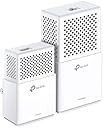
Desertcart purchases this item on your behalf and handles shipping, customs, and support to Tunisia.
⚡ Power up your home network — fast, smart, and effortlessly connected!
The TP-Link AV1000 Powerline Ethernet Adapter delivers up to 1000Mbps wired speeds over your home’s electrical wiring, complemented by dual-band WiFi up to 750Mbps. Designed for easy plug-and-play installation, it supports multiple adapters for whole-home coverage and features an intelligent power-saving mode that reduces energy use by up to 85%. With 128-bit AES encryption, it ensures secure and private networking, making it ideal for streaming, gaming, and smart home devices without the hassle of new cables.


| ASIN | B0725LPTZR |
| Best Sellers Rank | #666 in Powerline Network Adapters |
| Brand | TP-Link |
| Color | White |
| Compatible Devices | Smart TV |
| Customer Reviews | 4.0 out of 5 stars 1,997 Reviews |
| Data Link Protocol | Ethernet |
| Data Transfer Rate | 1000 megabits_per_second |
| Global Trade Identification Number | 00845973099084 |
| Hardware Interface | Ethernet |
| Item Dimensions L x W x H | 5.35"L x 2.8"W x 1.93"H |
| Item Weight | 1.6 ounces |
| Manufacturer | TP-Link |
| Mfr Part Number | AC750 |
| Model Number | AC750 |
| Number of Items | 1 |
| Product Dimensions | 5.35"L x 2.8"W x 1.93"H |
| UPC | 845973099084 |
| Unit Count | 1 Count |
J**E
make sure both devices are on outlets fed from the same side of your electrical panel
have only had it for about a week, but so far so good. I live in a 3000 square foot, 3 floor house. My router is in the living room on the middle floor. At first, the wifi signal to the master bedroom on the top floor was fine. We streamed movies, music, and tv, and surfed the internet with no issues (I have a 50 mbps plan with comcast and regularly get 55-60 mbps on the same floor as the router). For some reason, we started to lose internet connection upstairs when streaming. Checking the speed on my comcast app, it would fluctuate upstairs from 50 mbps down to 3. Purchased this powerline wifi extender after researching whether to buy this kind, or a simple wifi repeater. Installation was easy. The units in the kit are already paired, so it's literally plug and play. Checking my breaker panel, my living room circuit where my router and the powerline base unit is plugged into, is not on the same side of the breaker panel as my master bedroom. But, my upstairs laundry room is. I plugged the extender unit into the outlet in the laundry room and everything connected, except the powerline LED indicator was red indicating a weak powerline signal, and my speed was only about 3 mbps .The receptacle in the laundry room is a GFCI so I figured this must have something to do with it. Possibly filtering out some of the signal. I plugged the unit into an outlet in my master bedroom, knowing it was not fed from the same side of my breaker panel as the outlet the base unit is plugged into, and everything connected and the powerline LED was now green indicating a good signal. I figured everything was fine and it didn't really need to be on the same side of the panel as the base unit. Checking my speed, I was now getting about 35 mbps. Which was an improvement over what I was getting, so I was happy with that. I didn't think I would get my full internet speed anyway. Randomly checking the speed over the next couple days, I would notice it was fluctuating randomly down to 2-3 mbps. Tried several other outlets around the bedroom, and would get the same thing. I decided to switch the electrical circuit of my master bedroom to the same side of my panel as the living room where the base unit is plugged into (I am an electrician, so I do not recommend anyone do this without some electrical knowledge). I checked the speed again, and I am now getting 45-50 mbps steady on the 5g band in my master bedroom. So far no drops in the speed like I was getting before. I will probably get another extender unit to pair with my base unit and install it on the lower floor. Make sure to feed the base unit and extender unit from the same side of the breaker panel. Some reviews may say it is not necessary, but the signal will be reduced and may not be steady. Also do not plug into a GFCI, as this may filter out some of the signal as well.
W**M
Works great to connect Tivo Mini
The kit includes a Powerline Adapter, Powerline Extender and two white 6 ft. Ethernet cables. It works, but you have to set it up correctly. First, a little background. My home is 3280 sq. ft. I have 100 Mbps internet using a Nighthawk router on level 2 of my home NETGEAR Nighthawk X6 AC3200 Tri-Band WiFi Router, Gigabit Ethernet, Compatible with Amazon Echo/Alexa (R8000) and actually have 100 Mbps all over my house. I didn't buy this kit to increase my wireless signal. I bought this kit, plus TP-Link AV1000 1-Port Gigabit Powerline Adapter, Powerline speeds Up to 1000Mbps (TL-PA7010 KIT) because I have three Tivo Mini's that connect via Coax for a MOCA connection. I constantly have connection issues related to signal quality. First thing out of the box I plugged in the Adapter, connected the ethernet cable to my router and pressed the WPS button on my router and the Wifi button on the Adapter. Then I took the Extender, plugged it in not only in a different room, but in a different level of my house. I tried to pair the two and failed. Then I started reading all of the reviews of the product and frankly got more confused because some people said you have to plug the adapter and extender into outlets on the same circuit BREAKER and other people said they didn't have to have the same circuit breaker, but the same PHASE. I was ready to box up and return everything. The instructions say "the same circuit". It's unclear what they actually mean by that, but it wouldn't make any sense for the answer to be circuit breaker, so I decided to start over. I'll explain the steps I took to successfully connect. 1. Plugged adapter into wall outlet, level 2 (you CANNOT plug these into a power strip or even a surge device that covers the face of the outlet). 2. Used a pin in the RESET hole (because I had set it up already incorrectly). 3. Plugged extender into a nearby wall outlet in the same room. 4. Pressed the PAIR button on the adapter. 5. Pressed the PAIR button on the extender. (Both will flash and then you'll see two solid lights - one for power, one for paired) 6. Unplugged both units. I set the extender aside and plugged the adapter back into its permanent home near the router. 7. Used an 8 ft. ethernet cable to connect the router's LAN port to the adapter. 8. Used my cell phone to see if I could pick up a WIFI signal for the 2.4 GHz and 5 GHz frequencies, which were there. (I didn't want to connect to these - I just wanted to see that there was a signal there) 9. Pressed the WPS button on my router, followed by the WIFI button on the adapter. (The frequency lights will blink slow, then rapidly, then turn solid - my router's WPS button doesn't stay on long and while one of the frequencies was found quickly, the other took longer so I watched the WPS light on my router and as soon as it quit blinking, I quickly pressed it again so that both frequencies were found) 10. Plugged the extender into an outlet in the same room to verify it was still paired - yep, two solid lights. 11. Plugged the extender into an outlet in my office, level 1 - yep, two solid lights. 12. Plugged one end of the provided ethernet cable into the extender and the other end into my iMac. Turned off Wifi on my iMac. Opened a web browser - yep, a page loaded. Performed an internet speed test. Tested >100 Mbps. 13. Removed the extended from the outlet in my office and plugged it instead into an outlet in my bedroom (level1) near my Tivo mini - yep, two solid lights. 14. Removed the coax cable from the mini and replaced it with the provided ethernet cable. Test - Able to watch live tv? Yes. Able to communicate with the Tivo Bolt on level 2? Yes. Able to connect to the Tivo service? Yes. Able to stream content? Yes. 15. Took extender #2, plugged in outlet, level 2, same room as adapter. 16. Pressed the PAIR button on the adapter. 17. Pressed the PAIR button on the extender - yep, two solid lights. 18. Repeated the process for extender #3, yep, two solid lights. 19. Relocated the extenders near the mini's I needed to connect (one inside of a cabinet in my kitchen (level1) and the other in our home theatre (level 2). Both immediately showed the two solid lights. 20. Connected them to the mini's using the provided ethernet cables and then tested the connections as I did before. All Tivo Mini's connected successfully and still getting >100 Mbps signal strength all over my house. So glad I bought these!
G**Y
Poor instructions, device works
The product seems to work. The instructions are awful. It looks like they ship the same instructions for similar products. For example, the instructions always say press and hold a button for one second. On my device that doesn't work. You just press and release the button with no pause. Installation went smoothly once I figured out this instruction error. Using the WPS button on my router made it easy to download my existing wireless SSID/Password settings to the new WIFI extender. One thing puzzles me... There are two parts to this kit: the small adapter, and the larger extender. The adapter connects to the router via ethernet and sends data through the powerlines. The larger extender sends/receives data from the powerline and also creates a WIFI network. The smaller adapter can also be used to create a remote ethernet connection. You can also connect multiple WIFI extenders, but I can't seem to find WIFI extenders for sale by themselves. That was sort of the whole point of using this device.
C**K
Difference between circuits varies considerably.
I wanted to use this device to get better performance than my wireless in a room with poorer wireless coverage. When I got the device I did some testing. These cases were as follows and are also listed in the attached pictures. 1. Shortest possible path 2. Same electrical circuit 3. Adjacent electrical circuit 4. Dissimilar electrical circuit I logged into the devices configuration page and was happy to find it had a throughput reporting tool that allowed me to see what the actual performance was between the two powerline transceivers. Screenshots of the performance of the test cases are listed in the attached pictures. Test result 1: This setup involved connecting both devices on the same power cord (not powerstrip) to create the absolute shortest possible path. Able to attain the advertised speed of the device (with IP and transmission overhead accounted for). Test result 2: This setup involved plugging each device into power outlets in the same circuit in the same room. Able to attain 90% of advertised speed of the device. Test result 3: This setup involved plugging each device into power outlets in adjacent rooms which were on different circuit breakers, but the breakers were adjacent to each other in the circuit box. Able to attain 30% of advertised speed of the device. Test result 4: This setup involved plugging each device into power outlets into different rooms with breakers that were not adjacent to each other. Able to attain 5% of advertised speed of the device. What results 1 and 2 show me is that the performance of powerline on the same electrical circuit is very good. Result 3 showed me that if my network needs are in adjacent rooms (and more importantly adjacent circuit breaker), this is still better than WiFi in most cases. Result 4 showed me that powerline is no better and sometimes worse than WiFi on different, non-adjacent circuits. Before you purchase this product, first find out what your electrical circuit setup is in your living space, and then determine if this solution may work for you.
M**G
Much better than WI-Fi extenders.
So let me begin by saying that first I've tried a decently rated Wi-Fi extender. That was a terrible idea. It never worked right and was constantly disconnecting from my network. I had to return it and get my money back. So back to the drawing board. I found about powerline WiFi adapters and I must say this is the way to go. The installation for the TP Link was very easy. The only thing I wasn't able to do was have the secondary unit mimic my WiFi network over the WPS button. I know I can go online and do it manually but that's ok. In the far away room where I've installed the wifi unit, I am using the TpLink address and password. Once I added to all my WIFI devices, they sign in automatically once I step into that room, so not a big deal anyway. I would like to mention that I am getting strong signal but if course...not as fast as when I am near the main router. My service is 80mpbs and I get 55-60 via WIFi 5 feet away from it. When I use the powerline adapter in the far away room I am getting 28-30 mpbs so there's a fair loss but let's not forget the unit is not plugged in the same breaker group of outlets as reccomended. Honestly that's a bit unrealistic. Of course, in a household, your WiFi drops drastically in the room far away from the router. If the room is far away, all the power outlets there are on a different breaker anyway. The unit is getting a bit warm but it doesn't seem to affect performance.
A**E
powerline extender AND wifi repeater in one is exactly what I needed
Update!:: After two months of use, the wifi-extender side seems to have become faulty. We have a Fios connection that should have wired DL speeds up to 100Mbps. After unplugging and replugging, those speeds ARE reached. For a few minutes. After about a half hour of use or less the unit starts to bottleneck itself and wired speeds slow to 7.5mbps or worse. Wifi suffers a similar degradation. It could just be a faulty unit (and likely is), but I caution buyers that this product might not last like you'd hope and a 5 star product is now 2 stars or less in my mind since I'd seriously expect that it last more than just a couple months of relatively light household use. // So, we live in a strange apartment. It's long. All the rooms are end to end in a line. (two bedrooms, a bathroom, a kitchen, and two large common rooms with one super-long hallway connecting them). Our IP put the router and modem on the far end of the apartment. Before we were barely able to detect the router's wireless signal, but with this we are able to get speeds with very little loss (minus what is standard for each type of connection; wired, wireless, etc). Since our phones need wireless signal to function well (we're on Republic Wireless) - we needed something to extend the bubble. The repeater function works well and covers the second half of our place, while our router covers the first half. The added nerdy bonus of being able to hook our computer up to a super-effective wired connection is great, too. That we can create another identical broadcast of our wireless signal with one device, and do it very efficiently over the wires in our house without running a 150m cable down the hallway of eternity is wonderful.
M**N
Great product. Does what is says!
This was perfect for me. I had a flaky WiFi connection to my TV in the living room. My router is in the office, 20 feet but through 2 walls, and I was getting interference from neighbors' routers as well. The TP-Link Adapter did the trick, I'm now getting a rock-solid "wired" connection to the TV and as a bonus enhanced WiFi signal in the living room, all the way to the sundeck. Not bad at all for $70! Installation was very easy, in fact, a real snap for the Ethernet connection. For the WiFi setup, it's very simple too, but *read the instructions* they are good and will greatly eliminate head-scratching ;-) Note of caution: you will probably not get a full 1,000Mbps bandwidth, the signal degrades rapidly in AC wires, particularly if you have an older house with lengths of wiring and many breaker jumps. In my case, I get a steady 70Mbps at the TV with an estimated 75 ft A/C wire run. But 70Mbps would be enough to watch movies in 8K (if they existed), so it's more than sufficient with your 4K TV, even if you have a couple of phones and laptops running on the WiFi at the same time. Thank you TP-Link, after all these years, you still make great products at great prices.
K**M
Works fine with little headache
I am a Linux user. The Internet Service Provider (e.g. comcast, at & t, etc) gives me a modem. A Netgear router was attached with a set of port-forwarding configuration, etc. The router has its own SSIDs -- one for 2.4G, another for 5G, the others for guests. I have a home Linux server formerly attached to the Netgear router via Ethernet (i.e. wired). Now, I moved the home server to somewhere else in the house, and am no longer able to connect it to the router via a wire. That's why I purchased the TP-Link's extender. I did not worry much about signal. I did worry about configurations. The home server should be on the local network with all the others such as printer, TV, all the other laptops, smart phones, iPad, etc. The configuration seemed seemlingess, which I am so satisfied with. Actually, at the Netgear router, I assigned static local IPs to each device--e.g. 192.168.1.16 for the home server, 18 for the printer, etc--, and I did not need to change any of them. The extender & Powerline seem to claim the same local IP per device -- or, perhaps, uses each device's MAC address to claim the IP. The only part that was not seamingless was the SSID. The extender has separate SSIDs. There seems WPS, which allows the extender to copy the existing SSID, encryption policy, passwords, etc, from, say, the Netgear router. My router unfortunately is missing the feature. Besides, I am not sure what happens if I change the Netgear router set up. Perhaps, sync via WPS should be re-done. But, the extender, just like a router, somehow, has a domain name through which we can connect to the Powerline & Extender(s) system. How to configure it is pretty much the same as how to configure a router. But... additional port forwarding, etc, was not required on the Powerline & Extenders. Only the SSIDs, encryption policy, admin password, and wifi passwords.
R**I
not what they say
Works but with restrictions
.**.
No puedo creer que haya funcionado
Buscaba una solución para tener WiFi en la 2da planta de mi casa por que lamentablemente los modem de fibra óptica de Telmex tienen pésima cobertura y en todas las recamaras de mi casa no llegaba nada pero al investigar esta tecnología PLC me llamo mucho la atención ya que la red eléctrica esta prácticamente nueva y sentí que podía ser una buena solución que tirar metros y metros de cable. Algo que me llamo mucho la atención es que decían en muchos sitios e inclusive en tienda Telmex donde igual lo busque el dispositivo que si los contactos estaban conectados a diferentes pastillas no funcionaria pero déjenme decirle que en mi caso si funciono la sala donde tengo el modem es una pastilla totalmente independiente a la planta alta y al menos que todo este interconectado de alguna manera funciono y la verdad muy bien. El paquete incluye los 2 dispositivos, instructivos muy claros de entender y 2 cables de Ethernet de buena calidad uno de ellos se usa a fuerza por que el modem debe conectarse por medio de Ethernet a un dispositivo, ya el otro dispositivo se conecta a donde queramos tener internet se emparejan y listo el PLC copia la red para que la conexión sea la misma en toda la casa y los dispositivos como celulares o tablets no estén cambie y cambie de red a cada rato todo un alivio. Las pruebas me dieron una conexión de 70mb de 100mb que tengo contratado algo curioso es que me da los 20mb de subida esos no se ven afectados pero la descarga no paso de esos 70mb supongo que ha de ser por el rollo de la pastilla pero la verdad con eso me conformo ya que en la planta alta no tenia ni una misera rayita de WiFi y ahora tengo todo al 100% y muy estable y excelente velocidad. Sin duda es un imperdible ya que es mas fácil y estético que andar tirando metros y metros de cable Ethernet y comprar repetidores o mover el modem a un lugar donde nadie se beneficia.
R**N
Excelente
Dudé mucho antes de adquirir el producto porque la instalación eléctrica en casa no es muy nueva y los contactos del emisor y el receptor no están en la misma pastilla pero finalmente lo hice y no me arrepiento para nada. Tengo el módem en la planta baja y en el segundo piso la conexión WiFi siempre había sido muy inestable, sobre todo en el punto donde tengo conectada la televisión de la recámara y si alguien estaba viéndola con Netflix o similar, mi conexión WiFi en mi computadora se alentaba notoriamente. Con estos aparatos, ahora puedo conectar la televisión con el puerto ethernet de forma alámbrica; obtengo una señal estable y buena: cero problemas ya para ver Netflix y ya no se come el ancho de banda del WiFi para otros dispositivos. La instalación es rapidísima; no hay nada qué hacer más que conectar los aparatos. La guía menciona un proceso de pareo entre ambos aparatos pero creo que sólo es necesario si se quiere un segundo receptor y es por cuestiones de seguridad, por ejemplo, para que el vecino no se conecte a tu internet con un aparato receptor.
I**V
Excelente expansor
Compre el producto derivado de que en donde instale mi escritorio, no llegaba con calidad la red del módem. Había probado replicadores de red con antenas que habían servido para dos cosas. Desesperada por tener buena señal, me recomendaron comprar este replicador. Tiene un alcance muy bueno y es muy fácil de instalar. Lo "complicado" es andar probando en donde ubicar el replicador ya que son dos dispositivos. Uno debe ir conectado al módem y el otro debe estar a una distancia no tan lejos del primero. Sin embargo tienen buena calidad y la señal se replica sin problemas. Considero que si alguien piensa en comprar un replicador de red, sin duda debe optar por éste y no por los de antenas.
M**C
Bueno, pero no me fue útil.
El producto en teoría es muy bueno, el internet a través de la línea de corriente eléctrica se escucha bien; pero al menos en mi caso en la práctica no funcionó como esperaba, tengo contratado 150 megas en Infinitum, el modem está en la planta alta y requería internet estable en la planta baja; debo decir que instalar el dispositivo es muy fácil y la app es muy intuitiva; pero simplemente el internet no funcionó bien, únicamente me daba 30 Megas máximo y bajaba a 10 megas tanto por cable como por wifi, intenté cambiando los toma corrientes y ni así me daba un mejor internet, mi casa no es antigua tiene 3 años y la red eléctrica está bien, además debo decir que puse los dispositivos conectados en tomas de corriente directa (no extensiones) y funcionando solos sin tener otros aparatos conectados a la misma toma; hice la devolución del producto y me fue reembolsado el dinero; compré otro dispositivo y este es sensacional (Deco M4) ya lo reseñaré como corresponde.
Trustpilot
1 month ago
2 weeks ago