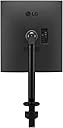
๐ฅ๏ธ Elevate your desk game with the monitor thatโs redefining productivity!
The LG 28MQ780-B is a 28-inch SDQHD Nano IPS monitor featuring a rare 16:18 DualUp aspect ratio with 2560x2880 resolution, perfect for professionals craving vertical screen real estate. It boasts 98% DCI-P3 color accuracy with HDR10 for vibrant visuals, an ergonomic stand with C-Clamp for customizable comfort, and USB Type-C connectivity delivering up to 90W power. Designed for multitasking and creative workflows, itโs the ultimate upgrade for millennial managers who demand style, performance, and eye-friendly tech in one sleek package.


| ASIN | B09XTD5C7H |
| Adaptive Sync | FreeSync |
| Additional Features | Ambient Light Sensor, Auto Brightness, Auto Input Switch, Black Stabilizer, Color Weakness, Dynamic Action Sync, Flicker-Free, High Dynamic Range, Low Blue Light, Reader Mode |
| Aspect Ratio | 16:10 |
| Best Sellers Rank | #141,573 in Electronics ( See Top 100 in Electronics ) #3,021 in Computer Monitors |
| Brand | LG |
| Brightness | 300 cd |
| Cable Length | 1 inches |
| Color | Black |
| Compatible Devices | Computers and Laptops |
| Connectivity Technology | Bluetooth |
| Contrast Ratio | 1000:1 |
| Customer Reviews | 4.4 out of 5 stars 490 Reviews |
| Display Resolution Maximum | 2560x2880 |
| Display Technology | SDQHD |
| Display Type | IPS |
| Hardware Connectivity | HDMI, USB, USB Type C |
| Image Contrast Ratio | 1000:1 |
| Included Components | 2 x HDMI Port, 2 x USB Port, 1 x USB Type-C, 1 x Headphone Jack, 1 x DP Port |
| Item Dimensions D x W x H | 18.16"D x 18.96"W x 33.2"H |
| Item Weight | 9 kg |
| Manufacturer | LG |
| Model Name | LG28MQ780B |
| Model Number | 28MQ780-B.AUS |
| Mounting Type | Wall Mount |
| Native Resolution | 2560 x 2880 |
| Number of Component Outputs | 1 |
| Picture Quality Enhancement Technology | Nano IPSโข Technology, HDR10, Super Resolution+ |
| Power Consumption | 90 watts |
| Refresh Rate | 60 hertz |
| Resolution | SDQHD 2880p |
| Response Time | 5 milliseconds |
| Screen Finish | Glossy |
| Screen Size | 28 inches |
| Screen Surface Description | Glossy |
| Specific Uses For Product | business, personal |
| Total Number of HDMI Ports | 2 |
| Total USB 3.0 Ports | 4 |
| Total Usb Ports | 4 |
| UPC | 195174035207 |
| Viewing Angle | 178 degrees |
| Voltage | 240 volts |
| Warranty Description | 1 Year Parts & Labor |
| Warranty Type | 1 Year Manufacturer Warranty |
M**.
My Favorite Monitor - Here is Why
The LG 28MQ780-B DualUp Monitor is a game-changer for anyone who values multitasking and clarity in their work environment. This innovative 28-inch monitor features a unique 16:18 aspect ratio, providing ample vertical space that is especially valuable for programmers, video editors, and anyone who enjoys browsing the internet in an exciting, naturally vertical format. One of the standout features of this monitor is its impressive clarity. Text appears sharp and vibrant, significantly enhancing the reading experience, particularly when dealing with detailed documents or spreadsheets like Excel. The built-in sound system is another plus, eliminating the need for external speakers and simplifying your workspace. While I did encounter a minor issue with PowerPoint presentation mode, itโs easily resolved by adjusting settings within PowerPoint itself. This small hiccup does not overshadow the overall functionality and efficiency that this monitor brings to my daily tasks. In summary, the LG 28MQ780-B DualUp Monitor is an excellent investment for anyone looking to boost productivity and enjoy a seamless multitasking experience. Its unique design makes it particularly advantageous for creative professionals and casual users alike. Five Stars!
D**B
Quality display with a unique aspect ratio
Everyone knows LG makes great displays and this one is no different. The colors are vibrant and the 2K resolution is more than enough for almost all uses. Text is super crisp and pictures/videos look fantastic. At only 60hz this won't satisfy a power gamer but for everyone else the display will move perfectly smoothly. The monitor arm is well made and works intuitively. The monitor build quality is good and although I don't use the speakers they sound fine. I wish it could get a little dimmer because even at 0 brightness it's a bit bright for me in dark room. The matte finish on the screen does a great job softening most reflections and the viewing angle is very wide. I love tall aspect ratio monitors and this 8:9 (or 9:8) aspect ratio is about as close to a square you'll ever get. The USB hub and multiple display inputs all work very well together. I have not used the KVM or Dual screen software so I can't speak to how well it works. Ultimately I am very satisfied with this purchase and I'm glad to see more brands embracing unconventional aspect ratios to fit more types of user preferences.
D**D
Best secondary monitor, especially for a shared use home workstation
I rarely leave reviews, but I've had this monitor for about 2 years now and just wanted to say it's perfect. I used to use 3 monitors for work and 3 monitors for personal use (gaming mostly, with some productivity and watching shows). Using this monitor, I was happily able to consolidate everything onto one 3 monitor L-shaped desk setup, where the short arm has my Macbook Pro and a 34 inch ultrawide mounted for work and the long arm has a 42" inch OLED TV that I use for a monitor for gaming and everything else. In the corner of the L, I have this LG monitor mounted. It's shared between the two setups and works *seamlessly*. It's roughly the same height as the 42" inch TV as well so aesthetically they flow together. What prompted me to write this review was sitting down at my desk just now, checking my emails on my Macbook, closing it, and swiveling over to my personal computer where the monitor automatically registered which computer was on and started showing content from it. I didn't do anything to set this up, and it may be a simple thing, but I've been working on PCs for over 20 years now and it feels like nothing ever works this well. The monitor itself is also fantastic, very clear and crisp for IPS. No real complaints. I personally would not use the DualUp as my primary monitor because the refresh frate is 60hz, which even for productivity I find a bit lacking these days, but I'm also kind of a display snob. However, for a secondary monitor it's absolutely perfect for having web browsers and chats up. The Windows 11 snap functionality they've been perfecting over the last few OS generations works perfectly with this as well, letting you to snap windows into either the 4 corners, above and below each other so it works like two stacked 27 inch monitors (which was my old setup, or in a few different orientations that I personally feel work with this aspect ratio better than 16:9 and 21:9. If you're on the fence, I don't think you'll be disappointed at all.
R**M
Mostly love it
I got this because so many web sites these days are designed for cell phones, not computers. A widescreen laptop or desktop monitor just doesn't show enough of many web pages, which have thick borders at the top. Fine for a cell phone, terrible for a widescreen. Especially if you have older eyes and need larger text. Yes, I know I could flip a standard monitor into a vertical position. But that's a pain, since I wouldn't want to use it that way all the time. This monitor is just what I needed. I use it as one big screen, though you can use it as two screens. It lets me set my text large, and read web pages without scrolling every couple of lines. One thing to keep in mind: you might want to adjust your mouse sensitivity, and/or get a bigger mousepad, since your mouse will be covering a lot of real estate on this monitor. I docked one star because it has a tendency to go blank, with a "no signal" message. Unplugging it and plugging it back in again fixes it. I think it's probably a driver issue, since I don't have a problem with any of the other monitors connected to the same computer. Happens maybe once every couple of days. Annoying, but nothing I can't live with.
K**G
Not for Coding, Good in Theory, Requires a whole workflow change. Takes a lot of adjustments.
I thought it would be good for coding. To allow me to see the whole file, but not really. The first days of using the monitor you would realize how much your coding workflow and tools are horizontally oriented. Your IDE will be clunky "as is" and requires a lot of adjustments. 9 times out of 10 I felt more comfortable reconnecting to the ultrawide. The other problem is the height. There is no good way to position it. You are either craning your neck or sitting higher than normal to see the top of the screen. But then the bottom of the screen is too far and you have to noticeably look down and lean into the desk to see the bottom of the screen. The opposite happens if you optimize viewing for the bottom of the screen. The top of the screen becomes too far away and you need to look up, lean in, and extend your neck ever so slightly. Granted we are talking about millimeters, but this is not required on curved ultrawide. I can scan on the ultrawide without any noticeable effort and my head is not moving around as much as I do when using this screen. This screen seems like it was created for Windows. Where your active areas (menus and docks) are colocated. On the mac, your menu bar is at the top. The dock is at the bottom so there is no good way to use this display with the mac. 90% of you need to optimize for top-of-screen viewing because that is where your app menu bar is. Magnet (screen layout manager) helps a bit. I tried the dual-up wit two outputs from the mac and enabled top and bottom of the screen layout. This is probably how it's meant to be used when on the mac. It kinda word, but not optimal, each time I cross the horizontal, I'd trigger the (auto-hidden) dock. It's been several weeks. I can say I am "used" to it, but it is not a productivity booster as I thought. I still prefer my ultrawide and am more productive on it. The dual up is not used as often as I would like. As a technological marvel. it is very high quality. The monitor arm, the DPI, and the light weightiness are unbelievable. As a coder monitor, it is not optimal.
2**7
FINALLY A NEW SQUARE MONITOR!!
I have been dreaming for ages of finally having an upgrade to my old 1280x1024 monitors that still has a square aspect ratio, while still being better in terms of resolution and/or color depth. I had wanted one in 2560x2048, to be twice the resolution. This is even better than that: It can not only contain that resolution, but has an even squarer aspect ratio than 5:4, at 8:9. Furthermore, it has a high color depth, which makes it even better for doing Blender work. It is perfect for watching video in whatever orientation you want, as it is huge in both directions. Anything wide/narrow, and you will have a lot of unused screen space, but even then it's fantastic for watching anything with subtitles without having the subtitles cover the video. It's great for scrolling literally anything as well. And for vertical video, it's absolutely unmatched. It is also wide enough that the black bars aren't really bothersome at all; it's basically the same width as you'd otherwise get with a shorter monitor. The monitor mount is a bit limiting, in that it can only be installed on a normal desk that you can mount it on from behind. It's definitely NOT a portable monitor whatsoever, requiring very careful installation ever time it's moved. It does, however, work great at being ergonomic, as is the intention. I lean it a bit down as it's so crazy tall it can be hard to clearly read the top of the screen otherwise! It is extremely bright on even 40% brightness compared to my Dell 1907FPV monitors from 2007 that I use alongside it. I'm not sure this is a really high bar though. Refresh rate is 60 hz and only 60hz. This monitor is definitely better for still-image creative work than anything you'd want something higher than that; even my 1907FPVs, able to do 75hz, can beat the frame rate. This monitor, being a modern one with thin bezels, probably isn't even close to the durability of my 1907FPVs. I have, however, treated it extremely carefully, so it hasn't had much time to have its durability tested. The factory condition out of the box, however, is utterly impeccable. I have not noticed a single, tiny flaw in the finish or pixels of this monitor. It is, truly, NEW in every way, unlike some other products I have bought which end up with minor flaws. There is NO seam in the middle of the monitor, as I was initially worried about before buying this. It can be used exactly as a 2560x2048 monitor with a bunch of extra on top with no issue whatsoever. It's a HUGE monitor with basically nothing designed for its aspect ratio, so you can put the windows pretty much wherever and with any dimensions and still have it work pretty equally well. In any dimension at all (also in resolution!), it's bigger than most other monitors I have used. It is also utterly fantastic for very large screenshots as it can contain an absolutely massive amount of text, especially for long, vertical documents. I really hope that LG continues to make this fantastic monitor! It has been my dream monitor for a very long time and I intend to buy 2 more of them to replace my 1907FPVs whenever I have a bit more money spare.
L**S
I enjoyed using it, but it only lasted 7 weeks
The monitor size is great for multi tasking. Using the betterdisplay app on mac used to allow you to have very comfortable resolution for multi-tasking with two usable workspaces top and bottom, but after the last update it only allows you to use the default or halved resolution. Halved is still great and allows you to view a lot more code on one screen than normal, but stacking apps on top of each other is too crowded. Unfortunately my monitor stopped working after only 7 weeks and I have to send it in for warranty repair to LG since it's past the return window with amazon. The monitor started flashing rapidly( like a strobe light) and had my last browser window burnt into the screen. I was a bit worried about it causing a seizure while I was trying to trouble shoot, but ultimately there was no way to fix it. I regret buying this since it only lasted 7 weeks. At over $600 I had planned to use this for several years. I bought the new LG 27inch oled gaming monitor(27GR95QE-B) for $1000 after this one that needed to be sent in for service after updating the firmware, luckily that happened within the return window for that monitor. Having major issues with 2 separate LG monitors in the first 2 months of ownership makes me hesitate to buy any LG monitor in the future.
J**N
Impressed.
Let me start off by saying I had two 32" monitors prior to purchasing the DualUp. I'm a day trader but also have a technical profession coding. With the price of this one monitor, I was prepared to send it back, but it just is so functional for what it does. I'm able to have multiple charts on my screen with great resolution (compared to my 32's) as well as feel a bit more productive with this as my stand alone monitor. There is a lot to be said about the ergo monitor arm, it is simply fantastic. I sit/stand at my desk, and this arm is so easy to move around. I have my 2019 MBP 13" powered by the monitor and am using the Dual Up directly in front of me. When sitting at my desk, I can drop the monitor arm down to mimic where a laptop screen would sit on the bottom half of the screen as well as have the top half at a good eye level. The colors are great here. I'm not gaming or anything but I assume this would do the job if you needed the functionality in the peripheral space that this monitor offers. Thats the biggest takeaway, functionality within the peripheral space you utilize. The ability to switch over to another input source to use the bottom hemisphere is genius and I've already used it several times. If they come out with a larger version of this monitor I will be first in line to snag one.
H**O
Excellent
Very practical
H**.
Excelente monitor, pero no apto para PS5
Este es un excelente monitor para casi todas las tareas, si eres programador lo vas a amar, mas sin embargo si lo quieres para gaming con una PS5, no te recomendaria que lo compraras ya que la gama de color es malisima, incluso estando en la pantalla de inicio, los colores no se pueden ajustar y se ven pesimos en comparacion a una TV, fuera de eso es estupendo para las tareas cotidianas, mas sin embargo para la proxima vez me compraria un monitor curvo.
A**M
Very useful
It's a very useful display. For normal use. Office use work from home, programers designers. Even for normal games. Tried with PS4.
P**.
The monitor that I never knew I always wanted.
This is the best monitor purchase I've ever made, hands down. Picture quality is great and I love the unconventional aspect ratio. For productivity tasks it's amazing. There are some minor issues that LG will hopefully improve on if they decide to produce a follow-up: the design of the stand arm makes it quite annoying to get the display perfectly level (but it stays quite well, so that's mostly a one-time frustration), the auto-sleep/blanking behaviour is too trigger happy and not fast enough to recover (I do a lot of switching between inputs and rebooting, so most people might never notice this), the top and side bezels are super skinny but there's a quarter inch of empty display on those edges which sort of ruins the effect, I'm concerned about the lifespan of the single input/menu/control nub, the alleged "built-in KVM" is a sad joke, and some of the clever features, like dual-display mode, are compromised by requiring LG software *with network access* to work. That list may seem fairly negative, but again, the advantages far outweigh the problems, and my 5-star ratings stands as my overall impression after a couple of months of daily use.
U**S
Productivity Beast-Unique form factor - Youtube shorts in full screen
Great Monitor for Productivity usage and for hard core professional this is like two 22 inch monitor stacked one above another the ergo stand is pretty good and it allows you to turn this monitor 360 as it claims and even my previous 22 inch monitor i cant turn this screen this much also the form factor is odd but if you do lot of multitasking job this will help you a lot and Picture by picture options is great intially it is tricky for me weather to use this as a single big tabloid or to split mode but after couple of days use i figure it out the best of both worlds - i will tell you how i configured it may look stupid but it solved my purpose from my laptop using usb c as chanrging and monitor input as my first source again my laptop hdmi connection as secound source and make your configuration 2k and scaling at 225(default ) and make sure you configure as extend the screen and windows display configuration as first input source screen as bottom display and second source to use the top of screen now it work like 2 monitons stacked up one above another but now it allows to scale you application as well so even your pbp setting is in split mode the bottom part of the display use usbc and top part will use hdmi the kvm will allow to move from top to bottom without any issues and based on your work need you can either switch between screens or scale up the application as one screen without changing pbp setting To my surprise the inbuilt speakers are decent for casual use and it is very clear and able to Teams calling without headset this monitor have waves maxx audio support ( dont expect pro sound ) it is good for youtube and news watching and melody music (At 2am with vidyasagar music online with hot coffee it eases workload) Verdict At this price you may get 4k monitor however if you are on to productivity and space constraint on dual monitor setup then you can go for this but dont pick this one for gaming and this is not a gaming monitor Also with the configuration setup you can watch youtube shorts in full screen that is cool and it is better than watching the shorts in 4k tv
Trustpilot
1 day ago
1 week ago