Desertcart purchases this item on your behalf and handles shipping, customs, and support to Tunisia.
🎮 Dominate your game library with speed and style—because lag is so last season.
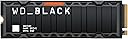
The WD Black SN850X 2TB NVMe SSD delivers elite gaming performance with ultra-fast 7,300 MB/s read speeds and a premium aluminum heatsink for superior thermal management. Designed for serious gamers and PS5 users, it offers massive storage capacity and Game Mode 2.0 technology to minimize load times and maximize smooth gameplay. With easy installation and a 5-year warranty, it’s the ultimate upgrade for your gaming rig.


| ASIN | B0B7CKZGN6 |
| Best Sellers Rank | 1,282 in Computers & Accessories ( See Top 100 in Computers & Accessories ) 7 in Internal Solid State Drives |
| Box Contents | Internal SSD |
| Brand | SanDisk |
| Brand Name | SanDisk |
| Cache Memory Installed Size | 2 |
| Color | Black |
| Compatible Devices | Computer, PlayStation 5 |
| Compatible Video Game Console Models | Sony PlayStation 5 |
| Connectivity technology | NVMe |
| Customer Package Type | Standard Retail Package |
| Customer Reviews | 4.8 out of 5 stars 15,659 Reviews |
| Data Transfer Rate | 7300 Megabytes Per Second |
| Digital Storage Capacity | 2000 GB |
| Digital storage capacity | 2000 GB |
| Enclosure Material | Aluminium |
| Form Factor | M2 |
| Global Trade Identification Number | 00718037891309 |
| Hard Disk Description | Solid State Drive |
| Hard Disk Form Factor | 0.87 Inches |
| Hard Disk Interface | NVMe |
| Hard disk form factor | 0.87 Inches |
| Hard disk interface | NVMe |
| Hard-Drive Size | 2 TB |
| Hardware Connectivity | Solid State Drive |
| Hardware Platform | playstation |
| Installation Type | Internal Hard Drive |
| Item Dimensions L x W x Thickness | 8L x 2.2W x 0.2Th centimetres |
| Item Type Name | Solid State Drive |
| Item Weight | 24 Grams |
| Manufacturer | Sandisk Technologies Inc. |
| Manufacturer Part Number | WDS200T2XHE |
| Media Speed | 7300 MB/s |
| Model Name | SN850X |
| Model Number | WDS200T2XHE |
| Network Connectivity Technology | NVMe |
| Number of Items | 1 |
| Product Features | Game Mode 2.0, Heatsink |
| Product Warranty | 5 year manufacturer |
| Read Speed | 7300 Megabytes Per Second |
| Special feature | Game Mode 2.0, Heatsink |
| Specific Uses For Product | Gaming |
| UPC | 718037891309 |
| Unit Count | 1.0 count |
R**Y
Blazing Fast and Runs Cool — Perfect for Gaming
I upgraded to the WD Black SN850X 1TB with Heatsink for my gaming pc after my ssd died, and it has exceeded every expectation. Installation was a breeze — it slotted perfectly into my motherboard's M.2 slot, and the built-in heatsink saved me the hassle of having to reuse the one i already had and made installing it easier The speed is incredible. Boot times are almost instant, and games load fast AF. I’ve also noticed smoother performance although thats probably due to having a fresh windows install. The heatsink does a fantastic job — even under heavy load, temps stay well within safe limits. It’s also PlayStation 5 compatible, so this would be a great option if you're looking to expand your PS5 storage with something fast and reliable. although i dont own one so cant comment on anything about that If you want top-tier performance with excellent thermal control, this drive is worth every penny. Highly recommended!
R**J
Great way to improve your (in my case) PS5
Really easy to install on a PS5 (can't speak for anything else). PS5 Cover off (which just pulls off), one screw to remove SSD cover, 1 screw to remove 'spacer', clip SSD into place, slide spacer in to ensure a good tight fit, do up screw, replace SSD cover and tighten screw, refit PS5 cover (which snaps on) - turn on PS5 and select Format when prompted - play PS5 - simple. PS5 (mine is the 1TB Slim version with Blu-Ray) is a little annoying in that I had a PS4 Pro (1TB) - so, you think - great have a 1TB, so everything will fit on the new PS5 1TB - NO, because the system software is much bigger - you only have about 730GB to play with. Also, if (as many do), you have an external hard drive on your PS4 - be aware YOU CANNOT PLAY GAMES FROM THAT ! - it needs to be on an SSD - either the one you get with the PS5, or with one that you add. You can only store games on the external drive, not play them. So, buy one of these SSD's, they're great, reasonably priced, fast, and gives you loads more space. Just buy one!
A**R
Definitely Worth the money
Works good. Easy to install. Lot of space for decent price
M**.
Great product!
I’m extremely impressed with the WD Black SN850X 2TB NVMe SSD with Heatsink and would happily give it five stars. This drive delivers outstanding performance and has been a fantastic upgrade for my PC, providing incredibly fast loading times, smooth operation, and plenty of storage space for games, applications, and large files. Installation was straightforward, and the M.2 2280 form factor fits perfectly into compatible systems. The included heatsink is a great addition, helping with heat management during demanding tasks and giving extra confidence when using the drive for extended gaming sessions or heavy workloads. Once installed, the difference in speed compared with a traditional hard drive or older SSD was immediately noticeable. The read and write performance is excellent, making everything feel much more responsive, from launching games to transferring large files. The 2TB capacity is also ideal, offering enough room for a large game library and important software without constantly needing to manage storage space. The build quality feels premium, as expected from WD Black products, and the drive has performed reliably with no issues. Overall, the SN850X is a high-performance SSD that combines speed, capacity, and reliability in one excellent package. I would definitely recommend this SSD to gamers, content creators, or anyone looking to significantly improve their system performance. It is a superb upgrade and easily deserves five stars!
N**E
Best PS upgrade option!
Game changer, literally! I was debating just buying a new 1TB PS as I tried an external storage option but wasn't satisfied. Then I found this with great reviews. I am so glad I got it and saved so much money. It was so easy to install. Note: this is an internal ssd but don't be out off. Google installation but you only need to unclip the cover and remove 2 screws. Plug in ssd and put the screws back in. Then format it when prompted and BOOM! Takes a few minutes and you have yourself a full storage upgrade. All my games play seamlessly with no issues at all. I don't often write reviews but this was definitely deserving of 5 stars.
F**Z
Works flawlessly (via an andaptor) in my '2013' Mac Pro (running both MacOS and Windows 10)
Got this for a fantastic price on Prime Day. I was not sure how this would behave in an old '2013' Mac Pro (via a cheap tiny adaptor) — some NVME's will part-work, but for some reason MacOS can't boot from them ...no such worries here thankfully! I am getting slightly faster — and certainly more consistent — write-speeds with this NVMe storage when compared to the old Apple storage that originally came with my Mac ...and at a decent 1TB it has quadruple the capacity of the old stock apple stick. The built-in heat sink seems decent — if you have room for a heatsink I would always opt use one. The OS seems slightly 'nippier' to when using this storage. I also have Windows 10 on a partition on this stick, and that too seems to run without issue. If this goes on 'sale' again (for £75 or less) then I would highly recommend it.
K**E
so far, a very good product
several months ago I bought mw3 for the ps5. with all the updates seemingly almost daily and the constant changes to the game every 8 weeks or so, it very quickly filled my hard drive on my ps5. I had plenty of other games on the internal storage, which were being removed to an external drive to allow for the mw3 updates. on the last time I checked, there was only 40gb of space and no other games, I decided to fit an internal ssd with 2tb of available space. the first one I bought was only £100 and had very good reviews, so I took a punt and bought it. not only did it not work but my ps5 never even recognised it was attached. I quickly returned the unit for a full refund. I wanted to buy this one but at the time I could not justify the price, bearing in mind that this particular model was twice the price of the original one, that I had purchased. 2 weeks ago, just after the Amazon prime reduction I noticed this one had dropped in price by £60, so I bought it. within 2 minutes it was fitted and working exactly as it should. I transferred all my external ps5 games on to it. it took over 6 hours and then another 2 hours for the updates to be installed. now, I can pick any game that I want to play and play them, not kick out a game and install a game to play several hours later. so far £150 well spent. I still have over 1tb of space available on the internal drives and 1tb on the external drive. I never installed the ps4 games, because they can be played direct from the external drive.
C**N
Everyday use I personally haven’t noticed a huge difference
I installed the WD Black SN850X 2TB NVMe as an upgrade expecting a noticeable jump in speed. On paper it’s extremely fast, with advertised read speeds up to around 7,300 MB/s on PCIe 4.0 x4, which puts it right at the top end of Gen4 SSDs. Installation was straightforward and the drive works perfectly. The system recognised it instantly and it performs exactly as expected. That said, incompared to other NVMe drives running in PCIe 4x4 mode. Boot times, program launches, and general desktop use all feel very similar to other decent NVMe SSDs. Where this drive really shines is in benchmarks and large file transfers, where the higher sequential speeds can actually be used. For normal daily use and gaming though, the difference isn’t as dramatic as the specs might suggest. Build quality is excellent, reliability seems solid so far, and it’s clearly a very capable high-end drive. Overall: a very fast SSD and a great upgrade if you want top-tier Gen4 performance — just don’t expect everyday tasks to suddenly feel dramatically faster.
A**N
Nickel
Installé dans un PC gaming. Les débits annoncés en lecture/écriture sont atteints sans problème. Utilise l'application SanDisk Dashboard (anciennement WD Dashboard) pour des réglages et effectuer les mises à jour firmwares.
U**Z
Excelente
Excelente
C**R
Fantastic and recommended.
I had studied a lot options and this was top choice for obvious reasons. The metrics and performance are as described and this is obviously better than the version officially recommended for PS5. Take this and you'll always smile 😍
サ**☆
こいつ・・・光るぞ!(H370-PRO GAMING(WI-FI)のクローンディスクに使用)
WD BLACK SN850X NVMe SSD 2TB WDS200T2XHE(ヒートシンク付) Crucial MX300 525GB(2016)から本製品の2TB(ヒートシンク付片面実装)にクローンして換装。 使用中の温度は、MX300の25℃に対し45℃でした。(室温22℃にて) その後、吸気ケースファンの位置を下げたところ、MX300が23℃に、本製品は40℃となった。 以下は概略手順(参考) ①本製品をM/B※1のM.2_2スロットに取付ける※2。 ②ディスクの管理※3にて本製品をGPTフォーマットする。 ④クローンソフト※4にてMX300ドライブ(525GB)を本製品にクローン。 ⑤BIOSメニュー(再起動時にF2キー)にてブートドライブを本製品に変更する。 ※1:H370-PRO GAMING(WI-FI) ※2:M/B付属の六角ポスト及び取付ビスを使用する。六角ポストによりM/BからSSD背面が浮くため、両面実装のM.2SSDや大型ヒートシンクも取付可能と推察する。 ※3:Winマークを右クリックしてディスクの管理が選択できる。 なお、OSがWin 10 homeのため、CドライブのBitLocker(暗号化)の解除は不要であった。 ※4:Macrium Reflect8の30日無料トライアル版 MX300ドライブは、1-回復(450.0MB)、2-NO NAME(100.0MB)、3-書式なし(16.0MB)、4-(C)(487.94GB)、5-なし(563.0MB)の順だったが、1-回復、2-NO NAME、3-書式なし、5-なし、4-(C)の順にして4-(C)を最大サイズに指定した。また、本製品内に1-書式なし(16.0MB)が作成されていたが、これは不要と判断し削除した。なお、今考えるとMX300ドライブの3-書式なし(16.0MB)も削除して良かったかも知れない。過去にWin7からWin10にグレードアップしたため、パーティションの乱立が起きていると推察する。
E**Z
Excelente producto.
Llego en óptimas condiciones tardo casi el mes pero del lugar de donde viene es normal el funcionamiento es perfecto, no llevo mucho usándola pero la transferencia de datos fue muy rápida. Facil de instalar y el precio me pareció excelente. Recomendable. 2TB.
Trustpilot
4 days ago
2 weeks ago