




Sense Energy Monitor - Track Electricity Usage in Real Time and Save Money
Product ID: 47172569
⚡Real-time energy tracking
📱Multi-platform app access
🛡️ETL/Intertek certified safety
⚡ Power your smart home with real-time energy mastery!
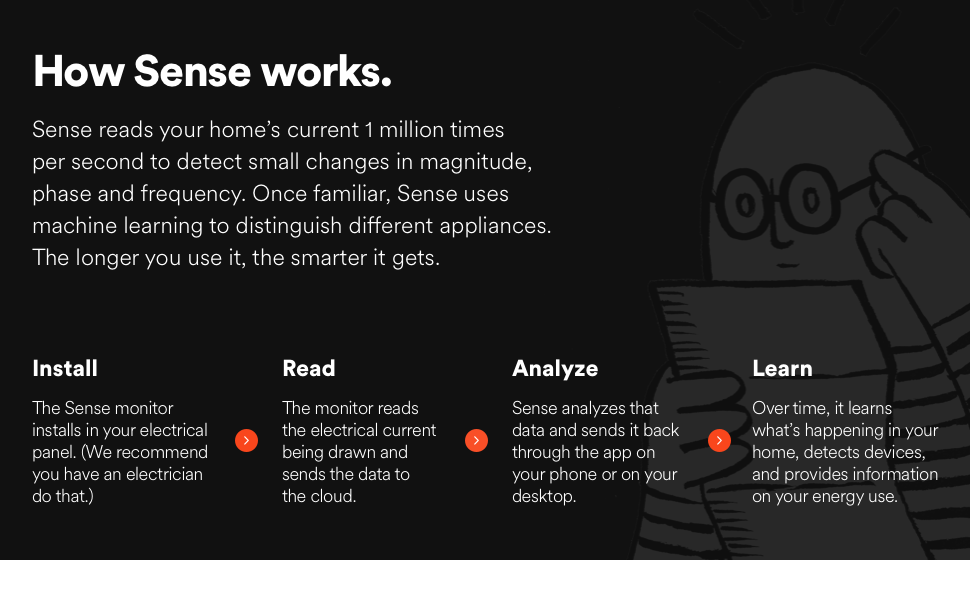
The Sense Energy Monitor delivers real-time electricity usage tracking with multi-platform app support, enabling users to optimize energy consumption and save money. It features custom alerts for critical devices and supports time-of-use rate plans. Designed for safe installation inside electrical panels, it meets rigorous ETL/Intertek safety standards, making it a trusted choice for modern, energy-conscious homes in the US and Canada.




| Asin | B075K6PHJ9 |
| Best Sellers Rank | #472,794 in Tools & Home Improvement (See Top 100 in Tools & Home Improvement) #677 in Home Automation Devices |
| Color | Orange |
| Customer Reviews | 4.0 4.0 out of 5 stars (2,967) 4.0 out of 5 stars |
| Date First Available | September 11, 2017 |
| Included Components | Sense monitor |
| Item Model Number | 12000 |
| Item Package Quantity | 1 |
| Item Weight | 1.7 pounds |
| Manufacturer | Sense |
| Part Number | 12000 |
| Pattern | Monitor |
| Product Dimensions | 7.9 x 7.6 x 7.4 inches |
| Style | Sense |
| Voltage | 110120 volts |
User
Can be use in Thailand 1-phase, 220 Volt ! Great product !
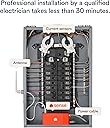
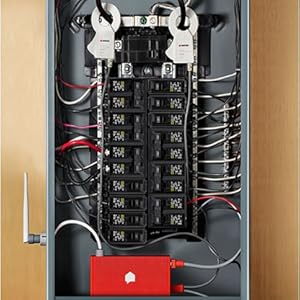
I'm Thailand customer who want to try this cool gadget.Of course, the warranty will automatically voided.And i'm fully awared my risk and acknowledged.I hope my review could provided valuable information for other international customer.And you may use it at your own risk.My electrical system. (In Thailand, which is common in EU-standard.)Is 1 Phase (Non-split like US), 220 Volt, 50 HertzWhich means... i have 2 wire goes to my house.One is LINE, another one is NEUTRAL.And voltage across Line-Neutral is 220 Volt.I'm am Mechanical Engineer and have some basic knowledge about electrical system.So, i'm doing this on my own (With my Dad's help) without certified electrician.We use extremely caution, and use probe to double check which wire is Live (Always have electricity) and which line is Neutral.Installation step :(Find the picture) I detach the main-panel and on the left side.You will see main circuit-breaker with two big black-wire (That coming from power-line) connected to it.Black wire on the LEFT pass thought breaker and connected to upper uninsulated Bus-bar. (This is Neutral zero Volt)Black wire on the RIGHT pass through breaker and distribute electricity through all of Circuit-breaker on the right. (This is Line 220 Volt)For electrical wiring, i have two breaker empty (the 6th and the 7th)So, the Black-wire (Power supply & voltage sensing to SENSE) goes to 6th breaker.And White-wire obviously goes to upper busbar (Neutral)For the Current sensing (The clamp), just attached only one to the Line.Setup :When i switch on the power.The app show that something wrong with the installation :)I just continue and go to the main screen.And yes, its showing Power consumption for only one phase.Testing :I do initial testing, like turn on the light.Use the Induction hobs, oven.The app show the power consumption very accurate.Problem :Yes, i use this in Thailand.So, after 3 hour of data-sampling. The main menu indicate warning say about"Sense detected an installation problem and unable to fix automatically. Support team will take a look."Because i use only one phase with abnormal 220 Volt.And SENSE probably cannot analyse my current and voltage data to map electronic devices in my house.I'll try to contact SENSE team... if they could make my account as an exception.And analyst my data...Another problem is, when SENSE was running for a while.The real time data of Power (Watt) indicate the app seem to be shift. and its getting larger by the time passed.For example, on the 10:45 its showing live feed of data on 10:40.I thought this might be internet connection or bug. So, i reset my router and SENSE.Its still happening and three hour passed. The gap was larger.Like.. on 13:50, SENSE live-feed time showing data from 13.35 !Conclusion :Regardless to problems (exclude i cause by using it in Thailand).I'm satisfy with the futuristic concept of tracking power consumption in household.The setup was quite simple, If you have electrical knowledge.If you don't, just call professional guy to take care that for ya.I can't try this AI-feature yet. But still love it !Update : 2/2/2020Day 0After SENSE detected installation problem and cannot analyse electrical signal to map my house appliance.I've sent an email to support team to unlock or by-pass.And at the end of day, App show that installation diagnosis is OK and start listening now.Day 1My Pressure booster water pump was detected. (Brand : Grundfos)App saying that most user voted this might be 97% match to the "Pump"I do some verification, on the pump on.. see if SENSE detect this pump.And yep, this is definitely the pump.Day 2Sense notify that two new device detected.Heater & Motor...Identify the "heater" was a little bit difficult.Because i have... Water heater, Rice cooker, Induction stove ?But after i click at the usage data. I can see that this Heater was active around 6 p.m.At that time, i was't shower or use the stove !So, 100% this is rice-cooker. (Electrolux-brand)App suggest Coffee maker 50% & Rice cooker with 40% confidence, Good guess !For motor, i just click and see the activity.This one was active on 11:00 p.m. until 8:00 in the morning.Also, it keep cycling ON-OFF for 50-70 times during nightApp suggest this one was A/C with 97% confidence !
User
Really great product for landlords, much cheaper alternative to sub-metering
Wow, this is a simple way to solve splitting up utility costs for multiple rental units all under the same meter. Rather than getting a whole new sub meter system set up, which will costs thousands and require city permitting, and interacting with the utility company, just get this devise installed. My electriton installed it in about 3 hours. I have this measuring the entire amount of electricity that gets used by an adu on my property. I occupy the main house, and have a tenant in my detached ADU (second unit). This devise measures how much electricity is being used by only the ADU and not the main house. I am sure this could work for house hackers as well because it can be installed to measure individual bedrooms and what not if you set it up to do so.Each month I send my tenant a screenshot of the energy usage. This devise also allows me to input the cost of a KWH and calculates the cost for me! One screenshot is all I need to do to inform my tenant of how much to send me for this months utility bill, I dont even have to think about it.I rarely write reviews, but I went down a very very long rabbit hole of trying to figure out how I can accurately bill the utility costs to the tenant in the second unit, and want to help others out. It was actually my electrician who lead me in this direction. While this devise isn't advertised to be something landlords and house hackers can take advantage of, it absolutely solves a problem and I am very satisfied.Upon discovering this devise I learned there are similar types of devises that measure water use-age as well.Overall this is a gem for those looking for a cheaper and simpler alternative to sub-metering.
User
Review from an engineer
I'm not an electrician but I am an engineer and wanted to give an honest review on how someone who is comfortable with technology will experience the installation and operation of the device.INSTALLATIONThe installation is very straightforward and should take 30 minutes, including prep and cleanup. Here are some things that are not immediately obvious from the simple installation guide.* They mentioned that this device should be installed by an electrician. This is likely because you'll be playing in your panel, which cannot be fully turned off. The installation is dead simple.* Your electric panel, if fed by the street, will ALWAYS have live, exposed and energized terminals. The energized and deadly parts are whatever come BEFORE your service disconnect. You will need to put two clamps around insulated ENERGIZED wires. That's the reason the instruction manual asks to get an electrician to install the Sense. You do not want to touch the live terminals ever.* Buy a touchless live voltage detector. Test it on a live circuit, then test it when the circuit is off. Use that to help you confirm that what is off is really off.* The manual mentions it but it's really important. Make sure the clamps are put around the live wires AFTER the clamps are plugged in the sense. You can receive a deadly shock otherwise.* When you are putting clamps around the live wire or your hands are anywhere near the energized terminals, DO IT WITH ONLY ONE HAND. Your other hand will be in your back pocket.* Wear rubber shoes/boots and use common sense.WIFI* Do make sure that the antenna is screwed in all the way and that it is OUTSIDE the panel. Doesn't matter if it's visible to you or stuck inside a wall, it must be outside that metal box* The device only supports 2.4Ghz. While it's touted as a longer range than 5Ghz, the spectrum is usually crowded.* Setup was easy and worked the first time. It doesn't try to provide a seamless experience by capturing the config from your phone, which is a good thing. Devices that try to be too smart and only support 2.4Ghz often fail when the wireless network name (SSID) is the same for both 2.4Ghz and 5Ghz.* The sense connects over bluetooth for the initial discover and WiFi configuration. It costs more but provides a solid experience that doesn't involve changing the WiFi on your phone (Like an Amazon Alexa for example).Accuracy* I found the sense to be 5-10% off in a consistent fashion when compared to the meter. This will likely not affect device detection since turning a 100W light bulb on and off produced consistent results on the dashboard.* I wish they'd provide a way to calibrate the sensor for advanced users. For example, turning off all the circuits in the panel except for a circuit that only has a 100W light bulb (Or something equivalent...). Then calibration mode would listen for 1 minute while the user turns the light bulb on and off a few time. Repeat for the different live wire and both clamps would be calibratedDevice detection* You can turn on network device detection in the settings. It will see when network devices turn on and off and try to match their MAC address to an energy pattern* "My Home". You can help the detection algorithm by listing the devices you have in your home. You can simply say you have "1 over" or be more specific with the make and model.* There is integration with other IoT devices. For example, it can connect to a smart thermostat and learn when it turns on the heat/ac/fan and improve the detection of your HVAC system.* It takes a few weeks to see devices appear.* I'll need to come back and edit my review when it finds devices.App and data* The app works well and is easy to use* Electricity cost is fixed with no support for more complex billing schemes. For example, in California, we have a 3-tier system where the more electricity you use, the more expensive it gets.* There's integration with different assistants if that's your thing (Alexa, Google)* Integration with IFTTT is pretty cool and lets you do things like send you an email if you leave the garage door open or if the bathroom light stays on for more than 1 hour.* There is no local interface not support for it. Publishing data to a local MQTT gateway would make this ideal for power users* Data export in CSV is available but needs to be done manually via the web interface.* There is no public API of any kind. You'll find reverse engineered clients on Github but nothing supported by Sense.DETECTION LOG (To be updated regularly08/03 Sense installed. No devices found08/05 No devicesReview update log (Excludes detection updates)08/05 Initial review. 4 stars
User
Great overall energy monitor to learn big picture and help save
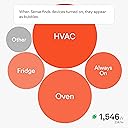
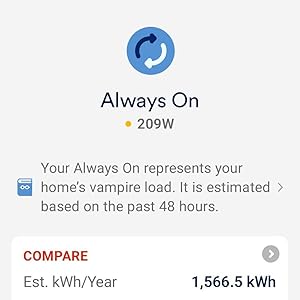
I have had a Sense for over 4 years now and I still enjoy it very much. I have used it to reduce overall energy consumption in my home by helping raise awareness of "Always On". More on Always On in a moment.My one warning - its not a "Buyer Beware", but more "Buyer be aware". Sense's ability to live up to its marketing hype with device detection is affected by many variables. Some homes have good results. Others don't. I've had reliable detections that work great for a while, and then stop working when the seasons change.Another thing to keep in mind. We tend to think of appliances in their whole. "The Fridge". "The Washer". Sense uses Machine learning algorithms to detect devices. Notice I said devices, not appliances. Your Fridge is actually a whole bunch of different parts that do different things at different times. Sense may detect your "Fridge" but it has actually only detected the compressor. It may not detect the defroster, or the ice maker. Or it may detect those things, but not necessarily as "Fridge". There are tools to allow you to merge detected devices. So if it finds "Fridge" and then it finds "Light" and you know that "Light" is actually the Fridge Light, you can merge them together so it all gets tracked together.This leads me to the next item. Sense doesn't always know what its detected. It knows it found something, and it can generally put a category to it (Motor, Heating Device, Light etc..) but the leg work on finding out which motor, or which light may be on you. Sometimes this is really easy. You turn on your bathroom vanity lights and see "Light" turn on in Sense, and you know and can then rename "Light" to "Bathroom Vanity". Other times, its harder to track down, especially when the device detected is a part of an appliance. This is where the active community forums comes in. Sense's Machine Learning is good, but at times, a human is better. Frequently people will post the graphic of the device that was detected, and other community members can chime in with suggestions. "I have a Garbage Disposal that has a waveform like that. Do you have a Garbage Disposal?"While I say a human eye is sometimes better, this is another item to mention. Training Sense is NOT something you can do. People always ask "can I train it". The short answer is no. Sense's ML system will do its work and find devices on its own. There is no training mode. Turning something on and off a bunch of times to try to "help" Sense see it is not always useful.Now, back to Always On. While my device detection has been so so, the Always On feature is what has really saved me the most money. After running Sense for about 48 hours, it will come up with an Always On number. This is basically the "low water" mark for electric usage in your home. At any given point in time, you are always using around xxx Watts. If you have an always on of 100w, using the average US rate of electric of 13.28c/kWh, that is $9.70/month or $116/year on your electric bill. While Sense cannot help you identify the Always On devices, just the awareness of the always on is enough to help you start making changes (if you want) to your home. Seeing my always on power of 600w (~$700/year) made me start looking for things that didn't turn off. I had a fan in my basement that ran 24/7 that I had never thought about. Now that fan is on a timer and only runs 12 hours a day.My TV stereo system which was always on is now on a power switch. Savings of 15w of Always On power. And the list can go on. Without too much effort, and more importantly, without impacting the comfort of the home, I have cut that always on number down to 300w.A last benefit of Always On. Once you learn your homes baseline, if that always on changes significantly in one direction or another, it can help to notify you that something is amiss. Always on goes down? Maybe a failed pool recirculating pump. Always On goes up a lot? Someone left the fan in the guest bedroom on. And so on.So all in all, I highly recommend a Sense. Whether it detects many of your home devices, or you just use it as a live instant power meter, it can bring savings and knowledge to your electric consumption in your home.
User
Seems cool, but a worthless product
I know someone who uses this and it seemed to be cool and might help reduce and track some power draw at my house.Install wasn't too bad, really just came down to were I could fit everything (clamps were a tight fit and I had to route cables outside of my box) but that's no problem of the product.The app setup itself was super easy and quick.Unfortunately that's where the good ends.It sometimes finds a device and will mark it. 95% of them are incorrect, or the 1 device is actually 3-4 different ones.I use a lot of electricity in my house and it's very standard stuff and I was hoping for sense to at LEAST find 25% of them in the 2 months I have been using it.For reference I am way above the top electrical users in my area, state, and all of sense it reports.air fryersoven\stoveFan and or light above oven2 ceiling fans3 computer monitors2 TVsSoundbar1 desktop2 laptops3 serversSonicwall firewallCisco switchNetgear switchAruba switch2x KVMs5 cell phone chargersWasherDryerDishwasherKuregThermostat3x space heaters (used as only heat source)bathroom fanIP camera (not PoE)Electric blanketAll LED lighting (23 different fixtures)2 shop lightsAs you can see I have a ton of devices this think could eat up.It found the water heater, and days after found the second heating element and I was able to merge the devices.It learned my microwave that I almost never useIt leaned a some cycles of my clothes washerIt knows the vent fan in my dishwasher, but not the unit itselfIt learned 1 of airfriyers.It found 1 of my air friers, and it merged it with 1 of my space heaters. I asked support what could be done and they just said if it's wrong delete it so I did.It has not learned the 1 air fryer or heater in question again.That's it, nothing else. Not even attempts.I have 2 space heaters, 1 I run at night in the master bedroom, and it will run until it's warm then cycle off. It's a Vornado, not that it should matter, and another space heater in the living room during the day, same thing.It never has attempted to identify any piece of electronics such as a desktop, laptop charger, phone charger, server, switch. You know the stuff you would like to know how much is pulling?I tried to use the community forums but I as a paying member not allowed to even post my own threads, just respond to other peoples, what crap is that?People have all these pictures of bubbles of what their home had\uses and all I ever get are 2 bubbles. Always on, and Other. Not very useful. Ironically the "other" is mostly always on. I have 2 servers running 24/7 that pull more constant wats then the always on so they can't even get that right.There is a section where they detail always on devices, and it just lists the sense device itself at 3 wats, out of my 465 of always on.I am curious how some people are having any luck with the device. I understand my environment is rather complex but this device was not advertised as a device in alpha, this is not even beta quality software, it just doesn't work and there is no way to troubleshoot, or even let the developers know something is wrong.I will continue using this until mid January and then I am going to rip it out and return it back to Amazon. This is not even worth $25 to me in it's current state. a Killawat meter provides way more accurate information then this. I thought it was much more matured and would make attempts to learn anything I have.Update: I reached out to support for a second time and they reported that my device needs to be within 10-15 feet of my wireless accounts points. I stated it was 50 feet away (has perfect signal) and they are just going down some random notepad of ways to essentially deny looking at your support request. Not once has my device lost signal except for when I turned my main power off to do some electrical work.
User
Track Utility Usage
Sense is an excellent whole house power consumption tool. Real time power monitoring makes it simple to view current power consumption and determine which devices draw excessive power. After weeks or months, machine learning devices identification will take place and your whole house power consumption profile will start to emerge. Machine learning takes time so be patient.Start by taking a whole house tour. Upon entering a room turn on and off individual switches and watch the power meter increase and decrease. Incandescent lighting is a power hog and the power meter will increase between 60w (watts) and 400w depending on the number of bulbs and their power rating; not good. Replace incandescent lighting with LED bulbs. LED lighting has a much lower operating cost; more efficient and will outlast an incandescent bulb. The annual operating cost of ten (20) sixty (60) watt bulbs operated for an average of six hours per day at 15 cents per kilowatt-hour is $395. Compared to equivalent LED lighting the annual operating cost is $52.00 a $342 annual savings.In the early morning hours when everyone is sleeping analyze your always on usage. Many devices demand power at rest or powered off; for example, furnace, garage door opener, refrigerator, router, washer, etc... Garage door openers are a good example of always on power usage; while at rest they may demand 20w of continuous power to be ready for the next time you open and close the garage door. A Keurig brewer use the most power during initial startup and after brewing. If the power is kept on, the brewer continues to use 200 to 400 watts of power in short bursts to heat water when the Keurig is not in use. Set the Keurig energy saving mode or auto off timer to conserve power when not in use. There is little you can do about always on power usage until the next time you must replace an item. Look for Energy Start appliances, electronics, heating & cooling, lighting and fans.Other usage will decrease over time as machine learning starts to identify devices and distributes power between each device; for example, washer, dryer fridge, circulator pump, microwave, etc.… Again, machine learning takes time so be patient and help the Sense community identify when prompted. For example, a heater was identified by Sense and it took some time to identify the source. The heater was a ceiling light/vent/heater combination in the guest bathroom.I have noticed that Sense machine learning identified Incandescent lighting but has not identified LED lighting as of now.FYI – after replacing incandescent lighting, turning off a 2nd refrigerator in the bar, turning off the garage door openers, replacing an old TV, setting the hot water heater to 120 degrees, turning on the refrigerator economy mode and using spot lighting the electrical bill dropped 50%. As a power consumption tool Sense is invaluable.In closing Sense has other practical applications. No need for a home freeze alarm in the north, set a custom alarm to alert you when the furnace does is off for a period (days, hours or minutes). Tell when you kids turned off the TV and go to bed.Would I recommend a Sense unit to my friends; YES.
User
Not Super Impressed So Far
So I'll say upfront this is based on having the sense device installed for about a month at this point. Its probably the least smart device in my house at this point and honestly really hasn't been worth the money. Maybe that will change over time and if that's the case I will edit my review.*** INSTALLATION ***This was pretty easy but I have no problem working with electrical and/or being inside the panel as I'm very much a DIY'er. The instructions and videos were straight forward and I knew what to expect. I lucked out in that I had a 240v breaker installed that wasn't being used anymore so I just appropriated that and remove the old wiring from the panel (something I'd been meaning to do anyway). That said, if your even the slightest bit apprehensive about electrical work you should probably consult with an electrician.*** MONITORING ***Its only detected 7 devices so far and even then I'm not 100% sure those are correct. The ones it has detected are pretty similar (Fridges, Coffee Maker, Microwave, Dehumidifiers and my HVAC unit) but its missed all kinds of other things. Some of that may be my fault for having a decent number of devices setup using AVR UPS systems ... so its unable to detect anything in my home theater setup, my office computers or my home server/networking gear.All that said ... it does give me a good idea of what electricity usage in my home looks like overall and its nice to be able to monitor it. I just have to wonder what goes into the giant "Always On" and "Other" bubbles.*** INTEGRATIONS ***I should have researched more thoroughly into TP-Link KASA support because none of the devices that I have are compatible with the integration (I have an extensive collection of KASA switches, bulbs, power strips and smart plugs but none are compatible). The Philips Hue functionality works but I'm slowly phasing that out of my home and I'm really down to 3 Hue bulbs at this point. I have not really taken the time to try and setup the Alexa integration since the questions I could ask it arent super helpful at this point.
User
Geeky Fun - Makes a Closet Data Scientist Out of Us All :)
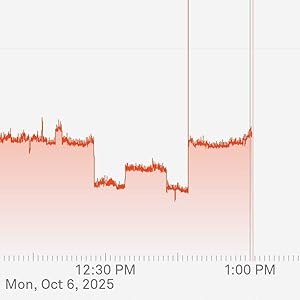
It's hard to argue you ever "need" such a device, but if you love to geek out on IoT and everything having a bit of a "brain" of sorts that you can peer into, then this is one of those things to be sure. After all, you can have a smart thermostat that'll tell you you turned on the furnace but this will actually tell you it's "really" on, how much power it's sucking, and estimate (at a per-second resolution!) how much money you're burning based on the rate data you give it.The data scientist in me loves honestly how they take a data lake of "noise" that comes for all the on/off cycles and the "quality" of the electrical data harvested to begin to piece together a story of what each thing is. It takes a week or two for the first item to be "found" and sometimes it's a treasure hunt when you verify what it is. For example, It would find lights and you had to double-check what they were and then you can properly label them. The most fun to find ended up at first I thought the refrigerator light (yes, on the inside) since I could verify it went on/off when I tested it. But then why did it come on in the middle of the night too? And no, nobody was out having a midnight snack. I deduced it was the internal door heater all fridges have to prevent frost. Made sense that circuit looked similar to the system but it was detecting an aggregate of like 63W, which seemed high for even an older fridge. Voila! The big stuff will then come next typically... electric ranges, dishwasher, A/C compressor. I'm still waiting on the fridge compressor itself and just got a new washer/dryer so will be interesting to see those get tagged.The support is excellent I'd say. It's mostly via email of what I've used but responses are very fast - usually same-day. And setting this up was a piece of cake *IF* you're comfy around electricity and respect your panel's ability to do harm. Lots of amperage in there and yes, you'll have to shut down the house to either hook this up to a new 240V breaker or piggyback off another (like an electric range/dryer circuit)... but the mains that come into the box are always live from the street and that's usually hundreds of amps. Two "loops" get clipped around each branch of those mains but there's typically plenty of room so long as you have a nice neat box.From there it's standard IoT-type setup. Turn on the power, it'll boot up, light up, and after perhaps 10-15 seconds give you a friendly beep that all is well. You'll then see it broadcast a SSID. Pair to the device which temporarily turns into a hotspot, give it your home LAN's SSID/PW, hand it off to the home LAN, and then finish any security you do on your network side. Log into the app and you should be going from that point on.Be aware if you have a really stingy ISP that this device is logging your electrical reality again on a 1-second pulse basis snapshot. That turns into roughly 300MB per DAY that it'll shoot up to the cloud for analysis in the data lake. Not a big deal even with today's caps honestly unless you're an absolute pig but for awareness!I think that's all from me. Have fun~!
User
Easy to install, Crazy Accurate
On a full month, it's as close as 0.5kwh from the utility meter, this is quite incredible.After 6 weeks it's continually detecting new devices in my home. Still, have a lot to detection to do but it's a very useful tool to reduce your electricity bill. I've reduced my consumption by about 25% since I have it. Great tool, can't recommend it enough.
User
Excelente
Excelente producto, si se lleva casi un mes en empezar a detectar los equipos, pero en general es muy bueno
User
Great product, works magic and gives you great insight into your electrical use
This product is quite amazing, but you will need patience (like at least 1 month) to see the results (detection of devices is slow). However, it gives you great information about your electrical use which in turn allows you to make changes to your devices/habits to spend less on electricity. For example I can tell if the stove was left on, if the garage door was turned on, etc and set notifications to let me know what's going on.
User
No comprar producto usado
El día de hoy 10 de junio del 2023 me acaba de llegar mi Sense y oh sorpresa tenía durex puesto (el sello de ambos lados estaba roto) la caja por obvias razones estaba golpeada y el producto mal colocado por obvias razones es usado es mejor no comprar este producto
User
Awful product. Confirmed by Support that this does not work for driers and baseboard heaters.
Just got the device in order to track electricity consumption at home, and first impressions are not that great. I know it takes take to sense devices, but we're one week in and besides itself it only detected one more thing as my stove but the readings are completely off and it claims the stove is going on and off all day and night (which I verified it is not).Will continue monitoring for now, but if it remains this inaccurate after 2-3 weeks I'll have no choice but to send it back. A device this expensive should be more reliable.---Update 2: 8 days after installation, and Sense has only detected that single device - supposedly my Stove. This was wrong, and was actually three separate baseboard heaters being detected as a single device. Power consumption appeared to be correct when only one was turned on, but did not increase when 2 or 3 baseboards were running at the same time. Per Support chat, this cannot be fixed and needs to be deleted so Sense can try to detect it properly down the road.---Two months in, and the device is flaky and unreliable. It has only correctly identified one baseboard heater so far. It also picked up the drier a few days ago, but that only worked for a couple of days and now no longer tracks the device when it's on. Seriously unimpressed.---After several exchanges with their support department, they've now confirmed that this does not work with driers and baseboard heaters, as they are unable to differentiate between their signatures. Completely disappointed by this, as this was not listed as a limitation in their product description. Will be returning it ASAP.---One year report - return was no longer possible, and after a year this piece of garbage has been proven completely useless. It's identified a handful of devices, consistently mixed them up with others, and is a complete failure when it comes to baseboard heaters. It can't tell any of them apart, and even mixes them up with the stove burners. Complete trash.
Trustpilot
3 weeks ago
2 weeks ago