

Desertcart purchases this item on your behalf and handles shipping, customs, and support to Tunisia.
🎯 Dominate your build with MSI MAG B650 Tomahawk — where power meets precision.
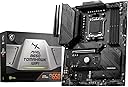
The MSI MAG B650 Tomahawk WiFi motherboard supports AMD Ryzen 7000/8000 series processors with DDR5 memory up to 6400+ MHz (OC). It features PCIe 4.0 Lightning M.2 slots, premium thermal solutions including extended heatsinks and M.2 Shield Frozr, and next-gen connectivity with Wi-Fi 6E, Bluetooth 5.3, and 2.5Gbps LAN. Designed for gamers and professionals seeking durability and high performance in an ATX form factor.


| ASIN | B0BHCCNSRH |
| Best Sellers Rank | #21 in Computer Motherboards |
| Brand | msi |
| Built-In Media | Item |
| CPU Model | AMD Ryzen 7 |
| CPU Socket | Socket AM5 |
| Chipset Family | AMD B650 |
| Chipset Type | AMD B650 |
| Compatible Devices | Personal Computer |
| Compatible Processors | AMD Ryzen 8000/ 7000 |
| Customer Reviews | 4.5 out of 5 stars 1,352 Reviews |
| Global Trade Identification Number | 00824142301036 |
| Graphics Card Interface | PCI Express |
| Item Dimensions L x W x H | 9.6"L x 2.5"W x 12"H |
| Item Type Name | Gaming Desktop Motherboard |
| Item Weight | 4 pounds |
| Main Power Connector Type | 24-Pin |
| Manufacturer | MSI |
| Memory Clock Speed | 7600 MHz |
| Memory Slots Available | 4 |
| Memory Storage Capacity | 128 GB |
| Mfr Part Number | B650TOMAHAWKWIFI |
| Model Name | MAG |
| Model Number | MS-B650TOMAHAWKWIFI |
| Number of Ethernet Ports | 1 |
| Number of Items | 1 |
| Number of Ports | 11 |
| Platform | Windows 11 |
| Processor Socket | Socket AM5 |
| RAM Memory Technology | DDR5 |
| Ram Memory Maximum Size | 128 GB |
| S/PDIF Connector Type | Optical |
| System Bus Standard Supported | Serial ATA/600 |
| Total Number of HDMI Ports | 1 |
| Total PCIe Ports | 3 |
| Total SATA Ports | 6 |
| Total Usb Ports | 10 |
| UPC | 824142301036 |
| USB 2.0 | 2 |
| Unit Count | 1 Count |
| Warranty Description | 3 Years |
R**R
Great motherboard with plenty of headers for fans and lights.
No issues except trying to sink rgb up with corsair ique. Besides that, its great. I did end up swapping out the wifi card out with a intel one to squeeze some speed out of the wifi. Has plenty of headers to run fans and rgb. I use a amd 7800x3d with 7900xt gpu with 32 gb 30cl ram and samsung exo g4 ssd. Handles everything with easy and keeps cool. I live in SOUTH New Mexico where its dry and hot. House stays about 75-85⁰f. No issues. Built to last. I like the bios from msi. Simple and easy. Update your bios! Use Ai to help if your not sure what your doing.
J**N
Exceptional Performance and Features - MSI MAG B650 Tomahawk WiFi Gaming Motherboard
I recently upgraded my gaming rig with the MSI MAG B650 Tomahawk WiFi Gaming Motherboard, and I must say, I am absolutely thrilled with the results. This motherboard has exceeded my expectations in every way, delivering an exceptional gaming and computing experience. My system runs smoothly, handling resource-intensive games and applications with ease. The motherboard's robust VRM design and high-quality components contribute to its impressive stability and reliability. One of the standout features of this motherboard is the built-in Wi-Fi 6E connectivity. With Wi-Fi 6E, I've experienced lightning-fast internet speeds and incredibly low latency during online gaming sessions. It's a game-changer for those who want to eliminate the need for cumbersome Ethernet cables while maintaining a stable and lag-free connection. The MSI MAG B650 Tomahawk also offers an abundance of connectivity options, including multiple USB ports, PCIe slots, and M.2 slots. This versatility allows you to expand your system with ease, whether you want to add additional storage, graphics cards, or other peripherals. The motherboard's design is sleek and visually appealing, featuring RGB lighting that can be customized to match your setup's aesthetics. It's not just about performance; it's about making your gaming rig look fantastic too. The BIOS interface is user-friendly and offers a wealth of customization options, making it easy to tweak your system settings to your liking. Overclocking is a breeze, thanks to MSI's robust and intuitive BIOS. In terms of audio, the MSI MAG B650 Tomahawk doesn't disappoint either. The high-quality audio components ensure crisp and immersive sound, enhancing the overall gaming experience. To top it off, MSI's customer support has been excellent, and the motherboard comes with a warranty that provides peace of mind. In conclusion, the MSI MAG B650 Tomahawk WiFi Gaming Motherboard is a top-tier motherboard that delivers outstanding performance, reliable connectivity, and a host of features that cater to both gamers and power users. If you're looking to build or upgrade your gaming rig, I wholeheartedly recommend the MSI MAG B650 Tomahawk WiFi Gaming Motherboard. It's a true powerhouse that will elevate your gaming and computing experience to new heights.
J**B
Is not updated to support 7800x3d...
This review is only with people getting this mobo for the 7800x3d .Though it don't support the 7800x3d without flashing first . Despite that this motherboard works great. I at first put a 1 star review. See When the 5000 series came out and i had to flash the mobo I installed every part cpu.. nvme.. gpu.. and I was able to flash right away. With the 7000 series to install you need everything off your mobo. I went through 4 usbs trying to get it to flash when i noticed i had the power leds from the tower case on. So if anyone installs the 7800x3d and other parts into their case before flashing the bios. The flashing won't work I confirmed this by testing 4 different usb flash drives... everything from the case and everything from the mobo.. even the ram. To flash this product you are going to need a 4gb-32gb flash drive formatted to fat32 now go to msi website. in the msi website find the support option in the website and click downloads. Now you are going to want to find your product for the first two rows click on mother board. Now you are going to want to click mag series. You should then beable to find the B650 Tomahawk wifi option. Now proceed and you will find the bios files download either one of last 3 files I personslly would go for the choose the most recent download that came out. Once you have the file downloaded transfer that to your flash drive ( don't include the notepad) again make sure the flash drive has been formatted to fat32. Once the bios update file is in your usb you are going to have to rename that file to (MSI.ROM) do not inclide the () in the renaming. Now that you have your file downloaded you are going to want to connect your power supply to your motherboard it is okay if the motherboard and power supply is in the case as long as there is nothing else connected to the motherboard. You are going to want to look at the usbs on the outer side of the case and there should be a usb slot that has a square line around it stating bios flash back with a little button on top that states bios ect.. insert usb hold button for a few seconds and release your finger a green and yellow light shows on the motherboard. Do not take out the usb do not disconnect the power supply either just let it be it may appear frozen but it is not . It should take about 5-10 minutes for it to flash once your motherboard either restarts or shuts off after 5-10 minutes your flashing is complete now install your 7800x3d now when installing you don't have to worry about your pins being flat;) Now for the rest of the review the motherboard is just like any other motherboard except for the cpu area. I upgraded from a 5800x so it was alien to me. For some reason the am5 board has a black plastic over the cpu slot that you have to remove... watch a tutorial for this part or you might mess up anything. I am using amd expo at 6000mhz by default. Do not use expo if you don't know what you are doing. Watch a lot of guides before changing voltages and timings. My 3080ti connected and the slot is nice and sturdy. The wifi is great and the bluetooth. This perfected my non rgb build ;)
S**H
A Robust Motherboard That Keeps Gamers in Mind
I recently upgraded my gaming rig and chose the MSI MAG B650 Tomahawk WiFi Gaming Motherboard for the heart of my new build. Having used MSI products in the past, I had high expectations, and for the most part, this motherboard met them. Pros: Design: The aesthetics of this board are eye-catching. The black and gray color scheme with subtle RGB lighting complements my build perfectly. Performance: With support for the latest processors and DDR4 memory, this board handled everything I threw at it with ease. The gaming experience was smooth, even in demanding titles. Connectivity: Built-in WiFi is a nice feature for those who need wireless connectivity, and there are plenty of USB and other ports for all the peripherals one might need. BIOS Interface: MSI's BIOS is user-friendly, and the Click BIOS 5 made overclocking and fine-tuning a breeze. Cons: WiFi Performance: While the WiFi connectivity is a great addition, I did find the speeds and signal strength to be a little underwhelming compared to a dedicated WiFi card. It's suitable for basic online gaming but might not meet the expectations of everyone. Price: The motherboard is priced slightly on the higher side compared to similar boards with comparable features. Overall, I'm satisfied with the MSI MAG B650 Tomahawk WiFi Gaming Motherboard. It's an appealing and reliable option for gamers looking to build or upgrade their system. Despite a few minor shortcomings, it's an excellent product that offers a balance of performance and aesthetics. For those who are serious about gaming and need a dependable motherboard with good features, this could be a solid choice. However, if WiFi performance is critical for you, you might want to invest in a separate WiFi card or consider other options.
A**A
Good so far
So far this has worked good. Compatible with 7900x3d and I have team T force Delta 6000 mhz 32gb ram with BitFenix Mesh SE TG case AIO Black cooler. The wifi works great and had no issues whatsoever except with the cases LED changing button. Whenever I press it to change the fan LEDs the PC crashes. Not sure if this is the motherboard or what but the fans work normally with the standard color setup. It might be just the fan module or something I'm doing wrong. A part from this I plugged everything in, remember ram goes into A2 B2 if you have 2 sticks, and booted it up with NVME and RX 7600xt. It booted up restarted twice on its own and then started up. The NVMe had windows from another PC. The case had usb 3.0 20 pins which did not fit right into the mobo 20 pin labeled usb and I bent the pins slightly. I bought an adapter for the usb 3.1 header and it runs just at usb 2.0 speed which is fine for me because there are plenty in the back. I have not updated the bios nor plan to unless I run into issues of stability. The board does have plenty of fan headers which is nice to get around too. The board is heavy but seems well built and the cpu backing seems strong and well put so the cpu aio cooler shouldn't rip or strip the screws. I did change out the CPU mount for a different one because I didn't like the fact of the mount only pressing down on two sides but that's just me. I wanted support on all sides. Bluetooth works great no issues so far on that side either. All in all I am happy with the purchase. Update: The fans I forgot I had to connect the controller to the case hold the LED button for 3 seconds for the motherboard to have controller of the fan lights. I straightened the pins on the USB header and was able to plug in the front USB 3.0. You need to be careful as it didn't like to slide in nicely at all hence why it bent the first go around. I have had no issues with it at all. I did update the bios since it patched a security flaw. The flashing of the bios was smooth. I formatted a usb drive unzipped the file from the site and put it on the root of the drive booted into the bios and flashed it no problem. Wifi has been great along with bluetooth. So far no issues in performance.
B**N
Perfect for my needs
I did lot of research and decided to buy this mobo for a PC I built. I do not game but like a fast PC that can handle graphics and some video editing. There was little upside in buying an 850. I doubted I need PCIe 5 for anything. I paired it with a Ryzen 7700x as a very nice fast processing option without breaking the bank and a Lancool 216 case which made the build very easy. I suggest you watch Youtube videos on all these which show build in detail. The MSI board has automatic overclocking although I probably don't need much but it took the memory to 6000Hz. The board had a lot of USB USB 3 ports; the memory was not in the way of the CPU cooler; had both wifi and bluetooth; reasonably good audio for my purposes. All in all a very nice middle of the road mobo that turned out great. It supported 3 NVME SSD's. The BIOS was not difficult and there are plenty of videos to help. It has onboard graphics which I used to get windows 11 installed and everything working well and then installed a NVIDIA 1650 super GPU which did everything I needed. Everything is very crisp. You wont regret using this board. One tip I have is to bench install it outside of the case to get it working with memory; CPU; SSD; Windows 11; onboard graphics etc. I installed the CPU cooler without thermal paste which was fine for the install as it was out of the case. When I was satisfied, I installed in the case.
A**S
Paired with a Ryzen 7 7800x3D + TeamGroup 32GB DDR5 6000mhz CL30 Ram Kit
Working beautifully, first boot took around 1 minute due to memory training, paired with a ryzen 7 7800x3D, everything's working well so far, I came from another MSI Board with Intel, the B660M Mortar D4 Wifi, that board also was great, didn't have any issues and I liked the BIOS layout. Decided to go with this B650 over a newer B850 because this board had the maturity and reliability I needed and heard it paired well with the 7800x3D due to the strong VRM power design, I trust MSI Motherboard products, enabled AMD Expo and RAM is running at 6000mhz CL30 no issues. I also used Curve optimizer and it's working like a charm! The only thing I noticed was that while I was in BIOS I was on my phone for like 30-40 seconds and once I tried moving my mouse or use the keyboard in the BIOS I had noticed it froze/hanged, I had to power off the PC via power button and after that I went back into the BIOS again and booted into Windows normally, ChatGPT states that it's a very rare glitch that sometimes happen in MSI Motherboard BIOS but nothing to really worry about, I just don't suggest you sitting in BIOS idle, get to it, change what you have to and save and reboot to apply changes. All in all, great, sleek looking Motherboard and so far everything's working great! I bought it July of 2025, the BIOS it came with was from December of 2024. any Bios from 2024 and on should support the 7800x3D out of the box. And if not, it has bios flash button you can use without the CPU or even RAM to update BIOS with a USB thumbdrive.
R**D
I got scammed lol
Bought this motherboard NEW. In fact got one for my friend as well. Was putting the new PC together for him and 4 connectors on his PC had broken/severely bent pins. Most were fan connectors we weren't gunna use, but the pins for the power switch were so bent they were sideways and touching.... We bent all the pins back and made it work but wtf?? This board isn't new, it was definitely a return..... Let's talk about my board tho. My board came in bubble wrap... I didn't even get a motherboard box. The board looked good so far though, until I looked at the usb3.0 header. The pins were so severely bent I couldn't even bend them back lol!... But who cares right? Well my m.2 was put in and it doesn't show up (it has my windows install on it).... Try slot 2.... Slot 3... Nothing. Btw the plastic on the m.2 heatsink was pre peeled and had a fingernail in it.... THIS IS A FULL PRICED NEW BOARD BTW... so now I had to buy a buncha extra stuff and setup a SATA SSD for my boot drive to get it up and running. This is just extremely sad. No working usb3.0, or m.2 connectors ... (Btw got a m.2 adaptor to USB and accessed my drive that way so yes my m.2 isn't bad it's the motherboard) 1 star horrible product. You spend so much money on a new quality board and get hand me down return garbage. Thanks... In summary Board 1 -friends 4 different sections with bent pins 2 sections (out of 4) that had broken slots Board 2 -mine No motherboard box (came with bubble wrap) Bent USB 3.0 header M.2 1,2,and 3 slots not working Be careful buying this unless u wanna be scammed.
F**1
Excelente Placa!
Excelente placa, estável e completa com muitas conexões para fans, argb e USB. Compra segura, produto topo de linha!
T**.
Good all around "budget" motherboard
This review is only a few days into owning my new setup, however I have nothing but good things to say. First thing like other have said update the bios, even if it seems like everything's going great I found out after a few restarts it started acting up and freezing with the boot light on the Ez debug. After update so far so good. Paired with a 7700x it's more than capable for what I use the PC for and for what games I play, supports the Corsair 6000 cl36 with xmp enabled no problem. Wifi works awesome, no complaints on signal strength. Live rural and with Starlink I've hit 200 Mbps plus no problem. Only issue I found and might help someone else out is while installing windows 11. I ran into an issue with it requiring an Internet connection. Not having access to an Ethernet option and obviously no wifi drivers available during setup theres a trick to skip the requirement. Shift+f10 and in the command promt type "oobe\bypassnro" (without quotations) it will restart setup options and give you options to bypass the Internet requirement. I'll update if things change but so far it's all I need and more, I don't have a use for overclocking so I'll leave that for someone else's review.
M**I
Best price , best performance
I feel like I found it underrated 👌🏻 underpriced also Works the best with ddr5 and Am5 Ez setup also
A**N
Satisfied
MB works as intended
E**S
Excelente placa base con gran rendimiento y características
La MSI B650 Tomahawk WiFi ha superado mis expectativas, mejorando notablemente el rendimiento y la estabilidad de mi sistema. Elegí este modelo por su combinación de características avanzadas como WiFi 6, soporte para DDR5 y PCIe 5.0, lo que me asegura un equipo preparado para el futuro. Satisface todas mis necesidades, brindando una excelente conectividad y un diseño eficiente de disipación de calor. Los puntos fuertes incluyen su fácil instalación, la estabilidad de su rendimiento y las opciones de conectividad, aunque el precio podría ser un poco más alto en comparación con otras placas sin WiFi integrado. Sin duda, una excelente opción para quienes buscan calidad y fiabilidad.
Trustpilot
2 weeks ago
1 month ago