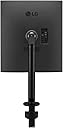
๐ Elevate Your Workspace: Twice the Screen, Zero Desk Clutter!
The LG 28MQ780-B is a groundbreaking 28-inch DualUp monitor featuring a unique 16:18 stacked SDQHD Nano IPS display (2560 x 2880) that doubles your vertical screen real estate without increasing desk footprint. With 98% DCI-P3 color accuracy and HDR10 support, it delivers stunning visuals ideal for professionals. Its ergonomic C-Clamp stand offers full adjustability for personalized comfort, while USB Type-C with 90W power delivery simplifies connectivity and charging. Advanced multitasking is enabled through Picture-by-Picture and KVM functionality, allowing seamless control of two devices with one keyboard and mouseโperfect for the modern multitasking manager seeking productivity and style.
| ASIN | B09XTD5C7H |
| Adaptive Sync | FreeSync |
| Aspect Ratio | 16:10 |
| Brand | LG |
| Brand Name | LG |
| Color Gamut | 98.0 |
| Colour | Black |
| Compatible Devices | Computers and Laptops |
| Contrast Ratio | 1000:1 |
| Customer Reviews | 4.4 out of 5 stars 468 Reviews |
| Display Technology | LCD |
| Display Type | LCD |
| Hardware Connectivity | HDMI, USB, USB Type C |
| Has Color Screen | Yes |
| Image Brightness | 300 |
| Image Contrast Ratio | 1000:1 |
| Is Electric | Yes |
| Item Dimensions D x W x H | 21D x 38W x 49H Centimeters |
| Item Type Name | monitor |
| Item Weight | 9 Kilograms |
| Manufacturer | LG |
| Maximum Display Resolution | 2560 x 2880 |
| Model Name | 28MQ780 |
| Model Number | 28MQ780-B.AUS |
| Mounting Type | Desk Mount |
| Native Resolution | 2560 x 2880 |
| Network Connectivity Technology | DP port |
| Picture Quality Enhancement Technology | HDR10 |
| Pixel Pitch | 0.228 |
| Power Consumption | 90 Watts |
| Product Features | High Dynamic Range |
| Refresh Rate | 60 Hz |
| Resolution | 2560 x 2880 |
| Response Time | 5 Milliseconds |
| Screen Finish Type | Matte |
| Screen Size | 28 Inches |
| Screen Surface Description | Matte |
| Shape | Flat |
| Specific Uses For Product | business, personal |
| Total HDMI Port | 1 |
| Total USB 3.0 Ports | 4 |
| Total USB Ports | 4 |
| Total Video Out Ports | 1 |
| UPC | 195174035207 |
| Unit Count | 1 Count |
| Viewing Angle | 178 Degrees |
| Voltage | 240 Volts |
U**S
Productivity Beast-Unique form factor - Youtube shorts in full screen
Great Monitor for Productivity usage and for hard core professional this is like two 22 inch monitor stacked one above another the ergo stand is pretty good and it allows you to turn this monitor 360 as it claims and even my previous 22 inch monitor i cant turn this screen this much also the form factor is odd but if you do lot of multitasking job this will help you a lot and Picture by picture options is great intially it is tricky for me weather to use this as a single big tabloid or to split mode but after couple of days use i figure it out the best of both worlds - i will tell you how i configured it may look stupid but it solved my purpose from my laptop using usb c as chanrging and monitor input as my first source again my laptop hdmi connection as secound source and make your configuration 2k and scaling at 225(default ) and make sure you configure as extend the screen and windows display configuration as first input source screen as bottom display and second source to use the top of screen now it work like 2 monitons stacked up one above another but now it allows to scale you application as well so even your pbp setting is in split mode the bottom part of the display use usbc and top part will use hdmi the kvm will allow to move from top to bottom without any issues and based on your work need you can either switch between screens or scale up the application as one screen without changing pbp setting To my surprise the inbuilt speakers are decent for casual use and it is very clear and able to Teams calling without headset this monitor have waves maxx audio support ( dont expect pro sound ) it is good for youtube and news watching and melody music (At 2am with vidyasagar music online with hot coffee it eases workload) Verdict At this price you may get 4k monitor however if you are on to productivity and space constraint on dual monitor setup then you can go for this but dont pick this one for gaming and this is not a gaming monitor Also with the configuration setup you can watch youtube shorts in full screen that is cool and it is better than watching the shorts in 4k tv
A**X
First monitor in the world which has dual up monitor
Thanks to LG for bringing up unique kind of monitor (dual up monitor). LG is the first to introduce this kind of monitor. There were many in the world who desperaty wanted this kind of monitor but not available earlier. It's really helpful for coding, image editing, gaming and many multi purpose use. Display is good. But in this price 4k resolution they would have been given. Many ports are available. Stand is also good. Can be moved in any direction. LG should introduce 24 inch dual up and 27 inch dual also in future. Current one is 22 inch dual up. Overall very good monitor for multi purpose usage
N**.
First dual up monitor with dotted line on screen๐ฌ
After use within 8 days there is dotted line on monitor screen. I have tried using windows and mackbook as well. Feeling waste of money
M**S
Amazing! changed my development game
I am an engineer focussed on backend development. The most intensive thing about software engineering is "context stack" when you are solving a problem and for that multiple things need to be referenced. Our stack involves multiple types of databases, API endpoints, backend code and there is always the need to google search so thats 5 tabs at any given time. Not to mention that I get pulled in to check production app logs. Switching windows/tabs gives me that "black hole memory blip" where I get easily distracted and forget what i am doing. Without this monitor, getting a simple task which involves making changes in multiple places + googling + thinking about logic / edgecases was a stressful task. I was so stressed that I would get scalp aches and horrible eye strains because i am focussing so hard. After this monitor, because i can see all of my things in one go and not worry about alt-tabbing, i have been consistently able to put in good amount of development time without stressing myself out while i am doing the work. So needless to say the size of the monitor works so well for me! Also the PBP feature is fantastic! I also have a mac mini and a Macbook air. Since Macbook air is blocked at software level from having multiple monitors, this monitor is a wonderful hack against that. I use it as "dual" monitor to connect to mac mini and macbook sometimes and some other times as single big monitor for macbook. My desk has a clean setup now! The monitor is pretty bright but I use it at lower brightness in blue light and use a benq monitor light in warm tone that helps with eye strain.
S**H
Good for dev's
I had to import this model from the US, since it wasnt available in india. But I love this monitor. Nuff Said. Good resolution and quality. Im planning on getting another one to even out both sides.
H**O
Excellent
Very practical
H**.
Excelente monitor, pero no apto para PS5
Este es un excelente monitor para casi todas las tareas, si eres programador lo vas a amar, mas sin embargo si lo quieres para gaming con una PS5, no te recomendaria que lo compraras ya que la gama de color es malisima, incluso estando en la pantalla de inicio, los colores no se pueden ajustar y se ven pesimos en comparacion a una TV, fuera de eso es estupendo para las tareas cotidianas, mas sin embargo para la proxima vez me compraria un monitor curvo.
A**M
Very useful
It's a very useful display. For normal use. Office use work from home, programers designers. Even for normal games. Tried with PS4.
B**B
A unique and great product
Great for coding and research, decent for content consumption and gaming if you don't mind the frame size in the portrait aspect ratio. The monitor is not for competitive or immersive gameplay, but casual or story games it gets the job done with flying colors (pun intended, the colors are amazing out of the box). The double simultaneous inputs from 2 devices work like a marvel as well. The arm is solid, feels great and effortless, though it doesn't go as high as I'd like, but nothing a piece if wood can't fix. I went from having 3 screens to 1 and I don't mind at all. Just make sure that if you're on windows, to use fancy zones for a more optimal multitasking environment.
M**.
My Favorite Monitor - Here is Why
The LG 28MQ780-B DualUp Monitor is a game-changer for anyone who values multitasking and clarity in their work environment. This innovative 28-inch monitor features a unique 16:18 aspect ratio, providing ample vertical space that is especially valuable for programmers, video editors, and anyone who enjoys browsing the internet in an exciting, naturally vertical format. One of the standout features of this monitor is its impressive clarity. Text appears sharp and vibrant, significantly enhancing the reading experience, particularly when dealing with detailed documents or spreadsheets like Excel. The built-in sound system is another plus, eliminating the need for external speakers and simplifying your workspace. While I did encounter a minor issue with PowerPoint presentation mode, itโs easily resolved by adjusting settings within PowerPoint itself. This small hiccup does not overshadow the overall functionality and efficiency that this monitor brings to my daily tasks. In summary, the LG 28MQ780-B DualUp Monitor is an excellent investment for anyone looking to boost productivity and enjoy a seamless multitasking experience. Its unique design makes it particularly advantageous for creative professionals and casual users alike. Five Stars!
Trustpilot
1 week ago
1 month ago