Desertcart purchases this item on your behalf and handles shipping, customs, and support to Tunisia.
โ๏ธ Cool your core, light your lore โ Vetroo V5 keeps your build fresh and fierce!
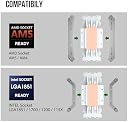
The Vetroo V5 White CPU Air Cooler combines five direct contact heat pipes, a high-density aluminum fin array, and a large copper base to deliver efficient thermal management for CPUs up to 150W TDP. Featuring a 120mm PWM fan with speeds from 800 to 1700 RPM, it balances airflow and noise with nine fan blades and vibration-dampening pads. Its addressable RGB lighting syncs with motherboard 5V headers for customizable aesthetics. Compatible with Intel LGA 1700/1200/115X and AMD AM4/AM5 sockets, itโs a versatile, quiet, and visually striking cooling solution for modern desktop builds.


| ASIN | B08F2FS7SR |
| Air Flow Capacity | 52 Cubic Feet Per Minute |
| Best Sellers Rank | 53,819 in Computers & Accessories ( See Top 100 in Computers & Accessories ) 959 in Fans & Cooling |
| Brand | Vetroo |
| Compatible Devices | Desktop |
| Cooling Method | Air |
| Cooling method | Air |
| Country Of Origin | China |
| Customer Reviews | 4.6 out of 5 stars 1,720 Reviews |
| Included Components | Fan, cooling tower, installation brackets |
| Item Dimensions L x W x H | 14.8L x 12.8W x 7.5H centimetres |
| Item Weight | 761 Grams |
| Manufacturer | Vetroo |
| Manufacturer Part Number | V5-WT |
| Material | Copper,Acrylic |
| Max Rotational Speed | 1700 RPM |
| Model Number | V5-WT |
| Noise Level | 30.8 Decibels |
| Number of Items | 1 |
| Number of Packs | 1 |
| Power Connector Type | 3-pin/4-pin |
| Power connector type | 3-pin/4-pin |
| Product dimensions | 14.8L x 12.8W x 7.5H centimetres |
| UPC | 609015786611 |
| Unit Count | 1.0 count |
| Voltage | 12 |
| Wattage | 150 watts |
J**E
perfect once you get the metal straps on the fan
can be confusing but in the end its worth it its silent and keeps my pc cool as hell well worth the price
A**S
nice fan
very nice cpu fan does what it has to do
J**A
Keeps the cpu cooler than a fridge
this is one of the best cooler I've ever used. it keeps the cpu nice and cold and looks extremely good the rgb fan that comes with it it really good as well it was easy but it look time to install. I recommend this to anyone with a small budget.
S**.
Easily fits Dell G5 desktops, incredible value
For anyone considering buying this for a Dell G5, but who's scared that it may be hard to install: do it. It's easy to install and it's worth it. No customization of additional hardware is required at all. NOTE: I have the G5 model with the solid side panel, I don't know if the dimensions of the one with the transparent side panels are the same. I have almost zero experience in building PCs, but I was able to easily replace a Dell G5 desktop Intel CPU cooler with this one. The general steps are pretty straightforward: 1. Unscrew the old cooler and remove it 2. Clean any leftover thermal paste with a paper towel 3. Adjust the new cooler screw holes so that they fit the 4 holes on the motherboard 4. Apply a pea-sized amount of new thermal paste in the center of the CPU 5. Screw the new cooler to the motherboard 6. Attach the fan and plug the wires (no RGB controller available on the G5 though) I use my CPU to mine, and this cooler drops the temperature by 15ยฐ C. With the stock cooler, the CPU was throttling like crazy, now not so much. The provided instructions could include more details for a newbie like me though, like the direction of the fan. I believe the airflow direction follows the "VV" logo on the side of the fan. Three first step also tells you to remove the fan from the cooler, but mine came already separated. To attach the fan to the cooler, I suggest looking for videos on YouTube, as that part could be hard to figure out from the instructions alone. As I mentioned, the G5 motherboard doesn't seem to have any RGB led controller, so the cable is left hanging for now. But I ordered a super unnecessary sata RGB controller that should do the job, I will test it once I receive it in a month or so. When running at full speed, it's also super noisy compared to the stock fan. But I don't really care, since I leave my PC doing its stuff in the garage. It's crazy how it fits the G5 case. I think if it were like 1cm taller, it would protrude the case and we would not be able to install the side panel.
B**.
Improvement over the AMD Stock Cooler, hassle to install
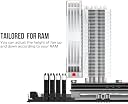
Bought the white version for use on a Ryzen 7 3700x on a MSI MPG X570 GAMING EDGE WIFI AM4 ATX motherboard, Neo Qube ATX case (a copy of a Lian Li 011D XL). Compared to the AMD stock cooler: at ultra settings with full RTX on for Cyberpunk 2077, I was easily hitting 80C for CPU temp. With the Vetroo V5, I was hitting about 62C with the same settings (AMD says 80C-90C is typical for the 3700x under stress loads). Idle temps with the Vetroo V5 as I'm typing this are about 32C, 35% fan speed. It does come with thermal paste and they give you brackets so you can install it on either an Intel or AMD motherboard. The heatsink also pretty tall compared to the AMD stock cooler. Its height cut really close to touching my glass side panel but it managed to fit without touching/scratching it. In terms of clearance alongside the RAM sticks with the included fan clipped on the heatsink: It can cut pretty close. I have 4 ram slots to the right of my CPU but I'm only utilizing 2 slots [ x O x O, (O is slot used, x is empty)] and with the fan on either side, it fits no problem. If I had all 4 slots filled and the fan positioned on the same side as the RAM sticks, it would cut pretty close to touching the RAM sticks. I'd recommend holding it in place prior to screwing anything in just to see if clearance is an issue for you. Because the heatsink is taller/narrower, it might give some leeway for the fan to fit next to the RAM sticks and be no issues. I had a few gripes with the cooler: mainly pertaining to the installation. For the most part, the instructions they provide you are clear in how to install it for either Intel/AMD. For AMD motherboards, when you screw on the two metal brackets onto the heatsink, point the diamonds at the ends so that a majority of it is facing inwards TOWARD THE HEATSINK, NOT AWAY, and orient the coiled covered screws in the proper direction. If anything, I'd recommend aligning the two metal brackets themself with the CPU backplate (if your mobo has it) prior to screwing the brackets onto the heatsink itself. My mistake was mounting the brackets incorrectly so the screws didn't align in a perfect rectangle to the backplate (it was more like a parallelogram). This could be an issue specific to the design of my ATX case, but because my motherboard was positioned vertically for the installation process and gravity wants to pull the heatsink down, that became a problem for me. I could not position my case/motherboard down horizontally as I needed to hold the backplate in place to the back of my motherboard (my case itself could not prop up the backplate nor could I get my hand in a position to hold the plate if i set my case horizontally). Like imagine trying to assemble a sandwich in midair and the bread slices are standing vertically. The heatsink is the left bread slice, the backplate is the right bread slice and the motherboard/case is this gigantic ass piece of hard ham. The only way to hold them together is using toothpicks through the left side where the heatsink is. (I believe only AM4 motherboards have this backplate that detaches behind the CPU/mobo?) Anyways, after a small struggle, I was able to sandwich the heatsink/mobo/backplate together just so the screws slotted onto the top of the backplate, then tilt my case moreso on its side to actually start screwing it together. In addition, because the screws that tighten to the motherboard sit so close to the heatsink, I had to use my screwdriver at an angle instead of just having it straight down. I was afraid of stripping the screw, but it felt like the grooves were big enough so I was able to tighten it a fair amount so it fit securely and not strip the screws. Overall and despite my long rant about the annoying installation issues, I'm satisfied, especially considering price to performance ratio. Noise level is minimal/quieter than the AMD stock cooler even at higher fan speeds. Aesthetics with RGB fan is fine to me and the CPU is running at a lower temperature which was the main thing I cared about. All at a decent price and I couldn't ask for more personally. It's akin assembling IKEA furniture. It might be a bitch to put together but if the end result provides functionality and aesthetics of it, then you may be fine going through the hassle if it is one.
B**A
Gets the job done and looks great, but there is one very minor issue
This is a fine product, works well, fit perfectly with zero hassle installing it. The only issue is that the LEDs are not aligned with the others in the computer because this part is sideways compared to the case fans. It's not a huge deal or anything, and for some patterns it wouldn't even be noticeable, but it might bother some people (it sort of bothers me, but not that much).
N**Y
Fantastic Performance & Stunning RGB!
Iโm really impressed with this CPU cooler fan! The installation was straightforward, and it fit perfectly in my setup. The cooling performance is excellent. My CPU temps have stayed consistently low even under heavy loads, which is exactly what I was hoping for. But what really stands out is the RGB lighting. The colors are vibrant, and the white design looks sleek and modern in my case. The lighting effects are easy to customize, and it really adds a cool aesthetic to my build. Overall, this cooler fan is a great combination of style and function. It works wonderfully to keep my CPU cool and adds a beautiful RGB touch to my setup. Highly recommend it, 5 stars all the way!
Trustpilot
1 month ago
1 week ago