Desertcart purchases this item on your behalf and handles shipping, customs, and support to Tunisia.
⚡ Dominate your digital domain with the Nighthawk X4 — speed, power, and range that keep you ahead.
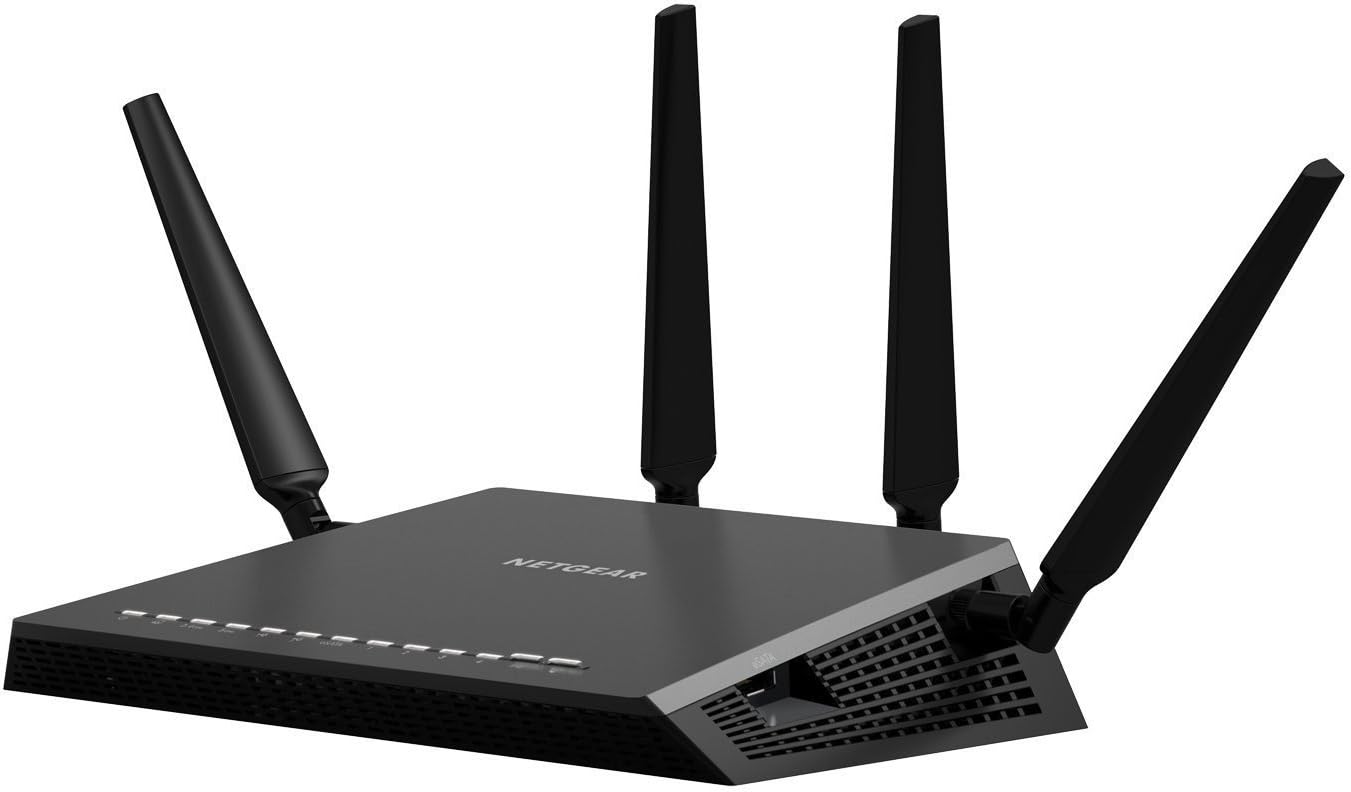
The Netgear Nighthawk X4 AC2350 Smart Wi-Fi Router (R7500) delivers next-gen Wave 2 Wi-Fi with quad-stream technology, reaching speeds up to 2.33 Gbps. Powered by a 1.4GHz dual-core processor and equipped with four external antennas featuring Beamforming+, it offers expansive coverage and robust performance for demanding home networks. Dynamic QoS intelligently prioritizes bandwidth for gaming and streaming, while dual USB 3.0 and eSATA ports provide fast external storage connectivity. Ideal for professionals and media enthusiasts seeking reliable, high-speed wireless networking across large spaces.


| ASIN | B00MRVJY5C |
| Antenna Location | Gaming, Home |
| Antenna Type | Retractable |
| Best Sellers Rank | #97,733 in Computers & Accessories ( See Top 100 in Computers & Accessories ) #2,112 in Computer Routers |
| Brand | NETGEAR |
| Color | Black |
| Compatible Devices | Personal Computer |
| Connectivity Protocol | Wi-Fi |
| Connectivity Technology | WiFi^Wired |
| Control Method | App |
| Coverage | Up to 2,500 sq. ft. |
| Customer Reviews | 3.8 out of 5 stars 649 Reviews |
| Data Transfer Rate | 2.33 gigabits_per_second |
| Frequency | 5 GHz |
| Frequency Band Class | Quad-Band |
| Global Trade Identification Number | 00606449104110, 10606449104117 |
| Item Weight | 3.1 pounds |
| LAN Port Bandwidth | 10/100/1000 megabits_per_second |
| Manufacturer | Netgear Inc |
| Maximum Upstream Data Transfer Rate | 1000 megabits_per_second |
| Mfr Part Number | R7500-100NAS |
| Model Name | Netgear Nighthawk X4 |
| Model Number | R7500-100NAS |
| Number of Antennas | 4 |
| Number of Ports | 3 |
| Operating System | Linux,Mac Os,Safari 1,Vista,Windows 7 |
| Other Special Features of the Product | QoS, WPS |
| Router Firewall Security Level | Basic |
| Router Network Type | WiFi |
| Security Protocol | WPA;WPA2—PSK |
| Special Feature | QoS , WPS |
| UPC | 606449104110 |
| Unit Count | 1 Count |
| Voltage | 100240 volts |
| Wireless Communication Standard | 802.11ac |
| Wireless Compability | 802.11ac |
L**.
Netgear Nighthawk X4 (R7500v2) Wireless Router Review
What a little beast! Ordered/purchased this router Sunday, 6 March. It was delivered on Tuesday. Setup was very easy in addition to upgrading the firmware that is almost always recommended immediately before placing the item into production. The process was very easy since I already have a fast internet connection to the outside world @ 90 Mbps. I did have a small issue after completing the setup which was discovered by testing my network for security vulnerabilities. After reviewing all firewall logs, in addition to the router logs, the vulnerability being reported turned out to be a false reading from the router. I notified Netgear and within 24 hours they provided me with an upgraded firmware version (V1.0.2.4) to correct the false report. The network security software now reports the entire network and all devices are secure after loading the new firmware. The speed on the primary floor is remarkable. The Trendnet 680MB wireless bridge used in the living room now connects to the router at 405 Mbps TX and 450 Mbps RX. With the HP laptop sitting almost 40 feet away and down the hall from the computer room and office I typically connect at 300 Mbps and connection strength a solid 100 percent. That is a 8 year old wireless card which only goes up to an "n" connection on the 2.4Ghz or 5Ghz bands. I believe 300 Mbps is the maximum connection speed for that type of card. The laptop connection dropped to 269 Mbps when I had every IP device in the house connected and moving data packets across the network. The slowest devices were the iPad mini and my wife's ASUS tablet and iPhone 5s. My wife's phone packed away in her purse in the living room shows 54 Mbps connection speed according to the Netgear Genie app used on my iPad mini. I admit the connection priorities for her devices and my iPhone 6S are set to "low" on the router config because we honestly do not move much data through our phones and tablets. I was hoping the signal was a bit stronger down in the basement. However, I must say the tests were made with the laptop connected around 60-70 feet away, one floor down, two walls to go through and a few other devices in the house using the wireless network. This router spoils you but with the speed downstairs of 81 Mbps and signal strength less in the 30 percent range, it is more than acceptable in the far corner of my basement with the laptop. Definitely speedy enough to surf the net and check email or make a remote desktop connection to the PC upstairs or the media server upstairs at the router by the PC. An AC class wireless range extender or CAT 5 cable to a managed switch may be needed when the home theater is built out and functioning down there. It's possible a better/cheaper solution might be to move the new router downstairs and then run a CAT 5 cable to a small 4 port switch upstairs for connection to the PC and printer via a 1 Gbps Ethernet CAT 5 cable. Still have more testing to do before I decide how the hardware will be setup for the best results at the 4K big screen with AV receiver pushing the sounds. The primary point with all of the jibber-jabber is this router has serious speed and is strong enough with good range to have more than acceptable wireless network speed at a very reasonable price. It has an external SATA port for connection to a very fast external SATA III disk drive. This feature would make the router a very good media server for the price of an external powered SATA III disk drive. 2 addition USB 3.0 ports for external disks or other devices to be used for file/system backup locations or media "shares" are also strong selling points. A total of 5 each 1 Gbps Ethernet ports, one for the WAN and 4 LAN connections provides multiple very fast Ethernet connections. BTW, this router in recent tests with one of the later firmware upgrades bested the leading AC2600 class router in features, range, speed and price. This isn't even an AC2600 class router but an AC2350 with two bands and a total of 7 possible wireless data streams (Quad stream on the 5Ghz and 3 on the 2.4Ghz). Details are available at: [...] Can you tell I'm very pleased with the performance of this device? For the purchase price of $163 delivered from Amazon, it might be difficult to locate something as good for anything close to that price. Maybe... Lots of new tech coming out and prices are going down. Heck, if I can get 4 or more solid years of use it would be well worth the small expense.
D**Y
Very good after a few hurdles getting setup
Fast, easy to use, very efficient router that's great for gamer's and the media connected household contingent you have wireless devices that can use what the router is capable of. This is a quad channel router that is capable of 1.7gbps with 5Ghz and it certainly got that in my tests. FIRST - I was shipped the v2 of this router which uses different firmware than the v1 that got so many complaints. Do not get them mixed up because its easy to on Netgears website when you do a firmware update. I've had the router for 3 days and have had up's and down's (almost thought it was defective) but after getting it setup now its working great. I am very proficient with wireless devices and thoroughly tested The r7500 v2 and its associated apps. I personally got the router because I have so many point-to-point media devices and multiple media servers running locally. So I was more interested in the local traffic and overall bandwidth the router was capable of. Im going to keep the review short but there was a major issue after updating the firmware to 1.0.2.2. I have 7 wireless 5Ghz devices all at least averaging between 250mbps - 1.3gbps link speed (from ipads, android cell phones, computers ect). As well as wired gigabit devices. Initially (pre firmware update) the router was doing really well. I could max the network out transferring large files (movies 10+GB each). Then after about 2 hours of working great the network came to a screeching halt. All wireless devices link speed dropped to 54mbps (basically wireless G) - and the wired gigabit network; file transfers to slowed (wired or wireless) dropped to around 4MBps. How was this affecting the wireless or wired network? Rebooting the router didnt fix anything. I updated the firmware to 1.0.2.2 -- same thing. My local AC network was slower than my internet LOL After about an hour of rebooting, unplugging waiting ect.... I factory reset the router... with the new firmware already installed. I didn't want to do a full reset since I had to re-configure everything. But it fixed everything. So I would suggest upgrading the firmware right away and doing a factory reset on it before you begin the setup of your home network. I think the OS and drivers for the CPU's (memory offloading controller) are getting hung up and the router is going into a 'fail safe' hence the 54mbps super slow local speeds wired AND wireless. To be very specific I have a USB 3.0 'powered' (it has its own power source) full size SEAGATE backup hard drive directly connected to the routers USB 3.0 ports and it was transferring files even on a local drive around 4MBps. (yes mega-bytes a second). Now the same drive is hitting the 90MBps which is about peak for the drive. So just be forwarned if yours acts up - firmware then reset - then setup. But its working fantastic now. RANGE? I live on an acre and can see the router from inside my living room (its mounted up high on the wall next to a window). Now I used a Nexus 6 with a dual channel antenna that is capable of 768mbps link rate (I tried the ipad/iphone but they couldn't exceed single channel 300mbps too bad though) and I didn't see any significant drop in speed until I was about 150'-200' away outside the link rate dropped to about 24mbps using the 5GHz frequency. I don't use the 2.4GHz spectrum because its too polluted with other radios I have but if greater range is needed the 2.4GHz spectrum is preferred (twice the range for the same output power at lower speeds). So as far as range goes from a router - this is as good as I could expect - fantastic! These routers really dont go much further BUT you can buy HIGH-GAIN antennas and the router will accept them SIGNIFICANTLY increasing its range (just a thought). Would I buy again - yes! It is working great. It has fantastic range (no router is perfect but this is working fantastic for my needs) ITS FAST! Not just transfer rates but the CPU on this thing screams. I tried to over load the router by transferring very very large files from many points to each other and maxing out the wireless and the CPU never buckled. I am very impressed with this. Then I put Amazon Prime HD movies on a laptop, Netflix HD on an ipad, YoutUbe 4K videos on the TV - NOTHING stuttered or buffered (granted my internet screams) but this was while I was transferring files. The QOS on the router managed high priority traffic better than any router Ive ever used. It wouldnt let the media that was playing drop for low priority nonsense traffic I deliberately tortured it with.
S**.
Not good at all
07/15/2015 I guess I can share my final comments on this piece of work. First of all - the Netgear support is absolutely clueless. I know I mentioned that before, but I need to stress it again. The latest issue was caused by bad FW and nobody at Netgear even mentioned that. I just noticed that the latest version disappeared from their site, downgraded mine and most of the issues were gone. Unfortunately, not all the issues. The major problem for us is the inconsistent Wi-Fi signal. The coverage is great, but pretty much useless, as random Wi-Fi devices in the house sporadically dropping the connection. Bottom line - going back to Linksys. 06/21/2015 Yeah. Had to remove one more star - pretty bad for $280 router. I have it now for 8 month and to get Wi-Fi connected I need to reboot it pretty much every day. It has been updated with the latest FW, QoS disabled and it's been sitting on the cooling pad from the day one. Wired Internet connection is still good, but both radios stop working more and more frequently. Spent 2 hours on the phone with the Netgear support - although it was way over 90 days, they agreed to talk. First person had no clue. No clue whatsoever - he was going by the book and kept telling me that I need to change the IP - that's why I'm getting the radios to drop the connection. After talking to supervisor, I was switched to the to the next level of support - that guy supposed to know more than the first one, but I'm afraid he was just following the different troubleshooting guide. He suggested to change the wireless channels and modify CTS/RTS and fragmentation. He could not explain why the previous settings were working fine for 7 month and told me that the settings have to tweaked every time the FW is updated (!) and that would be paid support (!). What a horrible experience, so far... 10/19/2014 Thanks to the great Amazon customer support, I got it replaced. Both bands seem to be more stable with better coverage. Still can't get any Cisco bridges connected, but this time got R7000 connected as the bridge in a matter of minutes... QoS is still a joke. The arbitration is very far from being "intelligent". By the way, it completely kills VoIP. 10/11/2014 For some strange reason, Netgear abandoned the "repeater" function on this router (for me it's a major show stopper). I spent some time with Netgear support and they have no immediate plans to get the "repeater" option back to the picture. Now, I've been using for a little while and would like to drop another star. First of all, the coverage in my house is just a little bit better than $100 cheaper R7000. And I'm talking about 2.4GHz coverage. 5GHz is pretty bad. Secondly, the "intelligent" QoS seems to be pretty dumb and not flexible. Of all the devices in the house, it assigned the highest priority to the bridge, which is used once in a blue moon. The VOIP box and most heavily used computer are set to "low". The rest of the devices are assigned very awkwardly as well. I have three bridges in the house. All of them worked perfectly fine with R7000. With R7500, none of them can find 5GHz band broadcast on site survey, although 5GHz works fine with the phones and TVs. If I install R7000, everything is back to normal. Tried to use R7000 as the repeater for R7500 as base with absolutely zero luck. Called and chatted with Netgear support. Two people assured me that R7000 can easily repeat R7500, but the last lady told me that it's not possible because R7500 "does not have MAC address". What a great support!
F**K
Overall, this router exceeded my expectations
Routers are probably one of the most difficult things to review after purchase. I think it is for two reasons. One, because expectations for them tend to differ wildly between persons. One person might expect to be able to load 30 devices on the network all sucking bandwidth/doing real-time activities without a single hiccup or issue, another might consider a heavy load just a few devices. It's all based on past experience and perception. Second, they're complicated devices, and they communicate with equally or more complicated devices. It is too often possible that the router is not responsible for a network issue, and it is instead the device's fault. Along those lines, it is difficult to review a network device when you are not a networking expert. I can try my best though. I have some very specific requirements for my router to exceed my expectations. I have would classify my user scenarios under two categories- 'typical' operation and 'high stress' operation. Typical operation would mean day to day, small numbers of visitors, with variables (the devices connected, their usual locations) staying mostly constant. High stress would be a LAN or house party when you have a ton of devices doing whatever they want. My first router was a DIR-655. It was good for a while but seemed to get progressively worse with firmware and the addition of new devices. It came to a point where it rebooted at least once a day. Very unstable. Second was a stock Actiontec router MI424WR, older revision, with Fios. I don't recall it having great range, and I remember having issues with consoles and dropped connections. Third, and most recent before the Nighthawk, was an Optimum-branded Sagecom router. This is the most recent router I had before this purchase, and so the problems it had directly resulted in me picking up the Nighthawk. I noted it had two serious issues that, in my opinion, are all too commonplace with older generation routers. For a newer "smart" router it should not have these issues: 1- poor range. It did not reach the basement of the house more than 1-2 bars. Frequent wireless drops. 2- Would reboot itself under moderate stress (some streaming, two PCs gaming...wired!). I would have given this router a 2 or 2.5 stars. I mean, it's supposed to be "smart." A "3" stars router to me should be able to handle moderate load, and not reboot on its own under such load. It should not need reboots for arbitrary issues in a range of days. instead it should be weeks and months of stability. This is my expectation for any newer gen, over $120 dollar router. That's just how I view the price point for those requirements that some would demand in every router in existence. However, we need to recognize that the hardware in routers often cannot handle the load being put on the device. First and foremost, with this router, I have not experienced any device-decided, annoying-as-hell automatic reboots caused for reasons us consumers will never know under both typical and stressed operation. I remember them well, and I'm glad they're gone. Some reviewers say they have experienced these drops; I have not. This router has not rebooted on its own under both "typical" and "high stress" conditions. It has not arbitrarily dropped any of my devices on 2.4ghz, and has rarely done it on 5ghz. When it has on 5ghz, it was when the range was poor (<2 bars) and it was a phone. I'm cool with this. It has also only "needed" a reboot to fix an issue once after 2.5 weeks of typical uptime. Ideally, I'd want to not see a single issue for months. This is really how a device should be, and should evolve towards after several firmware iterations, and is my expectation for this device and any other expensive, technologically advanced router. But for a recent release, I'm good with several weeks of stable uptime on average. If this does not become months of uptime in the near future (3-4 months), I will come back and bump down the review. I also had the opportunity to test this device in two high stress situations. One, a house party. I was looking at over 30 devices connected at once- most on 2.4ghz- all doing whatever the hell they want (completely unscripted, uncontrolled). I disabled beamforming for this occasion, early on, because I suspected it was causing some (very few) devices to be dropped arbitrarily when outside with a weak signal. After that, smooth as silk. No reboots, no drops. Second stress test was a small LAN party. Two laptops gaming over wireless on Counter-strike (one on 2.4ghz, one on 5ghz), and two machines gaming over wired. HD streamng from other devices elsewhere. We could all play, lag-less, with no hiccups except for a few seconds on one of the laptops. In terms of % time without issues while intensely playing Counter-strike, I'd say 98% was good, 2% had hiccups. Now if you don't know anything about Counter-strike, know that it is a ridiculously network sensitive game (like most shooters, but perhaps more). If it can handle this situation, then I am happy. And it could. Now here's an important point about how I use the 5ghz on this router. I do not connect older devices to it. This includes iPad 2's and older laptops. Why? Because there is a trend with older devices and 5ghz- they experience problems. It is my theory that many of these reported issues are because the wireless drivers and hardware on these (at this point, legacy) devices are buggy over 5ghz. When I connect a newer (within 2, maybe 3 years) device, I have a flawless 5ghz experience. For this reason, I use the 2.4ghz much more. The Nighthawk X4 has a theoretically solid implementation of Quality of Service. It uses Qualcomm's Streamboost technology for inspection and prioritization of traffic. It has a database which can update automatically for identifying devices. I have a large internet pipe (100/30), so I can't say for sure if this feature works under the most stressful scenario (limited bandwidth). I can say that I have had no bandwidth clogging issues and most of my devices (iPads, laptops, chromecasts) were identified correctly. Note that there are issues with VOIP devices and applications being identified. If VOIP is a necessity in your home/home office and you are dependent on QoS (small pipe), do not get this router right now. At some point however, I'm sure the QoS database will be fully comprehensive. Here are some issues with this router that prevent it from deserving a '5'. First, the GUI. It is REALLY slow. It is usable, and it gets the job done. It is a bit faster with the most recent update at time of writing (68), and I can tell Netgear is working on it. But the big thing is when you compare it to the competition. The DLink 880L has a super streamlined, beautiful GUI that I would have fallen in love with if it only had showable "advanced" options. Problem is they removed all advanced options completely. The real competition with the software however is with Asus. You can check out the Asus router GUI on their site; it has a mock version hosted live. It is much prettier, much faster, and much easier to understand. I'm okay with an older looking GUI, but it still needs to be fast and responsive. The second issue was with file transferring. By trying to transfer a large file over 5ghz, the router flopped out and the transfer needed to be killed. Apparently the most recent firmware fixed this, but it is something I need to test a lot more if I'm going to update this review. It is something to be aware of if one of your core requirements is reliable file transferring. It is not for me. Versus the X6 (the cyber bug), I think the X6 makes more sense if you have many newer devices that can communicate over 5ghz, or will have them in the near future. Like XBox One, recent iPads. It has two dedicated bands, but to really put that to actual use, you need a lot of devices. And I think you'll just run into problems if you buy the any next-gen router with the intention of connecting everything that can to 5ghz instead of when it is appropriate-phones really don't need to be on 5ghz. Are you streaming constantly from your phone?. Versus Asus overall in the category of recent high-end routers, I think Asus wins. For the 87U vs X4, I'd say it is close, with the 87U being more feature-rich and having better software. I believe the 87U beats this router out feature-wise in everything except QoS. I think QoS is a distinguishing factor. The faster processor on the Nighthawk, in theory, makes it more performant under load, but this is difficult to test. It seems to reflect positively on the excellent reliability of this device. Overall, this router exceeded my expectations- at this time. It better not crap out! I was hoping for something with slightly better range and with better reliability under typical operation(for a launch release). I was expecting major issues during stressful operation. I have great range- all the way to the backyard on 2.4ghz with a couple deadspots- and 5ghz coverage for the house. I have reliability measured in the weeks (have had the router for 1.5 months). I have reliability under typical and high stress operation- huge for me. I would definitely recommend picking this router up on sale IF you are OK with the VOIP issue in QoS and occasional filesharing bugs, and if you have a small bandwidth pipe. If not, wait a bit. The newest routers across the board have issues, and firmware updates will fix them (whether they're through Netgear or from open source; you have that option). Disclaimer: I am *NOT* a Netgear beta tester or friends/family reviewer or a Vine reviewer or anything else other than an ordinary person. I'm totally unbiased, and this is my honest review.
C**S
Excellent router with super signal
I'm a computer consultant and support home users and small businesses. I've installed quite a few routers and I'm very impressed with teh whole Nighthawk router lineup. I have installed quite a few of the original Nighthawks, but for those clients with lots of devices, or buildings that kill wireless signal, the X4 gives you an extra edge in performance. All the Nighthawks that I have installed at client's homes and offices and all are running reliably enough that I don't get phone calls about them. At my business client, that was my first install of an X4, they were experiencing an issue with the 5 gigahertz spectrum quitting and we would have to reboot the router to get it back. We had installed the unit in February 2015 and Netgear fixed the issue with a firmware update about 2 months later, I believe. Since that flaw was fixed, I think the unit has required all of 2 reboots. This client, btw, is pushing the X4 more than any of my customers. They are a business with about 12 employees, with nearly 20 wired devices on their gigabit network, plus another 15 or so wireless ones (half of them being laptops when they are not connected to ethernet and half employee's personal devices). Plus, the signal needs to cover 3 floors. The X4 has no issues dealing with this list of demands. The wifi speed on 5g is superb and wall penetration is quite good on that spectrum.... But it will only travel so far.... at which point you need to use 2.4 which has amazing penetration. I have the X4 hanging very high on a tall wall -- so about 8 feet high -- with the antennas separated from each other as much as possible. The unit gets warm to the touch but nothing more. (The connections to the router come down from the drop ceiling. The wall wart power adapter for the router is up in the ceiling.) At another site, I installed one of these as a killer WAP (Wireless Access Point) and it doubled the signal strength in all the trouble areas, despite having to be placed in a discreet location, in order to please the client. At one time Linksys was my "go to" router, but then the brand lost their way. Now that Belkin has bought them, they seem to be resurging with interesting products, but I haven't tried them. I've been happy enough with Netgear and Asus (and Apple sometimes), that I'm sticking with what works.
K**S
Good Router with Frustrating Support
I am giving this unit the rating that I have because of the set up time and the level of support. I purchased the Netgear Nighthawk X4 to replace an aging Linksys router that kept dropping the signal. I used my ISP's wireless modem for a while but the signal too weak to reach the entire house. We have a gamer in the house and we like to stream movies so performance was the most important factor in my decision. I received my router on Thursday but wanted to wait until Saturday to set it up. Let me say that I am no IT expert; however I have installed routers and set up computers before. However, it took me SIX hours to get this router up and running. The instructions were clear about what to connect and how the router should operate. I followed the instructions but could not get an internet connection. I contacted support and the first agent that I spoke with told me to look on the website for help (duh). I told him that I had and then he tried to help me. We made a little progress – I was able to see the router login, where I wasn't before. He told me to contact my ISP, which I did and they bridged the modem. When I called back with my ticket, I was connected to an agent, who put me on hold for 30 minutes before disconnecting the call. I had too much time invested to give up! I called back and was connected to John. There was an issue between my modem and my router and John stayed on the line with me for over one hour to make sure I was up and running. What the other reviews state about the level of service between India and the Philippines is 100% correct. The best result I received was from the Philippines. I am sure that if Netgear would upgrade their level of support, they would have fewer returns. (How about some US-based agents? ) The router is working fine and I will update this review once it's been up for a while. **After six weeks of use, I am very pleased with this router. It is fast and always on. My only regret is that the price is now lower than I originally paid!
N**F
2.4ghz Amazing and VERY stable with very good Parental Controls. A+
I have been running this router for the last three months. I didn't want to write a review based upon the first week. I'm coming from a router of 5 years old that I never had to reset, but wasn't the fastest with all the new standards. This router has very good range, it definitely extends further and allows me to get wireless at further places. Lets talk about speed: The 2.4ghz is awesome. I get the maximum speed possible for this. I work from home and work for a large software company and do all my work from webex. I have never had any issues on this band width. Also the router is VERY stable, I do not have to reset it. The 5.0ghz is a different story. If I was buying this for 5.0 quality,.. this router is not the best but I have nothing to compare it against and I believe all routers can have issues with this bandwidth. It has a short range and will drop. If you stay in range its very fast. I have just decided to put all my families devices on 2.4ghz and that speed is fantastic.. streaming etc has ZERO issues. So this isn't' a issue for me... but its hardly a reason to give this router a bad score because the range and speed of the 2.4 is fantastic. Let me talk about the idiots that have given a bad review for the parental controls... Yes they are idiots, because it works amazing. I have setup the openDNS for my wireless and any of my family member is blocked for inappropriate content. its works!... Now those of you that want to bypass this, all you have to do is download the Genie app on your device or computer and go into bypass mode.. This will allow the device or computer to browse un-restricted. I do wish it had more control's by MAC address or time... but that's really the only thing you can knock on it. I'm very satisfied with this router and I spent weeks researching routers and they all have some issues. Its strength is 2.4 speed, range, stable, good Parental controls.
S**H
Netgear Nighthawk R7500v2 review
I purchased this Netgear Nighthawk R7500v2 to replace my aging but reliable Netgear WNDR3700 Wireless N router that is over 5 years old, and take advantage of the new wireless AC technology. My residence is a two story home, and in my previous set up, I had to use two additional wireless access points to cover the entire house. Upon setting up this new Nighthawk X4, I was surprised by the performance. I no longer need the access points. All the family’s PC’s, laptops, tablets, cell phones, and web enabled HDTV’s are happy and can stream video from all points of the house. WI-FI signals from this router going thru multiple walls are no longer a big obstacle for my devices, and the access points are no longer required. Pro’s This router has an intuitive GUI, and for those of you that have used Netgear products before, setup is a breeze. Also, I used the same SSID’s and keys from the previous router and all my devices automatically connected to the new router. This is a very powerful router, and in the week I’ve used it, I have not experienced any connection issues on all my devices. Also, I pay for 75MBPs for my ISP, and this router was routinely delivering 88 MBP’s download speed. The router box design is pleasant and has a futuristic spaceship look. Con’s Expensive but you get what you pay for. This router is replacing three Infrastructure devices in my home. Big footprint - it takes more space than my old device. I guess it has a lot of components big to provide coverage for a big house. It has bright white LED’s, and I wish Netgear had stuck to the blue/yellow LED’s from previous products. These LED’s are great for letting you know of the router status. However, they can be turned off if they become an annoyance. The switch is in the back of the router. Conclusion: - I strongly recommend it for folks with large houses. And I’ve had great reliability history with Netgear products thru the years. They may be better/stronger routers out there but what about long term performance and reliability?
R**B
Five Stars
perfect for gaming great speed and performace
Trustpilot
2 days ago
5 days ago