We remain fully operational. Our teams are working around the clock to ensure your deliveries continue safely.

DOWNLOAD THE APP


Customer Services
Copyright © 2025 Desertcart Holdings Limited
DOWNLOAD THE APP
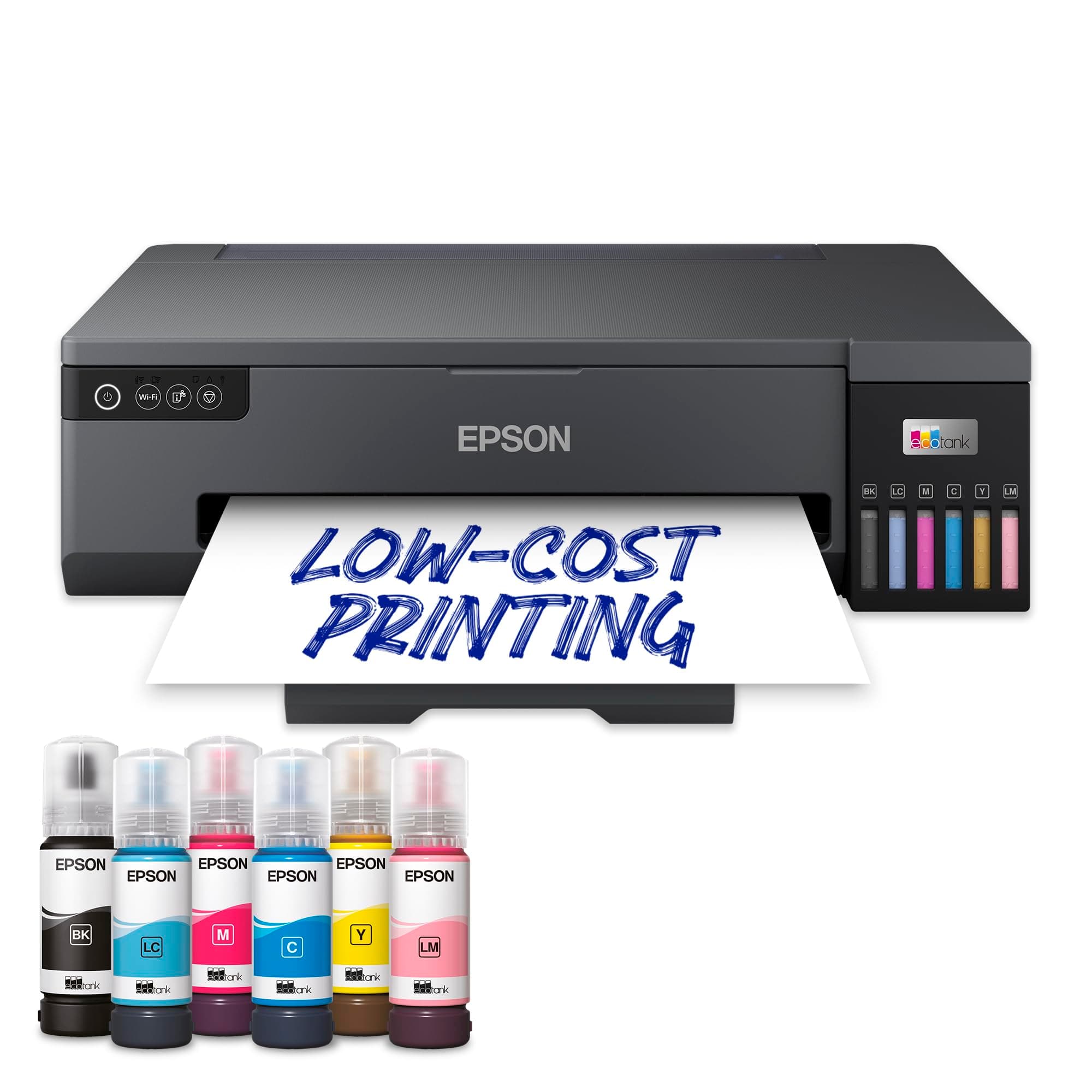
🖼️ Elevate your prints, not your expenses — go EcoTank and never look back!
The Epson EcoTank ET-18100 is a wireless inkjet printer designed for professionals and creatives who demand high-quality A3+ photo prints. Featuring a 6-colour ink system and ultra-high-capacity refillable tanks, it delivers up to 2,100 vibrant photos per ink set, drastically reducing printing costs. Its specialty media feed supports printing on CDs, DVDs, and PVC ID cards, while Wi-Fi Direct and the Epson Smart Panel app enable seamless mobile printing. Compact yet versatile, this printer combines professional-grade output with eco-friendly efficiency.


| ASIN | B0BZ93GFQB |
| Additional Printer Functions | Print Only |
| B&W Pages per Minute | 8 |
| Best Sellers Rank | 2,355 in Computers & Accessories ( See Top 100 in Computers & Accessories ) 26 in Ink Tank Printers |
| Box Contents | Improved Ink Bottles |
| Brand Name | Epson |
| Color Depth | 24 bpp |
| Color Pages per Minute | 8 ppm |
| Colour | White |
| Compatible Devices | Smartphones |
| Control Method | App |
| Controller Type | Android |
| Country of Origin | China |
| Customer Reviews | 4.1 4.1 out of 5 stars (25) |
| Display Type | Digital |
| Dual-sided printing | Yes |
| Duplex | Automatic |
| Global Trade Identification Number | 08715946702964 |
| Hardware Interface | USB |
| Ink Colour | Various Colors |
| Item Dimensions D x W x H | 50D x 13W x 35H centimetres |
| Item Type Name | Inkjet Printer |
| Item Weight | 8 Kilograms |
| Manufacturer | Epson |
| Maximum Copies Per Run | 250.0 |
| Maximum Copy Resolution Black and White | 1200 dpi |
| Maximum Copy Resolution Color | 1200 x 1200 dpi |
| Maximum Copy Speed Black and White | 8 ppm |
| Maximum Print Resolution Black and White | 1200 dpi |
| Maximum Sheet Capacity | 250 |
| Maximum Supported Paper Size | A3 |
| Maximum print Resolution Color | 1200 x 1200 dpi |
| Model Name | ET-18100 |
| Model Number | C11CK38401BY |
| Model Series | EcoTank |
| Network Connectivity Technology | Ethernet |
| Number of Drivers | 2 |
| Number of Ethernet Ports | 1 |
| Number of Trays | 1 |
| Other Special Features of the Product | Durable |
| Output sheet capacity | 250 |
| Paper Size | 29.7 x 42.0/21.0 x 29.7/14.8 x 21.0/10.5 x 14.8 |
| Print media | Glossy photo paper |
| Printer Output Type | Colour |
| Printer Type | Inkjet |
| Processor Count | 1 |
| Product Warranty | 2 year manufacturer |
| Resolution | 5760 x 1440 |
| Scanner Type | Flatbed |
| Series Number | 4 |
| Specific Uses For Product | home office, personal photography, creative projects |
| Total USB Ports | 1 |
| Warranty Type | limited warranty |
A**R
No enet connection.
Seem to give good images but not fully tested with all papers yet. Liked bottle ink loading as I used an eco system on my R3000(now defunct).
P**E
2nd ET 18100 printer
This printer is amazing. It has no touch screen which takes a bit of getting used to. It’s big when you open it up for printing at 990mm deep. You need 160mm at the back for the paper feed. Filling the ink tanks is easy. Slot the bottle in the port and it self fills. There is no spillage at all. Priming the printer with ink isn’t explained very well. This is what you do. Turn on printer. Wait till you see the orange ink light come on. Then press the button for 5 seconds. The priming cycle should start. If nothing happens. Turn off printer and unplug power cable and usb lead. Then press the start button for 30 seconds. Connect everything again. Turn it on and do the priming cycle again. This is what Epson told me to do and it worked. It took about 5 minutes and then I had to turn printer off and then press start button and the right hand button at same time to print the nozzle check. It’s then you install the software and you will get a firmware update as well. The Epson printer connection checker has the printer utilities but I’ve not used them as yet. Software support isn’t as comprehensive as I would have liked. Nowhere near as good as my XP-960. There also a phone app which may give you more functions. I did 2 print test images on Epson A4 glossy photo paper 183gm using the Epson photo+ on standard quality setting. This is a brilliant piece of software. My phone camera doesn’t do the quality of the prints justice. Once you get your head around not having a touch screen this is for my usage the perfect printer. Replacement 70ml ink bottles are £9.99 direct from Epson so printing even at A3+ is very affordable. If you want high class prints on Glossy metallic. Lustre and Baryta papers this is for you. Update 2 Been using this printer a lot. My print output has gone through the roof. I've printed a further 47 Astronomy images on A4 with 19 on A3 along with close to 60 A5 test prints. My ink levels have hardly moved, I'm now about 1/3 of the way into the 2nd mark. I'm wondering if my extra 2 sets of ink bottle purchases were a bit premature. If i was still running my Epson XP 960 i would have used 2 or 3 sets of XL Elephant cartridge sets by now which is approximately £192-£288 of ink and be into the 3rd or 4th set which is another £96. Which makes this printer a very cheap investment even though the initial cost felt high. The out tray is still a little stiff and so is the rear paper feed platen. The printer still makes clunking noises when printing but i have become used to the sound now and doesn't detract from using it. Using the High quality print setting isn't much use to me as all it does is lay down extra ink which can in some situations remove some of the finer details in my images. On big bold colour prints it's ideal, for my type of prints it detracts so i will stick to Standard quality and let the ICC profiles do their magic. As for print quality.. I can't tell the difference between Claria photo inks in the XP 960 and the 107 Eco tank ink sets in a side by side comparison. The Astro images are 800dpi scans of my printouts on Lustre 300gsm with ICC profile. I hope they give a good idea of the print quality of this printer. I've now expanded my range of paper types to 5 with Smooth pearl 310gsm and Velvet Fine Art 275gsm in A4 which give me a better look for LRGB images ( Luminance Red Green Blue ) bare in mind paper weight does not equate to paper thickness the 275gsm Velvet is slightly thicker than the 310gsm Pearl. The only downside.. if this is a thing, I had to buy a cabinet to hold the paper boxes and sit the printer on.
C**G
Printing Quality is okay, packaging is poor.
I purchased this product after reading several reviews. The print quality is acceptable, but it requires high-quality paper and proper settings to achieve the best results. However, if you are looking for photo printer then upgraded version may be better. My main concern, which led to a one-star rating, is the packaging. Although the outer box was sealed, the interior packaging was inadequate, containing only one foam board and missing the plug. I had to use a plug from my old Epson printer. The ink was the only component properly packaged. This seems to be an isolated incident since my previous Epson printers were packaged much better. The card printer for ID badges works well, provided you follow the instructions carefully. Overall, the setup is straightforward and the instructions are clear. If not for the packaging issues, this would have been a decent purchase. However, I recommend considering newer, upgraded models.
A**R
Amazing print quality
Having had Epson and HP printers over the years, when it came down to Colour I went for Epson once again after my XP-960 6 Colour Machine finally gave up, and this machine has again not disappointed, now using Ink tanks makes the hole process effortless and cost effective. Instructions are very easy to follow when installing initially you have to use a smart phone having download the app using the QR code printed on the paperwork. Patience and take you time and follow the instructions on the app to the letter and all should turn out as it should. Remember to use the Epson Photo + software when printing onto Plastic ID Cards and CD's. Its Magic when the tray finally opens and you see a perfectly printed borderless card, outstanding print quality. Yes I have seen some reviews where people have had issues but often that is user error. To this date I have never had any issues with Epson and will continue to use these amazing machines for all my Colour Works.
D**T
So far so good.
Arrived undamaged. When turning on for the first time it alerted that the spill tank was full and it refused to complete the setup. I slid the spill tank out and pushed it back in and everything then worked as it should. So far the print quality is as good as my cammeras so I am very happy with this printer. It only gets 4 stars because it is so epensive and it cannot cook toast.
P**N
Great Pictures
I've had loads of Epson Photo printers, but the picture quality is great and good value for money. This should last me years.
J**E
No! If I could give 0 stars I would
This went wrong within 3 months. I ring up to be offered a swap for a new printer, or so I thought! No, I get a refurbished second hand one delivered instead. Not worth spending the money for such a service !!! I shall be asking for a full refund shortly
A**Y
Print Quality & Speed combined
I bought this to replace an older Epson photo printer, the first thing to note was ease of installation (but then everything's easy on a Mac). Highest quality print is almost twice as fast; quite important as it has to do thousands of full page / full colour A4 sheets annually. Print quality as good if not better than previous printer, and colour matching markedly better - although I had a slight hitch with missing colour profiles after a Mac system upgrade, but sorted that fairly quickly (without Epson tech support, who seemed to want to resolve a different (non-existent) issue - obviously they didn't read the email properly - hence lower score for that). Added bonus is that it is not forever doing unnecessary & very wasteful print head cleans, unlike previous (cartridge based) printers. So far, very satisfied; but early days yet, have only printed a few hundred sheets to date.
Trustpilot
1 month ago
1 day ago