Desertcart purchases this item on your behalf and handles shipping, customs, and support to Tunisia.
🎨 Unlock your creative flow—wireless, precise, and ready to inspire!
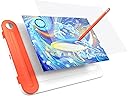
The UGEE Q8W is an 8.5-inch Bluetooth 5.0 drawing tablet featuring a large active area and a battery-free stylus with 8192 pressure sensitivity levels and 60° tilt support. Designed for both beginners and pros, it includes transparent tracing paper and offers dual connectivity via Bluetooth or USB-C. Compatible with Windows 7+, Mac OS 10.10+, Chrome OS 88+, and Android 6.0+, it empowers versatile digital artistry on multiple devices.


| ASIN | B0C4YN7JS8 |
| Active Surface Area | ≥ 20,32 cm (ancho) x 12,7 cm (alto) |
| Best Sellers Rank | 52,913 in Computers & Accessories ( See Top 100 in Computers & Accessories ) 110 in Graphic Tablets |
| Box Contents | Battery-free Stylus, Integrated Pen Holder, Pen Nib, Transparent Tracing Paper, Type-C Cable |
| Brand | Ugee |
| Brand Name | Ugee |
| Colour | Orange |
| Compatible Devices | Wire connected:Windows 7 or later 、Mac OS X 10.10 or later、ChromeOS 88 or later/ Bluetooth connected:Windows 10 or later、Mac OS X 10.10 or later、ChromeOS 88 or later |
| Connectivity technology | Bluetooth (Wireless) |
| Country of Origin | China |
| Customer Reviews | 3.9 out of 5 stars 89 Reviews |
| Display Type | LCD/LED |
| Item Dimensions L x W | 28L x 20W centimetres |
| Item Weight | 341 Grams |
| Manufacturer | Ugee |
| Manufacturer Part Number | digital drawing pad |
| Model Name | Q8W |
| Model Number | Q8W |
| Model name | Q8W |
| Native Resolution | 1920x1200 or 1600x1200 |
| Network Connectivity Technology | Bluetooth (Wireless) |
| Operating System | Windows 7 e versioni successive, Mac OS 10.10 e versioni successive, Chrome OS 88 e versioni successive, Android 6.0 o versioni successive |
| Operating system | Windows 7 e versioni successive, Mac OS 10.10 e versioni successive, Chrome OS 88 e versioni successive, Android 6.0 o versioni successive Operating system Windows 7 e versioni successive, Mac OS 10.10 e versioni successive, Chrome OS 88 e versioni successive, Android 6.0 o versioni successive See more |
| Pressure Sensitivity | 8192 Levels |
| Pressure sensitivity | 8192 Levels |
| Product Features | Battery-free stylus with 8192 levels of pressure sensitivity and 60° tilt function, Bluetooth 5.0, Unique mushroom-shaped pen nip |
| Product Warranty | 2 |
| Screen Size | 8.45 Inches |
| Special feature | Battery-free stylus with 8192 levels of pressure sensitivity and 60° tilt function, Bluetooth 5.0, Unique mushroom-shaped pen nip Special feature Battery-free stylus with 8192 levels of pressure sensitivity and 60° tilt function, Bluetooth 5.0, Unique mushroom-shaped pen nip See more |
| Specific Uses For Product | Drawing |
| Target Audience | Student, Teacher |
| UPC | 850013593699 |
| Unit Count | 1.0 count |
A**N
Pad Active
it is great Thank you
G**E
Awful
The installation on a perfectly working Windows 11 laptop was a nightmare. I had to fiddle with Bluetooth settings to convince this device even to show up in order to pair the laptop with it. Having finally installed it, the behaviour was erratic. The tablet kept disconnecting and behaving unpredictably, while the manufacturer's instructions and website said nothing about what to do if something didn't correspond to the instructions supplied in the box. Either I received a faulty device or Ugee isn't a reputable company. Either way, I will think more than twice before I buy anything marked with that name again. As for the functionality/design of the tablet -- for those lucky enough to get it working, that is -- it's nice for people learning to draw because the tablet helps them trace drawings into the computer. But that's pretty much where the positives end. The thing is, whether you do digital drawing or just want to take course notes on a tablet like this, you need SOME buttons. I am not talking about overkill, with buttons everywhere, but things like changing brushes, zooming, etc. become really tedious if one has no buttons at all. And this tablet has NO buttons -- not on the tablet's body, not on the stylus. This makes me think that it's probably just a toy designed for children. It lacks the basic foresight any reasonable manufacturer of digital tablets would have designed into their product. Pity, though. The idea of Bluetooth connection, the compartment for the stylus and the convenient setup for tracing drawings could have been lovely features if the rest of the design wasn't so poorly thought out and limiting.
S**G
An affordable graphic tablet for those who want to try digital drawing
An affordable tablet to tryout digital drawing, if you can't connect the tablet using Bluetooth on your Windows 11 PC, you need to set your Bluetooth to Advanced connection options (instead of default). Otherwise, it won't showup. I hope this helps.
L**M
OK but with significant flaws
I ordered this tablet for using as a whiteboard during remote meetings. - In general, I found it acceptable, but it’s taking some time to learn how to actually write on it while looking at the monitor and the results do not come even close to actually using a whiteboard and a secondary camera. - I think that the method for selecting the monitor area where the tablet is to operate is unnecessarily clunky and difficult, and way way too small! I suspect the programmer never actually had to use it in earnest (or they are total sadists). It would have cost them nothing to make it bigger instead of wasting most of the window’s space (see photo) - The tablet seems to interfere with the operation of the actual mouse - I am quite disappointed with the seller. I had asked them a question before buying the tablet, but I received no answer whatsoever.
C**S
Did not work correctly
I have owned a Ugee drawing tablet before, and until it went faulty it was great, hence why I bought Ugee again, but sadly this device did not work for me. It took ages to figure out how to connect it to Bluetooth on my PC; I had to set the PC Bluetooth setting to advance for the pad to be discoverable. When the Bluetooth was set up , the pen was erratic, when trying to use it, the cursor was all over the place, or sometimes not moving at all. other times it acted like I was left clicking the mouse button, so created a square box on the screen. I got sick of it and went to the wired version of the Ugee already have.
M**S
Not bluetooth connected
Fine if using the usb
Y**M
Untrustworthy
Barely worked and broke within a few days don't buy save your money
S**R
Tablette urée q8w
Fonctionne très bien avec mon iPhone
E**A
Tavoletta grafica Ugee Q8W
Molto più grande di come appare nelle immagini dell'annuncio. Alla prima prova funziona bene. Scaricata la App dal sito, ma solo guardata approssimativamente. Funziona con Onenote ma richiede di fare un po' di pratica. Molto comodo lo sportellino per riporre la penna.
B**T
Tablette dessin top
Tablette très facile à manipuler, ce connecter facilement au téléphone portable ,je suis très satisfaite
W**N
Ugee Grafiktablett
Das Grafiktablett verbindet sich leider nicht wieder automatisch mit dem Bluetooth Anschluss. Ich muss in den Einstellungen des Smartphones immer wieder den alten Bluetooth Zugang löschen und einen neuen starten. Ich musste vor der ersten Nutzung des Tabletts erst die Treiber für Android installieren. Nach dem verbinden mit Bluetooth muss ich eine App von Ugee starten und connecten, erst danach kann ich Mithilfe der Google Notizen App eine Zeichnung anfangen. Ich habe bis heute noch nicht heraus gefunden welche App ich als Alternative zur Notizen App verwenden kann, keine Ahnung. Das Tablett hat keine eigenen Grafikelemente, es gehen nur die Elemente, die über die genutzte App verfügbar sind. Was mich am meisten stört ist, dass die Plastik Folie des Tabletts leicht verkratzt und das deshalb das Malen mit der Zeit erschwert wird. Trotz des komplizierten verbindens und der verkratzten Folie nutze ich das Tablett sehr gerne.
M**S
Calidad/precio excelente
Estoy aprendiendo diseño y la verdad es que va bastante bien para principiantes. Puedes ajustar la zona de trabajo con la app oficial etc.
Trustpilot
1 month ago
2 weeks ago