Desertcart purchases this item on your behalf and handles shipping, customs, and support to Tunisia.
🚀 Upgrade your WiFi game—fast, sleek, unstoppable!
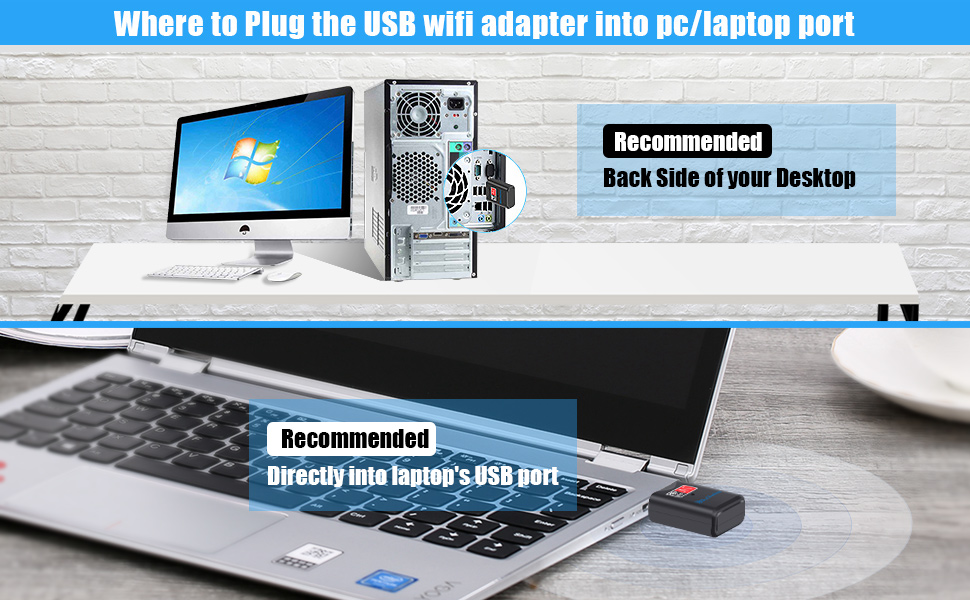
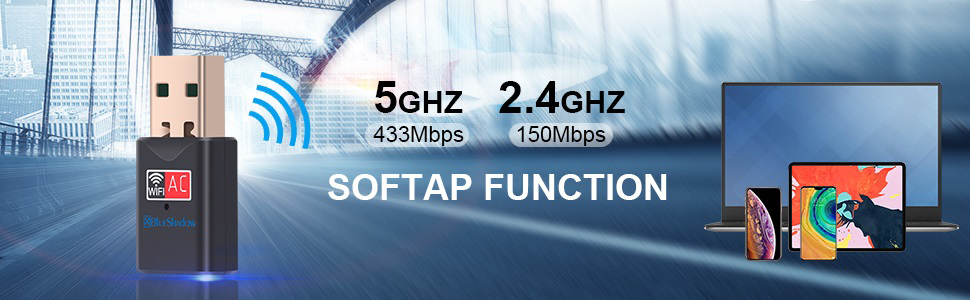
The Blueshadow USB WiFi Adapter delivers dual-band 802.11ac wireless speeds up to 600Mbps, upgrading any desktop or laptop with a compact, high-gain antenna design. Compatible across Windows, Mac, and Linux, it ensures seamless HD streaming, gaming, and reliable connectivity even in low-signal areas. A cost-effective, plug-and-play solution to future-proof your network experience.


| ASIN | B077XJB1Z8 |
| Best Sellers Rank | #282 in USB Computer Network Adapters |
| Brand | Blueshadow |
| Built-In Media | USB, USB2.0 |
| Color | Black |
| Compatible Devices | Desktop, Laptop, Supports Windows 11, 10, 8. 1, 8, 7, Vista/XP/ Mac OS X 10. 5-10.15,Linux(Kernel 2.6.24-4.15) Compatible Devices Desktop, Laptop, Supports Windows 11, 10, 8. 1, 8, 7, Vista/XP/ Mac OS X 10. 5-10.15,Linux(Kernel 2.6.24-4.15) See more |
| Compatible Operating System Family | ChromeOS, Linux, MacOS, Windows |
| Customer Reviews | 4.3 out of 5 stars 8,303 Reviews |
| Data Link Protocol | USB |
| Data Transfer Rate | 600 megabytes_per_second |
| Hardware Interface | 802.11 ac/b/g/n |
| Item Dimensions L x W x H | 3.8"L x 0.83"W x 0.59"H |
| Item Weight | 1.12 ounces |
| Manufacturer | Blueshadow |
| Mfr Part Number | 802 |
| Minimum Required Operating System Version | Windows XP |
| Model Number | 802 |
| Number of Items | 3 |
| Number of Packs | 1 |
| Product Dimensions | 3.8"L x 0.83"W x 0.59"H |
| UPC | 611890576010 611890576034 |
| Unit Count | 1 Count |
| Warranty Description | 2 |
A**Y
Wow, works!
I changed my internet provider and the router with the new service ran at 5mgz. My adapter card in my 5 year old PC only ran at 2.4mgz, so the day I changed services my "high speed" internet came to a crawl. After many hours of trying to figure out what was wrong I found some blogs that led me to check the existing cards MGZ. After learning that I cannot swap the card out some blogger suggested these USB toggles. I found this one, bought it, just installed it, and boom! High speed is 100% as advertised. For just under 20 bucks I don't know how you could go wrong. I'm shocked that it works as advertised, and took 5 minutes to install. Just pop in the mini disk, run the install file when you search in your folder (it does not automatically guide you to an installer) , double click and finish install through the wizard. Easy peazy. Then press the windows and X key to bring up your device manager, disable your old card and enable your new card and reboot. Or I think I rebooted first then disable and enabled. It was super easy, and super quick and I know how the speed my service is able to provide. Cheaper than buying a new pc :) This is a super great work-around!
T**T
Easy Installation If...
When I installed an upgraded wireless 5G router, I found that my ancient (7 year old) Dell laptop did not support 5G wireless. Not wanting to go through the hassle of setting up a new laptop, I searched around for a alternate solution. That's how I found the BlueShadow WiFi USB adapter. Actually, there are a number of different devices that handle this problem and the price is definitely less than a new laptop. I ordered and received it the following day. While waiting I did some reading and found that the necessary drivers could be downloaded from BlueShadow. I knew that the product came with an installation CD, but pulling out an external drive is usually a pain. Also, when I received the package I found that the included CD is one of those small (M-Disk) things. I don't know if my external drive will even accept one of these, so downloading the software was a good solution for me. After downloading the driver package, I found that it included a quick-install PDF document. Reading through it only took about five minutes and was definitely worth the effort. There are several important tips: 1. You must "disable" the existing Wireless device if your computer has one. Otherwise the computer will be confused about which wireless device to use. Do this before anything else. 2. Unzip the downloaded driver package then find the folder for your operating system. They include folders for Windows, Linux and Apple. In the correct folder is an "Install.exe" file. Double click this application and the normal Windows installation screen will show and you can do a normal software install. 3. Once the install process is completed restart your computer. You can plug in the USB WIFI device before performing the restart. After restarting, go to your "Available Networks" list and you should see your 5G network. Click on it and enter any required password. That's it, I now have 5G wireless access on my old non-5G laptop. Total installation time is under ten minutes once you know what to do. So far, the device work perfectly. Connects automatically on start up and doesn't seem to be unstable or to have disconnect issues. For the price, it's an amazing solution.
S**H
Pretty ok
(Don't get this if you don't have a cd drive!) I was expecting this is reach maybe 10 feet more than what it reaches now. This isn't a bad product, it's just that my office is over 50 feet away from the router so I'm really needing something that can reach over 60 feet- but that's what you'll get with this. Reaching 50 feet isn't bad for having thick walls blocking the reception, and this is powering a laptop With a hotspot set up for my phone for wifi. - TLDR; if you're someone who needs an antenna to reach the wifi just a few feet, 10/10 get this.
N**S
user friendly
It was easy to install . I just plugged it in a followed the instructions and it started working immediately
T**Y
Great
Wifi adapter works like a charm. There was no issue in installation. Should you have a old laptop and you want wireless service, then you should order this ASAP!!!
K**R
Fixing 5ghz Lenovo laptop connectivity issue
So I have a Lenovo e545 laptop. Lenovo has a nasty habit of "whitelisting" their add on cards, which means adding a special code to the pci-id so the BIOS will stop the boot if it doesn't have the lenovo code in it. How do I find this out?? I just moved to a comcast area and got a 60mbs modem. The standard 1 channel card in the lenovo only runs at 2.4 ghz. This means my download speed is .43 mbs!!! So i buy a dual band card from amazon for $14.99. I put it in the laptop, it dies at boot (see above). So I bite the bullet and get ready to buy a two band card from lenovo. I get lenovo parts on the phone and discover 1) None of the two band cards are in stock! 2) they aren't coming in till end of May, 3) it's $45.00!! Now you understand why i'll never buy another lenovo, or any other laptop that whitelists their peripherals. So what do i do?? I buy the USB two band wireless adapter listed here. Lenovo wireless software is totally screwed up, so you have to remove the card from the laptop (google instructions on the net). Otherwise it will keep trying to override the usb adapter. Next you have to uninstall the totally obnoxious and annoying Access connections from the control panel. Otherwise it will keep derailing your connection and dropping your adapter to internet link constantly. This is ANOTHER useless piece of junk from lenovo. Really, I can't say enough BAD THINGS about Lenovo laptops, but at least you'll get yourself working until you scrape up enough money to buy a replacement laptop that hopefully doesn't have these problems.
J**Z
Poorly made, horrible software, do not recommend.
I don’t have a disk drive for my pc so I had to download the device drive via a website described in the pamphlet included with the product. I download the driver, get everything set up, and go about my business. My pc is used mainly for online gaming, and I purchased this wireless adapter as a replacement for my other one which would cause me to disconnect from my internet every so often. I began using this wireless driver and it seemed to be better than my original, but very randomly and very CONSISTENTLY I would start to get very very high ping (latency/lag) during my gaming sessions. And I don’t mean 100ms or 200ms, I mean 1000ms, that’s not a typo: 1000ms. I had NEVER gotten this before with my other wireless adapter. I thought maybe troubleshooting would work. I cycled my adapter through all 4 of the USB ports from my MOBO as well as the 4 USB ports at the top of my case (4 USB 3.0 and 4 USB 2.0). No port worked. Ping was still ridiculously high. Tried uninstalling and reinstalling the driver. Nothing. The worst part about this wireless adapter is that it’s HOSTILE to other wireless adapter programs. I decided to stop using this product and reverted back to my old wireless adapter. Reinstalled that driver. And every hour or so of use my pc would get the Blue Screen of Death. When I reverted my pc settings to the last time my pc worked properly, it reset to before I reinstalled my old driver. This is hands down the worst product I’ve ever purchased on amazon, I thought it would’ve performed much better than it did. Least of all was I expecting this dainty little adapter to make my pc blue screen. Btw, the problem wasn’t my internet, I plugged in Ethernet, absolutely no problems whatsoever. So I guess wireless isn’t for me. I recommend either saving up for the higher quality wireless adapters, the best ones being those which you’d have to install inside your case. Because I’ve purchased 2 of the cheaper ones, and both left me extremely disappointed.
T**3
Reliable WiFi signal; 5Ghz strength!
I recently bought a new laptop that had an internal Realtek WiFi adapter. It constantly dropped the signal and I did everything I could to fix it - uninstall and reinstall the drivers, install updates, troubleshooting, tips from the internet, etc. You name it, I did it. NOTHING worked! I was getting ready to take it back to the store but all my stuff had been installed and I really did not want to go through the process of starting with a brand new computer all over again. Enter this USB WiFi adapter. This thing is a LIFESAVER! I am a grad student who requires a reliable internet connection - especially when I am taking online exams. I got it in the mail and it came with a tiny CD for installation. It was super easy and only took a few minutes. Once I entered the WiFi password for our router, I was online. The signal has been steady and strong! I love that it has dual bands, too, because I am currently on 5G and it is FAST! MUCH faster than 2.4G that I am used to. I am so glad I bought this adapter and didn't return the laptop.
G**S
Quickly replaced the WiFi adapter card in my laptop
The adapter card in my laptop died - and this was a quick and simple fix. The USB dongle is slightly larger than a mouse dongle, for example - but is not particularly obtrusive. It worked great straight out of the packaging, and was delivered the next day.
P**D
Klein und schnell
Guter, schneller USB WLAN Adapter. Wird sofort (mit den richtigen Treibern von Windows, Linux und Android erkannt und ist sehr leicht zu installieren. Jederzeit eine Empfehlung wert.
M**N
Parfait
Fonctionne très bien
A**R
Very easy to connect
For educational purpose and it is easy to use
S**A
Piccola ma efficiente
Una piccola chiavetta usb. Utile, mi ha risolto il problema del 2,4gz/5gz Semplicissima da usare. Basta inserirla in una porta libera e il gioco è fatto. Il pc la rileva da solo. Come sempre puntuale la consegna
Trustpilot
1 week ago
2 months ago