Desertcart purchases this item on your behalf and handles shipping, customs, and support to Tunisia.
🎨 Calibrate Brighter, Work Smarter — Own Every Pixel!
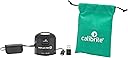
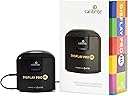
The Calibrite Display Pro HL is a professional-grade colorimeter designed for precise calibration of modern high-brightness displays including LCD, mini-LED, OLED, and Apple XDR panels. Featuring a high luminance sensor capable of measuring up to 3000 nits, it ensures accurate color profiling even on the brightest screens. The included Calibrite PROFILER software offers advanced customization and validation tools, while USB-C connectivity with an adapter guarantees compatibility across Mac and Windows systems. Ideal for creative professionals demanding consistent, true-to-life color across multiple monitors and projectors.


| Additional Features | Clip |
| Asin | B0C836NB5X |
| Aspect Ratio | 16:9 |
| Best Sellers Rank | #3 in Photographic Light Meter Color Calibration Charts #474 in Computer Monitors |
| Brand | Calibrite |
| Brightness | 3000 candela_per_square_meter |
| Color | Black |
| Compatible Devices | Mac, Windows, and compatible 3rd party monitor calibration software |
| Connectivity Technology | USB Type C |
| Customer Reviews | 4.4 4.4 out of 5 stars (334) 4.4 out of 5 stars |
| Display Resolution Maximum | 2560x1440 pixels |
| Display Technology | LCD, mini-LED, OLED |
| Display Type | lcd, led, oled |
| Global Trade Identification Number | 00850028833339 |
| Hardware Connectivity | USB Type C |
| Included Components | Colorimeter with adjustable weight, Travel storage pouch, USB-C to USB-A adapter |
| Item Dimensions D X W X H | 2.13"D x 2.6"W x 1.5"H |
| Item Weight | 4.8 ounces |
| Manufacturer | Calibrite |
| Model Name | CCDIS3HL |
| Model Number | CCDIS3HL |
| Native Resolution | 2560x1440 |
| Picture Quality Enhancement Technology | High Dynamic Range, Blue Light Filter, Advanced Color Calibration |
| Refresh Rate | 60 hertz |
| Resolution | QHD Wide 1440p |
| Screen Finish | Matte |
| Total Usb Ports | 1 |
| Unit Count | 1 Count |
| Upc | 850028833339 |
| Warranty Description | 1 Year |
User
Crucial tool for color accuracy where accuracy matters!
Being a photographer, having a properly calibrated display is crucial for accurate color representation during post processing workflow. I used non calibrated displays for quite some time and typically would have issues where what I initially thought was correct during my post processing of photographs, wasn't. This is solved by calibration and having a tool that measures the color, luminance, and gamma to confirm what you are seeing is indeed correct.This is where the Calibrite Display Pro HL comes into play. Let me start by saying, I actually ordered this used but in excellent condition and I received the item used and in excellent condition. I was able to save some money and repurpose a returned device. I have experienced no issues whatsoever with the device. The instructions to download the software were clear and I was able to successfully download and install the software which automatically recognized my device. I actually like the software interface. This is my first Calibrite device I’ve used and I do prefer the software interface over other brands. It's very simple and step by step.That's what makes this such a simple task, the software is step by step and explains everything needed to properly calibrate your display. The process does take a bit of time so it's best to set aside 20-30 minutes of time to fully complete the process. The end result is worth the cost of the device and the time to calibrate the monitor in my opinion. It really takes all the guesswork out of accuracy which is crucial in photography and videography. Which brings me to my next point and that is, the software will ask you why you are calibrating your device and for what type of monitor you are calibrating. There is an option for video as well as photo which may appeal to videography users as well. The device itself also came with a storage bag for the unit which I appreciate. It keeps it protected when it's in my drawer and not in use. I also appreciate the USB-C interface as this is the connectivity standard we need to be moving towards. This small detail is an important step toward interface standardization.I would highly recommend this to anyone looking to calibrate their viewing device for accuracy where accuracy matters.
User
This colorimeter really works and is easy to use!
This colorimeter really works and is easy to use! However, seems maybe too expensive to me.
User
Accurate Colors, Easy to Use, and a lifetime purchase!
I did not realize how out of calibration most factory screens are. I've only had this for a few days but I've already calibrated over 8 screens in my house and ALL of them were horribly off. I can't believe I never looked into these until recently since I started video editing!My Samsung Odyssey G7 27" 1440p 240hz screen required tuning the white balance to 44/48/50 RGB to get it to a perfect 6500K at 26/65 Brightness/Contrast with Black equalizer at 12, for 120nits in Rec709 Gamma 2.4 and it got a respectable delta of .7 across the screen. And this is running off of the HDMI at 60hz in 12-bit color, in which it's supposed to be calibrated for. I'm disappointed in the lackluster factory calibration but happy with the results from the Calibrate!My recommendation for software? I definitely recommend DisplayCAL colors over the Calibrate software. Calibrate's software tends to leave a green overcast and I did not like that one bit. I haven't tried HDR calibration yet but I'll do that on my sisters Acer Predator monitor laterDo be warned! It WILL take a while, I left it on the "High" speed and on average it took 15 minutes on each screen. There is the "Highest" setting as well and it estimates 6-minutes or so. DaVinci Resolve calibration? MAKE SURE YOU HAVE TWO HOURS!! It took 2 hours to complete the DR calibration, so do be cautious and do this when you have other things you can do since your PC will basically be inop during thisOverall, I am extremely pleased with my purchase and couldn't be more excited to edit the next film! I hope this will last at least the next 5 to 10 years with how fast screen technology is changing, but that's why I bought the Calibrate Display Pro HL!
User
Professional device
The device itself is compact and smaller than competing products. The application is intuitive, with a beautiful interface and the option to work in both simple and advanced modes. It does its job very well, and I would gladly recommend it to all professional photographers.
User
How to use Calibrite HD Pro
Software could detect my 3 monitors but it always applied the calibration to the wrong monitor. Okay fine I’ll only connect one at a time and calibrate that way, now it works but every color calibration makes the screen look orange tinted. Try again, dropdowns are invisible. Restart the app, dropdowns are invisible again, and again, and again. Restart computer, I can see dropdowns again. Run calibration, orange tinted again. Run validation, fails after confirming calibration multiple times. Consider throwing device in garbage disposal, return it instead.
User
Screen calibrator
Still working with it am still seeing how effective it is but easy to set up.
User
Excellent calibrator
This is a GREAT calibrator. Easy to use, and the color accuracy seems to be spot on. I do a lot of photo and video work, and this has given me a great sense of control and consistency. I bought this, because another brand I had, had aged out of updates. This seems to have a long lifespan, and there's even third party software that may extend it's usage life into upcoming OS's. It was more expensive than I wanted, but I got it when they were offering a rebate. Looks like Amazon's not offering it anymore, but I'd recommend it elsewhere.
User
Great calibration tool, but the software needs some work
This is a tough one to rate because the calibration tool is really nice, but the software is so-so. I have had a couple calibrators in the past including a Spyder 4 and I like this one as much or better than anything I've had. It's small and packs up nicely when you don't need it. I like the bag it comes with as well to keep it dust free when not in use. The trouble is the software is fine once (IF) you can get into the calibration, but has some quirks that can make it very difficult to use.The main issue I had is that the setup window where you pick all your options doesn't seem to scale with the monitor it's on. I don't know if it's locked into some specific size or scale factor, or has some way it detects screen resolution and font scaling that needs reworked, but I had problems on both monitors I tried it on (each on a different PC). My main monitor is a 4K monitor and I could see everything, but it was slow and glitchy. My screen would flicker periodically and trying to move the window caused a weird disconnect from where the mouse was related to the window. It's hard to describe, but it made moving it very difficult and non-intuitive. I could work with it though even though I really wanted the window to be in a different location to make the calibrator easier to use for my setup. I couldn't get it positioned correctly though due to the movement issue.The second monitor (on a different PC) is a 1440p ultra wide and on it the setup screen was way oversized with the bottom 1/4 or so of the window cut off below the monitor view and the text was overly large and fuzzy. I couldn't resize or move the window either, so I couldn't see some of the options down there or select them! From the first monitor setup experience I was able to muddle through mostly with the menu items at the top, but there were several option screens that I wanted to make other choices but couldn't because I couldn't see/reach those items to select them. I should also mention that I was able to set up calibration because of using the custom options on the top of the window. Some of the preset options were cut off and unselectable making it not very user friendly at all for someone who isn't comfortable working with the customization. Once the calibration started the window resizes and everything looks like a normal window including sharper text, so I have no idea what is going on there. It's like the two parts were made with different software and the setup part is outdated or broken... I have no idea what the behavior or usability would be like on a 1080p monitor since it seemed like the smaller the screen the worse it was.The other issue is that one of the big reasons I chose this calibrator is because it was listed as compatible with DisplayCal, an open source calibration software I have used many times in the past and prefer. For whatever reason though, I couldn't get this calibrator to work there. It would detect it but error out as soon as I tried to start a calibration. I spent a couple hours working through troubleshooting steps on their forums and never got it to work. I tried it both with and without installing the Calibrite software. Some claimed the software has to be installed in order to release a "lock" on the hardware from the driver side, but nothing worked for me. The errors code I was seeing per the DisplayCal forums is related to the hardware address of the calibrator not being allowed to be accessed so... I can't honestly say which side the issue was on, but if you use DisplayCal I would say you are gambling with this calibrator. At least on a Windows system. Linux users seem to have more options to work around things? I would have preferred to use DisplayCal and honestly only ended up using Calibrite software because I couldn't get that to work.Despite the above issues I do think the tool did a good job, and for me, the Calibrite software WAS sufficient and thorough enough for what I needed it for. It's just the bugs that really give me pause. It would be a 4 or 5 star calibrator easy if things could be improved on the software side. I read several things on forums while troubleshooting about the software in use here being adapted legacy code from their older calibrators. I can't speak to how accurate that is, but in any case I can't give it more than 3 stars right now. While I like the hardware, the state the software is in makes it a gamble on whether you'll have to fuss and fight with it. Not too big a deal if it reliably worked with open source options, but that is yet another problem. These things are too expensive for software to be an issue! If they update the software in the future (I'm on Profiler 1.2.8) I would definitely recommend this. For now, I can't recommend it unless you are fairly savvy with troubleshooting on a PC.
User
couldn't launch the software
couldn't even launch the software on windows 11 - it throws error "Application failed to launchPlease quit the application and check your Display setting preferences are set to 'Extended Display / Desktop' and then restart the software". many reports on the same problem with no solution. real shame
User
Good product!
Something you really need particularly if you care about colours in your monitor! Easy to use in "Basic" but in "Advanced" mode too, fast and accurate result!
User
Great product
I use it for graphic design and illustration. Very accurate and easy to use. The colors are the same on both monitors.
User
De Calibrite Display Pro HL werkt zoals beschreven.
De Calibrite Display Pro HL werkt zoals omschreven, ik heb mijn beide schermen gekalibreerd, alles wijst zichzelf.
User
Vale ogni centesimo speso
Utilizzo il Calibrite Display Pro HL da più di due anni per calibrare sia il mio MacBook Pro che il monitor Eizo del mio setup fotografico, e posso dire che è uno dei migliori investimenti che abbia fatto per la gestione del colore.Fin dal primo utilizzo si percepisce la qualità professionale del dispositivo. L’installazione del software è semplice e immediata, e l’interfaccia guida passo dopo passo anche chi non è esperto di profilazione colore. Su macOS funziona in modo fluido, riconosce subito il dispositivo e permette una calibrazione precisa sia dei laptop che dei monitor esterni.Sul mio MacBook Pro il risultato è stato notevole: colori più coerenti, bianchi corretti e una resa generale molto più fedele, ideale per lavorare su foto e video. Ma è con l’Eizo che il Calibrite Display Pro HL dà il meglio di sé. La misurazione è rapida e accurata, il profilo ICC generato è perfettamente stabile e la differenza prima/dopo è evidente soprattutto nei toni neutri e nelle sfumature più delicate.La qualità costruttiva del calibratore è ottima, i materiali sono solidi e il sensore ad alta luminanza permette di gestire senza problemi anche schermi molto luminosi o HDR-ready. Anche la velocità di lettura è superiore rispetto ai modelli precedenti che ho provato.✅ ProCompatibilità perfetta con macOSCalibrazione estremamente accurata sia su laptop che monitor professionaliIdeale per schermi ad alta luminanza (HL)Software intuitivo e affidabileCostruzione solida e sensore molto preciso📌 In sintesi:Il Calibrite Display Pro HL è un dispositivo indispensabile per chi lavora seriamente con le immagini. Affidabile, preciso e facile da usare: su MacBook Pro funziona alla perfezione, e con monitor professionali come gli Eizo dà risultati eccellenti. Lo consiglio senza esitazioni.
Trustpilot
1 day ago
2 months ago