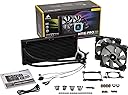
🌬️ Cool in silence, shine in style — the ultimate RGB water cooler for pros who demand more.
The Corsair H115i PRO RGB is a high-performance liquid CPU cooler featuring dual 140mm magnetic levitation fans that deliver 55.4 CFM airflow at an ultra-quiet 20 dBA. Its dynamic RGB pump head lighting is fully customizable via CORSAIR LINK software, which also enables precise control over fan and pump speeds, including a zero RPM mode for silent operation at low temperatures. Compatible with a broad range of Intel and AMD sockets, this sleek black cooler balances powerful thermal management with stylish, customizable aesthetics.


| ASIN | B077G3C6HH |
| Air Flow Capacity | 75 Cubic Feet Per Minute |
| Best Sellers Rank | 301,945 in Computers & Accessories ( See Top 100 in Computers & Accessories ) 4,289 in Fans & Cooling |
| Brand | Corsair |
| Compatible Devices | PC |
| Compatible devices | PC |
| Cooling Method | Water |
| Cooling method | Water |
| Customer Reviews | 4.6 out of 5 stars 1,789 Reviews |
| Global Trade Identification Number | 00843591026505 |
| Item Dimensions L x W x H | 31.5L x 14.3W x 2.9H centimetres |
| Item Type Name | All-in-one water cooling |
| Item Weight | 2.24 kg |
| Manufacturer | CORSAIR HOLDINGS HONG KONG LTD |
| Manufacturer Part Number | CW-9060032-WW |
| Material | Aluminium |
| Max Rotational Speed | 1200 RPM |
| Model Number | CW-9060032-WW |
| Noise Level | 20.4 Decibels |
| Number of Items | 1 |
| Number of Packs | 1 |
| Power Connector Type | SATA (pump), 4-pin (fans) |
| Power connector type | SATA (pump), 4-pin (fans) |
| Product Warranty | 5 Year Warranty |
| Product dimensions | 31.5L x 14.3W x 2.9H centimetres |
| UPC | 843591026505 |
| Unit Count | 1.0 count |
| Voltage | 12 Volts |
L**E
Quiet cooling without compromising on performance
While installation for me wasn't quite as easy as it should have been, I can't fault the cooler for that, instead the Corsair 460x I was installing it in. Considering there is space for fans at the top, Corsair really should have added some extra space up top in order to fit a radiator there. I instead ended up installing the radiator on the exterior of the case, at the top. Regardless, this isn't the fault of the cooler, and when I initially attempted to install it with the motherboard out of the case it went very smoothly, far easier than installing a high end air cooler. The included instructions were sufficient, but nothing special. Not everything was as clear as it could have been, however the installation itself is pretty intuitive and so this is a non-issue. When I initially powered on my computer for the first time after installing it I was shocked at how quiet it was. I actually ended up peering into my case to ensure that the two included ML140 fans had been connected properly. It really is dead silent, even on the default profile, and my three Corsair SP120 RGB case fans make significantly more noise than this cooler. After tweaking the fan profiles of everything and leaving the pump on the 'balanced' preset I cannot hear my computer (~0.75 metres away from me on my desk) when gaming with my speakers. With my 8600k on stock settings idle temperatures, while insignificant, were sitting around 32C in my room with an ambient temperature of 19C. What was really impressive was the temperatures I was seeing under load - in Aida64 Extreme on stock settings temperatures barely exceeded 60C after half an hour on the stress test, and all the while my system remained dead silent. After over-clocking my i5 8600k to 5Ghz at 1.350V I reach 68C under the same test. This is all with the included thermal paste on the cooler, and on a non-delidded processor. This performance is really impressive to me coming from air cooling. In terms of negatives, the only thing I can think of is the USB cable coming from the cooler. To control the RGB this must be plugged in, however the way that it comes out of the cooler can make it somewhat difficult to cable manage. I tried to route it underneath the VRM heatsink, however it comes out some distance from the motherboard, meaning that it is still very visible from the exterior of my case. An integrated solution for this would be more appealing than the mini USB cable utilised here, as it would make it easier to hide the cable coming out from the waterblock. On the plus side this cable is black, and so does not stand out too badly. Overall this cooler is superb, and does everything it needs to very well. The mix of performance and aesthetics cannot be faulted, and the 360mm offerings from both Corsair and other brands do not pose a significant enough bump in performance to justify the increase in performance in my opinion. This is a five star product.
S**C
Fantastic quiet cooler - but poorly designed fittings
This is a fantastically effective cooler - I have it sitting in the front of a Fractal Design R5, acting in pull configuration as the air intake - and in almost all usage scenarios it is, in practical terms, silent, and keeps my i7-6700 cool with ease. The twin mag lev fans are efficient and beautifully quiet. A huge relief after the irritating whine I was getting from the pump in its predecessor, an EKWB EK-XLC predator. The fitting process is straightforward, except that the base sections of the risers, the part that goes through the motherboard and screws into the base plate, are too long - or they were for my Gigabyte 1151 MB. It was therefore impossible to get them tight against the MB, they would just jiggle about. Some have claimed that this still works out OK when everything is fixed, but I played safe and found some old hard drive mounting grommets, cut them in half to create rubber washers, and then used these to fill the space behind the board, effectively pushing the back plate off the board a little. Everything then tightened up fine, and the rest of the installation is a breeze - the water block even has thermal paste pre-applied. Highly recommended, and the mag lev fans are worth the extra money!
L**K
Keeps the system nice and cool with hardly any noise
You can tell the fans are good (the well-regarded ML 140s fro Corsair) because you can more often than not hear the faint sound of the pump over the sound of them. One thing to bear in mind with this AIO is case compatibility, you may not be able to fit it in something like the NZXT H500. In my Corsair 275R it's had to go in the front which has hampered airflow very slightly in my case. With the stock blower cooler my GPU was definitely heading into thermal throttling territory, but after sticking a Morpheus II on it temps are much more reasonable. The one negative is the number of cables that come off the pump/coldplate combo - 1 fan splitter, 1 USB cable (for controlling via Link/iCue) 1 SATA cable and a PWM sensor cable. I've managed to route these so they are not visible, but it took some lateral thinking and liberal use of adhesive. The main selling point of this cooler is silent running, which the combination of a large radiator and low RPM fans manage very well. Load temps on my 2700x when running synthetic loads like OCCT or Prime 95 top out at 55c after 1 hour, which is amazing.
R**D
Good cooling, annoying pump noise
This is quite a reasonably priced 280mm AIO cooler, so it definitely gets marks for that. The cooler, like all AIO's is very easy to install. It comes with pre applied thermal paste, and the pre installed fans are aggressively mediocre. I've changed the pre installed fans for some Nocuta P14 fans, and that did improve fan noise levels and cooling. I'm running a Ryzen 9 3900X, and it idle it runs at about 30-40 degrees (dependant on amibent temperature, and hardly ever goes above 60 degrees celcius during extended gaming sessions. However, I do have one thing I don't particularly like about this AIO. The fans and pump are controlled by Corsair's iCUE software. The software itself is ok, however, the pump noise is extremely annoying. No matter what speed you set it at (quiet, balanced or extreme) the pump speed changes between two values every couple of seconds, this is completely intended behaviour, however, it makes the pump sound like it's 'hooting' every second or two. It's a highly annoying sound, and sadly there's nothing you can do about it. Overall this is a pretty good cooler (pump noise aside), however, if this did break, I would probably buy something different, either a different brand AIO, or a Noctua nh d15, just to avoid the pump noise
G**K
Great cooler - attractive, quiet and cool.
Got 5degC cooler at default settings compared to my air cooler (Arctic Cooling Freezer 13) and more importantly for me, I got equivalent cooling but at a damn-near silent setting. This unit sells itself as quiet and it certainly can be. I have the fans set at a constant 500rpm at which speed they are inaudible. The pump on the "quiet" profile is slightly audible (nothing compared to an air cooler) but I have quite an open case sitting on my desk. If you have your PC under the desk I doubt you'd hear it. The CUE software works okay. I find you have to press the "Apply" button many times for it to actually apply the settings but it works in the end. It's not that obvious how to make your settings the default settings.
A**R
Great Cooler.
The CPU cooler works really well. It took a while to figure out how to install it. The manual helps a bit but you also need to watch videos on youtube to completely get the idea on how to go about it. It is quiet and powerful and very dependable. FX 8350 boxes like mine can be a challenge to cool but it has worked perfectly on it. I am very pleased. Go for it.
S**L
Fantastic water cooler
Fantastic water cooler - really easy to install (I fitted it in a Corsair Obsidian 750D exhausting from the top vents). The difference between this and a good air cooler is incredible. The fans never go above 1000rpm, even when the CPU is at 100% load. Core temperatures are kept down between 40 and 50 deg under load, and around 30 deg idle, when attached to an i7 8700K clocked to 4.5GHz. The RGB looks great too, and easily controlled via the Corsair Link software. Highly recommended.
S**T
Great cooling with a great look
Bought this product as a result of my old water cooler breaking randomly and I am far from disappointed, this product keeps my cpu within the 30-35 degree range which is great for most rigs. Ascetically it’s fantastic, the rgb lightening had many presets and has plenty of customisation, the only issue I have is that sometimes the software can not pick up the cooler, however, this is more than likely an issue of the Corsair software and not the product itself. But overall, I am happy with this purchase.
V**T
Fantastic Liquid Cooler
This 280mm cooler did everything I wanted it to do. It's relatively easy to install and comes with detailed instructions on how to install it. Supports many CPU sockets and motherboards, and does AMD if you need to (come with mounting bracket for both). It's super quiet, and the fan speed and pump speed are both adjustable in the Corsair utility engine. LED's look nifty as well. I have an i5 9600k and I was using a crappy stock cooler before, so I went from 50 degrees idle to 27 degrees idle. Under stress, I went from 100 degrees (yes, i know) to 40 degrees tops. It never gets hotter than 40. Overclocked up to 4.3 Ghz so far and it stays under 40 all the time. Strongly recommend this cooler to anyone looking for a liquid cooler.
E**E
Parfait compagnon pour un 3900x
Ce H115 en 280mm fait la paire avec mon 3900x, il s'entendent plutôt bien ensembles ! Même après avoir passé une période de canicule pénible pour tout le monde... Rien à redire sur le kit en lui-même, après avoir eu un H60 (pas le même format ! les AIO ont fait du chemin entre temps...) dans mon ancienne bécane qui a correctement fonctionné pendant presque 7 ans, Corsair est fidèle à lui-même en terme de qualité de fabrication. C'est beau, c'est lourd. L'installation se fait sans heurt, j'étais dubitatif sur les branchements qui peuvent paraître pas évidents au début, finalement c'est assez pratique, ça n'encombre pas de prise ventilo sur la CM (sauf une pour le monitoring des vitesses de la pompe et des ventilos), en revanche ça impose de passer par un logiciel pour gérer les vitesses des différents éléments (je vais y revenir). Y a que la prise USB sur le module pompe qui est un peu disgracieuse, ils auraient pu faire quelque chose d'un peu plus intégré. L'installation est enfantine sur socket AM4, Corsair utilise les supports prémontés de la CM. Y a juste à poser, visser, et basta. Un pad thermique est préappliqué, mais je l'ai virer pour mettre de la vraie pâte à la place. Les LED c'est rigolo, mais je n'ai aucun autre élément éclairé dans mon boitier, donc c'est tout à fait gadget pour ma part. Niveau fonctionnement rien à redire là non plus. La pompe est audible en mode performance, mais totalement silencieuse en mode équilibré. Je suis authentiquement impressionné par les ventilateurs ML140 fournis, quelle efficacité ! Et quel silence ! Evidemment on entend le flux d'air passée une certaine vitesse (je dirais à partir de 60%), mais aucun bruit mécanique ou vibration ne vient gâcher la fête. Tellement impressionné même, que j'en ai commandé d'autres pour remplacer mes anciens BeQuiet qui commencent à avoir du kilométrage (et qui sont clairement en-dessous sur tous les niveaux, ventilation comme bruit). J'obtiens des températures CPU très satisfaisantes, entre 30 et 35° au repos, et aux alentours de 70° en mode torture (pour rappel : période estivale, canicule, tout ça). Pour le côté logiciel, obligatoire pour gérer les éléments de l'ensemble, j'utilise Corsair Link. Le logiciel permet en un coup d'oeil de voir les températures des différentes pièces du système, gérer la vitesse des éléments branchés au H115 (pas ceux branchés à la CM), gérer les LED du module pompe... Le logiciel a l'avantage d'être assez léger, et pas du tout intrusif (pas de compte utilisateur à avoir, n'est-ce pas NZXT). Petite particularité, la modulation de la vitesse des ventilos se fait non pas par rapport à la température du CPU lui-même, mais par rapport à la température du liquide de refroidissement mesuré par la pompe. Ca demande un peu d'habitude si vous souhaitez faire vos courbes vous-même puisque le référentiel utilisé a beaucoup plus d'inertie que le CPU lui-même, mais c'est finalement plus cohérent, et surtout ça évite aux ventilos de faire du yoyo dès que le CPU fait une petite pointe de température. Pour référence, avec ces températures estivales, la T° du liquide est généralement à 29° au repos, et monte à 41-42° à pleine charge. Le delta est beaucoup moins important que la température du CPU, d'où le fait qu'il faille un peu changer sa façon de penser au moment d'optimiser les courbes des ventilos. La seule petite critique, c'est qu'il n'est pas possible de mettre une vitesse adaptative à la pompe. Quelque soit le réglage la vitesse sélectionnée est fixe (en gros silencieux 1000trs/min, équilibré 2070, performance 2800). J'aurais aimé que ça puisse s'adapter à la température comme les ventilos. Bref au final c'est massif, mais il faut bien ça pour un 3900x, et le H115 coche toutes les cases de l'excellence. J'espère qu'il durera aussi longtemps que mon ancien H60 !
I**Y
12°C Kühler als mein Thermalright HR-02 Macho Rev.A
[Einleitung] Das Produkt habe ich im Warehouse Deal (Wie Neu) gekauft und so kam es auch an. Nun fiel mir beim Auspacken gleich auf das die Installation vielleicht doch nicht so simpel wird wie gedacht. Erstmal war ich froh den alten Tower-Kühler-Klotz endlich loszuwerden. Die Montage vom Macho ging mir bei jedem CPU Tausch mächtig auf die Ei**. Das reinfriemeln der Schraube durch den ganzen Tower war jedes mal die Hölle! Auch das Gewicht das man auf die CPU ausübt und von seitens Thermalright durch einen Spacer besser verteilt werden sollte, hat sich endlich in Luft aufgelöst. [Installation] Zu aller Erst stellt man sich die Frage wo montiert man denn den Radiator überhaupt? Nach einigen Tests und Erfahrungsberichten sowie Youtube Videos, habe ich mich für eine Front Installation entschieden. Hier gibt es zwei Theorien: Vorne: Sorgt für eine kühlere CPU aber für ein wärmeres Gesamtsystem. Höhere Grafikkarten Temperatur weil die Luft durch den Radiator bereits erwärmt einströmt. Die Backplate ist leider aus Plastik statt aus Metall. Warum auch immer. Beim Anbringen ist mir aufgefallen das diese nach Montage sehr locker sitzt im Vergleich zu meinem alten Backplate vom Macho. Das ist aber normal so. Erst durch das anbringen der Pumpe auf der CPU ensteht der nötige Anpressdruck. Die Backplate hat also erstmal etwas Spiel. Oben: Sorgt für ein kühleres Gesamtsystem aber für eine höhere CPU Temperatur weil die Luft ja bereits erwärmt aus dem Gehäuse kommt. Gut, also nachdem ich dann feststellen muss das die Instlalltion nicht so funktioniert wie mein Gehrin das eigentlich wollte musste ich mich doch etwas an die Anleitung halten. Ich wollte eigentlich erst die Lüfter an das Gehäuse montieren und daran den Radiator, so das die Luft durchgepustet und nicht durch gesaugt wird. Das hat aber so nicht funktioniert. Das heißt erst den Radiator an das Gehäuse und dann die Lüfter (Da muss ich nochmal recherchieren). Die Installation an sich ist ein Leichtes. Lüfter an den Radiator -> Radiator an das Gehäuse -> Kabel anschließen -> Fertig. Ich habe die mitgelieferte Wärmeleitpaste gegen die Thermal Grizzly Kryonaut getauscht. Etwas nervig sind dann doch die vielen Kabel im Vergleich zu Towerkühler. 2x Lüfterkabel 1x Power über SATA 1x USB an dann Mainboard Mit dem richtigen Gehäuse kann man einigermaßen schön verstauen. [Fazit] In Stress Tests unterscheidet sich die Temperatur um bis zu -15°C zu meinem alten Thermalright HR-02 Macho. Bei Gaming in Battlefield 5 bleibt sind es maximal 45° C. Die maixmal Temepratur mit meinem 9700k auf 5Ghz beträgt nach ergiebigem Stress Test etwa 68 °C. Warum hier viele sich über die Lautstärke beschweren kann ich nicht verstehen. Ich finde die CORSAIR Hydro Series H115i PRO RGB ziemlich leise. Am anfang hat kurz mal gerattert aber danach ist das aus meinem System nicht rauszuhören. Verbaut habe ich die AiO in ein Define C - Window von Fractal. Wie man auf dem Bild sieht wird es im Gehäuse doch ziemlich eng aber es passt noch ;) Ich kann die CORSAIR Hydro Series H115i PRO RGB absolut weiterempfehlen. Sie ist bis auf die Backplate toll verarbeitet, kühlt spitzenmäßig und sieht gut aus. Worauf ich mich am meisten freue ist, da ich die große Friemlei bei CPU Tausch mit dem Towerkühler nicht mehr hab. Denn wenn die CORSAIR Hydro Series H115i PRO RGB erstmal verbaut ist, ist so ein Tausch ein Kinderspiel. Keine schwer erreichbaren Schrauben mehr, keine Wärmeleitpaste die bei Kühlermontage verschmieren kann. Was will man mehr. Für mich war ein Hardwarewechsel mit dem Macho immer die Hölle, das ist nun definitiv anders. [UPDATE - 26.09.2020] -Eine Reklamation Nach nun 22 Monaten hat meine CORSAIR Hydro Series H115i PRO RGB irgendwie eine Macke. Die Temperaturen stiegen plötzlich um über 20°C zum Ursprungszustand. Nach Kontakt aufnahme mit Amazon wurde ich zuerst an die Corsair Support Hotline verwiesen, da die Abwicklung über Corsair erfolgt, was ich ja irgendwie nachvollziehen kann. Nachdem dort aber nach 3 Tagen weder die Hotline erreichbar war, obwohl ich in den aktiven Zeiten angerufen habe, noch mein Ticket beantwortet wurde, habe ich mich erneut an Amazon gewendet. Amazon war dann so kulant und hat mir angeboten den Artikel einzusenden und den Betrag zu erstatten. Finde ich persönlich ziemlich krass von amazon und kann nur sagen "Hut ab". -Ersatz Da ich trotz dem Defekt von der AiO von Corsair überzeugt bin habe ich mir die Corsair iCUE H115i RGB PRO XT als Ersatz bestellt und bereits eingebaut. Kühlleistung ist wie bei der CORSAIR Hydro Series H115i PRO RGB 1A. Der Einbau ist wirklich easy. Ich weiß nicht was sich hier als die Leute beschweren. Mit Ausbau der CORSAIR Hydro Series H115i PRO RGB und Einbau der Corsair iCUE H115i RGB PRO XT habe ich vielleicht 30 Minuten gebrauch. Wenn überhaupt... Vielleicht haben die Personen die sich beschweren einfach nen doofes Gehäuse. In meinem Fractal Define C Window ist das absolut easy und leichter zu montieren, als die meisten großen und starken Luftkühler!
S**H
H115i PRO RGB
C'è chi li ama e chi li odia, per me gli aio sono un'ottima soluzione per dissipare il calore delle CPU dei nostri pc, belli da vedere e regalano al pc quel tocco in più che i dissipatori ad aria non hanno! Case pulito e ordinato senza avere nel mezzo un pezzo enorme di allumino\rame che praticamente all'interno del vostro pc vedrete solo quello e io che amo vedere il mio pc aperto non ci sono alternative! Corsair con questo kit ha fatto un ottimo lavoro, facile da installare bello da vedere , si gestisce tutto tramite il suo software icue velocità, rgb e mille altre opzioni che per gli smanettoni è una vera goduria. L'ho installato per raffreddare il mio i5 9600k a 5ghz e devo dire che lo fa molto bene! in idle le temperature stanno sui 30 gradi in game dai 50/60 dipende anche dai giochi il tutto molto silenzioso impostando le 2 ventole da 140mm su silenzioso e la pompa su bilanciato tramite iCue. Dopo quasi un anno di utilizzo sono molto soddisfatto e ne consiglio l'acquisto.
V**A
Encantado con ella de momento
Excelente esta h115i pro. Fácil de instalar, muy eficiente y extremadamente silenciosa. Recomiendo crear tu propio perfil para ajustar la velocidad de giro de los ventiladores acorde a la temperatura. Si utilizas el Corsair Link te permite grabar la configuración en la propia h115i y no es necesario tener el sw residente en memoria. Con el software iCue no he visto que se pueda hacer esto y por eso prefiero Corsair Link. Como apunte decir que me cupo en mi caja Corsair Carbide 330r cuando en su web no aparece como compatible las RL de 280. Quedó justita pero no me roza con la placa y la unidad de cd la baje a la bahía más inferior. Compra realmente recomendable. Amazón: El producto lo compré como nuevo y llegó abierta la bolsa de accesorios y sin la pasta térmica del bloque. Aparte que la caja no vino dentro de otra caja como protección. Mal por Amazon, es la primera vez que me pasa pero según leo cada vez es más habitual.
Trustpilot
3 weeks ago
1 month ago