Desertcart purchases this item on your behalf and handles shipping, customs, and support to Tunisia.
🎥 Preserve your past, perfect your present, and share your story like a pro!
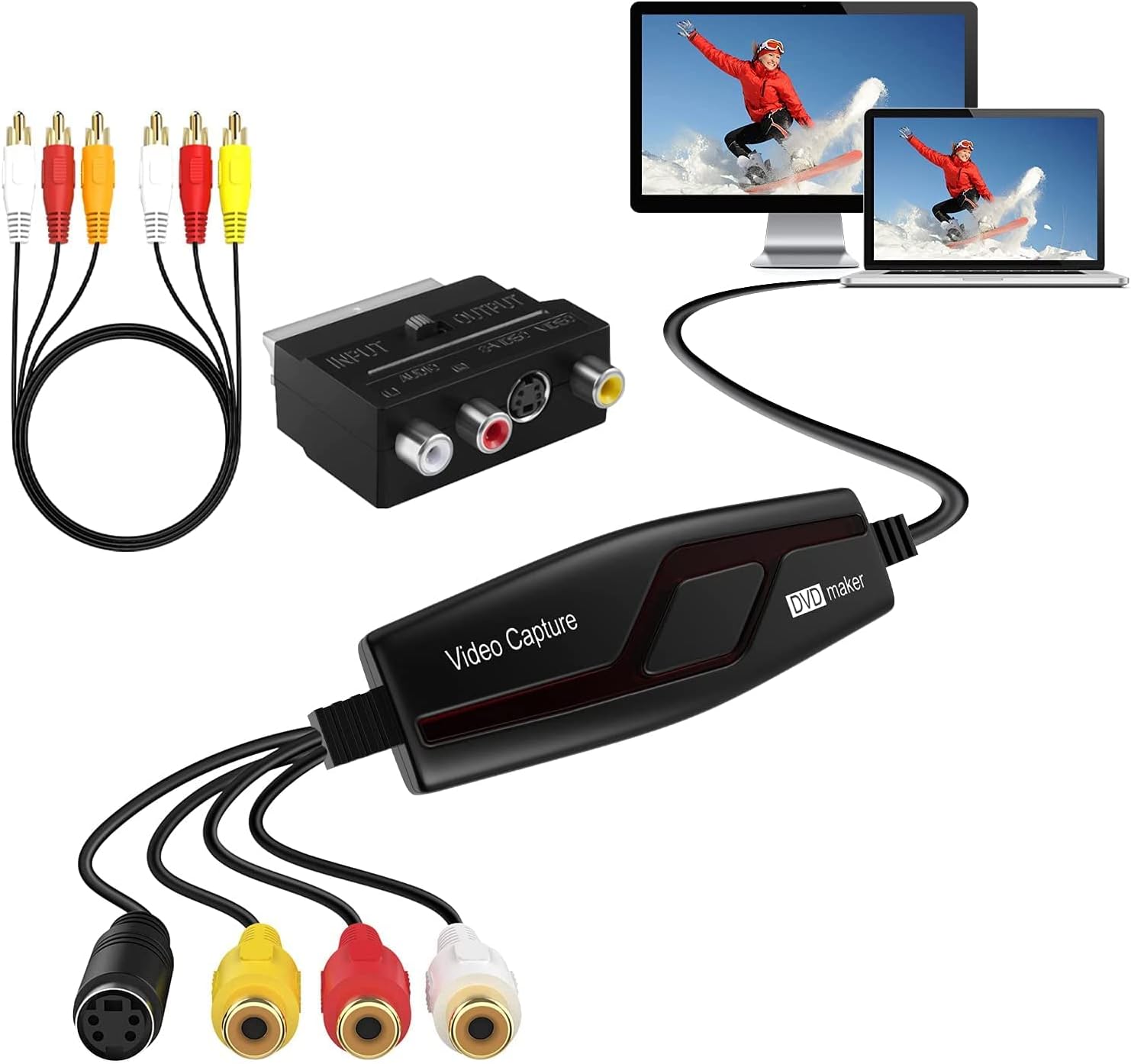
The DIGITNOW! Video Capture Card is a versatile USB 2.0 device designed to convert analog video sources such as VHS, Hi8, and DVD players into high-quality digital files. Supporting NTSC, PAL, and PAL/60 formats, it works across Windows (XP to 10) and Mac OS (10.5.8+). Bundled with ArcSoft ShowBiz software, it offers professional editing tools including noise reduction and color correction. Ideal for professionals and enthusiasts looking to preserve and share vintage media effortlessly.


| ASIN | B078H54QDR |
| Best Sellers Rank | 5,562 in Electronics & Photo ( See Top 100 in Electronics & Photo ) 53 in Video Converters |
| Brand | DIGITNOW |
| Brand Name | DIGITNOW |
| Colour | black or gray |
| Compatible Devices | Gaming Console |
| Compatible devices | Gaming Console |
| Connector Type | usb |
| Connector type | usb |
| Country of Origin | China |
| Current Rating | 2 Amps |
| Customer Reviews | 3.9 out of 5 stars 1,898 Reviews |
| Input Voltage | 240 Volts |
| Item Dimensions | 11.1 x 3.5 x 1.3 centimetres |
| Item Weight | 0.15 Pounds |
| Item dimensions L x W x H | 11.1 x 3.5 x 1.3 centimetres |
| Manufacturer | DIGITNOW! |
| Manufacturer Part Number | BR117 |
| Model Number | BR117 |
| Nominal Power | 480 Watts |
| Number of Items | 1 |
| Number of Ports | 4 |
| Package Quantity | 1 |
| Power Plug Type | No Plug |
| Product Finish Type | Polished |
| Product Warranty | 1 year |
| Specific Uses For Product | VHS Recorder, Hi8, DVD Player, TV Box, LP Player, Audio Cassette Player |
| Specific uses for product | VHS Recorder, Hi8, DVD Player, TV Box, LP Player, Audio Cassette Player |
| UPC | 190835701644 |
| Unit Count | 1.0 count |
| Warranty Type | Limited |
R**S
This one works.
When I say "this one", it's because if you're looking for a good and simple capture card I would recommend this model over the more expensive ones and definitely wouldn't bother with the £5.00 Easycap versions I'm convinced that the Chinese Communist party will eventually conquer the west, not by stealth or force of arms but just by giving us all nervous breakdowns due to us snapping up assorted things that turn out to be shyte and won't work after a weekend of trying every permutation of cables, ports, Windows versions and ecen laptops. Such is the lesson of 'you get what you pay for' learned. This one, however, really IS ok. It wouldn't play pictures on my new Acer with the latest Windows but seemed far happier on ny HP Pavilion g6 which has an older version. Both pictures and sound were very good and I doubt you'd get better quality north of £70.00 or a hundred bucks. One thing I REALLY thought was great was that as soon as you save the project you can just drag it onto the desktop and it instantly becomes an MPeg file complete with thumbnail. The software is basic but all you really want is something that better software like PowerDirector will accept, right?. On that note, Cyberlink doesn't recognise it by detection on its Capture setting so you can't cheat and use Cyberlink to capture your VHS from the off but you can drag and drop the MPeg into Cyberlink later. On the whole, not a bad little device at all.
T**R
Does the job fairly easily.
Installation of this device is easy and quickly done. The instructions are not too clear, although there is an excellent use of screenshots to show the progress of each step. Be aware that the ArcSoft ShowBiz video capture software supplied is old and outdated (V3 is supplied, that latest was V5). Also, be aware that ArcSoft no longer supports ShowBiz and no users instruction manual is supplied for using the software to compose and edit videos. There are helpful YouTube videos out there, but, to date, I haven't found any that go into detail of capture from a video recorder. There are capture settings for NTSC (default), PAL (several versions) and SECAM (again, several versions) so it's not easy to know which PAL setting I should use for the UK (I suppose it's similar for SECAM users). Most disappointingly, I found there is no capture view that lets you see what the video recorder is outputting, you only get sound. However, the captures do show a proper picture. all this goes to explain why I give it only a few stars, it could have achieved more if it worked better. I'm considering whether to soldier on or return the device within the permitted time and try another supplier's device.
M**H
Great works very well
Very good and easy to set up I’m still working through my tapes
R**N
Utter junk. Avoid at all costs.
Converts analogue video to even lower resolution digital recording The first kit I received didn't work. After multiple attempts to get any meaninglful support from the seller, I asked for a refund. In the end I was send a replacement. Although the replacement had the exact same part number, the instructions were different, the software on the supplied CD was different and the name of the device when it showed up on Device Manager - so clearly a different piece of kit badged as the same product. No attention to detail in the quality. Despite choosing the 720 x 576 resolution for the file, the actual recorded file can be clearly seen to be a resolution that is about half that = about 260 lines instead of 576. There was also a really bad comb effect on any motion. This looked far worse that the standard artefacts you'd get from normal deinterlaced problems and occurred in square blocks. The effect was much coarser that you would expect from that. For me this was not an adequate method to archive some old camcorder tapes onto a harddrive. In the end I bought a thunderbolt to firewire adaptor from Apple for my Macbook and some firewire adaptor plugs. This cost a bit more but archives the original video at the same quality as the original recording. The files will still need to be deinterlaced but I'm planning on doing this after I've got all the original tapes copied to a video file.
A**R
Captures video, but no how you would expect
I wasn't expecting super high quality from this device as I live in PAL land - and in many ways I was right... TL;DR: It does what it says, but not in very high quality. OK at a pinch. First of all, the process of getting it to work was problematic to say the least. Try as I might I could not get it to work on my AMD PC, the default windows drivers, the ones included with the device on CDROM, or one downloaded from various places on the internet just would not work. The interface to control the capturing would appear, but it could not render any output using any software including GraphEdit which is a manual way of building direct show filters. I tried it on my Intel Surface Pro, and it worked with the default windows 10 drivers! I have Premiere on this, so I started to capture using that, but because there is no control on how the video is capture it was using a mode that ended up being useless again thanks to compression and frame rate. It presents itself as a webcam and the audio seperately as a usb microphone. I tried using the supplied software, but the software key would not work with the version on the disk, or a downloaded version, so could not try it. In the end I connected it to my Intel gaming laptop, and using ffmpeg I could get more control over the capture. The settings offered are: ffmpeg -f dshow -list_options true -i video="AV TO USB2.0" [dshow @ 000001775f829980] DirectShow video device options (from video devices) [dshow @ 000001775f829980] Pin "Capture" (alternative pin name "0") [dshow @ 000001775f829980] vcodec=mjpeg min s=640x480 fps=10 max s=640x480 fps=50 [dshow @ 000001775f829980] vcodec=mjpeg min s=640x480 fps=10 max s=640x480 fps=50 [dshow @ 000001775f829980] vcodec=mjpeg min s=480x320 fps=30 max s=480x320 fps=30 [dshow @ 000001775f829980] vcodec=mjpeg min s=480x320 fps=30 max s=480x320 fps=30 [dshow @ 000001775f829980] vcodec=mjpeg min s=720x480 fps=10 max s=720x480 fps=50 [dshow @ 000001775f829980] vcodec=mjpeg min s=720x480 fps=10 max s=720x480 fps=50 [dshow @ 000001775f829980] pixel_format=yuyv422 min s=480x320 fps=30 max s=480x320 fps=30 [dshow @ 000001775f829980] pixel_format=yuyv422 min s=480x320 fps=30 max s=480x320 fps=30 Selecting 720x480 at 50 fps gives more picture at the side and isn't quite the correct aspect ratio, so in the end 640x480 at 50fps was used. The interface automatically deinterlaces the image, but sometimes gets it wrong resulting in flickering. One of the most annoying 'features' is an auto-gain on the video which causes the image to suddenly brighten or darken which is annoying. The fact there isn't a direct one to one relationship with the field structure results in soft images (even with lots of post production in FFMPEG when trying to recombine film captured footage which should give a full 576 full resolution progresive output but it soft thanks to it's own deinterlacing). In dark images and areas the MJPEG compression fails badly producing blocks in the image. Sound seems OK, though captures a little low in volume - havent checked stereo however. After capturing hours of footage thinking it might be OK I'm now purchasing a Firewire card so I can use my camcorder (which has analogue input) to do the conversion as it will provide a 720x576 DV image as close to the original as is possible. Watching footage I've previously converted this way and the footage captured via this card is like night and day. You might get better results in NTSC land, but again I suspect you'll have the same autogain issues. FFMpeg command used (NVidia hardware compression used, crop to remove head switching noise, scale to 720 for less loss in compression): ffmpeg -hwaccel cuda -f dshow -rtbufsize 100M -video_size 640x480 -framerate 50 -i video="AV TO USB2.0":audio="Microphone (USB2.0 MIC)" -vf "crop=632:468:4:4,scale=-1:720" -c:v h264_nvenc -preset slow -preset p6 -tune hq -b:v 10M -bufsize 5M -maxrate 15M -rc-lookahead 20 "%1.mp4"
L**.
Worked Exactly as Designed
First off, this did not work on my Macbook despite stating it would. The drivers/software are too old for the latest Catalina OS, it simply refused to install so this was a dead end. This was in December 2019. Fortunately I had a Windows 10 PC and the drivers/software loaded fine but I HAD to use their software, I tried to do capture via VLC but it refused to see the incoming Audio device but this was not a big deal as their own software worked fine for the actual capture. Read the manual that comes with it and follow it to the letter, do not deviate as it may not work otherwise. Hooked up my old VCR, pressed play on it and then hit the Capture button. Once captured, I was able to export it as an MP4 file and drop this into iMovie on the Macbook for editing. Very pleased for it considering the price, converted 25 VHS tapes and 10 camcorder tapes straight to digital! I am unsure why others were unable to get this to work but mine was fine. Windows 10 PC, install their driver/software that comes with it and ensure you use the software to do the capture.
S**8
A Must Have for Digitising your Home Movies
I don’t usually write reviews, but I had to give this a 5-star rating. I’m seriously impressed by the amazing video quality and how easy it is to set up — it’s literally plug and play. The package includes everything you need: the converter, RCA cables, and the capture device. All you need is your VHS player or DVD player and a laptop, and you’re good to go. I set up OBS Studio to capture both audio and video simultaneously, allowing me to watch the film while I record, which made the process so much more enjoyable. Thanks, DigitNow!, for making digitising my old tapes so simple and effective. Highly recommended!
P**N
Good for downloading video from 8 mm camcorder
When I plugged it into my Windows 10 laptop the video and sound drivers installed automatically. Great! However for the software, I don't have a DVD player on my laptop, and the software file from their website didn't work. However, all you need to do is install VideoPad from the Microsoft store, create a new project, rewind your 8 mm tape to the beginning, press the play button, then press the record button in VideoPad. You should record your entire tape and this will become the mp4 that you extract clips from to build up a "sequence" of clips for an edited mp4 for showing to an audience. I found VideoPad quite easy to use, with online instructions and videos available. The mp4 file it created is quite big however at 2.3 GB. I also found my camcorder heads became dirty after only a single tape download, presumably as a result of long term storage. I have ordered a head cleaning kit from Ebay, but there are good videos on YouTube that also show you how to do it. So it has been a success..but the CD with software should be consigned to the bin.
Trustpilot
3 weeks ago
1 month ago