Desertcart purchases this item on your behalf and handles shipping, customs, and support to Tunisia.
🖨️ Upgrade your print game—because your office deserves nothing less!
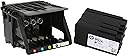
The HP 950 Printhead with Setup Cartridge is a genuine, high-yield replacement designed for HP OfficeJet Pro 8100 to 8640 series printers. It ensures vibrant, professional-quality prints with easy installation and long-lasting durability backed by a 1-year warranty. Ideal for high-volume office use, it includes ink cartridges for a complete, cost-effective printing solution.


| ASIN | B079NTTVMK |
| Additional Printer Functions | Copy, Scan |
| Best Sellers Rank | #53,871 in Office Products ( See Top 100 in Office Products ) #1,688 in Inkjet Printer Ink Cartridges |
| Brand | HP |
| Built-In Media | Printhead, Setup Cartridge |
| Cartridge Type | Genuine |
| Color | Black |
| Compatibility Options | Genuine |
| Compatible Devices | Printer |
| Customer Reviews | 4.6 out of 5 stars 1,316 Reviews |
| Ink Base | Water |
| Ink Color | Multicolor |
| Ink Colour | Multicolor |
| Manufacturer | BORACELL |
| Mfr Part Number | CR322ACM75160186A |
| Model Name | HP 950 |
| Model Number | 8100 8600 |
| Model Series | OfficeJet Pro 8000 series |
| Number of Items | 1 |
| Number of Packs | 1 |
| Other Special Features of the Product | High Yield |
| Page Yield | 12000 |
| Print media | Card stock, Glossy photo paper, Paper (plain) |
| Printer Model Compatibility | HP Officejet Pro 8100 |
| Printer Output Type | multiple colors |
| Printer Type | Inkjet |
| Special Feature | High Yield |
| Specific Uses For Product | Office printing tasks |
| UPC | 654163384882 |
| Unit Count | 1 Count |
| Warranty Type | limited |
M**.
THANK GOODNESS!
THANK GOODNESS I found this replacement printhead for my HP Officejet Pro 8610 ! My printer has always worked great, for years! Suddenly one day, it just didn't print and showed an error that the printhead was the problem. I tried everything I read online and finally determined that I just wore it out. After looking at SO many printers online and trying to decide what I could get that would compare to my HP that I loved, I finally ran across THIS, which is a legit HP Printhead replacement, NOT A KNOCK OFF! Sure, I could have bought a cheap printer to 'get by', but instead I bought this and boy, was that the RIGHT CHOICE! It was easy to install, and my HP Printer works great again! I didn't have go through all the changes that installing a new or different printer would require and I have the quality printing from my older machine, just like normal. Yay! The Price is actually really good, IF you consider it INCLUDES ALL THE INK CARTRIDGES! I don't think most people consider the cost of those, or don't realize they are included. That makes this a very good deal, in my opinion. If you have an older model printer that you love and want an EASY fix for printhead problems, this is the BEST way to go!
M**Y
East breezy, works like a champ!
Easy breezy to install, works like it should. I was on the fence - buy a new printer, or try and fix my old reliable HP8600. I always liked my 8600 so I thought give this replacement print head a shot. It took maybe 5 minutes to replace the print head, including unboxing, reading the instructions, and doing a test run.
R**R
Fixed the dreaded printhead missing/not detected error.
Works like new. HP Officejet Pro 8625 printed one moment, then stopped with the printhead missing/not detected/installed incorrectly error at the next print job. I tried the many internet "solutions", washed/soaked the printhead; cleaned the contacts; made sure the contact springs were clean and aligned. Yes, this is rather expensive but included in the kit, you get all new ink cartridges that YOU MUST INSTALL WITH THE NEW PRINTHEAD. The printer recognized you used genuine new HP ink cartridges and finished the setup. When you open the front cover/door and the printhead moves to left so you can access it. When it reaches the left side and stops, pull the electrical plug to prevent any delay by you to time out and the carriage return back to the right side. Lift the gray locking lever on the right side to remove old printhead (with cartridges in it). Add the new printhead and flip the gray lever back down to lock the printhead , then inkjet cartridges one by one. Close the front cover door and plug printer in. After a few moments, the printer will turn on automatically and start it's setup from the printer. I first ran ink quantity report, aligned the printhead and was back to printing. Time to first print was less than 30 seconds. Aligning the printhead took a minute or so. This kit worked for me well worth the price with a new printhead and new genuine HP inkjet cartridges.
T**N
AMAZING!
One word… AMAZING! I have had a “Printer/Ink Failure” on my HP Officejet Pro 8600 Premium for quite some time now. After researching online for ways to resolve this issue for months and getting nowhere, I was at my wits end. I had even purchased not one but two complete sets of new HP 950XL/951XL ink cartridges at different times thinking that maybe the issue was defective cartridges that cost more than a new printer would have cost. Unfortunately that was not the problem. I had basically given up ant that point and was ready to purchase a new printer. Nothing I had tried resolved the issue. Then, just by shear luck, I found and watched a video that showed the same type of HP printer with the same issue. The resolution was to replace the printhead itself. Now, mind you, I had tried everything else, including removing and thoroughly cleaning the printhead. So, after watching the entire video, I found this OEM HP printhead, which I thought was a bit pricey compared to others that I had seen, but it was an actual HP printhead. So I purchased it. Within a matter of a few days, it was delivered. After unboxing it and removing the old printhead, it was the moment of truth. Would this be the resolution that saves an otherwise great printer? So, I installed the new printhead AND the new 950XL/951XL cartridges that came with it. After a few minutes of the printer doing it’s thing, it sprang back to life and I was back in business. So, was it worth the cost? Absolutely. No expensive new printer, no wasted ink cartridges (X2 complete XL sets), and no issues due to a cheaper aftermarket product. AMAZING!
R**E
Printing with Rhythm
When I recently inserted a new, genuine HP cyan ink cartridge into my HP Officejet Pro 8600 Plus inkjet printer I got the message: “There is a problem with the printer or ink system. Turn printer off, then on. If problem persists, contact HP.” I figured it may have just been a fluke so I popped out the cartridge and pushed it back in. Same message. I only use HP cartridges so I knew it had nothing to do with using a no-name cartridge. I figured the cartridge was defective so I bought another one. Same message. Now I assumed I would have to buy a new printer but after an exhaustive search of printer brands and models, I found that no one seems to like any brand or model of inkjet printer these days. I began searching online for people who had a printer like mine and who were having the same problem with it. That’s when I began seeing comments from people who had success replacing the printhead. It seemed weird to me that a printhead would suddenly stop working but I really like my printer, even more after reading reviews of new printers so I looked to see if Amazon sold printheads for my printer. Of course they did. It's Amazon. Prices varied a lot. This printhead cost more than my entire printer did but I was hesitant to try one of the knockoffs even though they were half the price. So I bought this one. It took all of two minutes to take out the old printhead and put in the new one. HP even has a video on their website with easy-to-follow instructions if you’re uncomfortable doing these kinds of things. After I popped in the new printhead, I sent a color picture file to the printer. I honestly did not expect it to work. The printer first wanted to go through an alignment procedure, which took about a minute. It printed out a perfect alignment page and then it printed out the picture I sent. I was amazed. It printed perfectly! The problem was indeed the printhead and I now have my printer back. Yay! So you might be wondering why I am only giving this purchase four stars instead of five. I’m glad you asked. When I took the printhead out of the box, I heard a rattling sound inside it but thought maybe it was supposed to be that way until it was put into the printer and the ink cartridges were inserted. No. It still rattles. It sounds like someone playing maracas while the printer is printing. It’s not super loud but it shouldn’t make any noise at all. I suspect there is a small piece of plastic rolling around inside the printhead that might have broken off during the manufacturing process and rattles as the printer vibrates during printing. I thought of returning it for a replacement but since the printhead works fine, I didn’t want to risk returning it for a replacement and having something wrong with the replacement. Now I just think of my printer as having musical rhythm when it prints and I’m fine with that. I am otherwise very happy to have been able to fix my printer so easily!
E**T
HP Print Head (Awesome)
Installation was a breeze. Print head came with ink cartridges, once initialization, printing was perfect. Previous print head was not HP, and after opening package, ink spilled all on my hand and on to the carpet. I love this print head. Other print head was not compatible.
S**Y
Missing order.
This product was received on time, was simple to install, less than 5 minutes, and works as specified. Very satisfied.
G**Y
it works flawlessly
The print head worked without any issues. Installation is simple. It sounds expensive but comes with a complete set of color cartridges - at least a $70 value. Considering that and the fact it is an HP product that works right out of the box, it’s a better deal than the gamble of using a knockoff product
Trustpilot
2 weeks ago
4 days ago