


❄️ Stay Cool, Game Loud, Look Lit — The Ultimate Laptop Chill Zone
The llano RGB Laptop Cooling Pad features a 14cm turbo booster fan with brushless DC motor, delivering rapid cooling that drops CPU and GPU temperatures by up to 44℃ within 90 seconds. Equipped with a vivid RGB light bar offering over 10 colors and 4 modes, plus an HD LED display with touch controls for fan speed and lighting customization. Designed for laptops 15-19 inches, it includes an adjustable height stand, 3-port USB hub, and anti-slip baffles for ergonomic comfort and connectivity. Engineered for quiet, powerful performance, it’s the perfect accessory for gamers and professionals seeking optimal laptop cooling and style.
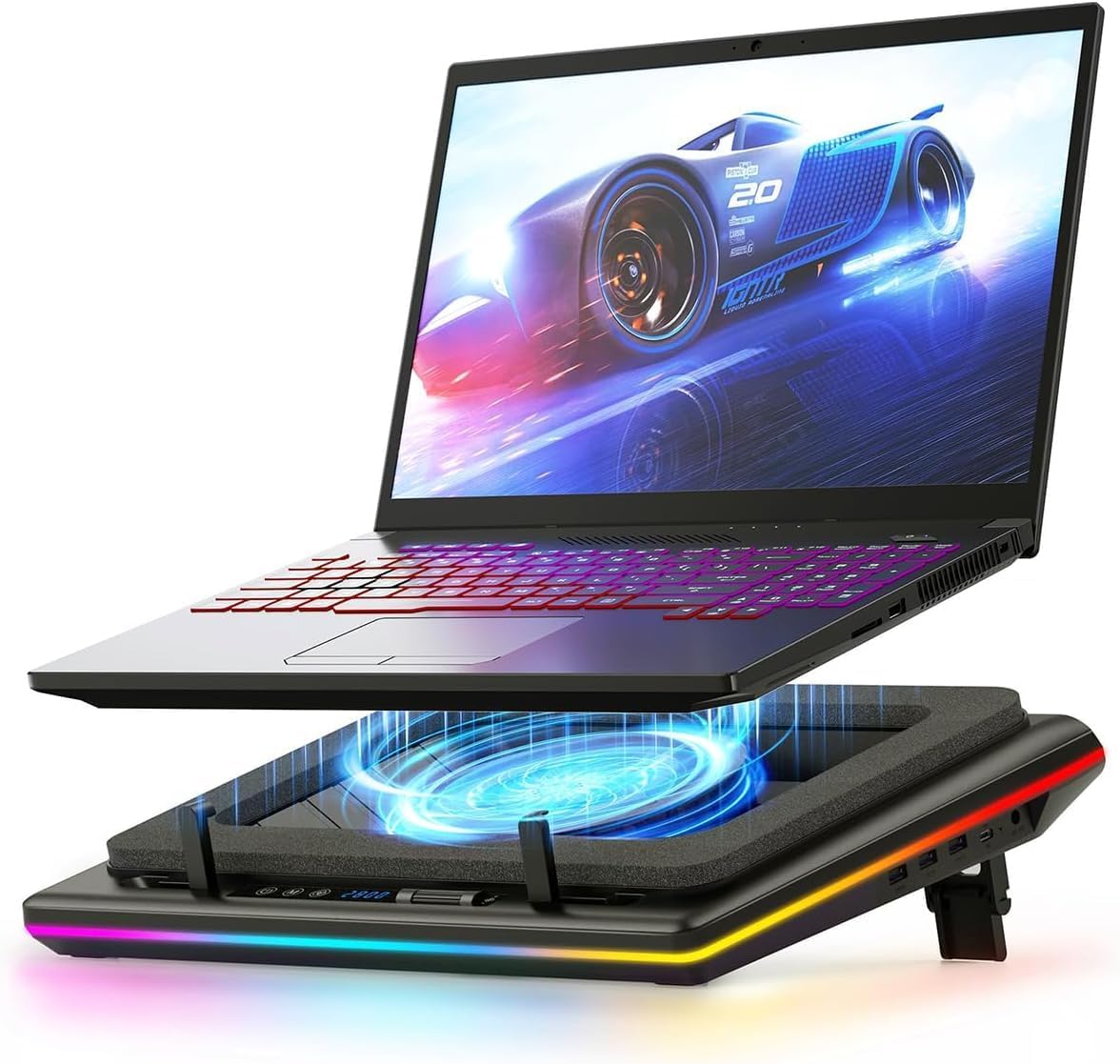



| ASIN | B0C69BVWGB |
| Best Sellers Rank | 25,957 in Computers & Accessories ( See Top 100 in Computers & Accessories ) 9 in Laptop External Cooling Fans |
| Brand | llano |
| Brand Name | llano |
| Colour | blackone |
| Cooling Method | Air |
| Cooling method | Air |
| Customer Reviews | 4.4 out of 5 stars 2,189 Reviews |
| Enclosure Material | Acrylonitrile Butadiene Styrene (ABS) |
| Item Dimensions L x W x H | 42.9L x 32.8W x 6.9H centimetres |
| Item Highlight | Radiator with Infinitely Variable Speed, Touch Control, LCD Screen, 3-Port USB Hub, Seal Foam for Notebook Computer 15-19in |
| Item Weight | 1.8 Kilograms |
| Item weight | 1.8 Kilograms |
| Manufacturer | llano |
| Manufacturer Part Number | V12 |
| Material | Acrylonitrile Butadiene Styrene (ABS) |
| Model Number | V12 Black (Hub+RGB) |
| Number of Fans | 1 |
| Number of Items | 1 |
| Product Warranty | 1 Year |
| Product dimensions | 42.9L x 32.8W x 6.9H centimetres |
| UPC | 704444171967 |
M**N
Superb cooling, if a little noisy
Works perfectly. My son's laptop was barely usable on high FPS games during this heat. Often topping out at 90degrees, even with a cheaper cooling pad. This may not be cheap but it does do the business. Temperatures now around 60, works as a great stand and, if you're that way inclined, a decent disco light setup. It's not quiet, but buy can you hear how it's working. Wish we'd invested in this rather than the bottom end. As long as you have good noise cancelling headphones, you can't go wrong. Have a very happy teenager
T**R
Superb performance. Very Happy
Like everyone else that needs a laptop cooler my end gaming machine was getting far too hot far too quickly and then thermal throttling the performance (i9 13900H 5.40ghz). I had done a lot of research and most people suggested that cooling pads were either totally useless, made heat worse or gave mimimal cooling results but then I came across several reviews and videos for the Llano branded coolers and decided to pull the trigger expecting to return it for a refund. My machine was sitting idle at roughly 65 degrees C with the cooler at full power I was getting a steady 20 degrees C at idle granted with the trade of being the cooler is very loud at full speed, but I was absolutely blown away at more than 40 degrees worth of performance. At lower speeds it still does a great job but of course the lower speed, less noise, less cooling but I have found a sweet spot of 400rpm is acceptable fan noise with decent cooling for normal use and if gaming I can crank it up a bit depending on how long my gaming session is. Asus Zen Book Duo 14 sits well on the foam pad and creates a good seal. All in all takes about 2minutes to set everything up. Sorry not a particularly technical review but take it from someone that had very low hope for this cooling pad I am absoutely delighted with it and wished I had bought it sooner. My laptop no longer feels like a tractor with a Ferrari engine under the hood unable to use any of the performance I had paid for. Very pleased and highly recommended from someone who is a very harsh critic of everything.
M**S
Powerful Cooling, but Mind the Volume – A Gaming Laptop Essential (for Home Use)
The Llano RGB Laptop Cooling Pad is an undeniably powerful piece of equipment, and it lives up to its promise of significant cooling for gaming laptops. However, it's crucial to understand that "powerful" here often equates to "loud" at its highest settings. This is a bulky unit, designed to deliver serious airflow, and its maximum cooling performance definitely comes with a considerable amount of noise. You'll want some good noise-cancelling headphones if you plan to push it to its limits. I personally use this with my 16-inch Lenovo Legion 7i, and it's a perfect fit for the cooler's generous top surface. It does an excellent job of keeping the laptop cool, which is vital for reducing the strain on the laptop's internal fans and, perhaps more importantly, preventing dust from being sucked up into the bottom vents and clogging the system. In my opinion, dust accumulation is one of the biggest long-term cooling problems for gaming laptops, and the Llano's "air chamber" design seems particularly effective at mitigating this. When I'm gaming, I typically find my sweet spot between 300-600 RPM. This range provides a great balance of effective airflow without the fan drowning out the game's audio. At these speeds, the sound is not unpleasant and is easily negligible over game speakers – my partner and I barely notice it. This makes it comfortable for extended gaming sessions without needing headphones purely for noise mitigation. Overall, while this is a pricier cooling pad, I believe it's absolutely worth the investment if you're looking for something truly efficient. The unique "air chamber" design ensures more air is directed through your laptop's cooling system, leading to genuinely lower temperatures and helping to prevent dust ingress. Just be aware that its size makes it less than portable – this is a cooling pad designed for a dedicated desk setup, not for throwing in a backpack. For the serious gamer or power user who values sustained performance and laptop longevity at home, the Llano RGB is a perfect, albeit stationary, companion.
L**R
Simply put, a must have to extend the longevity of your laptop & help it run faster.
Pardon the pun, but this is a game changer! This allows my laptop to sustain higher fps constantly. My preferred level is 1200rpm, it's a good balance between noise and cooling. It's about as loud as the laptops built in fans at this setting. Before, the built in fans kept the 4070 in my galaxy book 4 ultra at 80 degrees average. At 1200rpm with the cooler on, it's a sustained 60 degrees with the highest workloads which is fantastic. I'm a content creator & photographer rendering a lot of video, so this is a must-have for when I travel now. Just goes into the seat pocket in the car. The lights are a little obnoxious, and I'd like the 7 segment display to be red not blue. When I queue up a load of jobs to run overnight, the blue is really bright. I feel like it's a bit pricey for what it is, it has a relatively cheap plastic build but I think all the r&d went into the fan motor & design. I don't like the rgb lighting that's on by default but it's possible to turn them off so that's really not a big deal. Be careful not to block the fan on your laptop with the foam pad or you'll notice little to no difference in temperatures. There is a sweet spot to find depending on what laptop you have, make sure you can feel the air leaving the laptop vents and it'll work fantastically.
V**K
It’s a little noisy when running at 800 RPM or higher.
This laptop cooling stand works perfectly and was delivered quickly. The build quality is excellent, and it keeps my laptop cool very effectively. I highly recommend it.
J**E
it works well.
quite surprised at the performance of the cooler, before using my temperatures were 81c or slightly above on both cpu and gpu, with the laptops fans working pretty hard to keep it there. HWinfo was indicating throttling on both components (16 core i7 processor/ rtx5070 gpu) when using the cooler its strong enough to bring the temperatures under control quickly at full power and then maintain those temperatures at under half the coolers power. No massive benefit to laptop performance however gpu clocks remain very stable and high when nicely cooled, giving 2-3fps boost generally. its loud but so is the laptop, so theres loud and struggling or loud and under control nicely.
A**R
Worth the money
Worth spending the extra money on, keeps my CPU and GPU cool and allows me to turn off my much nosier laptop fans. Max I ever run it at is 600rpm and nothing goes over 70 degrees whilst remaining quiet.
R**P
Ok initially, broke after 1 year. Would not recommend.
Performance initially good, build quality quite cheap given the price. RGB works wel and cooling is good with limited noise at average speeds, higher settings can get quite loud but thats expectee. Broke after 1 year of infrequent use. Would not recommend this product for the price and longevity of it.
K**R
It really works. GPU from 90 degrees to 66 degrees.
My GPU was always at 90 degrees while rendering. Now it's at 66 degrees. But it comes with a price, noise. But you will find the point at regulating the fan intensity, you will not use it at full power all the time, I mean, what if my GPU is at 72 degrees instead of 66 degrees? I have tried many cooler pads, even the small exhaust on the side of the laptop, but nothing really worked. This does. I TOTALLY recommend it. I have a ROG STRIX SCAR II and no need to fry more eggs on it...
R**6
Costoso ma consigliato per i pc portatili da gaming
Il prezzo è alto ma è di ottima fattura. A velocità minima (300) è silenzioso e si può aumentare o diminuire alla bisogna con facilità. Se messo al massimo e il pc è leggero, potrebbe farlo volare via (!), ma ci sono delle leve per evitarlo. Belle le luci RGB . La schiuma densa mantiene fresco il portatile e concentra il raffreddamento su di esso. L'ho provato sia per un portatile 14'' che 15.6'', funziona per entrambi, ma forse è troppo grande per i portatili da 14''.
D**8
This Thing Is An Absolute Beast
For starters, this took roughly 2 weeks to arrive after I ordered it. It was either that or the GT600. The GT600 would have an extended time to arrive due to it being shipped from out of the country (Canada). So I went ahead and ordered this. My laptop is a heavily modified MSi Katana B12VG (Windows 11 Pro, an additional 1TB SSD which is the WD Black SN770 that only has games on it, and 64GB of RAM instead of the stock 16. The reason for 64GB, is because this laptop replaced an 2019 ROG Strix, and it's because of Diablo IV, which I'm able to run with maxed out settings along with raytracing. Laptop has an i7-12650H and a 4070, which does not use GeForce Experience. All the changes to programs and games are made through nVidia Control Panel). I'm also not using the laptop's keyboard and trackpad, instead I use a SteelSeries Apex 7, an Aerox 5 (a standard and the Diablo IV edition, with the Standard Edition used just in case) and an Aerox 9). I also have power profiles since the 12th Gen H series processors cant be undervolted, and those are Extreme (the same as Gaming Mode, with every setting maxed out), Balanced, 99% (disables Turbo Mode), 75%, 50%, 25% and 10% (each cuts the processor speed, with it set to spin the fans up before throttling the processor). With the fans set at 300 (don't know if that's RPM or not), running a Performance Analysis with the power profile set at 25%, for 8 hours playing old Opie and Anthony episodes, and the screen off, the fans never spun up once (normally I'd have the CPU fan on around 2500RPM at about 55-60 degrees Celsius). Normally you'd be looking at the processor fan spinning up and remaining on. But nope. Never came on once. Temps stayed between 35-40 degrees Celsius on the processor and 34-40 degrees on the GPU). Now for Diablo IV, which this is benchmarked against. Slightly increasing the fan speed to 600, the game's temperature dropped 20-30 degrees Celsius (runs about 75-90 degrees on the CPU and 60-80 on the GPU), even after fighting the Herald of Malphas about 27 times (had someone keep activating it), and this is with every conceivable item on the ground. Temps stayed around the 60-70 degree Celsius mark. If I increased the fan speed, it does become more noisy, but I'm using noise cancelling headphones (Sony WH-1000XM4's repurposed for my laptop), so I don't hear the fan for this while playing games. I could probably increase the fan to 700-1000, but once it hits 1000, it starts to sound like a jet engine on an airplane about to take off, and starts to get loud. Speaking of that, I put the thing at 2800, and past 1000, you can feel the air coming out from the laptops vents in the back. You can also slightly feel the air coming from it on the side (if your laptop has a side vent or vents) That's how powerful this thing is. Because of this, I would recommend that the 300 setting be used for general work, and nothing about 1000 for games, unless you live alone. You can comfortably run Diablo IV on a setting (for my rig) at 600-1000 without you standing next to an airplane on a tarmac and that won't bother anyone. The one reason I listed noise level at 5/5, is because at the 300 mark (default), it does not bother you or anyone else. It's only after 1000 that you may get people bothering you that it's too loud. On mine however, there is a bit of a whine that you can hear on the lower settings, but as you ramp the fan to a higher setting, this is less audible, and I've tuned it out. You definitely cannot hear this if you are wearing headphones. Due to that, I will not dock points off. If you decide to get this, you will need to use noise cancelling headphones when you game (it's fine if set at 300, anything higher than 600, you'll need them). All in all, for a mid range laptop like mine, well worth the money I paid for it.
A**X
Very impressive
Was skeptical about buying this because of its size and price. I had a small, simple, usb powered 3-fan cooler that I was using which was fine. I don't know how effective it was but it was better than nothing, I suppose. I was worried about the hooks that grasp the laptop near my wrists being an issue. However, thanks to the replies of a number of other users, that is not a concern. I don't even use them as the memory foam gasket is sufficient to hold the laptop in place. This thing can move a ton of air. It can be noisy when you have it wound up, but I usually keep it at 500 rpm. You can hear it, but it's not offensively loud. It keeps the laptop cool during gaming with no concern whatsoever. It requires a DC jack which I didn't think about. It's not a concern for me, just something I did not consider. It's nice to have so many extra USB ports, even if I'm not really using them. It is thick, but the payoff is well worth the extra size. I should have bought this ages ago; it does a fantastic job.
S**I
Worth the price
I was a bit skeptical at first, however, it actually works. I usually keep it between 300 to 500 rpm, since I don't really have a reason to go any higher at the moment. Note: this thing can get really loud. It's a bit pricey but worth your money if you care about your expensive (gaming) laptop.
Trustpilot
2 months ago
3 days ago