Buy anything from 5,000+ international stores. One checkout price. No surprise fees. Join 2M+ shoppers on Desertcart.
Desertcart purchases this item on your behalf and handles shipping, customs, and support to Tunisia.
🖨️ Print smarter, save bigger — join the EcoTank revolution!
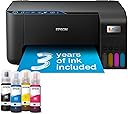
The Epson EcoTank ET-2861 is a compact, wireless A4 inkjet printer designed for busy homes and small offices. It features ultra-high capacity refillable ink tanks that deliver up to 7,500 color pages, drastically cutting printing costs by up to 95%. With the Epson Smart Panel app, users can print, scan, and copy directly from mobile devices. Its heat-free printing technology ensures long-lasting printheads and energy efficiency, while a 100-sheet tray and borderless photo printing add versatile functionality.


| ASIN | B0CQ2J5DGQ |
| Additional Printer Functions | Copy, Scan |
| B&W Pages per Minute | 33 ppm |
| Best Sellers Rank | 666 in Computers & Accessories ( See Top 100 in Computers & Accessories ) 3 in Ink Tank Printers |
| Box Contents | 4 x 65ml individual ink bottles (Bk, C,Y,M), Power cable, Setup guide, Warranty document |
| Brand | Epson |
| Brand Name | Epson |
| Color Pages per Minute | 15 ppm |
| Colour | Black |
| Compatible Cartridge | 104 Series ink bottles |
| Compatible Devices | Laptops |
| Connectivity technology | USB |
| Control Method | Touch |
| Controller Type | Android |
| Country of Origin | China |
| Customer Reviews | 4.0 out of 5 stars 551 Reviews |
| Dual-sided printing | Yes |
| Duplex | Manual |
| EU Spare Part Availability Duration | 3 Years |
| Global Trade Identification Number | 08715946725925 |
| Hardware Interface | USB |
| Ink Colour | Black, Cyan, Magenta, Yellow |
| Item Dimensions D x W x H | 34.7D x 37.5W x 17.9H centimetres |
| Item Type Name | Inkjet Printer |
| Item Weight | 3.9 Kilograms |
| Manufacturer | Epson |
| Maximum Copy Resolution Black and White | 1,200 dpi |
| Maximum Copy Resolution Color | 5,760 x 1,440 |
| Maximum Copy Speed Black and White | 33 ppm |
| Maximum Print Resolution Black and White | 1,200 dpi |
| Maximum Sheet Capacity | 100 |
| Maximum Supported Paper Size | A4 |
| Maximum print Resolution Color | 5,760 x 1,440 DPI |
| Model Name | ET-2861 |
| Model Number | 2861 |
| Model Series | EcoTank |
| Model name | ET-2861 |
| Network Connectivity Technology | USB |
| Number of Trays | 1 |
| Other Special Features of the Product | Borderless Printing |
| Output sheet capacity | 100 |
| Paper Size | A4 |
| Power Consumption Size | 12 Watts |
| Print media | Envelopes, Glossy photo paper |
| Printer Output Type | Colour |
| Printer Type | Inkjet |
| Printing technology | Inkjet |
| Product Warranty | 1 year manufacturer |
| Resolution | 5760 x 1440 |
| Scanner Type | Flatbed |
| Special feature | Borderless Printing |
| Specific Uses For Product | Business, Home, Office |
| Total USB Ports | 1 |
| Unit Count | 1.0 count |
| Warranty Type | Limited |
S**Y
Great home printer
Excellent printer delivered on time and in good packaging, set up was straight forward to both phone and laptop. I was printing in about 30 mins from delivery. Good quality and much lighter than my previous printer. Ink supplied is good and seems like a big quantity of ink compared to cartridges. I would recommend it, knowing what a mine field it is to choose a printer so many pros and Cons to work through, genuine replacement ink is a good price as well, not as expensive as some that are nearly the same price as the printer but so far so good
S**A
So far so good!
So far so good! Brought the ET-2861 as an upgrade for my small business as my old printer was starting to lack in quality when printing and I wanted to try adding stickers to my shop. Still yet to try it out through my cricut but will update once done. Didn’t take too long to set up, did seem to have a few connection issues but nothing that wasn’t a quick fix. I like how compact it is and the quality is amazing compared to my old printer! It may not support AirPrint but I can export all my keynote documents for a quick and easy print. The printing itself does take a little bit of time but that’s to be expected with how good the quality is. Loving the ink refills, yet to get through my first load of inks so not sure on the cost effectiveness as of yet.
M**D
Nothing but headaches and issues
UPDATE: Product is still awful. If you want a terrible printer that does not work, take your chances with this one, but it's just too expensive to gamble with. I am reluctantly donating my £200 printer to a local charity shop after only four months and buying a Brother. UPDATE II: I bought a Brother DCP-T780DW and thought it would be worthwhile contrasting the two products. My new printer is also a Tank printer with a scanner, but this one also has Apple AirPrint and can print in duplex (two sided) automatically. Firstly the Brother has a much more solid feel where the Epson felt flimsy and plasticky. The scanner bed is much better designed and it has a small but functional screen on the front. Setup was easy. While I did get some ink on my fingers while filling the tanks (which was admittedly easier on the Epson), that is likely due to user error. Their app stepped me through connecting to WiFi, which was straightforward once you figure it out (you have to connect your phone to a temporary network set up by the printer to enter your home Wi-Fi settings). From there, a quick calibration process and everything is up and running. With the Epson, you needed their app to print anything from a mobile device, and their app is terrible. From a mac, you have to know how to find and connect to their printer using an IP address, which not everyone will know how to do. With the Brother, using AirPrint, the printer just shows up on any Apple device on the same network. Magic. Finally prints are fast and clear. I didn't time the Epson, but it seems the Brother has less whirring and buzzing before each printout, which makes it seem faster. The black level is a touch grey (rather than deep black), but not unpleasantly so, but other than that, the print quality is everything I need. The TL/DR is with the Epson EcoTank, you are taking a potentially expensive risk. For me, it was a £150 lesson and I'll never buy one of their products again. ORIGINAL REVIEW I needed a color printer, so I reluctantly moved on from my black-and-white HP laser printer. That printer worked when you needed it. It was accessible from every device in my home through Apple's Air Print, and did exactly what you needed it to do when you needed it. It just worked. I chose the Epson because the ecoTanks received good reviews, and to be fair, they are the best feature of the printer. The tanks are large, easy to fill, and appear to deliver decent color printouts, exactly what I would need. If the printer ever worked. Which it does not. The problem isn't mechanical; it is software-related, so 100% addressable by Epson if they cared to build a usable product. I have no idea why they would choose not to use Apple AirPrint, or a network print protocol that is recognizeable by the devices on my network. They've chosen instead to force me to print through their app, which would be okay if it worked. But it does not. The app is one of the worst I've ever used, considering it's a product costing over £10. It is clunky, slow, written in poorly translated English, and incredibly hard to use. It takes about 20-30 minutes, at the absolute fastest, to get your printer configured and connected to Wi-Fi. This would be kinda okay if the wifi worked. But it does not. The printer loses connection to the Wi-Fi, despite being NEXT TO THE ROUTER. When it does connect, simple printouts (750k images) take 20 minutes to print, and they often fail before completion. Reconnecting to the wifi using their app takes another 10-20 minutes, and is a ludicrously long and convoluted process. For those who manage to get their printer to connect reliably, I'm sure it is a decent printer. However, if you're like me, it is an expensive paperweight.
A**R
Overall good, borderless photo printing poor.
Fairly easy to setup. Easy and clean (no ink spills) when filling ink tanks. No problems photocopying. Printing is quite noisy and slow. Photo quality on glossy paper is good but borderless printing on 6x4 paper leaves 2-3mm white band on trailing edge of print, this was non Epson glossy paper. Borderless photo on 6x4 plain white card works without fault! As does putting photo paper in tray, selecting plain paper and high quality in settings. Only downside is the DPI of the print is not quite as good as in photo setting.
H**S
Best Printer for value and quality - Home and small office!!
very very very impressed!! ideal for a small office ! it covers all the basics - after spending thousand in my business for these fancy laser and cartridge printers for my staff and then the ink things i happened to purchase this for my home use and have since gone through my business replacing them to these - the amount of money my business has saved is 1000's honestly , the picture quality is far better than i expected - for the money you cannot go wrong, and the fill up bottles last for ages - unlike the other printer cartridges!! i should be on commission for these as ive rcommened them to so many of my customers - Look forward to hearing form you Epson :-)
B**7
What a revelation!
So I'm not particularly technical when it comes to anything to do with I.T and related peripherals. I was a bit nervous about getting one of these ink tank printers as I had the mistaken impression that it would involve the possibility of pouring ink all over yourself or having it uncontrolled and it would all be a bit of a faff. Fortunately whoever has designed this has clearly thought about the fact that normal people will be trying to fill these mini ink tanks with bottles of ink. So what you need to know is that there's an ingenious design between the ink bottle and the ink reservoir which has something along the lines of a non return valve in it which is only actuated when the ink bottle is placed upside down on the receptacle in the reservoir something if you follow the instructions there is almost nil chance of spilling ink everywhere providing you have a reasonable degree of manual dexterity. The ink reservoirs will automatically stop when they're full so you can't overfill them and from what I can gather the printer will be capable of producing an immense quantity of print documents before replacement ink is required. I'm sure somebody out there has done some research but having spent many years using cartridge printers and being savagely wounded by the cost of the replacement cartridges, it was clearly time for a change and I'm glad I made it. We all have different needs but as far as I'm concerned this is easy to use, easy to read the instructions, and more importantly easy to connect to a computer. I'm so far very impressed with the quality and the capacity of this wonderful little printer and I think if you're a bit nervous about swapping from a cartridge printer to a printer with individual ink tanks, you are probably nervous about something that there really is no need to be nervous about. It really is simplicity to use and hats off to the designers for coming up with something very clever and very easy to use. In summary, delightful and a good reason to make the change today.
G**S
Go the Manual route for set up
I am writing this review having just set the printer up. It took me one and a half hours to set up. My advice is to set up manually and not use the app. I downloaded the app but could not get beyond the ads and the requests to take out a subscription. Loading the ink is straight forward, my problem was it would not charge the ink. After 30 minutes I found a piece of card taped inside the machine which stopped the head moving. This could not be seen from the outside. I suggest connecting to WiFi via WPS, this was simple and straightforward and should be the preferred method. It’s connected to the laptop and it’s printing so, so far so good.
W**N
Say goodbye to ink cartridges
I’ve lost count of the number of ink cartridges we’ve bought over the years. The multi packs where you always end up with 5 spare Cyans but never enough Black, that you eventually throw away when the printer gives up the ghost. The increasing (and annoying) “you’re not using [insert brand name] ink!” warnings (yes, I know, because I’m fed up of paying 3x the price thank you). This printer - does away with that. Refilling the ink is easy, no mess, and really clear ‘windows’ where you can see how much ink is actually left (rather than some kind of calculated amount designed to panic you in to swapping cartridges). And the print quality is great. Wish we’d done this sooner
Trustpilot
3 weeks ago
2 weeks ago