Buy anything from 5,000+ international stores. One checkout price. No surprise fees. Join 2M+ shoppers on Desertcart.
Desertcart purchases this item on your behalf and handles shipping, customs, and support to Tunisia.
๐ Elevate your workspace with the ultimate 9-in-1 USB-C hubโbecause multitasking deserves no limits!
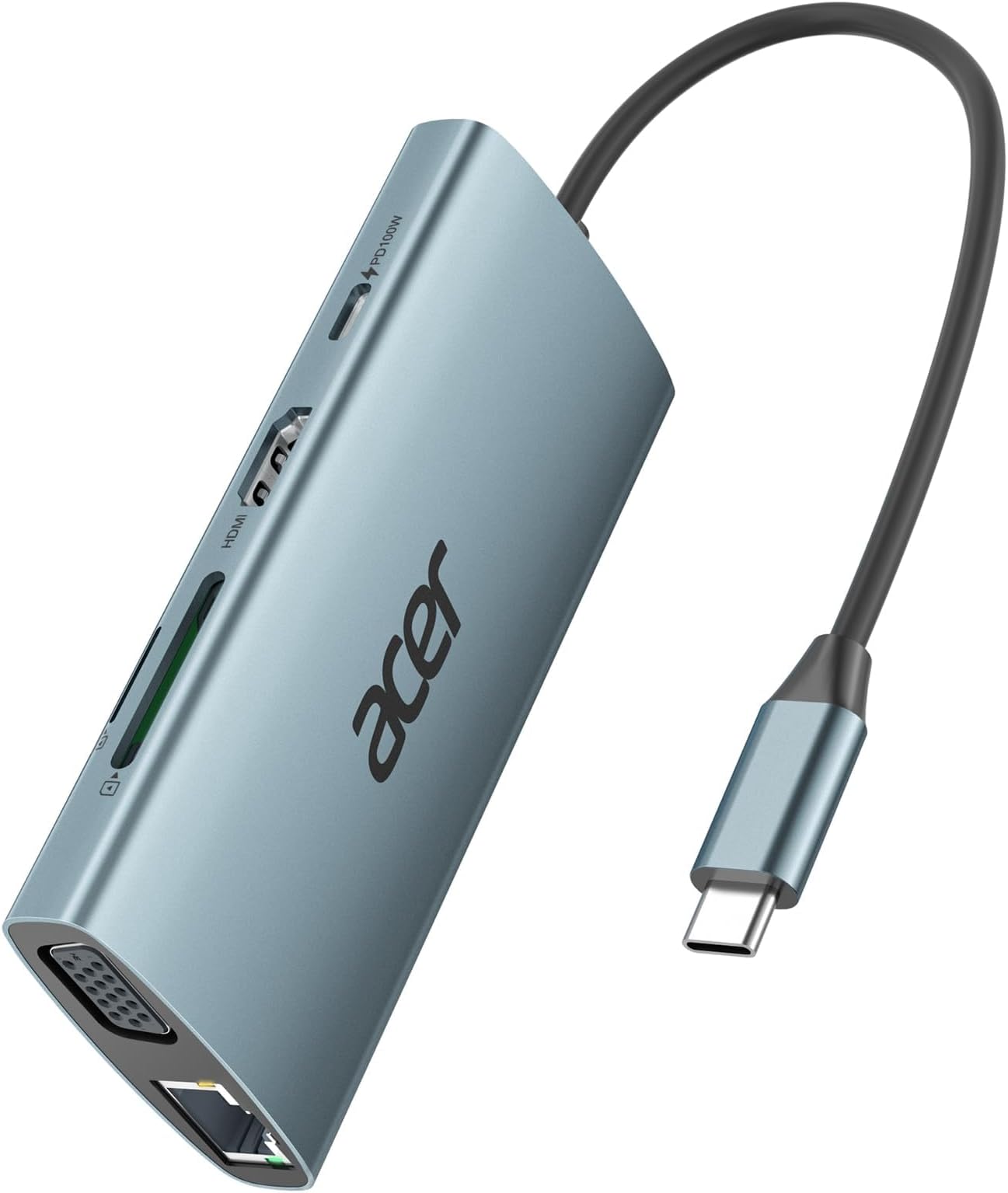
The Acer 9-in-1 USB-C Hub is a sleek, durable aluminum docking station designed for professionals who demand versatility and speed. Featuring 4K HDMI output, dual-display support via HDMI and VGA, 1Gbps Ethernet, 5Gbps USB 3.0 data transfer, SD/TF card readers, and PD 100W fast charging, it ensures seamless connectivity across MacBook, Surface, and other USB-C devices. Perfect for enhancing productivity, streaming, and rapid data handling in a compact, travel-friendly form factor.


| ASIN | B0CQSZYWT8 |
| Additional Features | 4K HDMI Output, 5Gbps Fast Data Transfer, Gigabit Ethernet, PD 100W Fast Charging, VGA, SD/TF Card Reader |
| Best Sellers Rank | #74 in USB Hubs |
| Brand | Acer |
| Color | Space Grey |
| Compatible Devices | Card Readers, Projectors, USB Flash Drives, Mouse, Monitors, Desktops, Laptops, Smartphones, Tablets |
| Customer Reviews | 4.5 out of 5 stars 1,315 Reviews |
| Data Transfer Rate | 5 Gigabits Per Second |
| Enclosure Material | Aluminum |
| Global Trade Identification Number | 00195133234962 |
| Hardware Interface | Ethernet , HDMI |
| Item Dimensions L x W x H | 4.33"L x 1.97"W x 0.67"H |
| Item Weight | 2.88 ounces |
| Manufacturer | acer |
| Mfr Part Number | ACER-UC906 |
| Minimum Required Operating System Version | Windows 7 |
| Model Number | ODK390 |
| Number of Ports | 9 |
| Operating System | Chrome OS, Linux, Windows, Mac OS, Android |
| Special Feature | 4K HDMI Output, 5Gbps Fast Data Transfer, Gigabit Ethernet, PD 100W Fast Charging, VGA, SD/TF Card Reader Special Feature 4K HDMI Output, 5Gbps Fast Data Transfer, Gigabit Ethernet, PD 100W Fast Charging, VGA, SD/TF Card Reader See more |
| Total USB Ports | 3 |
| Total Usb Ports | 3 |
| UPC | 195133234962 |
| Unit Count | 1.0 Count |
| Warranty Description | 1 year manufacturer |
Z**O
Best Hub for Surface Pro 11
This Hub has it all! The hub features a solid case with RJ 45 jack (ethernet), USB, HDMI, VGA, SD, Micro SD and more. The new Surface Pro 11 Snapdragon X and Elite is finicky when paired with a Type C USB hub, after two others failed to connect or did not allow it to recognize the RJ45 port, I was not hopefully with this one. However, it exceeded my expectations and works! This dock/hub provides full port usage in a nice form factor. The cable is long enough to not hang on the port but short enough to not be in the way. It was a simple plug and play and within seconds the devices recognized it, not drivers to install or software to download. Utilizing a Type C thunderbolt charging block it told me when the one being used was underpower when connecting the device, usb and HDMI while charging. This was good to know, it DOES Not come with its own power brick which would have been great to get a PD 100W or 65W charger included, but for the price of under 30 dollars this isnโt expected. Compared to the Surface Hub it works much better and there appear to be NO random disconnects for this hub, like others. I tested it for compatibility to worked with the MBP (intel), IPAD, Android Phone, M3 MacBook, Surface Book 2, One X Player 2 (Ryzen APU), Surface Pro 11 and a few others and all devices functioned as required with it. It just works, this is the one to purchase Good on Acer for this HUB.
J**A
Super easy to use, fast for large datasets and perfect for a 4k monitor
I bought it for my 4K LG Ultrawide monitor, and it has been and excellent acquisition; super easy to use and it has great speed, especially when it comes to large datasets. The materials of what it is made of are quite good, thus I am sure there is not any question about its durability. It never gets warm, and it is perfect to transport as it has a perfect size.
N**E
Works well, no issues
Excellent hub to connect my small, lightweight laptop to external USB devices and HDMI when away from home. Wish it had more USB ports on it though.
C**I
This gets the job done.
USB hubs such as this are like a jack-knife; with the different cables going in and out of them. I purchased this one specifically to replace an older one that was not self-powered. I noticed with my older one that my computer would get quite hot; and my internet speeds (it has an ethernet port) were slower than simply using WiFi. I selected this product from Acer because it checked all the boxes that I need: it can plug into an AC wall outlet (via a USB-C connection - and you can also use it without this connection); fast ethernet hookup, and three fast USB-A ports. My internet speed with this Acer USB hub is much faster than my previous one, and faster than WiFi. Of course, internet speed depends upon a number of factors: your purchase plan from your ISP provider, where you live, the CAT cable you are using, etc. But my speed went from 144 bps download (old USB hub) to 587 bps (Acer hub). My only complaints are that (1) it won't read my keyboard - I have to plug that directly into the computer, and (2) the ethernet hookup stopped once. It always needs to be connected before connecting the USB-C 100W AC power; or it will not work.
S**Y
It's Okay
Itโs been a mixed bag with this hub. My laptop would not recognize an external monitor through the hubโs HDMI port and had to plug the cable directly into the port on my laptop. Currently I have the following attached to the hub: a power cable for my external monitor, a cable for an external HDD that I use for backups, a printer cable, and an Ethernet cable. I friend suggested that I might have too much running through the hub and that I try disconnecting the Ethernet cable and plugging in the HDMI cable. I did but the monitor was still not recognized, so I went back to my original setup. Occasionally I loose the Ethernet connection and have to push the connector into the port. I never had that problem with this Ethernet cable when it was plugged into my desktop, so it seems to be a problem with the Ethernet port on this hub. I havenโt tried the other ports on the hub, so I donโt know if they work. I wonder if I have a defective unit or if this is a more widespread problem. I only turn on the external HHD when I do backups. With the Ethernet cable attached and 2 things powered on, the hub is noticeably warm to the touch. I wonder how hot the hub would get if I were also using the USB C and HDMI ports. In all, Iโm not impressed with this hub. Update: Acer Customer Service contacted me. I didn't ask for a refund, but they made one anyway. It really wasn't a problem with the hub but a mismatch with the USB C port on my laptop. Acer's response keeps me as a loyal customer. They went above and beyond my expectations. I am changing my rating to 5 stars due to their excelent customer service.
R**S
Works excellent!
Just what I was looking for! Works excellent! I'm very happy.
R**S
great features, why the [blank] mode?
Lightweight, versatile docking station for my Chromebook. Supports an external monitor via HDMI or VGA, has SD and microSD slots, USB-A ports, and RJ-45 Ethernet port for wired Ethernet. All works like it should, except for occasional blanking on the HDMI. At first I thought this might be a cable or monitor issue, but the symptom occurs on two different monitors and two different HDMI cables. Sometimes when it loses sync it blanks the screen for a few seconds and then comes back. Sometimes after blanking it goes into a "snow mode". Shutting down the monitor or disconnecting the HDMI input will usually (97%) restore the display after "snow mode". I have a second docking station by another vendor with very similar features and form factor, and I never have any blanking issues with it and either of the monitors or HDMI cables. If it weren't for the random blanking of the screen this gem would get 5 stars for the value of its features. I'm using it as I type this review. It gets the job done, except for about 5 to 10 seconds per hour when the screen goes blank. It may also be the case that when it "blanks" it also loses connection with storage devices plugged into the SD slot or USB-A ports. I experienced some glitches with spontaneous disconnections earlier, but so far have not performed tests to verify and isolate the cause of those disconnections.
I**.
This One Rocks!
Excellent USBC Hub. Acer is a trusted brand, and the item is AUTHENTIC. You can utilize the added USBA ports, SD/Micro SD Reader slots HDMI Connection for an additional monitor, and am For newer PCs and tablets that have limited or no USB ports I highly recommend this hub!!! It consolidates multiple uses from one USBC port while still allowing for the device to be charged through that port.
G**S
A good docking station
This arrived in good time. It was small enough to fit through the letterbox. It works well.
A**E
Funktioniert mit MacBook Air M4,macOS Tahoe 26.2,
Funktioniert perfekt mit einem MacBook Air M4, macOS Tahoe 26.2 In Benutzung/getestet sind: USB-Hub, Ethernet, HDMI-Schnittstelle, USB-C-Stromversorgung
J**R
A must-have for a laptop with limited ports
I was looking for an RJ45 connector. I bought this one because it has all the other ports that my laptop doesnโt have. The RJ45 to LAN connector works fine.
P**0
Product Review
This is a really useful accessory for macbook and new generation pc and mobile users,, helped me alot with my daily chores and handling my business work
P**N
Good product !
It serves the purpose of connecting multiple devices including power cable to the laptop. Works fine so far. Happy to use it.
Trustpilot
4 days ago
1 month ago