🚀 Elevate Your Storage Game!
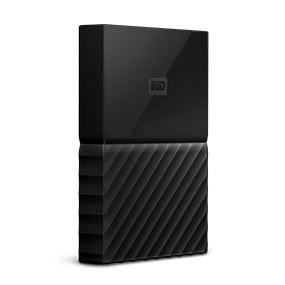
The WD2TB My Passport for Mac is a sleek, portable external hard drive designed specifically for Mac users, offering 2 TB of reliable storage, hardware encryption for security, and ultra-fast USB 3.0 connectivity. Perfect for personal, gaming, or business use, it ensures your data is both accessible and secure.


| ASIN | B0792FVB88 |
| Best Sellers Rank | #405 in External Hard Drives |
| Brand | WD |
| Color | Black |
| Customer Reviews | 4.5 4.5 out of 5 stars (2,616) |
| Date First Available | January 17, 2018 |
| Flash Memory Size | 2 |
| Hard Drive | 2 TB Portable |
| Hard Drive Interface | USB-C |
| Hardware Platform | Mac |
| Is Discontinued By Manufacturer | No |
| Item Dimensions LxWxH | 4.33 x 3.21 x 0.53 inches |
| Item Weight | 5.9 ounces |
| Item model number | WDBLPG0020BBK-WESE |
| Manufacturer | Western Digital |
| Product Dimensions | 4.33 x 3.21 x 0.53 inches |
| RAM | 2 TB |
| Series | My Passport |
V**T
Great Back-Up or Over-Flow External Portable Drive
I have been using Western Digital products since Windows 95. I am a believer in Western Digital products. I have had a few other competitive brands over the years but I always seem to return to WD. Their products are simply reliable, easy-to-use and well made. I use these for both Back-Up (Mac Time Machine) and file over-flow (stuff I don't need on my active disk but I want easy access). These are competitively priced for representative size. I have WD External Portable drives that are over 15 years old. I have never had one fail. It ultimately comes down to (Ford / Chevrolet / Toyota / Lexus / BMW). Whichever one is inclined to believe in, have faith in.
F**A
Lo compré hace años, me sigue funcionando perfecto. Muy buena calidad
V**R
Strong Performance and Value
I now own and use five different WD My Passport external hard drives. Each is a different size and were purchased in different years. My oldest is now 4 years old. So far, all have performed flawlessly and none (knock wood) have failed. Two are used as my Time Machine computer back-ups; one holds my considerable music library (so I can keep the media off my computer) and two hold back-ups to my 30,000+ photo archives. I am a Mac user and buy the ones pre-formatted for Mac, though it is quite easy to reformat a non-Mac version. I find the value and performance to be excellent all around and until one fails me, will always buy WD drives.
J**H
Great For Time Machine w/MacBook 12" 2017
I purchased this to use with Time Machine on my 12" MacBook, and so far it's been great! The set up (if you can even call it that) is super easy. You just plug it into your MacBook, the MacBook asks you if you want to use it for Time Machine, and you just say yes. It'll also ask if you want to encrypt it, which just involves setting a password for the drive. Don't lose this password, though, because you cannot access the drive without it - it will be a dud if you forget the password! A handful of the reviews are complaining about the speed, but I haven't had this issue. The initial Time Machine backup did take a few hours for me, which caught me off guard (make sure your MacBook is charged - if you unplug the drive, the backup restarts), but a quick Google search shows that your first Time Machine backup is supposed to be really slow. All of the subsequent backups take about a minute, tops. Time Machine only backs up files that you've changed since the last backup, so the first one takes a long time, but the rest usually only take a minute or two. If you choose to encrypt the drive, that's another process that the drive is going to have to go through initially, which can take a few hours as well. Unlike the initial backup, however, you can unplug and replug the drive without losing your progress. You can also perform backups while it's encrypting the drive, so it really doesn't affect you being able to use the drive as the first backup does. All in all, I'd say it's great! It is made of plastic and not an SSD, but not bad considering the price. Given that it's not an SSD, though, I'd pick a different drive if you seriously need the extra reliability. For me, I just need it to not fail at the same as my MacBook, which is pretty unlikely, so the old school disc drive is no biggie. I got a used version to save $15 and have zero complaints. I feel way more confident in my Mac now that it's backed up, I would definitely recommend this drive!
C**A
So far so good as a data/backup drive on MacOS.
This tiny drive packs a punch. It's slick looking and performs well for streaming or just plain old storage. Great price too.
C**N
How can this be so good?
I'm not the type who replaces equipment just to get a shiny new model. I'm still using an early 2009 Mac Mini and had a 9 year old WD external FireWire 800 external drive for Time Machine. I started having trouble with Time Machine backups a few months ago, and wasn't able to mount the old drive the other day. So, I searched for a replacement. I figure I'll likely upgrade my Mac within the next year or two and know Firewire is no longer "the thing". I figured I would need a drive with a USB-C connectivity, but still needed USB-2 for the current Mini. This WD My Passport (1 TB) seems to do all I really need for Time Machine. I ordered this drive yesterday, and was surprised when it was delivered in under 24 hours! First, I'm ammazed at the small size, truly a shirt pocket size. Plugged it in, and it mounted right away. Went into Disk Utility and divided it into two partitions, and it's currently downloading a copy via Time Machine. Yes, it's probably slower than my previous FireWire-800, but good enough, I hope, for my current needs. Great deal for the price!
L**Y
My coment
The storage format is not the same as on your i-mac photo Library.
A**S
Made me lost all my data
Search "fix DW Passport" and you'll find how often these terrible products break down. When an external drive breaks down, can make you lose years of work.
F**R
Ab High Sierra hat Apple auf allen Geräten, sofern diese einen SSD-Speicher haben, das Dateisystem APFS neu eingeführt. Beim Löschen und Formatieren einer externen Festplatte werden vom Festplattendienstprogramm deshalb nur noch verschiedene APFS-Formate angeboten und nicht mehr das hier erforderliche Format Mac OS Extended (Journaled) oder auch HSF+J (gleiches Format, nur eine andere Bezeichnung). Es war mir deshalb nicht möglich, mit der Time Machine ein verschlüsseltes Backup zu erstellen. Nach langem Hin und Her habe ich schließlich mit Hilfe der Bedienungsanleitung dieser WD-Festplatte die Lösung gefunden: download der WD-Software WD Security für Mac und WD Drive Utilities für Mac. Mit WD Drive Utilities habe ich die Festplatte auf HSF+J formatiert, mit WD Security den Paßwortschutz eingerichtet. Seitdem funktionieren alle Backups einwandfrei. Mein Tipp: Auf der Festplatte befindet sich u.a. die Bedienungsanleitung (auch auf Deutsch), diese sollte man als erstes gleich kopieren und an anderer Stelle auf dem Mac speichern. Nach dem Löschen und Formatieren der Festplatte ist diese leer.
N**O
iMacOS high Sierra10.13.6でも問題なく使用できます。 もともとMac専用ということもあり、記載通りに繋げるだけでした。今の所はTime Machineも正常に稼働しております。 デザインもよく、iPhoneより一回り小さいサイズです。気に入って愛用しています。
V**A
Tiene un buen acabado y gran capacidad de almacenamiento, a un precio interesante
I**A
Ce petit disque dur portable s'est montré parfait lors de la première session d'enregistrement et de sauvegarde. Tous ceux qui ont perdu des thèses ou des mémoires ou ont subi des vols (et même ceux qui n'ont rien subi d'aussi pénible) connaissent l'importance d'avoir un DDE qui reste paisiblement à la maison, bien planqué, en tant que gentil animal (de sauvegarde) de compagnie. Celui-ci est très facilement transportable, a une grande capacité de stockage (très gros volumes de photos, vidéos, morceaux de musique et documents). Grâce à l'association parfaite avec le logiciel de sauvegarde Time Machine d'Apple et au système de protection par mot de passe, le disque dur My Passport for Mac protège parfaitement bien les fichiers, malgré sa petite taille ; en outre il fait très bien le job sans bruit. Il est fourni avec des câbles USB-C et USB-A pour une compatibilité universelle avec les ordinateurs Mac, d'ancienne comme de nouvelle génération. Pour l'instant, il donne toute satisfaction, et nous le recommandons donc comme un partenaire valable pour un Mac. Et on sait combien les adeptes de la Pomme sont exigeants !
B**A
I have been using this drive for a while now and I enjoy the ease of use and set up. Makes me happy that my information is backed up. I don’t travel with it, so I can’t comment on using it that way, but the size and weight would be good for using it that way
Trustpilot
1 month ago
1 week ago