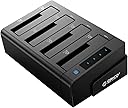
ORICO USB 3.0 4-Bay Hard Drive Docking Station and Clone for 2.5 and 3.5 Inch SATA III HDDs/SSDs
Product ID: 61061643
Details
- BrandORICO
- ColourBlack
- Hardware interfaceSolid State
- Hardware platformLinux Mac
- Memory storage capacity4 TB
⚡300MB/s transfer speed
📦4-bay capacity
🔄Clone without PC
Details
- BrandORICO
- ColourBlack
- Hardware interfaceSolid State
Description
🚀 Clone, Dock, and Conquer your data!
- POWERFUL PERFORMANCE - Equipped with a robust 12V-6A power supply for reliable operation and hot swapping capabilities.
- CLONE WITH CONFIDENCE - Effortlessly duplicate up to three drives simultaneously without a host computer.
- SPEED MEETS EFFICIENCY - Experience lightning-fast data transfer rates of up to 6Gbps with USB 3.0 and UASP technology.
- VERSATILE COMPATIBILITY - Supports both 2.5 and 3.5 inch SATA HDDs/SSDs, accommodating up to 6TB per bay.
- PLUG AND PLAY CONVENIENCE - No drivers needed—just plug in and start working on Windows or Mac without interruptions.
The ORICO USB 3.0 4-Bay Hard Drive Docking Station and Clone offers a dual function for seamless cloning and docking of multiple SATA drives. With the ability to clone up to three drives simultaneously at impressive speeds, this docking station is designed for professionals who demand efficiency and reliability in their data management.
Specifications
| ASIN | B07BJL7SP1 |
| Best Sellers Rank | 277,421 in Computers & Accessories ( See Top 100 in Computers & Accessories ) 239 in Hard Drive Docking Stations |
| Brand Name | ORICO |
| Colour | Black |
| Compatible Devices | Personal Computer |
| Customer Reviews | 4.4 4.4 out of 5 stars (120) |
| Data Transfer Rate | 6 Gigabits Per Second |
| Hardware Interface | Solid State Drive |
| Hardware Platform | Linux, Mac, Personal Computer, Windows |
| Manufacturer Part Number | 6648US3-C |
| Memory Storage Capacity | 4 TB |
| Model Number | 6648US3-C |
| Supported Devices Quantity | 4 |
| The Standard Size of the Hard Drive or the Bay the Hard Drive Is Compatible With (in inches) | 3.5 Inches |
| UPC | 660989180775 |
Common Questions
Yes, all products are sourced directly from authorized retailers in the US, UK, UAE and India. We maintain strict quality control processes and verify each product before shipping. All items come with applicable manufacturer warranties and are covered by our standard return policy.
Delivery times vary by destination country, typically ranging from 3-9 business days. Each order is fully trackable through our system. We handle all customs clearance and use reliable courier partners for last-mile delivery. You'll receive regular updates about your order status via email and our app.
Desertcart is an international e-commerce platform operating since 2014. We securely process thousands of orders globally each day. Every product goes through our quality verification process before delivery, and we provide end-to-end order tracking, 24/7 customer support, and a comprehensive returns policy to ensure a safe shopping experience.
Our prices include the product cost, international shipping, import duties, customs clearance, and local delivery charges. We handle all customs and import procedures, ensuring there are no hidden fees upon delivery. PRO members receive additional benefits including free shipping.
Trustpilot
TrustScore 4.5 | 7,300+ reviews
Shop Global, Save with Desertcart
Value for Money
Competitive prices on a vast range of products
Shop Globally
Serving millions of shoppers across more than 100 countries
Enhanced Protection
Trusted payment options loved by worldwide shoppers
Customer Assurance
Trusted payment options loved by worldwide shoppers.
Desertcart App
Shop on the go, anytime, anywhere.