


Desertcart purchases this item on your behalf and handles shipping, customs, and support to Tunisia.
🌬️ Upgrade your airflow game — smart comfort is just a vent away!
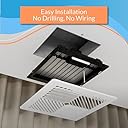
The Flair Smart Register Supply Vent 8x8 is a sleek, battery-powered smart vent cover designed for walls and ceilings. It integrates with your existing HVAC system and smart thermostats to deliver precise, room-by-room temperature control. Easy to install with no wiring required, it leverages smart sensors and an intuitive app for automated airflow management, energy savings, and voice assistant compatibility.


| Asin | B0CTRYMRM4 |
| Batteries | 2 C batteries required. (included) |
| Battery Cell Type | Alkaline |
| Best Sellers Rank | #49,933 in Tools & Home Improvement (See Top 100 in Tools & Home Improvement) #312 in Registers, Grilles & Vents |
| Color | White |
| Customer Reviews | 3.8 3.8 out of 5 stars (534) 3.8 out of 5 stars |
| Date First Available | January 31, 2024 |
| Finish | Finished |
| Included Components | Batteries |
| Item Model Number | FLAIRVENT88 |
| Item Package Quantity | 1 |
| Item Weight | 2.7 pounds |
| Manufacturer | Flair |
| Product Dimensions | 10.2 x 10.2 x 0.2 inches |
| Size | 8x8 Inch |
User
They work amazing
I love these, super expensive for everything but its nice you can just add extra vents as you buy them. They are built for the price, very sturdy and look nice. They work which is the best part. I always had my room either to hot or to cold and constantly was adjusting my vent. These do it all for me and I dont have to worry about anything. Its always a comfortable temp now. And customer service is great I had an issue with one vent sticking open or closed and they just sent me a brand new one. The fit and size is what you expect. I do wish they had other colors like black, white isnt what I would pick but again I cant complain I love how well they work
User
Works great
For some reason they seem to want everyone to use batteries with these (not sure why you'd want to mess with unscrewing the cover and replacing them, no matter how infrequently), and neglect to mention until you receive the item and look at the manual that for wired operation it requires a 24V AC adapter/transformer plug. It's not convenient to have to go back and order more products after I've received the vents; they need to make this clear in the product info. Also of note is that one 24V AC adapter can power up to 10 smart vents, and the polarity is not important, according to the manual. I hooked up one 24V AC adapter to both of my vents connected in parallel wiring, which was simple enough to do. Just needed to strip and cut the ends of the adapter cord and connect one wire from each of the wires on the adapter to each vent using wire connectors that you crush with pliers to secure.The setup where I live is that there is a regular (non-"smart") thermostat upstairs controlling the HVAC of the house, and in the basement (where it routinely gets quite hot due to 2 PCs and 3 stereo receivers and TV running most of the time), the 2 smart vents, which I hope will help cool it off in the fall/winter here by closing off the heat when it's warm enough already in the room.It works great through the app or website to open and close the vents remotely; currently I don't yet have the necessary thermostat though. It's not the most clear from the description what is needed to make the system work, but I'm going to order an inexpensive Honeywell smart thermostat (RTH6580WF) to hopefully make them work automatically soon. I now have the 2 smart vents, Flair bridge (which is apparently always necessary), and Honeywell room sensor (model FBA C7189R1004). Apparently the room sensor isn't enough to control the system; an actual smart thermostat is needed and room sensors probably add on to that for individual room temps.
User
Great...when it works like it is supposed to.
These are great, when they work like they are intended. For all of the other times, it is extremely frustrating and I really wish I would have looked into the company and their support structure a little further. The single biggest point of frustration for me is that there is no live support option. You have to send an email to their support email box and just wait for a response and then go back and forth with them until your issues are resolved. There's not even a live chat option.The products seem to be extremely touchy. My current problem is the vents keep resetting the mode that the Thermostat is in to Heat, even after I manually update it to Cool. This results in the vents operating off the wrong trigger temperatures and defeating the entire purpose of having them. Great thought and idea for the product, but awful execution in terms of support structure for working through buggy systems and issues.**5/23/2023 Update**Now, when the Air Conditioning is on, half of my vents say they have poor signal and just stay closed. They've not moved, the pucks haven't moved so I'm not sure what is causing it but the problems coincided with the transition from Furnace use to Air Conditioning use.10/9/2023 UpdateFlair vents and pucks are doing the exact same thing as before, but in the inverse where they wo t register a change from cooling to heating. Update to reflect 1 star. A "smart" device shouldn't require constant oversight and manual interference for them to work properly. Avoid until they figure out how to offer live tech support and/or build a more reliable back end.
User
Updated. Some drawbacks, but does what I want it to do.
First, let me say that a lot of the negative reviews of the Flair products seem to be written by people who do not understand what this product is. The Flair vents will not magically turn your standard HVAC system into a multi-zone system. It will not overcome all air flow problems, although it does handle most of them. These vents, combined with a Flair Puck, will automate the opening and closing of your HVAC vents based on the measured temperature in the room. That's it. The end. The good news - they do it well.The 2nd floor of my house has terrible air flow. During the summer, it would be easily be 10-12 degrees hotter than the main floor. I did all the normal things - replaced the attic fan, added insulation, etc. Then I purchased a Honeywell T9 thermostat and several remote temperature sensors. The T9 allows me to set a schedule so that the 'set point' for the thermostat (the temperature reading used to turn the system on or off) can be one of the remote sensors, not just the the main thermostat which is located in the dining room on the main level. So, I set it to cool the 2nd floor in the evenings. This worked, but since the HVAC system services the whole house, the main floor would cool to 65 or colder just to get the 2nd floor down to 72. My temperatures were evening out, but my electric bills increased. I added booster fans to the upstairs vents, and this again helped a little. To get things working right, I had to go around opening and closing vents every night and morning to get the room temperatures where I wanted.I recently put in a few Flair smart vents and one puck, to see how they worked. They did what I wanted, so I now have most of the vents in my house converted to Flair, and have 3 more on order to complete the transition. Using the app, I set the temperature point in each room to the desired temperature. During the winter, when using the heat, when the room temperature is below that set point, the vent is opened. When at or above that set point, the vent is closed. And it just works.Since I already had the Honeywell T9 and remote sensors, I ordered more Honeywell sensors to install in each room. The Flair system can use them to monitor the room temps, and they are $38 vs $119 for the Flair pucks.The Flair system can directly control most thermostats, and has a schedule capability built into the app. In theory, you can set the temperatures you want in each room, and the Flair gateway puck will activate your system and open/close the vents to achieve your desired temperatures. IT DOES NOT WORK. At least, not for me. It opens and closes the vents just fine, but does not turn the HVAC system on and off when it should. Based on comments on the Flair website, I'm not the only person reporting this. But, since I am using a Honeywell smart thermostat and remote sensors, I can use the Honeywell app to set a schedule, and use the Flair schedule to control the vents. It's a little more complicated than using one schedule app, but once set up, they work great.One last thing - the Gateway puck communicates via WiFi to the internet. That's where your configurations and schedules, etc. are stored, and that's how it communicates with your smart thermostat and sensors. But communication between pucks and vents is via a separate 915mhz wireless network. Technically, it's called a PAN (Personal Area Network) and does not use your wifi system at all. That's why you need at least one puck set up as a gateway - it is literally the gateway between your 915mhz vent network and the internet, and controls the vents. This is fine except for one thing - the 915mhz frequency is more easily blocked by walls and other obstructions that the 2.4ghz or 5ghz frequencies that home wifi uses. So, even though you may have a good wifi signal all through your house, that does not guarantee the Flair system can have good communications to all corners of the house. I have one puck controlling 10 vents, scattered throughout my house, and it works just fine, but I had to experiment to find the correct placement for the puck so that it could get to the most remote vents.Pros :It does what I want it to do. Vents open and close based on room temperature and my settings/schedule. This is the main reason for the 4 stars.It has built-in protection against closing too many vents, which can cause pressure build-up in the HVAC system and damage the system.Integrates very well with the Honeywell thermostat and sensors. I highly recommend using a T9/T10 and Honeywell sensors instead of a puck in every room, especially if you're using these in more than 3 rooms. If you already have a smart thermostat (Honeywell, Ecobee, etc) it is much cheaper.The app gives good status information, including room temperatures, duct temperature, duct pressure, open/close stats, RSSI (signal strength). I like data when evaluating products like this, and it is there.Cons :The scheduling app just did not work for me, and apparently not for a lot of people. If you don't have a smart thermostat to supply this feature, the value of the product is diminished.The temperature readings of the puck are not right. When compared with temperature readings of the Honeywell sensors, and also with a separate room thermometer, the pucks will report temperatures up to 3 degrees too high or too low. Fortunately, I am using the Honeywell sensors, which seem to be spot on.There seems to be no way to add the puck to my Honeywell T9 as a remote sensor. Since I use the Honeywell T9 schedule, it would be convenient to have a Honeywell-enabled sensor in every room. To do this, I need both a Flair puck and a Honeywell sensor in one of the rooms.Price. The price of the sensor puck, doing basically the same job as a Honeywell remote sensor, is too high. As stated above, the Honeywell sensor is $38 on Amazon while the puck is $119. Also, the entire system is pretty expensive if you're using it like I am, just to automate the manual task of opening and closing vents several times per day.All that being said, I am happy with the performance of the system so far. I may update this later, but for now, 4 stars.Update 2/12/2024.I have now been using the Flair system for about 4 weeks, and have converted all of my vents to Flair smart vents.The system continues to perform as I want it to. I am using the schedule on the Honeywell app to control the thermostat, and the Flair schedule to control the vents.I am pleased with the combination of the T9 and Flair vents. Various areas of the house are maintained at the temperatures I want. Most days, I don't even give it any thought - the rooms I am in are comfortable. I don't know what effect this will have on my electric bill yet, But it will certainly not go up, and may indeed come down.After several emails with Flair support, and them assuring me that the schedule works well with the Honeywell T9, I disabled the Honeywell schedule and used the Flair app to control both the vents and the thermostat. It worked well this time. For 2 days. Then the heat come on one morning, as it was supposed to, and never turned off. I switched back to the Honeywell schedule when the average temperature in the house was about 74. It was set to 71 on the schedule.I will continue to use the Honeywell schedule. It may be that my particular use of the scheduling is just more complicated than the Flair app was built for. I have monitors in every room, and my schedule is set to use different rooms in combination, at different times, to control the thermostat. The T9/Flair system works the way I want, so I'm leaving it alone.Keeping the 4 star rating, because of the scheduling app and the price. Otherwise, it would be 5 stars.
User
Love this system!!
I waited way too long to purchase my Flair vent system as I was leaning towards a zoned duct control system instead.The costs would have been significantly higher (up to 5 times more in parts alone) but also the install would have been a major pain for me to DIY.The Flair vents were easy to install, the app setup was straightforward with the light layout on the vents used to identify which ones were for which rooms.I love that I can set the schedule to deactivate rooms when they are not in use and have it regulate the temperature in the active ones during those days/times.I did mess up a setting by changing the Default Hold Duration setting to forever (supposed to be the default option Until Next Scheduled Event) which caused my schedule not to work but Flair support got this identified and resolved quickly.I now have everything how I want it and the room leveling is perfect (was up to 5-6 degrees difference in some rooms). It is also awesome to be able to change the temperature on-demand in the rooms when needed.So far I am very happy with my purchase, but wish I had done this sooner.
User
One of my vents stopped working after 10 months.
My Flair system worked fine for10 months and then one of my vents wouldn't open. I had to remove and reinsert the batteries to get the vent to work again. My Flair system has 5 vents and one puck. I'm using it in manual mode where I use the app to open or close vents. Even though the vent didn't respond to the open command, I could see the current vent stats with the app so apparently the vent was still communicating with the hub but it refused to open.According to the Flair specs, a vent will automatically open if it stops communicating with the Flair server. This is the default fail condition. But this fail safe apparently doesn't work if the vent is still communicating but the open command doesn't work.
User
Flair can take over your temperature control and make your house unbearable!
This is going to “potentially” be a good addition to my house. I think it is redirecting the cool air to my hot rooms. It’s still not the dead of summer so I can’t tell for sure. BUT, a BIG, BIG, BIG HOWEVER, I didn’t know that Flair took over control of the thermostat and was changing the temperature on its own. It doesn’t give you the option in the set up to choose the Flair vent as the temperature control point or the thermostat. It automatically chose itself. I have an Ecobee, 2 years now, that has numerous smart features and a personalized schedule. Very predictable. But all of a sudden, I’d have it set at 72 degrees only to have it jump to 80 within a few minutes. Adjust it and it happened again. I’m away and have animals at home and my house temperature is suddenly set to 80 degrees. UNACCEPTABLE! So after HOURS of working at the thermostat trying to make adjustments and even factory resetting it, I FINALLY found out through Ecobee customer service that Flair was doing it. I had to make the change in the settings section of the Flair app to make the Ecobee the control point. So in an effort to make my house more evenly comfortable, Flair made it unbearable! Great concept with poor execution through the programming. They clearly the lack of understanding of the original intent as to why people are buying their product. Fix a small problem. Make hot rooms, cold and cold rooms, hot. NOT make the entire house completely unbearable! I’ll update when summer fully kicks in.
User
Flair Smart Vent works for zoning & comfort.
This has been a good purchase. It’s a comfort investment. Don’t assume an energy cost savings will cover the money spent on these. These do work well. The install/setup is not a no brainer.
Trustpilot
3 weeks ago
2 weeks ago