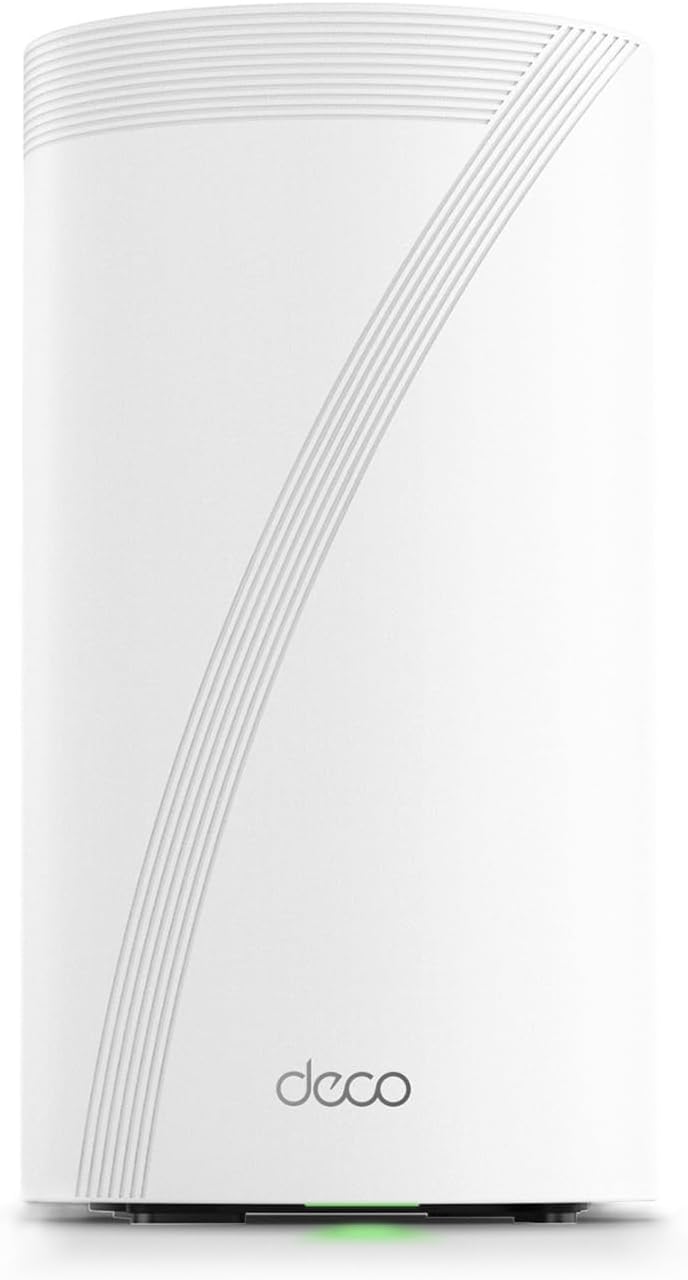
🚀 Elevate your home network to WiFi 7 speed and security — because buffering is so last decade!
The TP-Link Deco BE95 is a cutting-edge Quad-Band WiFi 7 mesh system delivering up to 33 Gbps combined speeds with 12 high-gain antennas and multi-gig wired backhaul ports. Designed for large homes and smart device ecosystems, it supports over 200 devices simultaneously with AI-driven seamless roaming and robust security via HomeShield. Easy to set up and voice-controllable, it future-proofs your home network with the latest WiFi standards and pro-grade hardware.


| ASIN | B0CD9QCPS5 |
| Antenna Location | Home |
| Antenna Type | Internal |
| Best Sellers Rank | #22,462 in Computers ( See Top 100 in Computers ) #89 in Whole Home & Mesh Wi-Fi Systems |
| Brand | TP-Link |
| Built-In Media | 1 Deco BE95 unit, 1 Power adapter, 1 RJ45 Ethernet cable, Quick Installation Guide |
| Color | White |
| Compatible Devices | Personal Computer |
| Compatible devices | Personal Computer |
| Connectivity Technology | Wi-Fi |
| Control Method | Remote |
| Controller Type | Voice Control |
| Coverage | Whole Home |
| Customer Reviews | 3.9 out of 5 stars 397 Reviews |
| Data Transfer Rate | 11520 Megabits Per Second |
| Frequency | 2.4 GHz |
| Frequency Band Class | Quad-Band |
| Frequency band class | Quad-Band |
| Is Modem Compatible | Yes |
| Item Dimensions L x W x H | 12.8L x 12.8W x 23.6H centimeters |
| Item Weight | 3.3 Pounds |
| Item height | 9.29 inches |
| LAN Port Bandwidth | 10 Gbps |
| Manufacturer | TP-Link |
| Maximum Upstream Data Transfer Rate | 1148 Megabits Per Second |
| Model Name | Deco BE95 |
| Model Number | Deco BE95(1-Pack) |
| Model name | Deco BE95 |
| Number of Antennas | 12 |
| Number of Ports | 4 |
| Operating System | [Proprietary Operating System] |
| Other Special Features of the Product | Access Point Mode, Guest Mode, QoS, Remote Access, WPS |
| Security Protocol | WPA-PSK |
| Special features | Access Point Mode, Guest Mode, QoS, Remote Access, WPS |
| UPC | 840030706899 |
| Wireless Compability | 802.11.be, 802.11ac, 802.11ax, 802.11g, 802.11n |
| Wireless communication standard | 802.11.be, 802.11ac, 802.11ax, 802.11g, 802.11n |
A**O
Vale su precio
Su esperanza de vida es larga. Tiene lo más reciente en colectividad y eso le asegura mucho tiempo de uso. Se le saca más provecho si se usa en mesh, si sólo usas uno como módem recomiendo más la versión BE85 o la BE65. Tiene una potencia tremenda. Vengo del deco x20 y sí hay diferencia siempre y cuando tus dispositivos estén adaptados a la nueva tecnología de wifi 6e y 7
H**K
Easy basic out of the box setup and powerful coverage and speed
I have been waiting for three years to reestablish my WiFi in my home following a fire that destroyed my previous WIFI MESH network. Extremely easy to setup once you login to your account. The only issue I experienced and it was an annoying one that could have been resolved with a preemptive statement in their instructions for logging into the TP app. It requires 2-factor authentication and will only use an email address and not a cell-phone SMS text message. They have difficulty in sending the emails to a regular email provider like Comcast. The 2-factor wait time times out long before you receive the code in an email… if you ever do. It was the only issue that I have encountered thus far. I found the first level support less than sufficient to explain why I could not get logged in, though he did insist that I needed to have a google or yahoo email but did not explain why. We spent over an hour and then he transferred me to his manager who said we would have to wait for the second tier support to call me in the morning. Which to their credit they did… but just after hanging u p with support, I tried to login from my iPad and I had face recognition setup and it bypassed the 2-factor email requirement. YAY that I didn’t need to revert back to the rental modem/router. The interface is intuitive though different approach than Comcast branded solution. Haven’t done much accept setup the bands and named the equipment. I have all network bands configured except you cannot separate 5&6 they are banded together as one for MLO. I have a guest, MLO, and IOT network setup for the SmartHome devices. All seem to have reconnected that were connected previously and 2 more have connected that had failed to connect with a single modem/router on the extreme end of the WiFi network. I have a 4k 4 story home so I really needed this. Two are on the on the 3rd floor on opposite ends of the house connected via Ethernet. The third is connected wirelessly on the first floor directly below the second unit. Coverage is terrific and performance a boost over the Comcast rented - modem/wifi router. I will update this as I explore more options and pursue network security options. Bottom line is simple out of the box setup and configuration with great coverage and speed. Only downside is they are L A R G E units so plan your placements ahead of time.
A**D
.
The WiFi coverage disappointed
C**N
Funciona al 100%, con este par, me cubren 4 pisos con una velocidad que sorprende.
Todo me gustó, es un producto original.
J**D
Casi todo perfecto
Trabaja muy bien, super veloz. El único problema es el conector de alimentación a la corriente eléctrica se desconecta con mucha facilidad solo, no embona bien o es muy corto y no se alcanza a fijar bien al aparato.
Trustpilot
2 months ago
3 weeks ago