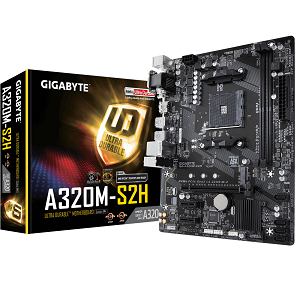
🚀 Power Your Productivity with Gigabyte’s MicroATX Marvel!
The GIGABYTE GA-A320M-S2H is a compact MicroATX motherboard designed for AMD Ryzen and 7th Gen A-Series processors. It features dual-channel DDR4 memory support up to 3200 MHz, ultra-fast PCIe Gen3 x4 M.2 slots for NVMe SSDs, advanced Smart Fan 5 cooling with multiple temperature sensors, premium audio components, and Realtek Gigabit LAN with internet acceleration software. Ideal for professionals and DIY builders seeking reliable performance and efficient connectivity in a budget-friendly form factor.

| ASIN | B079NYQQJJ |
| Best Sellers Rank | #629 in Computer Motherboards |
| Brand | GIGABYTE |
| CPU Model | Athlon |
| CPU Socket | Socket AM4 |
| Chipset Family | AMD A-series |
| Chipset Type | AMD A320 |
| Compatible Devices | Personal Computer |
| Compatible Processors | AMD A Series |
| Customer Reviews | 4.5 out of 5 stars 5,757 Reviews |
| Global Trade Identification Number | 00889523011904 |
| Graphics Card Interface | PCI Express |
| Item Dimensions L x W x H | 7.68"L x 4.09"W x 9.61"H |
| Item Weight | 1.1 pounds |
| Main Power Connector Type | 24-Pin |
| Manufacturer | GIGABYTE |
| Memory Clock Speed | 3200 MHz |
| Memory Slots Available | 2 |
| Memory Storage Capacity | 1000 TB |
| Mfr Part Number | GA-A320M-S2H |
| Model Name | GA-A320M-S2H |
| Model Number | GA-A320M-S2H |
| Number of Ethernet Ports | 1 |
| Number of Ports | 3 |
| Platform | Windows 10, Windows 8, Windows 8 Pro, Windows 8.1 |
| Processor Socket | Socket AM4 |
| RAM Memory Technology | DDR4 |
| Ram Memory Maximum Size | 64 GB |
| S/PDIF Connector Type | Optical |
| System Bus Standard Supported | SATA 3 |
| Total Number of HDMI Ports | 1 |
| Total PCIe Ports | 3 |
| Total SATA Ports | 6 |
| Total Usb Ports | 9 |
| UPC | 889523011904 |
| USB 2.0 | 4 |
| Unit Count | 1 Count |
| Warranty Description | 3 |
D**.
Booted up right away
Great, booted right up with a display using athlon 3000G processor
J**S
Nice MOBO for the Price!
I've never built anything around a Gigabyte board, so, I thought I would pick up a cheap board to experiment with. What a nice surprise! I received a Version 3.0 board with BIOS version F1 installed, and I dropped in an AMD Athlon 200GE along with a couple of Corsair 8 GB 3200MHz DDR4. Everything fired up with no issues. I did update the BIOS to the latest version (F2). It was quite easy to bring the RAM speed up to 3200MHz, it was defaulted at 2133MHz. Updating the BIOS was a little bit of pain in the butt, because for some reason the build was seeing the board version as x.xx rather than 3.0. So, while trying to flash the BIOS using Q-Flash the new version was seen as being an "Invalid BIOS Image." I'm assuming that it was due the system not recognizing the the MOBO version. I was able to update the BIOS using @BIOS through the "Gigabyte APP Center." Wow, that's the first time I ever flashed a BIOS through Windows, but it worked! Over all it is a nice board for the price. It is a little on the thin side, but there really weren't any issues. The CPU is being water cooled, and the board is performing quite well. I'm not a Gamer, but do play Minecraft with my Grandson through a realm. On my next build I'm definitely going to go with a higher end Gigabyte board. This little board made me a believer! Sorry MSI, and ASUS...
C**Z
Bien
Bien
S**S
RAM speed issues
Overall, my board seems to work mostly fine but not without issue. Haven't had issues with network adapter yet but if it pops up I'll mark it down. EDIT: RAM clock speeds are fine. After some research I found that RAM doesn't automatically clock to the manufacturers' specs right out of the box and often rarely ever does. Had to turn on XMP in the Memory Clock option in BIOS, now she's running full 3200. Sorry if my lack of knowledge hurt but hopefully this informs people better on their purchase and confusion. (This section is not accurate, but I leave it here to showcase my own stupidity and how to overcome it) RAM clock speed reads some weird number that's wayyyy under the as the advertised maximum of 3200, something like 2143 or whatever, even though I'm using 2 sticks of DDR4@ 3200. I feel like it's causing hiccups in higher-demanding processes but I'm still pretty new to the enthusiast market so I'm not entirely certain, but I've seen this gripe a few times and felt I should also leave a note about it. Pretty ok board for a beginner, supports "up to" 3000 models means the best chip you can throw in here is like a 2600x which isn't BAD, but not a tremendous amount of headroom for upgrades should you be inclined to do so. Hopefully I am just misinformed on this, but then again for a >$100 that's still a good range for upgrades. Guess you get what you pay for... for the money it does fine, but I wouldn't buy another one.
F**A
Good Motherboard For The Price
Pros: - Came with the latest drivers (meaning ryzen 3000 support out of the box) - Easy to build in - AM4 socket so you have a lot of upgrade options available in the future - Supports nvme hard drives - Inexpensive Cons: - 2 memory slots instead of 4 - you can't overclock - connection available for only one system fan I used this motherboard to do a budget build for my 10 year old nephew. I installed 16gb of ram + ryzen 5 1600 cpu + rx 480 gpu. Building on the motherboard itself was easy enough. After i hooked everything up I was ready to update the bios but I was pleasantly surprised to find that it already had the latest bios meaning it should work with the ryzen 3000series. I assume if you're looking at the motherboard you're doing a budget build because if you're using high end parts, it might be better to use a more expensive motherboard. You can't overclock in this one though i doubt my 10 year old nephew will be doing any of that. It also has 2 ram slots instead of 4 but for the price you really can't complain. Overall i'd recommend this motherboard if you're looking to do a budget build with room to upgrade parts in the future. With the build mentioned above my nephew's PC can do most games at 1080p high to ultra settings at 60fps+. We haven't had the motherboard too long but I'll definitely update the review if something weird happens or it dies.
M**8
Perfect budget Ryzen Mobo
Fyi these mobos are updated by the manufacturer to the very latest bios (or close to it) so they should be able to handle the very latest Ryzen cpus that are 5000 and below. However with the cheap chipset I would recommend the Ryzen 5 3600 to pair and it works perfectly. I got a decent pc build for under 300 bucks (although I already had a gpu from a previous computer). Manufacturer should state in the info that these boards are on the f55 bios. Love this board, great deal! Edit: watch out for the cpu backplate on this! It is completely loose. Mount ram first then cpu to avoid any issues. The amd Logo on the cooler has a significant overhang.
W**1
Ryzen 2000 ready. Ships with BIOS ver F24
Ryzen 2200G, Patriot 8BG ddr4 2666 Great little HTPC setup. Also a good MB for a net box... and surprisingly.. casual gaming. Plays 4K Youtube just fine (4K @ 60 Hz through the onboard HDMI. Impressive) MB was easy to install, runs perfectly, and looks nice. Flashing BIOS to latest was super easy. Absolutely sips the power for 1080p mkvs (barely 5% CPU/GPU) Going to try it out as an emulation station as well. Super cheap Motherboard solution with a surprising abundance of features. Highly recommend if you need a cheap system or HTPC. Amazing specs for the price. I also like the parallel electrolitic caps they used... should help keep the system running for a long time.
M**.
Not Good for Tight Spaces
I paired this case with a non-integrated graphics CPU, and a dual fan GTX 1060, all inside a darkFlash DLM-22 M-ATX case. Though most of the issues did arise from the room inside the case itself, there was a big problem with how the SATA ports were placed. Most modern GPUs are built with larger heatsinks to make up for the higher performance they provide, increasing both thickness and length of the card, which would normally be a chassis clearance problem, but in this case, the one I installed went far enough to cover 2 of the 4 SATA ports as well as one of the PCI-e slots under the PCI-Ex16 slot as shown in the picture I have provided. While many users looking at this may not be looking in to having more than, if even 2 drives in their PC, I had 3 to install for the user, which became an immediate problem. I was lucky enough to have a right angle SATA cable that could fit under the GPU, but there is a noticeable amount of stress on the board with the GPU pressing down on the cable, causing for concerns of the longevity. As for the PCI slots, there is room to fit something like a low profile wifi card, as the board does not include it, but is far from ideal as the added card would block a good portion, if not all of one the GPU's fans. While this board was not very good in my situation, I still give it a decent rating for the price value, assuming you are going for a budget build that uses low profile parts. Stick to a smaller GPU, or even use an integrated graphics CPU if gaming performance isn't the highest priority. Otherwise, get a full size motherboard and case, or a different board overall. Proper planning can save you lots of extra work!
J**R
Amazing motherboard for the price
Simply amazing motherboard, all things considered. I have been running a Ryzen 7 2700 and 16GB DDR4 3200MHZ RAM paired with a Radeon RX 570 on this motherboard for months now and it's been perfect. BIOS is super stable with zero issues. Would highly recommend for a budget build. It also support 3000 Series Ryzen CPUs as long as you have the BIOS updated to the appropriate version.
D**S
Better motherboard for better Ryzen
I'm regular customer of gigabyte motherboard I had 2-3 versions of gigabyte motherboard they're very nice And this one is kaim Technically speaking: This motherboard has 3.1 USB ports which are very fast and nice GUI BIOS I'm using AMD ryzen 3 1200 processor which doesn't come with graphics so I've installed Nvidia 1GB graphics card If you are buying non graphics based AMD ryzen processor you need to have graphics card to boot BIOS otherwise you'll get beap and display will be black I've seen many reviews of black screen please consider the case Works really nice you can use this motherboard both for gaming and programming processing I bought for programming (Web and Android) I've been watching MSI motherboard but actually gigabyte is value for money
F**O
Works great as a media PC hooked to my 4K TV
Worked out of the box with a Ryzen 3 2200G APU put it in a slim low profile case (an old Antec Minuet 350 I had lying around from years gone by) and stuck it behind my TV and added a PCI-E wi-fi, 16GB DDR4-3000 RAM and a SSD and I'm good to go. I really, really like that the HDMI output on the board is at least v2.0 - this means it can drive my 4K TV at 60Hz - something that should not be taken for granted if you are selecting a media PC and have a 4K TV. Not all boards and video cards support this - though pretty much anything released in the last year or two should have it. The M.2 slot supports PCI-E nvme SSDs as well as SATA M.2 ones. All in all, it works very well and I have two of them - the other one is running a gaming PC with a Ryzen 5 1600 and RX 480 - that one too works very well. If you don't overclock, you don't need more than two RAM slots and you don't need a full size board - this is a great buy. However - I would not trust it to work with Ryzen 3000 chips out of the box - it may need an older chip installed to do a BIOS update first. If you need guaranteed compatibility with Ryzen 3000 without the hassle of updating the BIOS - look elsewhere.
P**E
No Display
I've have read many reasons why, from hardware failure to incompatible bios, but it remains that there is no display with an AMD Athlon 200GE. Product was returned, on further research Athlon 200GE and others have dismay problems with lots of MB's so unless I can get a return on the it I am left with a useless cpu
M**Y
Buena Tarjeta Madre pero la Descripción es Incorrecta
La tarjeta GA-A320M-S2H es buena en base a la relación calidad precio, cumple con todas las funciones que indíca excepto por el hecho de que especificaba que incluía conexión WiFi 5Ghz, la realidad es que no incluye ningún tipo de conectividad con WiFi, por lo que si quieres conectarte a internet de forma inalámbrica necesitas comprar una USB WiFi o una tarjeta Interna. Un problema de diseño que encontré con la tarjeta madre, es la poca separación que existe entre el procesador y las ranuras de la Memoria RAM, con el disipador un Ryzen 3 3200g y memorias HyperX, el espacio fue exacto, no se rozan pero tampoco existe un espacio entre estos, por lo que si consideras meter un disipador que ocupe más espacio del que estoy mencionando o quieres meter Memorias RAM con RGB (recordar que las RGB son ligeramente más anchas) vas a tener problemas ya que el espacio no te va a ser suficiente. También si vas a meter una gráfica lo más probable es que bloquees una de las entradas PCI-EX, y en caso de que sea la gráfica de doble disipador o mayor tamaño, debes tener en cuenta que va a bloquear una de las entradas SATA, pero en este caso lo puedes solucionar poniendo en esa entrada un cable SATA con conector en L. Por último, la tarjeta ya venía actualizada para los Ryzen 3, por lo que no hubo necesidad de actualizar antes de poder usar.
Trustpilot
1 month ago
3 weeks ago