Buy anything from 5,000+ international stores. One checkout price. No surprise fees. Join 2M+ shoppers on Desertcart.
Desertcart purchases this item on your behalf and handles shipping, customs, and support to Tunisia.
💼 Elevate your workspace with speed and style — don’t get left behind!
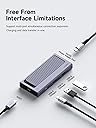
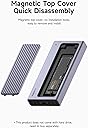
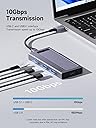
The Hagibis USB C Hub with M.2 SSD Enclosure (HB777) combines a high-speed 10Gbps USB 3.1 Gen2 hub with a versatile M.2 SSD enclosure supporting both NVMe and SATA protocols. Its magnetic cover enables quick SSD swaps without tools, while the premium aluminum body ensures efficient heat dissipation. Compatible with a wide range of devices including MacBook Pro, iPhone 15 series, and major laptops, it’s a compact, plug-and-play solution designed for professionals seeking fast, flexible, and portable storage expansion.


| ASIN | B0D2HFK5YN |
| Best Sellers Rank | 399,158 in Computers & Accessories ( See Top 100 in Computers & Accessories ) 1,574 in Enclosures |
| Box Contents | HB777, USB 3.1 Gen2 Type-C Cable |
| Brand | Hagibis |
| Brand Name | Hagibis |
| Color | grey |
| Compatible Devices | iPhone15, iPhone15 Pro, iPhone15 Pro Max, MacBook Pro 16", MacBook Pro 15", MacBook Pro 13", MacBook Air 13", MacBook Air 12", HP Spectre X360 / Spectre X2 / Spectre Folio / Elite Book 830 G5; Lenovo X1 / YOGA7300 E49 0 / ideapad 720s-13 / THINKPAD X390; Samsung Notebook9(950XBE); Dell XPS 13; iPhone 15 / 15 Pro / 15 Pro Max / iPhone 14 / 14 Pro Max / iPhone 13/13 Mini/13 Pro/13, iPhone 12 12 Pro … |
| Compatible devices | iPhone15, iPhone15 Pro, iPhone15 Pro Max, MacBook Pro 16", MacBook Pro 15", MacBook Pro 13", MacBook Air 13", MacBook Air 12", HP Spectre X360 / Spectre X2 / Spectre Folio / Elite Book 830 G5; Lenovo X1 / YOGA7300 E49 0 / ideapad 720s-13 / THINKPAD X390; Samsung Notebook9(950XBE); Dell XPS 13; iPhone 15 / 15 Pro / 15 Pro Max / iPhone 14 / 14 Pro Max / iPhone 13/13 Mini/13 Pro/13, iPhone 12 12 Pro / 12 Pro Max / 12 Mini / iPhone 11 / 11 Pro / 11 Pro Max / XS Max / XS / XR / X / 8 Plus / 8 / 7 Plus / 7 / 6S Plus / 6S / 6 / 5, iPhone SE; Galaxy S10 / S10e / S10+ / S9 / S9+ / S8 / S8+ / S8+. 7 Edge / S6 Edge / S6 Edge +, Note 9/8/7/5/4/3; LG G7/G6/G5/G4/G3/V20/V30+, HTC 10/HTC One A9/M9, Moto; Google Pixel 4/4XL, Google Pixel 3/3XL; Nexus 6P / 5X / 9; iPad Pro 3 2. 0.8 cm /3rd / 2nd / 1st Gen; iPad Pro 11" 2nd/1st Gen; iPad Pro 10.5"; iPad Air 4th / 3rd Generation; iPad 8th / 7th Generation; iPad Mini 5th Generation; Samsung Tab A / 4 / S6 / S5 / S5e / S4 / S3; Lenovo Tab M10 / P; 10/M 8 / V7 / E10 / E7; Google Pixel Slate 12.3 Compatible devices iPhone15, iPhone15 Pro, iPhone15 Pro Max, MacBook Pro 16", MacBook Pro 15", MacBook Pro 13", MacBook Air 13", MacBook Air 12", HP Spectre X360 / Spectre X2 / Spectre Folio / Elite Book 830 G5; Lenovo X1 / YOGA7300 E49 0 / ideapad 720s-13 / THINKPAD X390; Samsung Notebook9(950XBE); Dell XPS 13; iPhone 15 / 15 Pro / 15 Pro Max / iPhone 14 / 14 Pro Max / iPhone 13/13 Mini/13 Pro/13, iPhone 12 12 Pro / 12 Pro Max / 12 Mini / iPhone 11 / 11 Pro / 11 Pro Max / XS Max / XS / XR / X / 8 Plus / 8 / 7 Plus / 7 / 6S Plus / 6S / 6 / 5, iPhone SE; Galaxy S10 / S10e / S10+ / S9 / S9+ / S8 / S8+ / S8+. 7 Edge / S6 Edge / S6 Edge +, Note 9/8/7/5/4/3; LG G7/G6/G5/G4/G3/V20/V30+, HTC 10/HTC One A9/M9, Moto; Google Pixel 4/4XL, Google Pixel 3/3XL; Nexus 6P / 5X / 9; iPad Pro 3 2. 0.8 cm /3rd / 2nd / 1st Gen; iPad Pro 11" 2nd/1st Gen; iPad Pro 10.5"; iPad Air 4th / 3rd Generation; iPad 8th / 7th Generation; iPad Mini 5th Generation; Samsung Tab A / 4 / S6 / S5 / S5e / S4 / S3; Lenovo Tab M10 / P; 10/M 8 / V7 / E10 / E7; Google Pixel Slate 12.3 See more |
| Connectivity technology | USB-C |
| Customer Reviews | 3.5 out of 5 stars 24 Reviews |
| Data Transfer Rate | 10 Gigabits Per Second |
| Enclosure Material | Aluminium |
| Form Factor | Cover |
| Hard Disk Description | Solid State Drive |
| Hard Disk Form Factor | 2280 Millimetres |
| Hard disk description | Solid State Drive |
| Hard disk form factor | 2280 Millimetres |
| Hardware Connectivity | USB Type C |
| Installation Type | External Hard Drive |
| Item Weight | 5.5 Ounces |
| Manufacturer | Shanghai Xinxie Industrial Co., Ltd. |
| Manufacturer Part Number | HB777 |
| Model Name | HB777 |
| Model Number | HB777 |
| Network Connectivity Technology | USB-C |
| Number of Items | 1 |
| Product Features | Lightweight |
| Special feature | Lightweight |
| Specific Uses For Product | Personal |
S**N
Kriminella postombud!!
Fick aldrig varan. Han som lämnade måste tagit paketet då det inte låg kvar och ingen annan hade varit där på de 10min då vi har kameraövervakning.
ぼ**す
スマホのデータをSSDやHDDに移せて重宝する
USB-C端子のあるスマホのデータをSSDやHDDに移すことができるので役立つ 内蔵したSSDにはもちろん、ハブに接続したSSDやHDDにも写真・動画が保存出来るので、スマホの空き容量を確保したい人には強い味方になる 価格がかなり高いので一点減点とした
D**.
Issues with some nvme drives, bit of an odd device
I initially tested the enclosure with a 2TB Samsung 990 Pro, hooked up with USB C to a MacBook Pro and it seemed to work fine. I did swap that drive over into a USB 4 enclosure that was much faster. I put a 1TB Samsung 990 EVO that seemed to work fine, and was the drive I expected to use with this enclosure/hub. However, I had to migrate a Windows system drive to a new, larger drive and struggled to get this enclosure to function. With a 4TB WD SN850X in this enclosure plugged into a Windows computer Windows only saw a USB Billboard Device, which never resolved into a functioning drive. More worrying it made a very low repetitive clicking noise. The same drive in this enclosure was plugged into a Mac and worked fine. I swapped out the SN850X for a random older-generation NVMe and also the Samsung 990 EVO again, and both worked fine on Windows. All of the drives I tried worked fine in this enclosure on the Mac. To be fair the WD drive also didn't work in a cheaper Sabrent enclosure on Windows, but oddly did work in really old enclosure. All the drives/enclosures worked fine on a Mac. The WD drive didn't make the clicking noise in either of those other enclosures on PC or Mac, so I believe the clicking was coming from the Hagibis enclosure itself, or it was doing something awful to my new expensive SSD. I think the overall rating could be 3(or less if you end up with a drive it chokes on), because it just isn't as consistently reliable as the compatibility info it lists would lead you to believe, so you may be chasing compatibility issues. Could be 5 starts if you have an NVMe drive it likes, and want a single device that gives you an SSD enclosure and a few USB ports. But it's not all that much different in size from my thin NVMe enclosures and a thinner USB hub, so it isn't saving space. As a USB hub, it doesn't have HDMI out, for example, so I'd probably still lean towards separate devices for my laptops since I'd still need a regular USB hub most of the time. It will live next to my Mac Mini mostly to give me 2 USB A ports that the computer doesn't otherwise have, and a bit of extra storage. For that it earns a 4 star rating, good but not great.
B**D
Lets my old m.2 drive live on
I needed more space in my laptop so got a larger drive, after seeing this I figured I could use it to give the old drive some further use as an external SSD. Installing the drive inside this enclosure was easy and completely tool less. This worked with both the OEM drive and the Sabrent Rocket replacement drive without issue on Win11. If you're on windows you will need to format and partition a drive before it will just "show up" when you plug it in. After that it behaves just like any other removable storage and is detected as an external drive when I connect it to my PC. I ran tests with the Sabrent drive, the OEM drive and another external SSD via the USB-A port on this hub and all got just around the maximum you will see on a 10Gbs port, which is about 1000MB/s max. The Sabrent drive easily got double this once it was inside my laptops M.2 slot - so do be aware that some M.2 drives will be slowed down inside this enclosure simply because of the 10Gbs USB limit, but getting almost 1000MB/s speeds is still great. This comes with several thermal pads to install depending on the size of the M.2 you are placing inside of it, do remember to install those as some M.2 drives will get very hot without a heat sink, they will throttle to stay within safe temps but its not great for them. Just place the thermal pad(after removing the plastic) on top of the M.2 to cover as many of the "chips" as possible. It will sink this heat into the lid and body of the hub as its all metal. This will get hot if your pressing a drive inside of it at 100%, after running several minutes of stress tests the entire hub was quite warm, almost too warm to hold comfortably in the hand. Don't be surprised if this happens though, the drive inside is meant to handle far hotter temperatures than your hand is comfortable with.
仮**N
HAGiBiS製品は品質が良い!
説明書には日本語がなくて ちょっと残念ですが、 英語で十分わかります。
Trustpilot
1 day ago
3 weeks ago