


Desertcart purchases this item on your behalf and handles shipping, customs, and support to Tunisia.
🚀 Triple your screen space, double your impact.
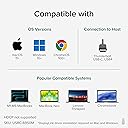
The Plugable USB C to HDMI Adapter (USBC-6950M) empowers MacBook M1 through M5, Windows 10+, and ChromeOS users to connect two 4K 60Hz HDMI monitors from a single USB-C port using DisplayLink technology. It overcomes Apple’s native single external display limit on base M-series Macs, enabling enhanced multitasking and productivity. Designed with a heat-dissipating aluminum body and backed by lifetime North American support, this adapter is ideal for professional hybrid workstations requiring reliable dual-monitor setups.




| Asin | B0CS8D3KF2 |
| Best Sellers Rank | #212,241 in Computers & Accessories (See Top 100 in Computers & Accessories) #209 in DVI-HDMI Adapters |
| Box Contents | PLUGABLE USB-C HDMI ADAPTER USB-C DUAL 4K HDMI ADAPTER |
| Brand Name | Plugable |
| Colour | Space Grey |
| Compatible Devices | Driver Installation required. MacBook Pro 13" / 14" / 15" / 16", MacBook Air, MacBook Retina, MacBook M1 / M2 / M3 / M4 / M5 / Neo, HP Spectre x360 / Pavilion / Envy, Dell XPS / Precision / Latitude, Lenovo ThinkPad / IdeaPad / Yoga / Flex, Surface Pro 7 / 7+ / 8 / 9, Surface Laptop 3 / 4 / 5 / Go / Go 2 / Studio / SE, Surface Go / Go 2 / Go 3, LG Gram, Acer Aspire / Swift / Spin, ASUS Zenbook / Vivobook, and Most Windows systems with Windows 10 or newer / Most Chromebooks running ChromeOS 100 or newer. |
| Connector Type | HDMI, USB Type C |
| Country Of Origin | China |
| Customer Reviews | 4.4 4.4 out of 5 stars (579) 4.4 out of 5 stars |
| Item Dimensions | 7.9 x 6.1 x 1.5 Centimeters |
| Item Package Quantity | 1 |
| Item Weight Unit Of Measure | 118 g |
| Manufacturer | Plugable |
| Manufacturer Part Number | USBC-6950M |
| Model Number | USBC-6950M |
| Number Of Items | 1 |
| Number Of Ports | 2 |
| Product Finish Type | Matte |
| Specific Uses For Product | Monitor |
| Unit Count | 1.0 Count |
| Upc | 819927013372 |
User
Works to extend extra monitor on MacBook Air M2
I was pretty disappointed to find out my new MacBook Air M2 only supported one external monitor natively.This worked out of the box and I can have 2 external monitors plus the MacBook monitor. Very easy set up, much cheaper than upgrading to higher spec MacBook or buying a whole new docking station. Recommended
User
Parfait pour Mac
Fonctionne parfaitement pour ajouter deux écrans sur un Mac
User
In my opinion, nothing beats Pluggable
As a 25 year Network Engineer veteran who does way more computer support that I care to do, I have used many USB video cards over the years. Pluggable is my go to brand. They are reliable and have never let me down. I would not use them for gaming cards or CAD (no horsepower), but work great for additional monitors for browsers, spreadsheets, docs, and pretty much everything else.
User
Amazing
amazing. fixed my screen issues. now i can run 2 additional monitors on mu Powerbook. even the apple adapters couldn’t solve the problem
User
良い!
Macbook Air M2用に購入して実際に使ってみるまでは若干不安でしたが、全く問題ありません。専用のアプリDL必要ですが、すぐ完了しますし、UIもシンプルなので何か難しいことをする必要もなし。映画を流しながら作業することもあり、最初試してみたのですが、やはり他のレビューにも書いてある通りサウンドだけど流れて、映像画面は真っ黒で何も見れませんでした。ですが、解決方法があります。下記のステップで解決しました。ご参考までに。↓↓↓↓↓↓↓↓↓↓↓↓↓↓ChromeやEdgeを使用している場合は、以下の手順で設定を変更してみてください。1.ブラウザの右上にある「設定(三点ドット)」をクリック2.「システム」または「詳細設定」を選択3.「使用可能な場合はハードウェアアクセラレーションを使用する」をオフにする4.ブラウザを一度完全に閉じて再起動する
Trustpilot
3 days ago
2 months ago