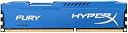
๐ Elevate Your Game with HyperX Fury!
The HyperX Fury 8GB DDR3 1866MHz CL10 DIMM Desktop Memory is engineered for high-performance computing, featuring 8 independent internal banks and a sleek blue design. With a lifetime warranty and efficient power usage, this memory module is perfect for gamers and professionals alike, ensuring reliability and speed in every task.
| Asin | B00J8E91UO |
| Best Sellers Rank | #120,396 in Computers & Accessories (See Top 100 in Computers & Accessories) #1,113 in Memory |
| Box Contents | RAM - 1 Unit |
| Brand Name | HyperX |
| Column Address Strobe Latency | 10 |
| Compatible Devices | Desktop |
| Customer Reviews | 4.3 4.3 out of 5 stars (1,261) 4.3 out of 5 stars |
| Form Factor | DIMM |
| Global Trade Identification Number | 00740617230543, 09154403386337 |
| Importer Contact Information | Shreepati Computech Pvt Ltd. Registered Office : M-20, Hemkunt Chambers 89, Nehru Place, New Delhi-110019 |
| Item Part Number | HX318C10F8 |
| Item Type Name | Memory Module |
| Item Weight | 0.08 Kilograms |
| Manufacturer | HyperX, Shreepati Computech Pvt Ltd. Registered Office : M-20, Hemkunt Chambers 89, Nehru Place, New Delhi-110019 |
| Manufacturer Contact Information | Shreepati Computech Pvt Ltd. Registered Office : M-20, Hemkunt Chambers 89, Nehru Place, New Delhi-110019 |
| Manufacturer Part Number | HX318C10F/8 |
| Memory Speed | 1866 MHz |
| Model Name | 1866MHz Desktop Memory (HX318C10F/8) |
| Model Number | HX318C10F/8 |
| Number Of Items | 1 |
| Number Of Pins | 240 |
| Packer Contact Information | Kingston No. 1-5, Li-Hsin Road., 1 Science Based Industrial Park, Hsin-Chu, Taiwan |
| Processorspeed | 1866 MHz |
| Product Features | Frequency (speed) - 1866MHz, CAS latency 10-10-10-30, Voltage 1.5V |
| Ram Memory Technology | DDR3 |
| Ram Size | 8 GB |
| Unit Count | 1 Count |
| Upc | 809395314552 807320227090 804904092235 740617230543 042111627684 803983048522 801940130303 |
| Voltage | 1.5 Volts |
| Warranty Description | Lifetime Warranty(Max 10 Years) |
User
It was a good purchase.
I was a good piece of HW, it served it's purpose.
User
A Necessity for Gamers
Excellent DIMM module, arrived in perfect condition. These days, if you plan to game or even multi-task heavily you need at-least 8 GB of RAM and the HyperX Fury line is a great choice for the price. These modules are designed for overclocking and will overclock automatically to the highest available frequency when installed in a motherboard that supports RAM overclocking thanks to the PnP (Plug-and-Play) feature built in. Additionally the heat-spreader on top ensure that excess heat is dissipated away from the memory modules and cast out. For those of you who are wondering if increasing your RAM will improve your performance in games I can verify that going from 4 to 8 GB definitely brought about noticeable improvements in certain, memory intensive games such as large open-world games like The Witcher 3 and Far Cry 4. There was a far less noticeable difference in older or smaller games as they rarely exceeded 3.5 GB of RAM usage. One thing that was noticeably smoother was task switching. Previously, switching from a game to another window and back to the game caused huge FPS drops when resuming the game, this was due to the OS having to move the game assets from RAM to Swap storage when switching windows because there simply wasn't enough room in RAM to store both the game files and the files related to the current task. Now, however, I can switch between tasks seamlessly. I can pause my game, tab over to a browser or another program, do some work there, then tab back into my game and resume without a hitch. Overall, it's a worthy investment if RAM is causing you bottlenecks in games or other applications. Highly recommended.
User
Super performance !! Zero compatibility issues. Go for It !
I purchased this RAM from Amazon recently and here is my Review :Delivery - Delivery was good and on time. Neither early nor late. Packaging was satisfying , though I expected it to be wrapped inside a bubble wrap which was not the case.The Product - Kingston HyperFury X is a gaming beast . No doubt. Performance is top notch. Installation is completely hassle free. Just fit it right in and you are good to go. NO manual tweaking required. It automatically sets itself according to your motherboard frequency and latency.Immediately after installing the RAM I fired up Quantum Break and Batman Arkham Knight, two of the worst PC ports ever . And to my surprise, almost all stutters were gone. My GTX 750Ti was running the games fairly well without any stutters.Few things however have to kept in mind before installing -1. If your motherboard supports anything less than 1866Mhz frequency, the RAM automatically downgrades itself to that frequency. For example :My Gigabyte H61MD2H motherboard supports a maximum of DDR3 1333Mhz , so in my system this RAM is running at 1333Mhz, and NOT 1866Mhz .2. If you have RAMs of different frequency ,again this one would adjust itself to the lowest common frequency. Example : I had another corsair RAM on my system of 1333Mhz , so this one downclocks itself to 1333Mhz3. If you have another RAM of lesser capacity ,say, 2gb/4gb , install the lesser capacity RAM in the first slot and the this one in the second or third slot (depending on your motherboard)Overall, very good product and most importantly very user friendly
User
With great performance comes great looks!!
I have been using this for the last 2 months now.this a A++ grade RAM. one of the very best. And this is much, much better than Corsair Vengeance, which seem to be more popular due to its aggressive looks. Let me tell you why this particular RAM is so much better..Corsair Vengeance has huge heatsinks. While it may look great on your system, it will lead to issues when you use CPU coolers, especially the bigger ones like CM Hyper 212X. I use the 212X, and this seats beautifully underneath the fan of the cooler.The Kingston Hyper is low profile, and will fit easily, with plenty of ventilation, which helps it to stay cool even under long sessions of gaming or any kind of memory intensive workloads. And dont get fooled by the low profile heatsink on this ram. It does a great job at drawing the heat away, the same as Vengeance heatsinks.As for the speed, these are blazing fast. Earlier, i was using generic Kingston value RAM. Upgrading from those, I can confirm that the loading times for games and memory dependent applications have more than tripled.In my opinion, this RAM has a higher VFM than Vengeance, or any other branded RAM sticks. I am looking forward to adding another stick shortly.
User
A nice product from Kingston with good specs
A nice product from Kingston with good specs. 1866 at CL10 will give you pretty good performance. I really like it. But first make sure that your motherboard can handle the 1866MHz speed either out of the box or OC (overclocked).I've seen reviews comparing this to Corsair Vengeance modules. The Corsair Vengeance modules work @ 1600MHz at same latency so obviously the performance would be inferior to this one. But Corsair does have the Vengeance 'Pro' series which can beat the Fury module quite comfortably especially when it comes to gaming performance due to its lower latency (CL9). But only the phanatics go after those.Please do note that YOU DON'T NEED ANY OF THESE FANCY MODULES FOR NORMAL USAGE. Under consistent, heavy load the modules will get hot and the fancy heat spreaders on the modules help spread the heat evenly across it. They don't improve the performance 99% of the time. If you plan to overclock the RAM you may need it to handle the increased heat though. For almost all uses a normal module without these fancy heatspreaders would be equally good. Just make sure the specs are good and that it's from a brand. Another proposed advantage is the increased durability but a normal module would easily last 5 + years.To summarise this is a very good module in terms of performance and appearance. You'll never regret buying it.
User
Working fine
Working
User
Buy a 8GB RAM 1866 MHz Before check in Userbenchmark.com
Already you insert a ram on your PC was they have face a many problems like a very slow performing but higher software open easily and quick start your computer Application's but mainly problem can you face in pc start and restart. Why are you face in this problems show in your computer. Because you have a DDR3 motherboard maximum 1600 MHz single channel dual slot without overclocking support only and already have 4gb ram 1300 MHz/1600 MHz than you insert a DDR 8GB RAM 1866 MHz. Mainly reasons a 2 different variant of ram different frequency like MHz and single channel slots if you buy a different variant and different frequency ram if do not buy because you motherboard not required this is totally wast of money and damage a system if you can wish upgrade your computer for highly powered please CHECK THE BENCHMARK ONLINE UserBenchmark.com and sat up required system and clarify the online price or MRP THANK YOU
User
Will run at claimed speeds on intel z97 boards only after manually tweaking ram timings @ bios
Physical condition was fine, proper delivery, no complaints.These older ddr3 fury kits are supposed to run at designated speeds on auto mode in bios, without xmp (intel) or docp (amd) profiles, but that was not the case for me, pc won't boot on auto nor manually selected 1866.Only boots properly @1600 mhz.My mobo is an asus rog maximus vii hero, which can handle upto 2400 mhz.My main complaint though is that Amazon has no return policy that refunds the money on this product.You only have the option to replace it with the same product, which is useless in this scenario.This is especially disheartening since older ddr3 kits are ultra rare to find these days and cost a premium.tl;dr - doesn't run designated speeds, I assume it's due to a lack of xmp/docp profiles since my mobo can handle speeds above what this kit is rated at.Do not waste your money.Edit: I managed to run it at 1866Mhz after manually tweaking the ram timings in BIOS (as per designated factory timings).First boot post tweak resulted in a freeze, but since then it has run properly.HyperX should notify in their product packaging that you might have to do this due to lack of xmp profiles, instead they simply claim it auto-clocks to 1866, which is not totally incorrect, but without manually dialing in proper ram timings, at least in my experience, it never booted in auto mode, as i assume it was trying to auto clock to 1866 with improper timings.IMPORTANT - after installing the ram, open bios right away and change ram timings to 10-11-10-24, to safely boot @1866 Mhz
Trustpilot
2 weeks ago
1 week ago