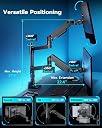
๐ฅ๏ธ Elevate your dual-monitor game with power, precision, and style!
The ARES WING Dual Monitor Arm supports two monitors up to 49 inches and 44 lbs each, featuring industrial-grade gas springs for smooth height, tilt, swivel, and rotation adjustments. It includes integrated USB-C and USB-A ports for device charging, fits desks up to 2 inches thick, and offers easy installation with VESA compatibility. Backed by a 3-year warranty, itโs designed for professionals seeking a sleek, durable, and highly adjustable multi-display setup.
| Asin | B0D2KH4V8H |
| Best Sellers Rank | #115,841 in Computers (See Top 100 in Computers) #755 in Computer Monitor Arms |
| Brand | ARES WING |
| Color | Black with USB |
| Compatible Devices | Monitor |
| Customer Reviews | 4.3 4.3 out of 5 stars (418) 4.3 out of 5 stars |
| Enclosure Material | Aluminum |
| Eu Spare Part Availability Duration | 3 Years |
| Item Highlight | Professional Gas Spring, Aluminum Material, Flexible Screen Layout, Fits VESA 75/100 Mount |
| Manufacturer | ARES WING |
| Maximum Supported Screen Size | 49 Inches |
| Maximum Tilt Angle | 50 Degrees |
| Minimum Supported Screen Size | 17 Inches |
| Model Number | GDT1004UCP-2BK |
| Mounting Type | Desk Mount |
| Movement Type | Rotate, Swivel, Tilt |
| Number Of Items | 1 |
| Number Of Packs | 1 |
| Unit Count | 1.0 Count |
User
Secret Labs should learn from ARES
20 December 2025: I am writing this immediately after setting everything up, so there is a possibility that this review may change and I will indicate if I ever make an edit to this, but I am thrilled. First paragraph is the story, second is the performance comparison, the third is the TL;DR for anyone in a hurryI have set the "ARES WING Dual Monitor Arm for Ultrawide Heavy Duty..." on my Secretlab MAGNUS Pro XL desk. I initially purchased one of the Secretlab (SL) single monitor arms to test out the feeling between monitor stand vs arm; now, without talking trash, the SL arm failed miserably. To add insult to injury I had to spend more than half the cost of the price of the SL arm to return it to the company because they do not cover return shipping fees. On the SL arm, I was supposed to be able to trust it to hold my monitor (Optix MPG321QRF QD) as it only weighs 16lbs (15.43lbs exactly) and the max weight on the SL arm is stated as 17lbs.Forgive my lengthy comparison between my experiences with the arms. I'm an educator and a nerd, so this one is for the people with the same level of OCD and anxiety as myself. SL ARM - In terms of the translational motion (that's the x, y, and z): motion along x (left to right), y (up and down), and z (backward and forward) felt jerky while repositioning the monitor. ARES - feels nearly fluid and and easily controlled. That's strike one for SL and plus for ARES. SL ARM - In terms of pitch (tilting up or down about the x axis) and yaw (swiveling left or right about the y axis): these were, at best, adequate, but weak; it holds, yet feels under supported and prone to drift under load. There was considerable force needed to change the pitch regardless of adjustments made to the screws and for a monitor that has very little to grab onto, this is, yet another strike. ARES - Sturdy and controlled, plus for ARES. SL ARM - In terms of the roll (tilting the monitor about the z axis): the display rolls off to either side and does not stay squared. the SL could not reliably hold a level horizon. ARES - No difficulties. That's three strikes for SL and three pluses for ARES.TL;DR: Mounted this to my MAGNUS Pro XL, it's sturdy, motion of the arms is fluid and stable, holds my screens without issue.
User
The best mount for 49 inch oled.
It can hold a 49 inch samsung montior very well.I have two ultrawide and it works well.I wish the height allowed me to raise it higher, - but you won't find one higher than this.Cable management is amazing. I face my desk towards the door and so it looks very clean.Make sure you tighten it aot before mounting.BE VERY CAREFUL. RAISE THE MOUNT UP BEFORE DISMOUNTING THE MONITOR. With all the pressure on the mount the arm will fly up when the weight of the monitor comes off. This is stated in the manual.
User
Seriously worth the money, one trivial issue
Ill start off by saying, I havegone through 3 mounts for my set up. From wall mounted to standing on the desk. I typically buy 80-100$ ones because im cheap. I decided to bite the bullet and try this expensive mount. Boy am I impressed.I have two 34 inch alienware monitors on this stand, and the stand itself is attached to my magnus XL pro desk. Everything fits very well. I can adjust the monitors like they are feathers, its so amazing.The one trivial issue is that the USB C does not recognize in my computer when I plug a flash drive into it. So its basically just a crappy charger. I didnt buy the stand for the ports anyway so im not stressed. 5 stars regardless.If you have two ultrawides stop looking around, this mount is the solution.
User
Sturdy
It wasn't that hard to set up. Took me a but because this was my first time setting one up. It works great. Exactly what I wanted. Sturdy, great quality
User
Excellent for dual monitor
These arms are great, very solid and have a lot of adjustment both horizontal and vertical. The only real complaint I have is the final joint on the arm for the back and forth adjustment of the monitor is very loose, it's not enough to be a deal breaker since the monitor shouldn't move on it's own in that axis, but there's no way to snug it up, even if you tighten that screw as far as it'll go
Trustpilot
1 day ago
1 month ago