
Desertcart purchases this item on your behalf and handles shipping, customs, and support to Tunisia.
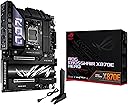
🔥 Power your future with the ROG Crosshair X870E Hero – where AI meets unstoppable performance!
The ASUS ROG Crosshair X870E Hero is a premium ATX motherboard designed for AMD Ryzen 7000, 8000, and 9000 series processors. Featuring advanced AI PC readiness, robust 18+2+2 power stages, PCIe 5.0, DDR5 memory support up to 192GB, Wi-Fi 7, and USB4®, it delivers cutting-edge connectivity and performance. With intelligent ASUS AI overclocking and cooling technologies, this motherboard ensures effortless optimization for professional-grade builds.
| ASIN | B0DDZSP2BG |
| Best Sellers Rank | #5 in Computer Motherboards |
| Brand | ASUS |
| CPU Model | AMD Ryzen 7 |
| CPU Socket | Socket AM5 |
| Chipset Family | AMD X870 |
| Chipset Type | AMD X870 |
| Compatible Devices | Personal Computer |
| Compatible Processors | AMD Ryzen™ 9000 & 8000 & 7000 Series |
| Customer Reviews | 4.4 out of 5 stars 369 Reviews |
| Graphics Card Interface | PCI Express 4.0 |
| Item Dimensions L x W x H | 14.6"L x 12.2"W x 4.4"H |
| Item Weight | 2.63 kg |
| Main Power Connector Type | 22 Pin |
| Manufacturer | ASUS |
| Memory Clock Speed | 320 MHz |
| Memory Slots Available | 4 |
| Memory Storage Capacity | 192 GB |
| Mfr Part Number | ASUS Vivobook 16 Laptop |
| Model Name | ROG CROSSHAIR X870E HERO |
| Model Number | ROG CROSSHAIR X870E HERO |
| Number of Ethernet Ports | 2 |
| Number of Items | 1 |
| Number of Ports | 20 |
| Platform | Windows 10, Windows 11 |
| Processor Socket | Socket AM5 |
| Ram Memory Maximum Size | 192 GB |
| System Bus Standard Supported | SATA 3 |
| Total Number of HDMI Ports | 1 |
| Total PCIe Ports | 2 |
| Total SATA Ports | 4 |
| Total Usb Ports | 20 |
| UPC | 197105710306 |
| USB 2.0 | 2 |
| Unit Count | 1 Count |
| Warranty Description | 3 years |
O**W
So far so good except for a few issues
Bought to replace my gen 2 threadripper setup. Still operating strong, but time to invest in a smaller workstation and now find a good new home for the retired threadripper. Bought this board for a few reasons. Top on the list is ASUS`s Q-code feature which gives you the ability to troubleshoot new builds and current ones. Will not boot, check and see what the Q-code is on the LED panel, and you should be able to solve issue without having to deal with ASUS tech support. This is the main reason for me to purchase ASUS motherboards. Now to the Crossfire X870E Hero. Pro`s: 4- motherboard chassis fan-controlled ports. Great for managing case fans 2- 20 Gbits/sec type c usb ports. One is capable of 60w for changing and 2 high speed usb ports is a big plus. Q-code troubleshooting future proof for awhile bios updated to latest amd 9950x3d and 9950x3d2 processors. Installation was easy and once I got past the fact that all I was willing to buy was one 32gb ram kit for now and using my old gpu card install was good. So far performance has been great. I installed a 9950x3d and that is working well. For cooling, I am using a Thermalright Royal Preytor Ultra 130 and this air cpu cooler does the job and excellent job at that. Idling at low cpu workloads shows cpu temps around low 30c`s to upper 30c`s and stress testing with cpuid is showing around 75c which is good. All in all, new system is working well. I updated the cpu cooler to an Arctic LF3Pro 240 mm to see if that improved cpu temps and they improved. So, either cooler works well with 9950x3d and this MB. Will still with the LF3Pro till it dies and then switch back to the Royal Preytor Ultra since it works extremely well. Now for the cons: m2.1 heatsink below cpu and above gpu is a huge heatsink that gets in the way of an Arctic LF3Pro cooler. I am using the same Samsung 990 Evo I purchased this summer and the cooling setup on the threadripper boards always showed, even under heavy loads, temps between 28c and 35c. single sided. Drive needs support and needs to stay flat and straight. To solve issue with better contact to top side of drive, I used a piece of Arctic TP-3 and 1.5mm in place of the ASUS factory tape and now when assembled these pieces snapped together snuggly and temps now hover around 41c under low loads and 46to 48c under heavy loads. Prior heavy loads were in the mid to upper 50c`s which sucked. Last issue is with the bios. When booting for the first time, make sure you plug in a usb keyboard and then your hdmi monitor cable into the onboard IGPU hdmi port. If you plug into graphics card, nothing on monitor if you are using an older gpu card or one that does not use the UEFI standard. You just sit there wondering what's going on because the Q-code system finds no fault. This is an issue after you get going because you're going to switch to your gpu card output and that's where this issue compounds. So, till you have Windows 11 installed and working, stay connected to the motherboard hdmi port. What happens after you switch is, when bios starts to boot and you want to get into bios, no screens are present like the rog welcome screen you saw using the igpu hdmi port. You see nothing and then system starts and next is Windows 11 desktop. When you search net for solutions, you get asinine recommendations to keep pounding on the delete key till bios menu appears. Really, if UEFI isn`t mapped to the gpu card, the screen info you see on the igpu hdmi port connection, isn`t going to be on the gpu card screen so banging on the delete does nothing. Update on the last sentence I made. AMD has added to the UEFI bios a feature that going to require future amd and probably all manufactures to enable future gpu cards to compatable and use the UEFI standard. Currently AMD R9000 series gpu`s are certified with this new AMD standard. If I ever hear back from ASUS, I suspect that they will tell me the current gpu card I am using will not meet this standard, and it`s video bios is old and not supported by new motherboard. Sucks mixing new and old hardware, so I am out of luck. They will probably tell me to work with the CSM option in the bios. Nope that not going to happen. So, if you experience this issue like I have, now you know what the issue probably is. Only way to get back into bios is to switch monitor back to igpu hdmi motherboard port. Not a good design but this is where the industry is headed and we have no voice. So long story short, my old video card runs after Windows 11 starts and runs just fine. New cards are way overpriced, so I will wait to solve this issue. One more thing, I am using a Samsung monitor. These monitors are slow to wake up and establish communication with gpu port. Tried a ROG ASUS monitor and it woke up quick and monitor communications were fast enough that actually got into bios using the wireless keyboard. Image that. Slow connecting monitor, which most have this issue, or an ASUS ROG or similar gamers monitor and fast connect. Who knew. As I said earlier you will have issues with the Arctic LF# Pro cpu cooler. I asked ASUS to send me another main M.2 heatsink and I proceeded to mill off part of the heatsink so I could install the cpu cooler in the correct orientation so the VRM fan will cool the VRM. When compared to prior LF3Pro cpu cooler installation where the cpu block is mounted 180 degrees opposite, I noticed after my milling of heatsink that under loads there was no increase in NVMe temp so That proves the M.2 main heatsink is a little overkill. Other than these issues, this is a good purchase so far. System is stable and quick.
A**Z
The most impressive MOBO in its class
The Crosshair x870e is a monster of a motherboard. Not only does it come packed with functionality in the shape of multiple NVME ports, dual GPU locations, extra powerful USB 2.0, a plethora of USB and USB-C connectors, but also comes equipped with Wi-Fi 7. The quick release antennas are a nice touch as well as the subtle yet eye-catching ARGB panel on the left hand side. I certainly wished I had more RAM to push this monster even further however it has no problems handing my 5090, the9950X3D, and 32GB of DDR5 pushed to 6400MT with no issues whatsoever. This motherboard comes with so many different functions that its hard to remember all of them at once.
W**E
A premium board with premium features.
I bought this for a 9000-series build because I wanted something that wouldn’t give me any stability issues. It’s a solid board. Definitely the best looking x870e in my opinion. Pros Build Quality: Extremely heavy-duty with a metal backplate; it feels and looks like a $700 flagship. Tool-Free Everything: "Q-Release Slim" lets you pop out the GPU just by pulling it, and "M.2 Q-Latch" means no more tiny SSD screws. High-Speed Networking: Dual LAN (5Gb + 2.5Gb) and a snap-on Wi-Fi antenna that doesn't require screwing in cables. Front Panel Fast Charging: The USB-C header supports 60W Quick Charge 4+, enough to fast-charge a laptop or handheld while you're gaming. Next-Gen RAM Tech: "NitroPath" slots improve signal stability, making it easier to hit 8000MT/s+ on DDR5 kits. * im running 96gb ddr5 at 6400mhz Overkill Power: 18+2+2 power stages that will handle any current or future AM5 chip without breaking a sweat. Onboard Diagnostics: Physical Start/Retry buttons and a Q-Code LED display for instant troubleshooting if a boot fails. overall its a premium board with premium features and quality. a good buy.
C**R
Loved it asus is the best
I loved it
F**Z
Feature-Rich, Rock-Solid, and Future-Proof — AM5 Board That Delivers
The ASUS ROG Crosshair X870E Hero has been the perfect foundation for my high-performance AMD build. Paired with a Ryzen 9 9950X3D, G.SKILL DDR5-6000 CL28 EXPO memory, and an XFX RX 9070 XT GPU, this motherboard has delivered exceptional stability, thermal management, and overclocking headroom. Out of the box, it booted without issue and recognized all components immediately. The BIOS is intuitive and robust, offering AI Overclocking, Core Flex tuning, and excellent fan curve controls — all of which are ideal for my configuration, which includes the ARCTIC Liquid Freezer III Pro 360 A-RGB cooler and full ARGB fan control via a hub. Connectivity is outstanding with PCIe 5.0, USB4, Wi-Fi 7, and 5x M.2 slots, leaving plenty of headroom for future expansion. I also appreciate the attention to physical build quality: reinforced PCIe slots, debug LEDs, and Q-Release features make working with the board stress-free. This board fit perfectly in my Corsair 7000D Airflow case after I had to upgrade from the Fractal Torrent due to space limitations. It’s a powerhouse platform for overclocking and high-performance gaming, especially in VR and 4K environments. I did need to update the BIOS to ensure full compatibility with my DDR5 EXPO memory. Once updated, EXPO enabled cleanly, and the system has been stable under heavy workloads and VR gaming.
M**C
Bent pins! Very worried!
Don't be like me and think everything will be ok with the board when you buy it. I installed everything and turn it on, nothing worked... wouldn't post. Do a full inspection before installation!!! I could only tell there was bent power pins with a magnified scope, im about 40 and not best eyesight, and it had 2 bent pins as in the pictures on the power rails of the socket. I purchased a damaged boad. Im extremely worried, possibly ruined my 9800x3d that costs as much as the motherboard. Will return this bad board. Do an inspection of the mobo before you install a cpu, I found out too late! Never had this problem before.
M**A
Amazing board, only downside is the price
This was the easiest upgrade I've done in years. Motherboard shipped with support for the 9800X3D, no BIOS update required. LOVE that it has SlimSAS, can easily add a 4th NVMe drive without cutting down PCIe lanes on the primary slot. Important note: This SlimSAS connection is PCIe ONLY. You cannot use SAS drives with this interface. Pros: 1) Lots of BIOS options. Everything a overclocker needs plus some. 2) Can run three NVMe drives out of the box without cutting down lanes on the primary slot 3) Looks GREAT. Little RGB panel over the VRMs and I/O looks amazing in action. 4) Tons of expansion, including SlimSAS 5) Complete overkill voltage regulators. 6) Rear heatsink Cons: 1) Top NVMe heatsink is too large and prevents an Arctic Liquid Freezer III from mounting. A $6 Thermalright heatsink fits and does the job. 2) Bottom NVMe heatsink is screwed in. Would have expected toolless operation for this price. 3) The price. This board would cost around $400 max 3 or 4 years ago.. 4) Asus Armory Crate is complete junk, still. Needs a complete re-write. That, or a lighter alternative for RGB control provided by ASUS. OpenRGB and SignalRGB do work as a workaround but is not ideal.
S**9
High quality board and reliable.
So far I'm incredibly happy with the build quality and stability. A premium price but you're getting a premium foundation.
E**O
perfetto
tutto bene, spedizione, qualità e sigilli antimanomissione intatti. la scheda poi è una top di gamma asus, quindi nessun problema. ottimo
R**R
Premium price but quality feels justified and comes with peace of mind
Premium motherboard, feels extremely heavy and comes with a fancy ASUS VIP Card which I have no idea what it's for, but it sure as heck makes me feel VIP. That aside, I enjoy the AI tweaker/auto-tuning features because all I did was plug in the motherboard with everything and start up my PC—it did the usual RAM tuning tests and did everything for me. I normally do some light tweaking, so this saves me the hassle of even having to do that—it was literally plug and play. I come from using a Gigabyte X670e Aorus Master, and that motherboard was garbage—3 RMA attempts, and the board kept on running into issues within 3-6 months of getting it replaced. It wasn't even a cheap board—it cost $670. So this board is a bit more expensive, especially after the tariffs as of May 2025 but for the $300 uptick in price; the hassle and stability this board brings I have no regrets with my purchase. Gigabyte - 0 Asus - 1 Bad cable management—no idea how to tighten that loose one above the fans but it works so w.e!
M**S
Top tier motherboard
An outstanding motherboard with ultra-premium finishes. It’s a motherboard for demanding users. The very best of the best when it comes to motherboards.
A**O
Es una mother gama alta excelente.
Todo excelente con mi placa. La verdad es un producto de gama alta muy excepcional, desde que la caja pesa bastante hasta que la abres por primera vez , te enamoras de la calidad que trae, todo es muy superior, los acabados, los heatsinks, conectores, la placa, TODO. No eh tenido ni un solo problema con mi placa, tal cual la saque, ensamble todo y listo. Eso si, actualice la BIOS como prioridad, ya que lei muchos comentarios de que esta placa traia muchos problemas por la bios, pero con las nuevas versiones iba mucho mejor y funcionaba como deberia. Entonces descarga e instala en la BIOS la ultima version de la pagina de ASUS y no tendras problema. Por otro lado, sigue trayendo el conector de PCIE que parece ser raya las tarjetas graficas (Q-Release slim), me parece que ASUS corrigio esto en modelos producidos despues de Marzo, y la mia justo trae fecha de ensamble de Marzo, pero al ver que esta mother venia nueva de paquete y nunca jamas nadie la abrio mas que yo (como luego las regresan, te puede llegar a tocar una de esas) me decidi quedar con ella, e hice unas pruebas quitando y poniendo varias veces una rtx 2060, y puedo decir que no hubo un solo rasguño o que se maltratara su conector PCIE de la grafica, eso si, hazlo como te lo indica asus, que es como jalandola de la parte mas izquierda hacia ti, eso viene en la documentacion y en una estampa en la misma mother. Enfin, conecte mi rtx 5080 rog astral y ni un solo problema, entonces dale sin miedo. La verdad es otra calidad de mother, el RGB se mira muy bien y vale totalmente la pena, estaba entre esta y la x870E-e, pero definitivamente estoy feliz con mi compra.
Á**O
Pesada y robusta.
Como el blindaje de un tanque; pesada, robusta y preciosa. Si quieres conocer sus specs, busca la info oficial.
Trustpilot
1 month ago
2 months ago