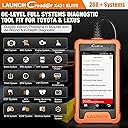
๐ Diagnose Like a Pro, Drive with Confidence!
The 2023 LAUNCH X431 Elite OBD2 Scanner is a cutting-edge diagnostic tool designed specifically for Toyota and Lexus vehicles, featuring a fast Android 5.0 OS, 4-inch touchscreen, and comprehensive OE-level two-way diagnostics. It supports exclusive reset and coding functions, universal OBD2 protocols for all cars post-1996, and offers lifetime free WiFi software upgrades, making it an indispensable device for professional-grade vehicle maintenance and repair.


| ASIN | B0CDPKN3X4 |
| Best Sellers Rank | 389,182 in Automotive ( See Top 100 in Automotive ) 595 in Automotive Code Readers & Scan Tools |
| Brand | LAUNCH |
| Brand Name | LAUNCH |
| Customer Reviews | 4.2 out of 5 stars 132 Reviews |
| Included Components | 1 x 5V DC Charging Cable, 1 x Toyota Scan Tool, 1 x User Manual |
| Item Type Name | Code Readers & Scanning Tools |
| Manufacturer | LAUNCH |
| Manufacturer Part Number | YZB14 |
| Model Number | for Toyota 1.0 Version |
| Native Resolution | 480*800 |
| Number of Items | 1 |
| Number of items | 1 |
| Operating System | Android 5.0 |
| Operating system | Android 5.0 |
| Power Source | Battery Powered |
| Power source | Battery Powered |
| Screen Size | 3.5 Inches |
| Screen size | 3.5 Inches |
W**.
Great Dignostic Scanner
I purchased this to check the diagnostic codes on my 2003 Toyota Matrix and 2015 Toyota RAV4. Inside the box comes a usb charger, Users manual and quick start guide along with the scanner. The scanner has a 4" display and is encased in a rubber case. The cord that plugs into the OBD2 port is sturdy. A protective cover comes on the end of the cord to protect the terminals on the end of the plug. Upon the first time that you plug the scanner into a car's OBD2 port, it needs to be set up via WiFi. I tried connecting to my WiFi but it wouldn't connect. Instead, I used my cell phone as a wireless hot spot. The scanner connected right away then. Set up included setting the desired language, country, and time zone. After that, the device gives you the option to download updates. There were a number of updates. It didn't take long to update (I was surprised). After performing updates, the scanner is ready for use. Since I already had it connected to my 2003 Toyota Matrix, I decided to use perform diagnostics. The scanner has a nice feature where it will scan your cars computer for the VIN code. I have another scanner that I've used and that will either detect the vehicle or ask you to manually put in the model. This scanner didn't find the VIN on my Matrix so I had to put it in manually (that was a pain). I figured out that I didn't have the ignition switch to the on position. The scanner never prompted me to do so. I thought that was odd. Anyway. I was able to pull the error codes off of my Matrix. The one function that I really liked is that you can send a vehicle diagnostic report to an email recipient. I sent one to myself and it looks great. The diagnostic functions for the 03 Matrix were about what I've seen with my other scanner. I hooked it up to my 2015 Toyota RAV4 and it pulled the VIN number right away. I turned the vehicle to the on position after I plugged it in this time. There were a number of more diagnostic items available for this vehicle. Probably because it's newer. The scanner comes with free upgrades and a number of downloadable options that are for an additional fee. I didn't really see anything additional that would apply to either of my vehicles. The display is easy to read. A bigger screen would be nice for those of us that fat finger the on display keyboard. The user interface was a little different from my other scanner. It took a while to figure it out. Overall, I'm happy with the purchase. The scanner does what I purchased it for. It reads codes and even gives you the option to get more information on any error codes that are set. It's got a built in web browser. It is run by an android OS. It's nice that it came with an actual paper copy of the owners manual. It does describe the functions pretty well. The quick start guide is a bare minimum of functionality. It's a good scanner.
M**D
A true mini professional scan tool
I purchased the Toyota version. I felt I was working on Toyotaโs TechStream But much cleaner interface and a LOT faster too. It does almost everything that TechStream does in a much easier way. Its NOT meant for a workshop but can be used The smaller screen and the limited live data streams makes it a bit impractical for a workshop. But all in all Iโm very pleased with this purchase and I do recommend it for any Toyota owner who knows how to use a professional scan tool
B**R
Excellent Scanner for Toyota/Lexus!
This is an awesome tool to have if you own or work on late model Toyota and Lexus vehicles. Hardware-wise, this tool comes with a very responsive touch screen similar to the size of an iPhone housed in a durable case. It is powered by the OBD2 port, so no need to charge any batteries for the unit. Connecting to Wi-Fi was quick and easy, and a must upon first powering on the scanner to ensure that the latest updates have been installed. I have used this X431 on various Toyota and Lexus models from 2004-2018 and enjoy its ability to quickly scan for fault codes. The live data log is also fast and easy to read and return to at a later date thanks to its ablity to save log files. It is a bi-directional scanner, allowing you to shut off and isolate systems such as the AC and fuel pumps. If you are a DIY mechanic or enthusiast looking for a fast and easy to use scanner at a great price, this X431 is one you should consider, especially if you are mostly working with single brands (Toyota in my case).
J**I
OBDII Scanner for Toyota/Lexus
I purchased a Launch Creader X431 Elite reader for our Toyotas. Specifically, I was interested in accessing the 'hidden programmable' features such as turning off the seatbelt warnings, programming the key FOB (open windows etc..) and other vehicle-specific options. I wanted a hardwired bi-directional device rather than using bluetooth devices such as Carista. The manual is very (very) basic, and only provides very rudimentary information. They really need a map that outlines the various menus and how to access all of the capabilities of this device. It seems to have a lot of capabilities and detailed information, it is just not intuitative to use. I spent quite a bit of time poking around the various menus to finally locate the programmable features. I was able to program two different Toyotas using this device, was easy once you figure out how to manuever around within the device. I will upload two flow charts for the various menus to assist other new users. I contacted CS to see if they had any other files or manuals that outline the various features, but apparently not. I inquired about accessing the programmable features of the vehicle, and they claimed the device CANNOT program these cars (clearly this was incorrect as I did program our cars once I found the correct menus). There are also a variety of YT videos showing folks programming their cars with these devices, so I knew it should be possible. I contacted US Launch to inquire about support for this scanner. They advise me these are sold by an overseas affiliate, and as such, they **do not** support these particular units. I asked if they had a similar unit for US customers that they did support, and they simply told me to search their website without providing any recommendation. Seems to be a handy device once you figure out how to use it. FYI - the box used to ship the device does not specify this is a Toyota-specific item. The Toyota options pop up when you work through the menus and scan the vehicle.
M**T
Toyota tundra long start fixed!
I bought this to address the long start issue on my 2015 Toyota tundra. I can say it worked for that, also I needed to program a key fob, it also worked for that. And I got the seat belt dinger turned off. Definitely worth the money just for those 3 things for me. More than satisfied. I waited a few days before doing a review to make sure the long start was totally fixed and it is. Anyone with that annoying problem this is your fix.
Trustpilot
4 days ago
3 weeks ago