We remain fully operational. Our teams are working around the clock to ensure your deliveries continue safely.
DOWNLOAD THE APP


Customer Services
Copyright © 2025 Desertcart Holdings Limited
DOWNLOAD THE APP
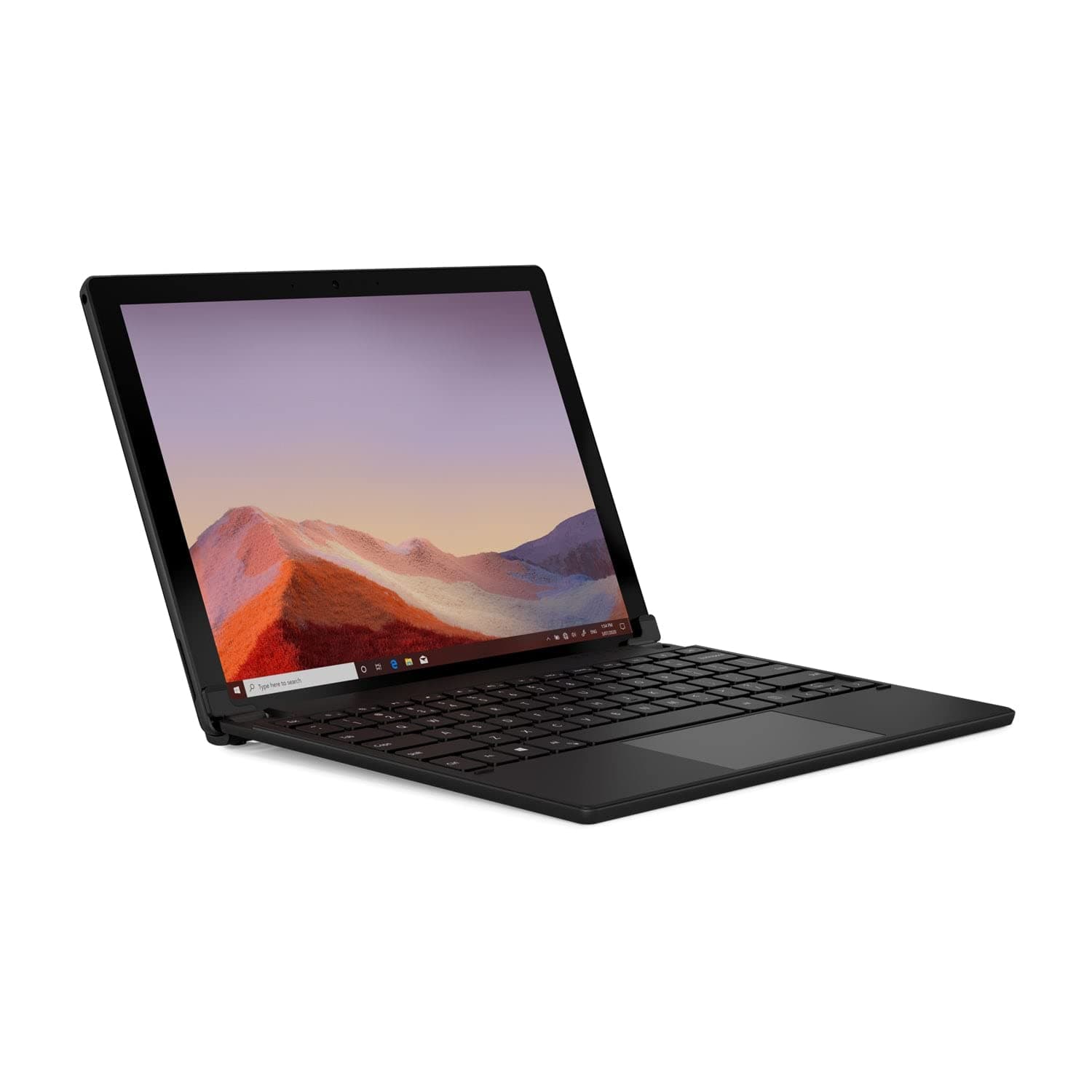
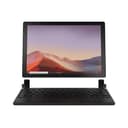
⌨️ Elevate your Surface Pro game—work smarter, anywhere, anytime!
The Brydge 12.3 Pro+ Bluetooth Wireless Keyboard is a premium accessory designed specifically for Surface Pro 4 to 7+ models. Featuring a 70% larger and patent-pending precision Bluetooth trackpad, adjustable backlit keys, and up to 6 months of battery life, it transforms your tablet into a versatile laptop-like device with a sleek aluminum chassis and a 0-180° adjustable stand for optimal viewing angles.


| ASIN | B08CWTKZQV |
| Additional Features | Rechargeable, Trackpad |
| Amazon Bestseller | #62,946 in Computers ( See Top 100 in Computers ) #965 in Computer Keyboards |
| Antenna Location | Office |
| Brand | Brydge |
| Color | Black |
| Compatible Devices | Laptop, Tablet |
| Connectivity Technology | Bluetooth |
| Customer Reviews | 4.1 4.1 out of 5 stars (1,548) |
| Enclosure Material | Aluminum, Plastic |
| Hand Orientation | Ambidextrous |
| Item Weight | 0.3 Kilograms |
| Keyboard Description | Wireless |
| Keyboard Layout | QWERTY |
| Language | English |
| Manufacturer | Brydge Technologies LLC |
| Model Name | Brydge Bluetooth Wireless Keyboard Surface |
| Model Number | BRY7012 |
| Number of Keys | 78 |
| Style Name | Compatible with Pro 7+/7/6/5/4 |
| UPC | 787790155348 |
| Warranty Description | 1 Year |
ブ**ス
安定性も高く、求めていたものが手に入りました。
川**澄
バッテリーも長持ちするし、タイピングしやすいです。最初は、重たく感じたが慣れれば普通の重さでした!
ほ**ん
ノートPC買うか迷ってたところドンピシャなアイテムがあり助かりました。 ヒンジにググっと差し込むだけでSurfacePro5がノートPCになりました。 買ってから気づきましたがBluetooth接続です。デュアルブートとかにしてる場合は注意です。 また英字キーボードなので切り替えが必要です。 キーボードの反応はよく、質感やうち心地も申し分なく感じます。 若干の重さは画面を支えるのに必要ですし、同サイズのノートPCと大差ない重量かと思います。 一点、トラックパッドがたまに反応しなくなったり、指先で触れた瞬間の遅れがあったりするのはBluetooth接続ゆえでしょうか。 Fn+Altの長押しで有効・無効を切り替えられるので、何度か押してると動きます。 多少のめんどくささはSurfaceタイプの形状をノートタイプにできることと、トレードオフかなあと思います。 なにより閉じたときの形状が完璧なサイズ感なので気に入っています。 長く使えることを願います。
L**N
一番問題がある点として、 excelを使うときに、F2を押して、セルをアクティブにする動作する際に、FnとF2を同時に押さないといけない。FnとEscを押せば、解除できると、説明書には書いてあるが、解除できない 問い合わせしたが、以下のメールを受けた 日本市場に積極的に売る気はないみたい 顛末として、Lenovoからkeyboardを購入して、このkeyboardの上に置いて使うことになった keyboardは不要だったが、ヒンジ替わりとして、役に立った。。。。 Thanks for reaching out to us here at Brydge. For an app-specific key combination/command, I recommend contacting Microsoft. They may be able to offer more assistance, the Brydge was designed to have the same key functions across apps so long as it is being used with Microsoft OS.
タ**ん
ヒンジがついたbluetoothキーボードが欲しくて購入しました。 surface goに取り付けて使っています。まるで純正品のような使い心地です。 キーボード配列が英語なのはいいとして、配列自体に癖があります。 慣れれば普通に使えますが、キーボードシールなどで対策して慣れるまで使うことをお勧めします。 あとは、取り付け部品が結構固いです。ガラスフィルムを貼っているので割れるのではないかとひやひやしました。普段使う分にはいいですが、真っ黒な画面を映したりすると下の両角にかなりの圧力がかかっているのが分かります。 Amazonだとちょっと高かったので、某〇天で購入しました。それでも一万超は高かった。
S**U
おそらくバッテリーの不具合で2台と故障しました。 ばらして別のキーボードを張り付けて、ヒンジだけ使っています。
B**T
Writing this on second day of delivery Build quality is really good. Comes in nice packaging. First impressions are very convincing
S**L
Those of us who own Microsoft Surface tablets love and loath them. We love them because they are powerful, thin, light, and fun to use. We loath them because they aren't quite a laptop, even with the MS clip-on keyboard cover. The kickstand idea looks good on paper, but how many of us really use tablets as tablets and not like ad-hoc laptops? Without a keyboard, you are basically wasting 80% of the Surface's power. Just go buy an iPad if all you want is a tablet. You'll be happier with it if all you're doing is watching streaming video or reading books. But if what you want is a modular tablet/keyboard combo to get you the power of a laptop with the versatility of a laptop, you really only have a couple of options. a) You buy Micro$oft's keyboard/cover combo, which is decent enough, but doesn't really solve that painful kickstand problem when you try to use it as a pseudo-laptop... or b) You buy a bluetooth keyboard/folio combo, which is usually a major kludge and chock full of compromises. Performance suffers and the whole thing just looks cheap. Why spend $800 on a Surface when it winds up looking like you stuffed it into a cheap pleather case with a crappy bluetooth keyboard. Enter option c) The Brydge 12.3 Pro+ bluetooth keyboard. This is the first and only (to my knowledge) keyboard that actually makes the Surface act more like a SurfaceBook. You slip the Surface into the clips that hold it snugly to the keyboard, you pair up the Bluetooth, you get typing. I'm typing this review on it, BTW. In the world of keyboard options the Brydge 12.3 Pro+ is... a) An incredible keyboard (super comfortable with a decent amount of spring to the keys) b) Well balanced (it has enough weight to keep the tablet part from tipping it over) c) Seems very stable as far as the Bluetooth connection is concerned The pros are obvious. For the first time the Surface behaves like a true laptop without the cheap pleathery case/combo feel. The cons are a little tougher to define, but they get down to the central issue. If you want a true SurfaceBook, get ready to spring another $500 to get into the ballpark. This does not make the Surface a SurfaceBook. The surface doesn't "clip" into the Brydge the way the MS keyboard/cover clips onto the Surface. The Brydge uses small-ish tabs at the lower corners of the surface to "cinch" the Surface into place. They are silicone coated clips that provide a snug, but not "clicked" point of connection with the tablet. In other words, the tablet *can* slip free, especially if you do what I did and try to add a sticker to the back of your Surface to protect that beautiful aluminum case from scratches. Then, what you'll wind up doing is also what I did, cutting away pieces of that beautiful skin so the clips maintain perfect, flat contact with the back of the Surface. After I put the skin on and tried to clip the Surface into the Brydge, the clips failed to make perfect contact, so the silicone coating wouldn't grip and the tablet slipped right out. But, if you do buy a skin and spend a few moments creating a template to cut the corners out before you apply it to your Surface, the silicone clips on the Brydge will maintain a reasonably snug connection with the tablet and you will have all the functionality of a slim, powerful laptop with a solid, author-approved keyboard. Bottom line, the Brydge 12.3 Pro+ keyboard for the Microsoft Surface Pro line of tablets is an incredible value, a solid performer, and perfectly funtional. Just buy a decent skin for the back of your Surface and make sure the silicone-covered pads that hold the Surface in place have complete contact with the tablet case and you'll enjoy the best of both worlds. The tablet functionality of the Surface when you need it, and the keyboard comfort of a laptop for the 80% of real world purposes that we buy a Surface for in the first place. Highly recommended.
B**L
This is a great Bluetooth keyboard with trackpad that will work (to varying degrees) with almost any computer. I am typing this on one of these paired with an ASUS ProArt PZ13 Surface-style tablet, have used it with an Android tablet, in Linux, and also paired to an iPad. On iPad I recall the trackpad not working for some strange reason that I would, perhaps falsely, attribute to Apple. Brydge went out of business, was bought out, and is sort of still a thing. This keyboard, a significant upgrade from the Brydge 12.3 for older Surfaces, is a bit of an abandoned product, for sure. But. It's selling for $60CDN vs $130USD, works with everything I've thrown at it, and is of quite high quality. If, in 2025, you are on the fence about this, just go for it. It is better than anything similar for $60. Even as a backup for a standard Surface keyboard, it's great. I have a bunch of Brydge keyboards that I've purchased on heavy discount in the last year or so. They are all great. No regrets.
E**Z
It is much nicer to type in than in the Microsoft keyboard and turns your Surface into a laptop.
T**R
It takes a lot to impress me enough to write a review, but this keyboard did it. I was already having buyers remorse for having spent so much for just a keyboard and touchpad and feared the worse, especially after watching a negative review on YouTube! (If you use this product with a Surface Pro, as intended, then make sure you fully update your drivers and even google the Marvell network driver issue that could cause mouse stuttering and lag.) Other than the faults that Microsoft could create for you - this is a perfect setup even for non-Surface users. I use this keyboard with a Macbook running Windows 10 and it does a fantastic job. And the large Alt key is absolutely perfect - I swap my Ctrl key over to Alt, and Alt to Win, Ctrl changes btwn Ctrl and Win. I know my setup sounds a bit complicated but that is only because I prefer mac style keys on Windows which I do via my Kinto app which uses Autohotkey. To the user that complains about the media keys being the default... instead of complaining you could pretty easily remap all of your media keys to F keys and the actual F keys to media keys via Autohotkey. You might feel toggling the priority should be possible - and maybe the company will listen and issue a firmware update - but short of that it can be fixed with a small amount of effort. The touchpad is exactly what one would expect from a precision touchpad - it simply works. It is a dive board setup as are many, if not all Windows touchpad meaning it is easier to press at the bottom than the top, but nothing quite works as well as the mac touchpad equivalent. However, due to the poor driver support, even the unofficial drivers that work slightly better, this touchpad works better than the one built into macbooks running Windows overall. It certainly works better than the one on my work dell and that was the primary reason I purchased this item, my work dell had no ability to click when the touchpad was pressed down and it makes it feel broken to me. This product completely fixes that. Technically this also works on iPad's, but do not expect the perfect modifier key alignment. The touchpad will also not work at all on iOS and I am doubtful that anyone on a jailbroken device will get it to work, perhaps if you're still on iOS 9 though.
Trustpilot
1 week ago
3 weeks ago