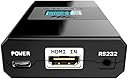
Desertcart purchases this item on your behalf and handles shipping, customs, and support to Tunisia.
🔊 Elevate your home cinema with the ultimate eARC audio breakthrough!
The HDFury ARCANA is the world’s first eARC adapter that separates eARC audio from HDMI sources, enabling Dolby Atmos playback on non-eARC TVs by directly connecting to eARC-compatible sound devices. Supporting 4K HDR video at up to 18Gbps via HDMI 2.0b, it ensures premium audiovisual performance. Designed for professionals and enthusiasts, it requires an external USB 5V 2A power supply and works best with external players like Apple TV 4K for full Atmos experience.


| ASIN | B08DF7GRCB |
| Amazon 売れ筋ランキング | 家電&カメラ - 374,960位 ( 家電&カメラの売れ筋ランキングを見る ) AV機器用変換アダプター・変換プラグ - 3,207位 |
| UPC | 631384548514 |
| おすすめ度 | 5つ星のうち3.8 341 レビュー |
| カラー | ブラック |
| コネクタタイプ | USB Type-A, USB Type-C |
| コネクタータイプ | USB Type-A, USB Type-C |
| パッケージ商品数 | 1 |
| ブランド | HDFURY |
| ブランド名 | HDFURY |
| ポート数 | 3 |
| メーカー名 | HD FURY |
| メーカー型番 | HDF0160 |
| ユニット数 | 1.0 個 |
| 主電源のプラグタイプ | プラグがありません |
| 互換デバイス | テレビ |
| 仕上げ | マット |
| 付属品総数 | 1 |
| 保証タイプ | 限定的保証 |
| 保証内容 | 1 year |
| 入力電圧 | 5 ボルト (DC) |
| 同梱商品 | USB 5v2a PSU |
| 商品の用途 | TV |
| 商品の重量 | 0.12 キログラム |
| 商品寸法 (長さx幅x高さ) | 9.9 x 5.8 x 2 cm |
| 商品本体サイズ | 9.9 x 5.8 x 2 cm |
| 商品用途・使用方法 | TV |
| 型番 | HDF0160 |
| 定格電流 | 2 アンペア |
| 対応デバイス | テレビ |
| 色 | ブラック |
S**A
DENON DTH-S517で動作しました
動作確認機種にはありませんでしたが、DENON DTH-S517で動作しました DMR4S102->HDFury Arcana->DTH-S517 -> Asus RogPG32UQ という構成で、視聴は 閃光のハサウェイ でATMOS再生で認識しました
レ**者
サウンドバーの買い替えが正解だった。。。
TV:TH-49FX750(4K入力は2つ,内1つはARC対応), サウンドバー:SC-HTB15(4K非対応,TV(ARC)+HDMI2入力), 4K機器が3台ありTV:ARCとサウンドバーを繫ぐとサウンドバーの入力からの接続では4Kとならない為に3入力以上の切替器を介してTVと繫ぐ必要があるが切替器は自動で切替えてくれないことと、1台は切替器を介さないようにする必要もあることから4K2台→切替器→ARCANA(in); ARCANA(out)→TV:ARC, ARCANA:eARC→サウンドバー, 4K1台→TV(4K入力)の構成としました。TV放送ならびにTV直接接続の4Kからの音声はサウンドバーから問題なく出ました。切替器からの入力(TVの入力をHDMI:ARC)にするとサウンドバーが勝手にHDMI入力に切り替わってしまいサウンドバーの入力をTVに切替える必要が生じましたが音声は問題なく出ました。ARCANAのFw:0.87, 設定:出荷時の結果です。ARCANAのAUDIO設定をDisplay+eARCに変更しても同様でした。サウンドバーの問題と思いますが、サウンドバーでの切替えが必要なことから星4としました。ARCANAさん、なんとかなりませんでしょうか?
E**S
Quelle produit incroyable !
Merci aux personnes qui ont créés ce produit ! Mon installation est la suivante : TV LG 55UJ634V, 4k, HDR avec port ARC mais pas de eArc (TV de 2017) Apple TV 4k branchée sur une Hdmi SyncBox. Et la Sonos Arc pour le son. Le HD Fury arcana vient parfaire cette installation, je l'ai branché entre la sortie de la Syncbox (qui fait office de switcher Hdmi) et la TV. Après quelques (pas mal en réalité) réglages et le changement des mes câbles Hdmi qui ne supportaient pas le flux (coupures intempestives de l'images pendant quelques secondes). J'arrive enfin à une installation stable ! Le produit est assez simple, léger, une interface en anglais (uniquement), il fait son job à la perfection ! Et projette un message de log sur le bas de l'écran TV super pratique pour visualiser les caractéristiques des flux qui passent par le boitier. (Ce message est désactivable via les réglages). Je recommande ce produit ! Bien que le prix, pique un peu !
D**I
Mac mini mit Teufel Cinebar One über Hdmi
Der Arcana HDMI Adapter wurde gut verpackt schnell geliefert. Ich habe ihn über hdmi in an einem Mac mini angeschlossen und am Earc out an eine Teufel Cinebar One (neues Modell) mit t6 Subwoofer angeschlossen. Einfach einstecken und läuft. Der Sound ist super. Der Adapter ist zwar nicht ganz billig aber er tut was er soll richtig gut. Ich würde ihn wieder kaufen.
P**L
Dolby Atmos!
I got this HDFury Arcana to send Dolby Atmos to a Sonos Arc from an UHD Player and an Apple TV. My TV (Vizio PX65-G1) wasn’t sending an Atmos signal to the Arc, and after some research, I found that it didn’t have enough eARC support. This little device solved that. It was relatively simple to set up, and after some tinkering (thanks youtube) it’s now working perfectly, without the blue info text on the screen. Can confirm it supports 4K HDR Dolby Vision and Atmos. It’s fantastic. Vision and Atmos films play perfectly through it, and it lets me take full advantage of the Sonos Arc and Era 100s. The only issue is it has only one input. That’s easily solved with a switcher, so I picked up a UGreen HDMI 2.1 8K switcher to go with it. Pairing the switcher with this HDFury has enabled me to enjoy full Dolby Atmos without the need to purchase a new eARC TV. I wholeheartedly recommend this for that upgrade. I dedicated considerable time researching the reasons behind my inability to access Atmos through my existing setup. If you are trying to resolve a similar issue, I hope this review saves you that time!
A**.
Enables DTS to Sonos Arc from Panasonic 4k
I purchased the HD fury Arcana for one reason - to enable my Sonos Arc to play downmoxed DTS from my Panasonic 820 4k player and display on my LG G1 tv. This is quite an expensive solution, however I was getting very frustrated with my DTS audio 4k discs only playing in 2.0 stereo on the Sonos as LG tvs no longer allow DTS pass through. While the Sonos won’t support full DTS master audio, it will at least downmix it to standard DTS which is better than 2.0. I can also confirm that when using an ears or arc capable tv, the tv ARC will still send down mixed audio to the arcana and through to Sonos. In order to get the best benefit, I have used a UGreen 8k 5 port hdmi switch to connect my 4k blu ray player and Apple TV to the arcana. Which means I can now get the full audio through to the Sonos. I have so far not experienced any lip sync or drop out issues. I also have a ps5, but have this connected to the tv direct and the arc allows surround 5.1 to be passed through the arcana to the Sonos. This is because the arcana will not support VRR (I believe the Arcana 2 will). I can live with standard 5.1 for gaming! Picture quality to rough out is exceptional and I can’t notice any difference. I had to fiddle with settings a bit to ensure Dolby Vision displayed properly. Also worth noting - my G1 has 3 usb outputs. I use only one as the power for the arcana. This currently seems to work and also means the arcana will power cycle with the tv I believe. Be aware that usb puts on tvs are generally underpowered, so I don’t plug any thing else in the spareness to ensure all power routes to the arcana. Failing this solution, the arcana does come with a usb power plug if required. This isn’t the solution for most people I’m sure, and certainly not cheap, but for me it works well.
G**W
HDFury Arcana 4K Setup + Review – Projector + Apple TV + Sonos (What Actually Works)
If you’re using a projector, Apple TV 4K, and Sonos soundbar, the Arcana HDFury 4k does solve the audio problems — but only if you configure it correctly. Out of the box defaults will cause black screens, missing movie audio, or broken volume control. Use my settings below and it becomes rock solid. My setup • Source: Apple TV 4K • Display: Epson 3800 projector (HDR10, no Dolby Vision) • Audio: Sonos Beam (Gen 1) + surrounds • Cable run: Long HDMI to ceiling-mounted projector • Use case: Movies and TV only (no gaming) Before Arcana: • Audio dropouts • No volume control • Black screens when starting or exiting movies • SPDIF hacks required • Constant HDMI re-syncs After Arcana (configured correctly): • Stable picture • Proper Dolby Digital 5.1 in movies • Menu audio works • Volume control works • No black screens • No SPDIF needed Important reality check (projector owners read this) Projectors do not handle SDR ↔ HDR switching well. If you let Apple TV auto-switch formats, you will get black screens. This is not an Arcana problem. The fix is to lock the signal. Arcana settings (critical) These are the settings that actually matter. On the Arcana: • Add PCM 8ch: ❌ OFF (This is crucial. If ON, movie audio will fail on Sonos.) • Add DTS:X / DTS-HD: ❌ OFF (Sonos doesn’t support DTS.) • TV ARC Routing: ❌ OFF • eARC Only: ✅ ON • Unmute Delay: OFF • TV Standby Mute: OFF Do not force formats. Let Arcana present a clean EDID. Apple TV settings (projector-safe, stable) This is the key to avoiding black screens. Video • Format: ✅ 4K HDR • Match Dynamic Range: ❌ OFF • Match Frame Rate: ❌ OFF • Chroma: 4:2:2 Yes, this means menus are in HDR. No, you’re not losing anything on a projector. Yes, it stops HDMI resyncs. Audio • Audio Format: Auto • Default Audio Output: Receiver (TV) (Correct even though you’re using Sonos.) Remotes & Devices • Control TVs and Receivers: ON • Volume Control: Auto via HDMI Do not default to AirPlay for TV audio. What “working correctly” looks like This is how you know it’s right: • Menus: PCM stereo (normal) • Movies: Dolby Digital 5.1 (check Sonos app → About My System) • Volume: Controlled by Apple TV remote • Picture: Always HDR, no black screens on pause or exit • Projector Info screen: Shows HDR10 (not Dolby Vision) Apple TV may say Dolby Vision is enabled — that’s fine. The Epson ignores it and displays HDR10. CEC expectations (don’t fight this) - Projector will usually turn off via HDMI - Projector will usually not turn on via HDMI - This is normal for Epson projectors Use the projector remote or a universal remote for power-on. Bottom line The Arcana 4K absolutely works for projector + Sonos setups, but: You must disable PCM 8ch and lock Apple TV to 4K HDR. Once configured: - No SPDIF hacks - No audio dropouts - No black screens - No guessing Once setup, unplug everything, wait a full minute, 60 seconds. Then plug in turn on the projector and Sonos so they are fully booted up. Then plug in and turn on the arcana and let it negotiate with both devices. Then plug in and turn on the Apple TV. Seriously, the timing and order matters! Take your time, it’s worth it. This setup is now boring — and that’s the highest compliment I can give it.
Trustpilot
2 weeks ago
1 month ago