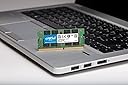
🚀 Upgrade your memory, upgrade your life!
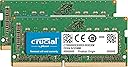
The Crucial 32GB Kit (2x16GB) DDR4-2666 SODIMM CT2K16G48FD8266 delivers high-speed, reliable memory expansion with a power-efficient 1.2V design. Perfect for professionals seeking smooth multitasking and enhanced system responsiveness, this AMD-verified, dual-rank, unbuffered RAM kit is easy to install and built to last with a lifetime warranty.
| ASIN | B071H38422 |
| Amazon 売れ筋ランキング | パソコン・周辺機器 - 47,484位 ( パソコン・周辺機器の売れ筋ランキングを見る ) PC用メモリ - 282位 |
| GTIN (Global Trade Identification Number) | 00649528780157 |
| RAMメモリ技術 | DDR4 |
| RAMメモリ採用技術 | DDR4 |
| UPC | 649528780157 |
| おすすめ度 | 5つ星のうち4.7 5,320 レビュー |
| カラムアドレスストローブレイテンシ | CL19 |
| コンピュータメモリサイズ | 32 GB |
| パック数 | 2 |
| ピンの数 | 260 |
| フォームファクター | SO-DIMM |
| ブランド | Crucial(クルーシャル) |
| ブランド名 | Crucial(クルーシャル) |
| メモリフォームファクター | SODIMM |
| メモリ世代 | DDR4 |
| メモリ速度 | 2666 MHz |
| メモリ速度(Mhz) | 2666 MHz |
| メーカー名 | Crucial(クルーシャル) |
| メーカー型番 | CT2K16G4SFD8266 |
| 互換デバイス | PC |
| 付属品総数 | 2 |
| 保証内容 | 永久保証 |
| 同梱商品 | DDR4 ノートパソコン DRAM。 |
| 商品の追加説明1 | nv:AMD検証^AMD Ryzen | 会社プログラム^重要な|コンポーネント構成^x8ベース | 構成^2048Mg x 64 | DDRタイミング^CL=19 | DIMMタイプ^バッファなし|密度^32GBキット (16GBx2) | エラーチェック^NON-ECC | メガバイト^32768 | メモリータイプ ^DDR4 PC4-21300 | モジュールランク^デュアルランク | パッケージ^260ピン SODIMM | プラットフォームカテゴリー^DDR4 | 速度^DDR4-2666 | 電圧^1.2V | ボリューム割引バケット^LOW… |
| 商品の重量 | 0.02 ポンド |
| 商品種別 | Crucial 32GB キット (16GBx2) DDR4 2666 MT/s (PC4-21300) DR x8 SODIMM 260-Pin Memory - CT2K16G48FD8266 |
| 型番 | CT2K16G4SFD8266 |
| 対応デバイス | PC |
| 特徴 | nv:AMD検証^AMD Ryzen | 会社プログラム^重要な|コンポーネント構成^x8ベース | 構成^2048Mg x 64 | DDRタイミング^CL=19 | DIMMタイプ^バッファなし|密度^32GBキット (16GBx2) | エラーチェック^NON-ECC | メガバイト^32768 | メモリータイプ ^DDR4 PC4-21300 | モジュールランク^デュアルランク | パッケージ^260ピン SODIMM | プラットフォームカテゴリー^DDR4 | 速度^DDR4-2666 | 電圧^1.2V | ボリューム割引バケット^LOW 特徴 nv:AMD検証^AMD Ryzen | 会社プログラム^重要な|コンポーネント構成^x8ベース | 構成^2048Mg x 64 | DDRタイミング^CL=19 | DIMMタイプ^バッファなし|密度^32GBキット (16GBx2) | エラーチェック^NON-ECC | メガバイト^32768 | メモリータイプ ^DDR4 PC4-21300 | モジュールランク^デュアルランク | パッケージ^260ピン SODIMM | プラットフォームカテゴリー^DDR4 | 速度^DDR4-2666 | 電圧^1.2V | ボリューム割引バケット^LOW 表示を増やす |
| 電圧 | 1.2 ボルト (DC) |
T**O
初めてのメモリ増設でも簡単取付。4年経過。
iMac2019で使用中。4年経ちましたが問題なく可動しています。 取付も簡単で初めてのメモリ増設でしたがうまくできました。
V**N
iMACに使用
iMAC2019年製に使用して数年経ちますが問題なく使用しています。
り**ん
iMac 27inch 2020に使用、動作快適です。
iMac 27inch 2020 に追加しました。純正メモリ2つと購入メモリ2つの計4つ使用して、メモリ動作周波数は2,666MHzでの動作中です。今のところ不具合無しで、満足してます。
ゆ**う
パワーアップしました
iMacの増設用に購入しました。 動画サイトを見ながら取り付けましたが、初めてでも問題なくできました。 それから2〜3年使っていますが、特に問題なく使えています。
て**ー
iMac2019で使用。問題なく使えています。
iMac2019のメモリが、40GB(オリジナルの4GBx2と、追加増設の16GBx2)だったものの、オリジナル4GBx2 の2枚を今回購入した、16GB2に置き換えて使っています。 交換前の状態では、PhotoshopとCaptureOneを使用すると、40GBだといっぱいになっていました。64GBだとまだ余裕があり、処理ももたつくことがなくなりました。快適に使用することができて満足です。 数ヶ月前に、1万円台になったときに買っておけばよかったなあと思うところで、お買い得度マイナス1としています。
A**I
お買い得って事ですネ
DeLL OptiPlex 5070 Microは、 スロットが2つしか無いので最大32GBまでしか搭載できませんし、 かつメモリ仕様を揃えないと本来の性能が発揮出来ないとの但し書きがあったので、 このCrucialの2枚セット計32GBを購入しました。 お陰でChromeは幾つタブを開いてもコケないし、 AdobeのInDesignもサクサク快調で~す。
春**鳥
iMac27インチ2019に使用
iMac27inch2019に使用。挿入にもう少し苦労するかと思いきや、スルッと入ってしまった。むしろ、「これで抜けないの?」という感じ。でも、ちゃんと認識し、問題なく動いている。速度低下もなく、定格通り。
S**△
古いiMacのメモリ増築に使用
imacの裏側のカバーを外して差し込むだけ。初心者でもできます。認識もすぐで、メモリスロット表示も変わっておりました。数年使用しておりましたが問題なしです。
H**N
Amazing
I upgraded my iMac 2019 now and it's work smoothly and it's look faster. Thank you so much for your cooperation.
F**S
Erweiterung Arbeitsspeicher
Fujitsu Lifebook E fit gemacht. Mit SSd und Erweiterung des Arbeitsspeichers ging dies recht einfach. Der Arbeitsspeicher bringt mehr Speicher insbesondere für Firefox und hat auch einen schnelleren internen Takt (Verbesserung von 2333 auf 2.600 MHz) . Dadurch Reduzierung der Systembelastung, der Lüfter springt nicht mehr so häufig an. Lieferung ging schnell, Einbau recht einfach, wurde sofort vom Betriebssystem sauber erkannt. Preislich in Ordnung, anderen verlangten 150-160 EURO.
P**L
Fantastic upgrade for the Mac Mini 2018
I was a bit hesitant to do this myself but when I saw the price that Apple is asking for a RAM upgrade... All of a sudden I found motivation! Took me 30 minutes to install. I was relieved to see my Mac Mini boot and detect the RAM. I ran the official diagnostics and it's all good. So 15 minutes after the procedure I find myself typing this, no issue so far and I hope it will stay that way for the next five years. Quick note for the DIYers wanting to upgrade the RAM on the Mini 2018: read the iFixit guide, watch the videos, work in good light, wash your hands and grab a good tool kit, I was using the iFixit toolkit that's available on Amazon, excellent. The hardest part was to detach/reattach the PS connector, and to reattach the antenna connector. No big deal though, breathe and take your time ;-)
A**9
Kit perfetto per Imac 2019 Cpu i9 3.6 8 core
Kit perfetto per fare l'upgrade della ram a un prezzo irrisorio rispetto a Apple. facile da montare, riconosciuta immediatamente, fatti tutti i test di stress della ram i risultati sono eccellenti. non mischiate le ram con quelle orinali per avere 40 gb e far lavorare male la ram, se avete bisogno di piu' memoria comprate un altro kit da 2x16 . ma 32 gb di ram sono tanti .
A**N
Easy Upgrade For 2018 Mac Mini
Okay. So this just came today, and I installed it in about 30 minutes while watching the 9to5mac upgrade video and being extra careful. Everything was honestly very straight-forward and fairly easy for anyone who is comfortable with tools in their hand. The screws are, of course, small, and can take a steady hand. I highly recommend a magnetic driver for this. Also, I haven't read this anywhere yet, but I noticed that there was blue Loctite on almost every screw I removed, so I added a drop to each one of those screws before replacing. This may not be necessary, but Loctite is cheap, so why risk it? Blue Loctite is made hold things in place, yet still be removable. Once you remove a screw however, it should always be re-applied. Just because you can still see it on the screw, doesn't mean it's still going to hold. It's also very useful on anything else you may assemble that vibrates, moves, or bears weight. Basically any screw that you think has a chance of backing out over time. I personally don't want one of those tiny screws on my expensive Mac falling out internally and damaging/destroying electronics, so I'm surprised this isn't suggested ion any of the upgrade videos/articles I've looked at. I struggled the most with plugging the antenna cable back in (fingers too big?), but got it to go after a handful of attempts. I also used an iFixit tool kit that I purchased here on Amazon. https://smile.amazon.com/iFixit-IF145-299-4-Driver-Bit-64pc/dp/B0189YWOIO/ref=sr_1_5?crid=385H6QIPQLVSQ&keywords=ifixit+essential+electronics+tool+kit&qid=1561248330&s=gateway&sprefix=fixit%2Caps%2C150&sr=8-5 This is a very solid tool kit that I will get a lot of use from. Highly recommended. This RAM was accepted instantly by my Mini and has made this thing blazing-fast. In summary, for about 30 minutes of your time and $130, you get $600 worth of factory speed on your new computer. If your clumsy, rich, or both - just pay Apple when you build your Mac. If you have a basic ability with tools, and a steady hand - this is a no-brainer. I'll definitely update this review if I see any problems with my computer going forward, but as of now, 5 stars.
Trustpilot
2 months ago
2 weeks ago