Desertcart purchases this item on your behalf and handles shipping, customs, and support to Tunisia.
🚀 Elevate your display game with flawless 8K power — don’t get left behind!
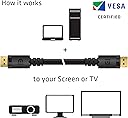
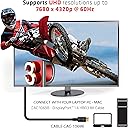
The Club3D CAC-1069B is a VESA-certified DisplayPort 1.4 cable delivering ultra-high resolutions up to 8K at 60Hz with 32.4 Gbps bandwidth. Featuring advanced Display Stream Compression, HDR support, and locking connectors, it ensures a secure, reliable connection for professional-grade monitors. Its durable, flexible design and backward compatibility make it the go-to cable for demanding setups seeking flawless, future-proof performance.


| ASIN | B07DX9CJFY |
| Best Sellers Rank | #10 in DVI Cables |
| Brand | Club 3D |
| Brand Name | Club 3D |
| Cable Type | Display Port |
| Color | black |
| Compatible Devices | Laptop |
| Compatible Phone Models | No Compatible Phone Models |
| Connectivity Technology | DisplayPort |
| Connector Gender | Male-to-Male |
| Connector Type | DisplayPort |
| Customer Package Type | coiled in protective tubing |
| Customer Reviews | 4.6 out of 5 stars 2,840 Reviews |
| Data Transfer Rate | 32.4 gigabits_per_second |
| External Testing Certification | Vesa Certified |
| Frequency | 60 hertz |
| Gauge | 24 |
| Global Trade Identification Number | 00841615101320 |
| Included Components | Club 3D DisplayPort™ 1.4 HBR3 8K Cable |
| Indoor Outdoor Usage | Indoor, Outdoor |
| Item Length | 13.12 meters |
| Item Shape | Round |
| Item Type Name | Club3D DisplayPort to DisplayPort 1.4/HBR3 Cable DP 1.4 8K 60Hz 4m/13.12', 24AWG Black, VESA certified (CAC-1069B) |
| Item Weight | 1 pounds |
| Manufacturer | Club3D |
| Model | CAC-1069B |
| Model Name | DisplayPort to DisplayPort 1.4/HBR3 Cable |
| Number of Items | 1 |
| Number of Pins | 20 |
| Other Special Features of the Product | HBR |
| Part Number | CAC-1069B |
| Recommended Uses For Product | Video |
| Special Feature | HBR |
| Specification Met | Vesa Certified |
| UPC | 841615101320 |
| Unit Count | 1 Count |
| Warranty Description | 2 years |
E**C
The only brand out of 4 others that fixed my screen tearing and display cutting in and out issues
I tried several other DP cables before buying this one and they were all returned as failures. I am using a DP 4 port KVM for my computer so I can use one monitor for a desktop and a laptop. In this configuration, whenever I'd use my desktop to play a game or something graphically intensive, the display would cut out every so often or glitch--not conducive to fast-paced PVP games or any online game for that matter. I tried graphics settings, drivers, every configuration and different cables and lengths but nothing helped. I checked a Reddit thread on brand recommendations and keywords detailing my issues and this brand was recommended. I really did not think a different brand would make any difference as the other ones I ordered from Amazon were highly rated and had supposedly same or similar specs. It made a HUGE difference in every way. My display never cuts out during a game and seems to even be smoother overall with refresh rate and more. I definitely recommend this cable and this brand as they have quality cables that perform exactly how you want them to. I do however recommend sticking with the shortest length possible for any cable to cut down on any form of signal degradation and more.
A**R
Great quality cable that helped with a weird monitor sync issue.
After having my computer for a while, I was starting to experience a sync issue with my primary monitor. At first it was only once in a while (every few months or so). Over time, it increased to about once or twice a week. When I would turn on my computer or when I was toggling which monitors were in active use, my main monitor would suddenly act like it wasn't receiving a signal. Neither unplugging and re-plugging the DisplayPort cable, turning the monitor off and back on, nor restarting the computer would fix the issue. I would have to unplug and re-plug the monitor's POWER cord in order for it to go back to functioning properly. While troubleshooting, I read that DisplayPort, as a whole, is known for being rather fussy. Also, that the cable can actually have a rather large impact how cooperative things are. I was more-so thinking that either the graphics card or the monitor was the issue. Which, I do still think the issue is primarily on the monitor's side of things, from the behavior. But, I figured that trying a new cable was a cheaper first step. I don't remember where I got the cable that I was originally using. Though, I recall it being one that I felt was by a good company. Perhaps I just got a bad run, or something? -shrugs- But, I did some research for what was considered a good and reliable cable and was pointed to Club3D by some tech reviewers that I have pretty high respect toward. So, I grabbed this one. Jumping forward by a little over two years, now. I've had that annoying sync issue happen maybe two or three times, the whole time I've been using this Club3D cable. Which, I use my computer just about every day. So, yeah, definite improvement over the previous cable's habit of once or twice a week! I'm still suspicious that there's a quirk with my monitor. But, things have been behaving well enough for me to be content. So, I haven't bothered to delve any deeper. I haven't had a need for another DisplayPort cable, as of yet. But, when I do, this is very likely what I'll get (assuming it's still available when that time comes). I haven't heard any negative feedback from the friends I've suggested it to, either. So, it definitely gets my recommendation.
J**E
FINALLY A DP CABLE THAT WORKS!!!
I already had a 3M cable made by another fairly reputable company that has served me well for a few years. I needed just a little longer as the recent build and work flow pushes the 3M length to its limits, zero slack which will ultimately lead to problems at the connections from strain. My search using the search feature didnt even list this product, had to research cables certified by VESA then find one of an appropriate length. In the end the search pointed to a find a vendor tab which gave me the egg or Amazon. I clicked the Amazon link and it put me right on the product. I had tried a few of the cables from the search, one of them a replacement offered by the vendor. Not one of them worked. The replacement cable at least let me get to desktop with out just a bunch of display...no display...display...no display.....lather rinse repeat. The final cable did however commence to the same behavior once an GPU benchmark was launched, like the microsecond it loaded down. Reducing refresh to bare minimum of 50hz with Gsync on and off and dialing back resolution to 1080P was fruitless across the board. For the record basic machine specs X299 platform 9940X CPU 2X Strix 2080Ti GPUs (running at factory settings while testing cable) with Nvlink. AUS PG348Q native resolution 3440x1440 (so not even 4K) Get this Club3D cable and just the packaging was a good start. Well packed in a cardboard box that was spec made for the cable instead of a plastic bag. Opening the box revealed what I already knew to be an excellent choice. Perfectly roled cables with top notch cable management velcro straps. Ends are seamless and the outer jacket superb. It looks like a great cable before even plugging it in. The product images show a thinner cable IMO but thats a good thing. Seeing a cable with some beef lets me know that larger conductors and better shielding was used in the construction. I was so confident that I went ahead with the task of routing the cable through my maze from tower to monitor before powering up and testing. The previous cable I was not as daring.right to desktop on the boot, not a flicker in sight. Set machine to how I use it with full resolution, 100Hz and gsynch enabled. Cards overclocked to the same profile with 3M cable. Ran multiple heavy workload benchmarks from superposition to Port Royal and everything in between. In a single word........FLAWLESS!!! not a blip, glitch, flicker, nothing. What one would expect. I cant say it works as advertised as the specs to much higher to 4K at 144Hz and 8K at 60Hz it works as good as it gets with 3440x1440 100Hz. I understand that going over 3M presents its challenges. However this is a case of do it right or leave it be. Club3D DID IT RIGHT!!! Ive found a new display cable vendor and ill buy their producst without hesitation again and again even if it takes a bit more effort to find. Kudos on making one of the best DP cables Ive ever seen.
M**.
Above 1080p 60Hz, the difference is REAL!
I never expected a monitor cable to make a difference in a 1080p 144 Hz setup. But it did. At the end of 2016, I bought two identical PC's. Right away, I upgraded the first one's discrete GPU and 1080p 60 Hz Monitor. The upgraded system worked fine using the DisplayPort cable that came with the new 1440p 165 Hz monitor (GOOD cable - thanks, Dell!). Two years later, I upgraded the second one's GPU to the same exact GPU as the first, and connected a 1080p 144 Hz Monitor that I had purchased earlier, figuring I should now be able to run it at full speed. I don't recall which DisplayPort cable I used, but I immediately started having frequent black screens (system running, but NO display) when running at 144 Hz. The monitor was already out of warranty. I had no diagnosis software, so I made some guesses and they were ALL WRONG. Upgrading the marginal power supply to a much more capable one did NOTHING. Investigating differences in GPU firmware led to a DEAD END. Then, someone (GPU company?) suggested I try a better cable. At first I thought this was nonsense. But after researching cables, I was surprised to learn that all DisplayPort cables are NOT created equal, even though they're supposed to be. So, after researching VESA-certified cables, I found the Club3D CAC-2068 on Amazon and ordered it. Honestly, I wasn't expecting it to help. I was too busy imagining ALL THE OTHER THINGS that could be causing the problem. Well, my second system has been running for over a year now and the display has been ABSOLUTELY FLAWLESS. What an eye-opener!!! I never thought it would be the monitor cable! I now recommend these to anyone and everyone running above 1080p 60 Hz.
T**E
This cable solved my fuzzy picture issues, as well as my screen randomly going black when using a 4K resolution
First off, this cable is perfect, and I know $15 seems like a lot for a cable, BUT it actually makes a difference and here is why: This cable is officially certified by Displayport. I didn't know this was a thing, but after having trouble with my Monoprice brand cable from a couple years ago (apparently old tech) and even the cable that came with my monitor, I ended up finding out that not all displayport cables are equal. I have a GTX 1080 Ti and I recently bought a 43 inch 4K Acer monitor, however my displayport was a little fuzzy at native 4K resolution, not a huge deal, but enough for me to notice that HDMI was giving a sharper image, my displayport connection would also just randomly drop and my screen would go completely black. I thought I got a bad monitor! So I started using HDMI and didn't have the issue any longer, however with HDMI I couldn't get 10bit video processing and my picture looked just a tad faded, but sharper. Finally, I looked up this issue in depth and found out that you need to have a certified displayport cable that can handle the bandwidth. Unlike HDMI, displayport is picky about the cable quality (probably because it does more than HDMI). I went to Displayport's website, did my research, found this cable, and a couple days later I am happy to report my picture is sharp, vibrant and I have not had a single black screen issue. Problem solved!
J**N
Great performance for competitive high-refresh gaming, but watch the length
These DisplayPort cables provide excellent performance for high-refresh-rate monitors. I ordered two of them—one for my main gaming monitor and one for my second screen. I use it with my 400Hz monitor to play CS2, and the bandwidth handles the extreme refresh rate perfectly without any flickering or signal drops. My only major issue came down to the physical durability when stretched. I use a standing desk that moves up and down, and when I fully extended the desk upward, the 2-meter cable ran out of slack and snapped surprisingly easily. Because of how fragile it proved to be under tension, I dropped my rating by one star. I definitely recommend the cable for its performance, but just make sure to buy a longer size than you think you need so it never gets stretched out enough to risk breaking.
M**W
I would pay twice as much for these if they jacked up the price, they're that good!
Just use whatever displayport cable came with your monitor or device, will it work? Yes, of course. Will it work as best as it should with all the advantages of the latest diplayport version? NO! Of course not! All of those hdmi, display port and even power cables that are included with electronics are ostensibly the cheapest quality manufacturers can get away with sourcing in bulk and packaging with their products. Yes, you will get decent cables with more expensive products like a hispeed hdmi cable with samsung tvs, and yes, major electronics companies with their largest markets in the west will include cables UL, ETL, or CSA certified, BUT in testing most ALL of these included or cheap cables are unreliable, had timing/sync issues or just outright could NOT meet the specs necessary for certification. And here we have Club3D, testing has shown every single cable to be flawless, exactly up to specs upon first purchase and LOOOONNNGG after they've been in use, my oldest ones still test as good as new. I would go as far as to say these are an absolute necessity in this day and age, at least in my day to day. I absolutely recommend!
W**H
Quality cable, slightly pricey
I don't typically expect to pay $15 for a DisplayPort cable, but I think quality is the most important factor in any purchase decision I make, and I will always pay a little bit extra for peace of mind. I could have bought a DP cable for $5 or $8 or $10, but then I might end up buying a replacement in 6 months. The reason this cables cost a bit more is because this cable is OFFICIALLY VESA certified for DisplayPort 1.4 standard and speed. Many will claim to be DP 1.4, but the VESA website says different. I bought this Club3D dp cable instead of those mystery-brand bargain DP cables that might fall apart because I believe this one to be superior quality, and that it will redeem itself through long-term reliability. Now that, my friend, is the meaning of value.
N**.
Hochwertiges Kabel für beste Bildqualität
Wer schon einige Kabel ausprobiert hat, wird schnell feststellen, dass viele Kabel über 2 Meter länge häufig Probleme bekommen, die gewünschte Qualität auch zu liefern. Dieses Kabel erfüllt alle Qualitätsansprüche, ist hochwertig verarbeitet und funktioniert einwandfrei. Meine Konfiguration: RTX 3090 -> [DIESES KABEL] -> LG Ultragear 31" Monitor Läuft mit 165hz und 2K (WQHD) Auflösung (2560x1440) HDR on, G-Sync aktiv
T**N
Parfait
J'ai acheté ce câble pour relier ma carte graphique Nvidia RTX 2080Ti Founder Edition à mon écran Asus PG27UQ (4K @144Hz) et il fonctionne très bien ! principalement utilisé pour les jeux et les films 4K, aucun soucis d'affichage et très bon maintien des FPS. De plus le câble est bien emballé et renfermé dans une boite sympas. Je recommande.
C**V
Muito bom
Meu uso é comum para design, não jogo. Funciona super bem pro meu uso.
S**O
Ottimo cavo anche per alte frequenze
Questo è un Cavo con la C maiuscola. Funziona meglio di versioni 2.1! Ho provato 4 cavi di cui 2 in versione 2.1 (di altre marche). Devo collegare un monitor 3440x1440 a 180Hz! Con gli altri cavi avevo frequenti schermate nere (pochi istanti) questo, sebbene 1.4, è eccezionale! E' spesso il doppio rispetto gli altri e regge il link video senza problemi. In assoluto il miglior cavo.
A**I
ممتاز
المنتج ممتاز وفعلا يشغل على اعدادات عالية يستاهل الشراء وجودة السلك ممتازة وثقيلة وايضا الجميل معتمد من vesa
Trustpilot
4 days ago
2 weeks ago