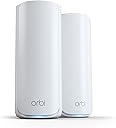
๐ Elevate your home network to WiFi 7 โ because your digital life deserves the fastest lane.
The NETGEAR Orbi 770 Series Tri-band WiFi 7 Mesh Add-on Satellite (RBE770) boosts your existing Orbi WiFi 7 system by adding up to 2,750 sq.ft of coverage with ultra-fast 11 Gbps speeds. Featuring a 2.5 Gbps Ethernet port and advanced security protocols like WPA3 and automatic firmware updates, it ensures seamless, secure connectivity throughout your home. Compatible with Orbi RBE772 and RBE773, this satellite is designed for easy expansion and uninterrupted roaming on a single network name.


| ASIN | B0D526GSYY |
| Antenna Location | Business, Gaming, Home |
| Antenna Type | Fixed |
| Best Sellers Rank | #9,401 in Computers ( See Top 100 in Computers ) #37 in Whole Home & Mesh Wi-Fi Systems |
| Brand | NETGEAR |
| Built-In Media | One (1) 2m Ethernet cable, One (1) Orbi WiFi 7 Router (RBE771), One (1) Orbi WiFi 7 Satellite (RBE770), Quick start guide, Two (2) power adapters |
| Color | White |
| Compatible Devices | Gaming Console, Personal Computer, Security Camera, Smart Television, Smartphone |
| Compatible devices | Gaming Console, Personal Computer, Security Camera, Smart Television, Smartphone |
| Connectivity Protocol | Wi-Fi, Ethernet |
| Connectivity Technology | Ethernet, Wi-Fi |
| Control Method | App |
| Coverage | 5,500 sq. ft. |
| Customer Reviews | 4.1 out of 5 stars 720 Reviews |
| Data Transfer Rate | 11 Gigabits Per Second |
| Frequency | 6 GHz |
| Frequency Band Class | Tri-Band |
| Frequency band class | Tri-Band |
| Has Internet Connectivity | Yes |
| Has Security Updates | Yes |
| Is Modem Compatible | No |
| LAN Port Bandwidth | 2500 Mbps |
| Manufacturer | Netgear |
| Maximum Upstream Data Transfer Rate | 2500 Megabits Per Second |
| Mfr Part Number | RBE772-100NAS |
| Model Name | Orbi 770 Series |
| Model Number | RBE772-100APS |
| Model name | Orbi 770 Series |
| Number of Ports | 7 |
| Operating System | NETGEAR Genie |
| Other Special Features of the Product | Internet Security, IoT Network, Parental Control, VPN, WPA3 |
| Router Firewall Security Level | Advanced |
| Router Network Type | hybrid |
| Security Protocol | WPA3 |
| Special features | Internet Security, IoT Network, Parental Control, VPN , WPA3 |
| UPC | 606449172010 |
| Unit Count | 2.0 Count |
| Wi-Fi Generation | WiFi 7 |
| Wireless Compability | 802.11.be |
| Wireless communication standard | 802.11.be |
G**A
Gran cobertura de internet
Excelente producto.
S**.
Worth the little extra money.
This is my second mesh WiFi system, my first Orbi 7. Very pleased. Easy to set up. Great coverage with the three units. Fast and reliable. No shut downs or lag on the WiFi. Would recommend.
R**.
Big improvement for us over older Google Wifi mesh system
We got this to replace an older 4-puck Google mesh system that struggled to cover a 3-floor, ~4000 sq foot house. We recently had gigabit fiber installed, but we were still only getting 50-100 mbps in my wife's office upstairs, even with her PC directly connected to one of the satellites with an ethernet cable. The replacement process shouldn't have taken very long, but it's so fool-proof that I screwed up a little and cost some ~20 extra minutes. Both systems allow you to have a main/admin network and also set up a guest network. All of our devices connected to the old guest network, and I wanted to keep the name and password the same so they would automatically re-connect. There are NO instructions that come with the Orbi, just a QR code to get the app that tells you how to set the system up. It's easy, but it doesn't tell you that you're setting up an admin network first. It's not until you're up and running that it gives you the option to run a guest network. Once I saw that, I had to rename the admin network, which took the system like 5 minutes. Since I wasn't interacting with it, it assumed I had a problem and kept giving me a "Report Problem" popup. After renaming the admin network, I created the Guest network using the same name and PW as the old one. That process also took 5+ minutes, with all the popups. But it worked. The only other hitch was that our older Blink cameras couldn't talk to the Orbi. Gemini was able to walk me through the process of setting up the Orbi IoT network that can talk to 2.4 Ghz devices. It took about 10 minutes of resetting and restarting the Blink hub before everything got working again. All told, everything's working, and working well. My wife's PC is now getting over 900 mbps hardwired to a satellite, and our mobile devices are getting over 300-500 mbps even through a floor and over a room or two.
J**W
Excellent Router
The Orbi 770 Mesh router was extremely easy to install and works great! The Orbi essentially installed itself within 20 minutes with ZERO glitches! I have one satellite which extends strong service into the garage for my smart irrigation system controller. The Orbi app works great, with some very useful tools, including a status of all items connected to the router. I am extremely satisfied.
T**S
Nightmare Router!! Go with Eero 7 Pro instead.
We had a Netgear Orbi RBR50v2 for years and it was time to get a new router. Since we didn't have issues with the Orbi RBR50v2 we decided to continue using Netgear for our wifi needs. We went with the Netgear Orbi 770. When it arrived I set it up as usual and it seemed to be fairly straight forward. I could still use the same app I always used since the router was by the same company so that was nice. I was already familiar with the UI of the app. After some usual hiccups like WPA2/3 compatibility issues with certain devices, we managed to get it up and running. Not long after, the disconnections started to happen. At first I thought it needed to be reset. So I did that and it seemed ok after each time I did this but it would keep returning. So then I looked into firmware updates. I tried looking into other things like the distance between the router and the satellites. I tried EVERYTHING. I'm fairly tech savvy and am usually able to figure out how to get things up and running for the most part. I read forums like Reddit with people have similar issues and also they were throwing out all kinds of things to try. Even downgrading the firmware. Eventually, I told myself, if I have to jump through this many hoops just to get this stupid router to work while paying an arm and leg for it, this router isn't cheap, I really don't feel like it's fair to the consumer to have to go through all of this misery and so I decided to return the item. I went with the Eero 7 Pro and never looked back. The Eero 7 Pro was SO MUCH EASIER to set up, it was like a night and day difference. I was completely blown away by how simple it was. Not to mention how good the connection has been since setting it up. I never once experienced a drop connection again. I don't know what happened with Netgear but I am no longer bringing their routers into my home ever again. From here on out its going to be Eero all the way. Thank you Eero for creating such an awesome product and Netgear, you have a lot of work to do if you want to stay relevant in the wifi market. Such a big disappointment. Hope this review helps you out and thanks for reading.
Trustpilot
3 weeks ago
3 weeks ago